


Top 10 AWS and Cloud DevOps Tools for CI/CD in 2026




AWS offers a full suite of DevOps tools that automate every stage of the software delivery lifecycle, writing and storing code, building and testing it, deploying it, and monitoring it once it's live.
Pipelines that used to need manual triggers and checklists now run on their own, infrastructure adjusts to actual load instead of sitting over-provisioned, and bad releases get caught and rolled back before customers notice. Here are 10 tools, five native to AWS and five cloud-native tools that pair with it, that make all of that possible.
Quick Comparison: AWS DevOps Tools 1–5
A quick snapshot of five standout AWS DevOps tools covered in this guide, spanning CI/CD orchestration, builds, deployments, infrastructure as code, and monitoring, so you can compare them at a glance before diving into the full list.
Top 10 AWS DevOps Tools and Cloud DevOps Tools Every Team Should Know
A complete, up-to-date look at the AWS and cloud-native tools that power modern CI/CD pipelines in 2026, covering source control, builds, deployments, infrastructure as code, monitoring, and security, so you know exactly which tool fits which part of your stack.
1. AWS CodePipeline
CodePipeline is AWS's continuous integration and continuous delivery (CI/CD) orchestration service. It connects the different stages of a release, source, build, test, and deploy, into one automated workflow that runs every time code changes. Each stage only starts once the one before it passes, so a failed test stops the pipeline before broken code reaches production.
Key features:
- Visual pipeline builder for designing multi-stage workflows
- Native integration with GitHub, CodeCommit, Jenkins, and other CI tools
- Parallel and sequential stage execution
- Live status tracking for every release, down to individual stage failures
CodePipeline removes the need to manually trigger builds and deployments, cutting release time and reducing the chance of a step being skipped or done incorrectly. Because each stage is chained to the one before it, a team gets a single, auditable record of exactly what happened in a release instead of piecing it together from separate build and deploy logs. Full configuration details are in the official CodePipeline documentation.
Trade-off: Pipelines are priced per active pipeline per month, so teams running many small, low-traffic projects sometimes consolidate pipelines rather than creating one per repository.
2. AWS CodeBuild
CodeBuild is a fully managed build service. It compiles source code, runs automated tests, and packages the output, all without you having to provision or maintain build servers. Each build runs in a fresh, isolated container, so one project's build environment can never leak into or conflict with another's.
Key Features :
- Auto-scales to handle multiple builds at once
- Uses simple YAML-based build specifications (buildspec files)
- Pay-per-use pricing based on build minutes
- Detailed logs for debugging failed builds
Teams no longer need to manage a fleet of build servers or worry about capacity during busy release periods, since CodeBuild scales automatically to handle however many builds are running at once. That also means a spike in commits from multiple developers doesn't create a build queue the way a fixed set of self-managed build servers would. Full setup details are in the official CodeBuild documentation.
Trade-off: Build minutes are billed per compute type selected, so teams running very frequent builds on larger instance sizes should keep an eye on cost as usage scales up.
3. WS CodeDeploy
CodeDeploy automates application deployments to EC2 instances, Lambda functions, ECS containers, and even on-premises servers, with built-in strategies to minimize downtime. Instead of pushing new code to every instance at once, it can shift traffic gradually and pull back automatically if something looks wrong.
Key features:
- Supports blue/green and rolling deployment strategies
- Automatic rollback if a deployment fails health checks
- Works across cloud and hybrid environments
- Integrates with CodePipeline for end-to-end automation
Bad deployments happen even with careful testing, no amount of pre-release testing catches every edge case that only shows up under real production traffic. CodeDeploy's automatic rollback means a failed release gets pulled back the moment health checks fail, instead of staying live while someone scrambles to diagnose it manually. Full configuration options are in the official CodeDeploy documentation.
Trade-off: Blue/green deployments require running duplicate infrastructure during the switch, which adds temporary cost compared to deploying straight to existing instances.
4. AWS CloudFormation
CloudFormation lets teams define their entire cloud infrastructure, servers, networking, databases, permissions, as code, using JSON or YAML templates instead of manual console clicks. A template describes the desired end state, and CloudFormation figures out the order to create, update, or delete resources to get there.
Key features:
- Reusable, modular templates through nested stacks
- Drift detection to flag manual changes made outside the template
- Full version control for infrastructure changes
- Safe rollback if a stack update fails
Infrastructure as Code (IaC) means environments can be recreated exactly, every time, which eliminates the "it worked on my machine" class of problems, since staging and production are built from the same template instead of two servers configured separately by hand. Full syntax and examples are available in the CloudFormation user guide.
Trade-off: Templates can get verbose for large environments, which is why many teams pair CloudFormation with AWS CDK to define infrastructure in a familiar programming language instead of raw YAML.
5. Amazon CloudWatch
CloudWatch is AWS's native monitoring and observability service. It collects metrics, logs, and events from AWS resources and applications so teams can catch problems before users notice them. Most other AWS services send data to CloudWatch automatically, so monitoring often starts working the moment a resource is created, without extra setup.
Key features:
- Custom dashboards with live metric updates
- Threshold-based alerts and automated actions
- Centralized log collection and analysis
- Anomaly detection for unusual system behavior
A pipeline that deploys fast but can't tell you when something breaks isn't actually reliable. CloudWatch closes that gap by turning raw metrics and logs into alerts that reach the right person before a customer notices the problem. See Amazon CloudWatch documentation for the full metrics and alarms reference.
Trade-off: Detailed monitoring and custom metrics are billed separately from the basic tier, so costs can climb quietly on accounts with many resources sending high-frequency data.
6. Terraform
Terraform, from HashiCorp, is the most widely used infrastructure-as-code tool for provisioning AWS resources, alongside infrastructure on other clouds if a team runs a multi-cloud setup. Unlike CloudFormation, it isn't AWS-specific, so the same workflow and syntax carry over if infrastructure ever extends beyond AWS.
Key features:
- Declarative configuration language (HCL) with a large AWS provider ecosystem
- State file tracks the real infrastructure, so Terraform plan shows exactly what will change before it happens
- Reusable modules for repeating infrastructure patterns across environments
- Works across AWS, on-premises, and other cloud providers from one workflow
Terraform remains the default choice for teams that need infrastructure defined once and applied consistently across environments, though it's worth knowing HashiCorp moved Terraform to the Business Source License (BUSL) in 2023 and was acquired by IBM in February 2025, which has pushed some teams toward the open-source fork, OpenTofu. Full documentation is in the Terraform AWS provider docs.
Trade-off: State file management gets complex at scale, and losing or corrupting state can be genuinely painful to recover from without care.
7. Argo CD
Argo CD is a GitOps continuous delivery tool for Kubernetes, including Amazon EKS. Instead of a pipeline pushing changes to a cluster, Argo CD runs inside the cluster and continuously checks that the live state matches what's defined in a Git repository, automatically correcting drift if the two fall out of sync.
Key features:
- Continuous reconciliation between Git and the live cluster, not a one-time deploy
- Visual dashboard showing exactly what's changed and what's out of sync
- Automated rollback by reverting the Git commit
- Multi-cluster and multi-tenant support
For teams running workloads on EKS, Argo CD has become close to a default choice for GitOps-style delivery, since it catches configuration drift that pipeline-based deployment tools like CodePipeline don't track after the initial deploy. See the Argo CD documentation for setup details.
Trade-off: It's built specifically for Kubernetes, so it adds no value for teams running purely serverless or EC2-based architectures without a cluster.
8. Datadog
Datadog is a cloud monitoring and observability platform that aggregates metrics, logs, and traces from AWS and other sources into one place. Teams running hybrid or multi-cloud infrastructure often use it alongside or instead of CloudWatch, since CloudWatch is scoped to AWS resources only.
Key features:
- Unified dashboards across AWS, on-prem, and other cloud metrics
- Distributed tracing across microservices, similar in purpose to AWS X-Ray
- Anomaly detection and machine learning-based alerting
- Pre-built integrations for most common AWS services
For teams whose infrastructure isn't 100% AWS, or who want a single pane of glass instead of stitching together CloudWatch with other tools, Datadog fills the gap CloudWatch leaves for cross-platform visibility. Full integration details are in the Datadog AWS integration docs.
Trade-off: Pricing scales with hosts and data volume, and can climb quickly for teams with a lot of infrastructure or high-cardinality metrics.
9. Snyk
Snyk is a security scanning tool that checks code, open-source dependencies, container images, and infrastructure-as-code files for known vulnerabilities, built to run directly inside a CI/CD pipeline rather than as a separate audit step. Instead of waiting for a scheduled security review, it scans continuously, so a new vulnerability disclosed in a dependency your project already uses gets flagged even if nobody touched that code recently.
Key features:
- Scans application code, dependencies, containers, and IaC templates in one tool
- Runs continuously, not just when new code is pushed
- Auto-generates pull requests with fixes for known vulnerabilities
- Integrates with CodePipeline, GitHub Actions, and most common CI tools
Adding Snyk to an AWS pipeline moves security scanning earlier in the process, catching a vulnerable dependency before it reaches a deployed container instead of after a customer-facing incident forces a scramble. Because it also scans infrastructure-as-code files like CloudFormation and Terraform templates, it can catch a misconfigured security group or an overly permissive IAM policy before that template is ever applied. Documentation is available at Snyk's official docs.
Trade-off: Like most security scanners, it can surface a high volume of lower-severity findings early on, which takes real tuning effort to avoid alert fatigue and developers ignoring the tool entirely.
10. HashiCorp Vault
Vault manages secrets, things like API keys, database credentials, and TLS certificates, centrally, instead of having them scattered across environment variables, config files, or hardcoded directly into application code. Applications and services authenticate to Vault to retrieve a secret at runtime, rather than having that secret baked into a deployment artifact where it can leak through logs, source control, or a compromised container image.
Key features:
- Dynamic secrets generated on-demand and automatically expired after a set time
- Fine-grained access policies scoped per application, team, or environment
- Full audit logging of every secret request, including who accessed what and when
- Native integration with AWS IAM roles, so authentication doesn't require a separate credential just to reach Vault itself
Centralizing secrets through Vault reduces one of the more common sources of security incidents, credentials duplicated across services or left in a config file long after they should have been rotated. It's worth knowing that Vault, like Terraform, moved to the Business Source License (BUSL) in 2023 under HashiCorp, which IBM acquired in February 2025. Documentation is at Vault's official docs.
Trade-off: Running Vault well requires its own operational overhead, unsealing, backup, and high-availability setup, so smaller teams sometimes stick with AWS Secrets Manager instead, trading some flexibility for less infrastructure to maintain.
Cloud DevOps Tools for AWS: Quick Comparison
quick snapshot of five cloud-native DevOps tools that pair with AWS, spanning infrastructure as code, GitOps deployment, observability, security scanning, and secrets management, so you can compare them at a glance before reading the full breakdown.
How Do These AWS DevOps Tools Actually Work Together?
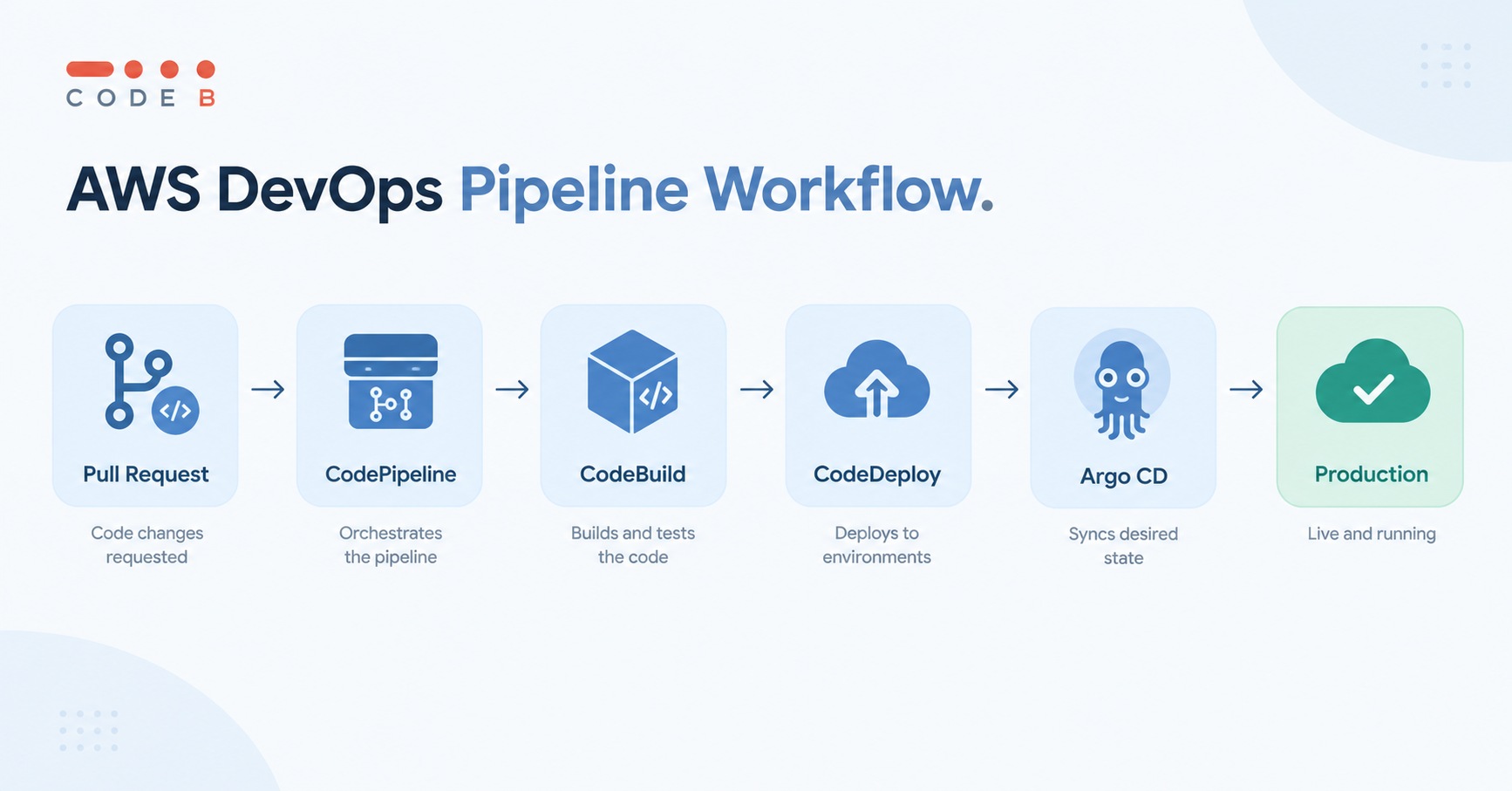
A list of tools tells you what each one does, but not how they actually work together once real code is moving through a pipeline. Here's what that looks like in practice, from a pull request going live to a bad deployment rolling itself back, using CodePipeline, Terraform, Argo CD, and the rest of this list along the way.
AWS CodePipeline:
Orchestrating a full release.
A merged pull request triggers the entire path from source to production automatically, no one manually kicks off a build or promotes code between stages while everyone waits around for the next step.
Because each stage only starts once the one before it passes, a team gets one clear point of failure to check instead of piecing together what happened across separate tools and logs after something goes wrong.
AWS CodeBuild:
Compiling and testing on every commit.
Instead of a shared build server queueing jobs one at a time, each commit gets its own isolated build environment, spun up the moment it's needed and torn down right after. No waiting behind someone else's build, no shared machine slowly accumulating leftover files or config drift from every project that's ever run on it.
A flaky dependency from one build can't quietly linger and affect the next, since every build starts from a clean slate, which is part of why debugging a failure here tends to be more straightforward than chasing an issue on a long-lived server.
AWS CodeDeploy:
Rolling out a release without downtime.
Traffic shifts gradually to new instances instead of all at once, and if health checks fail partway through, the deployment reverses itself before most users notice anything changed.
The same mechanism works whether the target is EC2, Lambda, or ECS, so teams don't need a separate rollback strategy for each compute type.
AWS CodeCommit:
Hosting private repositories inside the AWS account.
For teams already using it, code, IAM permissions, and the CI/CD pipeline all live under one roof instead of a separate third-party Git host.
That's useful for existing users, though worth remembering new signups have been closed since mid-2024, so this one's relevant mainly if you're already on it, not a starting point for a new project.
AWS CloudFormation:
Rebuilding an environment identically.
A staging environment that's drifted out of sync with production gets torn down and recreated exactly from a template, instead of someone manually chasing down every inconsistency by hand.
That same template becomes a record of what infrastructure actually exists, reviewable in a pull request like any other code change.
Terraform:
Provisioning infrastructure that spans more than AWS.
A team running a primary workload on AWS but storing backups on another cloud defines both in one place, with one workflow, instead of learning two separate tools with two different syntaxes and two separate mental models for the same underlying task.
The state file tracks what's actually deployed, so a plan command shows exactly what will change before anything touches production, catching a typo or an unintended resource deletion before it becomes an incident instead of after.
Argo CD:
Recovering from a bad Kubernetes deployment.
When a pod starts misbehaving, rolling back is a single Git revert, Argo CD handles the rest, no manual kubectl commands against a live cluster while everyone's watching and the pressure's on to fix it fast.
It also keeps checking the cluster continuously, so a manual change someone made directly and forgot to commit gets flagged as drift instead of silently persisting until it causes a problem nobody can explain later.
Datadog:
Tracing a slow request across a mixed environment.
A request that touches Lambda, an EC2-hosted service, and infrastructure outside AWS gets stitched into one trace, instead of five separate dashboards someone has to pull up and correlate by hand while a customer is waiting on a slow page to load.
For teams that are fully AWS-native, CloudWatch often covers this same need without adding a second monitoring bill, Datadog earns its place specifically once infrastructure stops being AWS-only and a single view across environments starts to matter more than cost.
Snyk:
Catching a vulnerability before it ships.
A critical CVE in a dependency gets flagged during the build step, with a fix arriving as an auto-generated pull request, not a security incident discovered after deployment when it's already running in front of customers.
Because it scans IaC templates too, a misconfigured security group in a CloudFormation file can get caught before it's ever applied, closing a gap that a code-only scanner would miss entirely.
HashiCorp Vault:
Keeping a database credential out of source code entirely.
An application requests a short-lived credential at runtime, tied to its IAM role, that expires on its own instead of sitting in an environment variable indefinitely, waiting to be found in a log file or an old config someone forgot about.
If a container image ever leaks, whatever credential it held has likely already expired by the time anyone finds it, turning what could be a serious breach into a non-event.
What Challenges Come With Adopting AWS DevOps Tools?
A realistic look at where AWS DevOps adoption actually gets hard, from tool sprawl and quiet cost creep to the security setup automation doesn't remove, so you know what to plan for before rolling it out.
The learning curve takes real time to get past.
Engineers used to manual deployments need genuine time to adjust to pipeline-based workflows, debugging a failed automated stage feels different from debugging a deployment you ran by hand, since the failure often surfaces in a log from a tool you didn't run yourself rather than an error on your own terminal.
Teams that skip this adjustment period tend to under-trust the pipeline early on, manually double-checking things it already handles correctly, which slows down the exact process automation was supposed to speed up.
Tool sprawl creeps in faster than expected.
With so many AWS services available, and now a growing set of cloud-native tools layered on top, it's easy to end up using more tools than the project actually needs.
Three overlapping ways to provision infrastructure isn't unusual on a team that adopted things piecemeal, one engineer sets up CloudFormation for one service, another reaches for Terraform on the next, and six months later nobody's sure which approach is the actual standard. Left unaddressed, this makes onboarding new engineers harder, since there's no single source of truth for how infrastructure gets built.
Costs climb quietly if nobody's watching.
Usage-based pricing is efficient when it's monitored, but without someone keeping an eye on it, spend from detailed CloudWatch metrics, Datadog's per-host pricing, or idle infrastructure can grow without anyone noticing until the bill arrives.
This is especially common with monitoring tools specifically, since it's tempting to enable maximum logging and alerting "just in case," and that data retention and query volume is exactly what most observability platforms charge for.
Security still needs deliberate setup, not just automation.
Automated pipelines still touch production, whether the orchestration is CodePipeline or Argo CD, and they need the same careful IAM permissions and access controls as any manual process. Automation removes human error, not the need for proper security boundaries.
a pipeline with overly broad permissions doesn't just risk one bad manual deploy, it can push a mistake to every environment it touches in seconds, faster than a person would ever catch it.
None of this is a reason to avoid these tools, but it's worth planning for before a full migration rather than discovering it mid-rollout.
How Should You Choose the Right AWS DevOps Stack?
A practical starting order for rolling out these ten tools, since adopting all of them on day one usually creates more overhead than it solves.
Not every team needs all ten of these tools on day one, the right starting point depends on where the project actually is.
Start with a working CI/CD loop.
CodeBuild and CodePipeline connected to a Git repository, GitHub or GitLab for new projects, since CodeCommit is closed to new customers, covers the basic path from commit to deployment.
This is the minimum a team needs before anything else on this list is worth adding, there's no point layering monitoring or security scanning onto a pipeline that doesn't exist yet.
Add CloudFormation once environments need to be reproducible.
It's worth bringing in as soon as recreating an environment by hand starts becoming a real time sink, rather than waiting until a staging environment has drifted so far from production that nobody trusts it anymore.
And CloudWatch belongs in the stack the moment anything is running in production, waiting until after an incident to add monitoring defeats the entire purpose of having it.
Together with CodeBuild and CodePipeline, that's the AWS-native foundation, tools 1 through 5.
Layer in cloud-native tools based on architecture, not team size.
Terraform earns its place once infrastructure spans more than AWS alone, and Argo CD matters specifically for teams running Kubernetes on EKS, neither is useful to a team whose entire footprint is AWS-native and container-free.
Snyk or a comparable scanner is worth adding the moment a pipeline is automated enough that a human isn't manually reviewing every dependency anymore, since that's exactly when a vulnerable package can slip through unnoticed.
Bring in Vault once secret sprawl becomes a real risk.
Credentials duplicated across services or sitting in config files usually start as a minor inconvenience and turn into an actual audit or compliance concern later, Vault is worth the operational overhead specifically once that risk becomes tangible rather than theoretical.
Conclusion
Between AWS-native services and the cloud-native tools that pair with them, this list covers the full software delivery lifecycle, from the first commit to production monitoring and security. Tools like CodePipeline, CodeBuild, and CodeDeploy handle the AWS side of shipping code, while Terraform, Argo CD, Datadog, Snyk, and Vault fill in infrastructure, deployment, observability, and security for teams whose stack extends beyond AWS alone.
The right starting point depends on team size, architecture, and how much of that stack actually needs to exist outside AWS, but for most teams building in the AWS ecosystem today, these ten tools are the foundation worth knowing well.
Frequently Asked Questions

 WhatsApp
 Call Us
 Mail Us