


How to Build APIs with Python



Building APIs with Python starts with choosing the right framework and setting up how your application handles requests and responses. Python keeps this process efficient by reducing boilerplate and letting you focus on actual logic. According to a recent developer survey, Python is used by over 49% of developers, which highlights its strong adoption for backend and API development.
At its core, API development involves defining endpoints, processing input data, and returning structured responses, usually in JSON. Python frameworks handle routing, validation, and documentation, which helps maintain clean and readable code as the project grows.
The key decision is selecting the right approach for your use case. Some projects need quick setup and flexibility, while others require more structure and built-in features. Getting this right early helps avoid unnecessary rework and keeps development efficient.
Choosing the Right Python Framework for APIs
The framework you choose defines how your API is structured, how much control you retain, and how quickly features can be delivered. Each option is built for a different type of workload, so the decision should be based on use case rather than preference.
A clear understanding of these trade-offs helps avoid rework later. The goal is to select a framework that aligns with performance needs, development speed, and long-term maintainability.
Why choose FastAPI for API development
FastAPI is built for high-performance APIs and handles concurrent requests efficiently using asynchronous execution. It uses Python type hints for request validation, which reduces runtime errors and enforces clear data contracts between client and server.
It also generates OpenAPI-based documentation automatically, which improves API visibility and speeds up testing and integration without additional tooling.
Why choose Flask for API development
Flask provides a minimal foundation and gives full control over how the API is structured. It is useful when you need a lightweight service or want to build custom logic without being restricted by framework conventions.
Since it does not include built-in validation, authentication, or ORM layers, developers can choose components based on project needs, which makes it flexible but increases responsibility for architecture decisions.
Why choose Django REST Framework for API development
Django REST Framework offers built-in support for serialization, authentication, and database interaction, which reduces the need for third-party integrations. It enforces a structured approach that helps maintain consistency across endpoints.
It is well suited for applications with complex data relationships, role-based access control, and admin-level operations where a standardized backend structure is required.
Framework Comparison Table
Choosing Between FastAPI, Flask, and Django REST Framework
FastAPI is a strong fit when the API needs to handle a high volume of requests or relies on asynchronous operations such as database calls or external integrations. It works well when strict data validation and clear request-response contracts are required without adding extra layers of configuration.
Flask is better suited for cases where you need full control over the application structure or want to build quickly with minimal setup. It is commonly used for smaller services, internal tools, or projects where flexibility matters more than built-in features.
Django REST Framework is the right choice when the API is part of a larger system that requires authentication, database integration, and consistent patterns across endpoints. It fits well in applications with complex data relationships and structured backend requirements.
How to Build an API with FastAPI
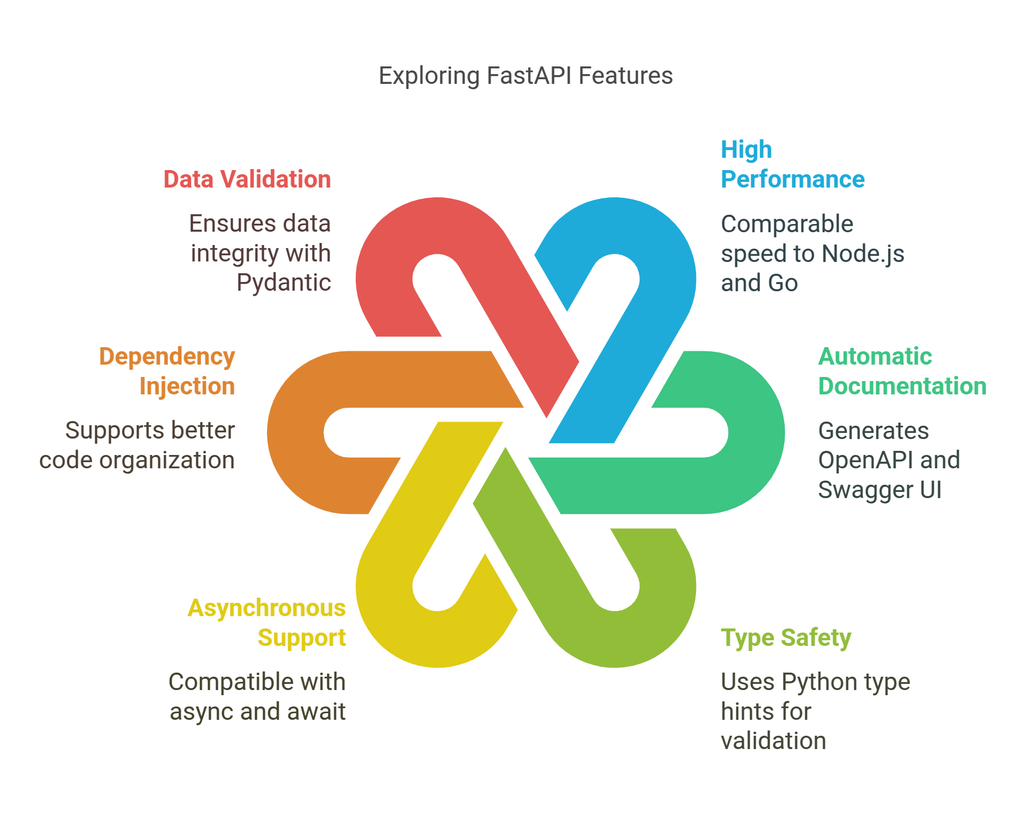
This section walks through creating a working API with minimal setup. The focus is on defining an endpoint, running the server, and understanding how FastAPI handles validation and documentation during development.
Installation and Setup
Install FastAPI along with Uvicorn, which is used to serve the application. Using a virtual environment is recommended to keep dependencies isolated.
pip install fastapi uvicornCreate a Python file, for example main.py, which will contain the API logic.
Creating Your First Endpoint
FastAPI uses decorators to define routes. Each route represents an endpoint that handles a specific request.
from fastapi import FastAPI

app = FastAPI()

@app.get("/")
def read_root():
    return {"message": "Hello, FastAPI"}
This defines a GET endpoint at the root path. When accessed, it returns a JSON response. FastAPI automatically converts Python dictionaries into JSON.
Running the API Server
Run the API using Uvicorn with auto-reload enabled for development.
uvicorn main:app --reloadOnce the server is running, the API is accessible at your local server address. Visiting the root path will return the response defined in the endpoint.
Auto-Generated API Documentation
FastAPI generates interactive API documentation automatically based on your routes and data models. This documentation updates as new endpoints or request models are added, so there is no need to maintain it manually.
By default, the documentation is available at /docs (Swagger UI) and /redoc (ReDoc) on your running server. These interfaces allow you to send requests, inspect payloads, and validate responses directly from the browser, which simplifies testing during development.
How Python APIs Are Used in Real Applications
API Role in Modern Backend Systems
In production systems, APIs act as the communication layer between frontend applications, databases, and external services. They handle data exchange, enforce validation rules, and ensure that frontend systems built through modern front-end development interact with backend logic in a predictable way.
A single API is rarely isolated. It is typically part of a larger architecture where multiple services depend on consistent request handling and structured responses to function correctly.
API Workflows Across Applications
In real-world applications, APIs manage operations such as fetching data, handling authentication, and processing user actions. These operations are exposed through endpoints that connect the user interface with backend logic and data storage.
For example, a product API retrieves data from a database, while an order or transaction API validates input and processes requests. This approach is commonly used across e-commerce, banking, and IoT systems, where backend services communicate through APIs to handle application workflows.
APIs in Microservices-Based Systems
In systems built using microservices, APIs act as the interface between independent services. Each service exposes its own endpoints, and communication happens through structured API calls.
This allows different parts of the system to evolve independently while maintaining consistency through defined API contracts.
Why API Design Decisions Matter Early
Decisions around framework selection, endpoint structure, and validation impact how easily the system can evolve. Poorly structured APIs often lead to inconsistent behavior and require rework as the application grows.
Designing endpoints with clear responsibilities and predictable responses ensures that new features can be added without breaking existing functionality.
Creating API Endpoints in FastAPI
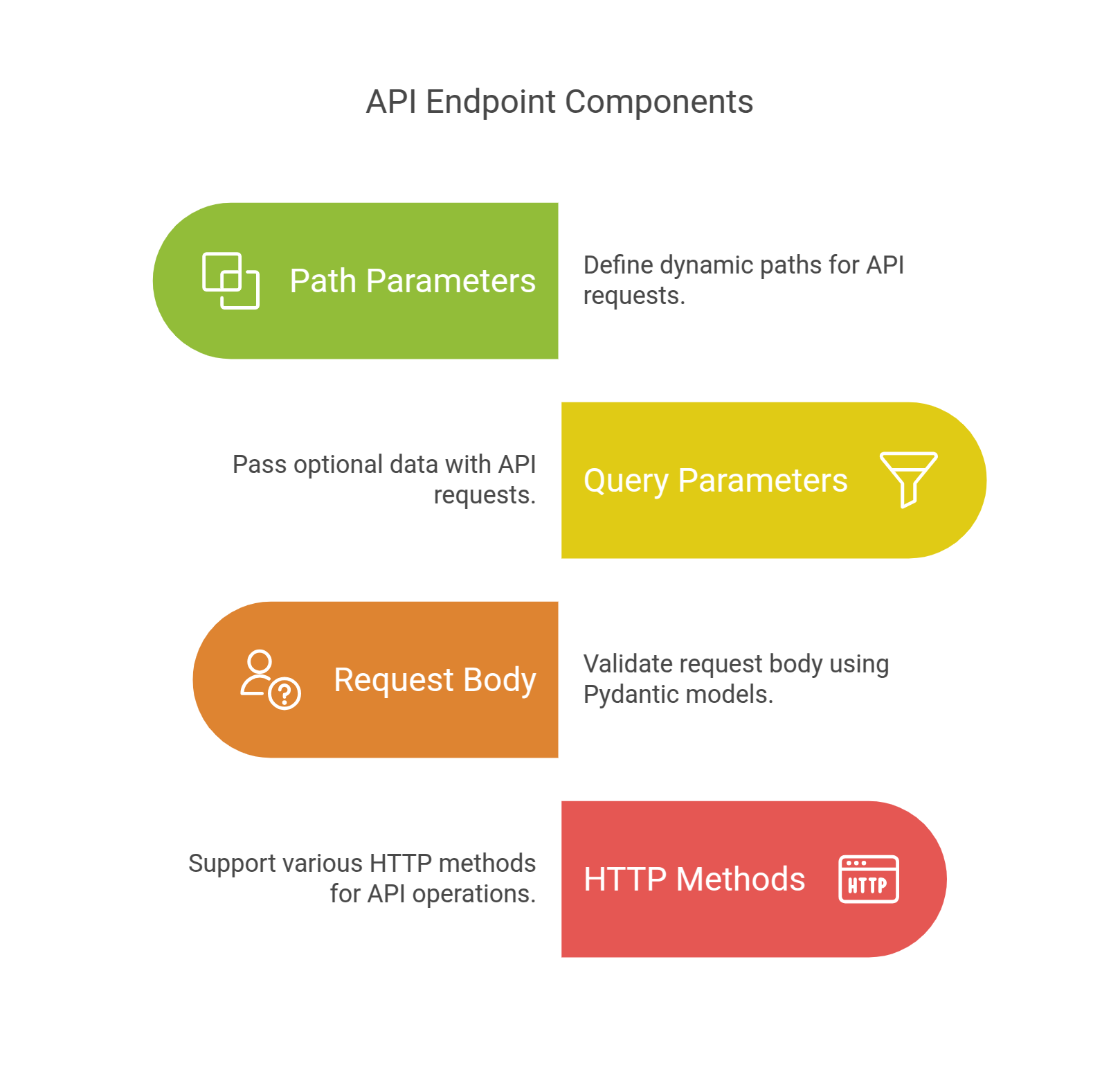
Endpoints define how clients interact with your API. In FastAPI, each endpoint maps a URL path to a function, along with the expected input and response structure. The framework handles routing, validation, and type conversion automatically, which keeps endpoint logic clean and predictable.
Path Parameters
Path parameters are used to capture dynamic values directly from the URL. They are typically used when identifying a specific resource.
from fastapi import FastAPI

app = FastAPI()

@app.get("/items/{item_id}")
def get_item(item_id: int):
    return {"item_id": item_id}
Here is extracted from the URL and automatically validated as an integer. If an invalid type is passed, FastAPI returns a structured error response without additional code.
Query Parameters
Query parameters are used to filter or modify the response without changing the endpoint path. They are passed after the ? in the URL.
@app.get("/items/")
def list_items(skip: int = 0, limit: int = 10):
    return {"skip": skip, "limit": limit}
These parameters are optional by default and support type validation. FastAPI also handles default values and conversion, which simplifies request handling logic.
Request Body with Pydantic
For POST or PUT requests, data is sent in the request body. FastAPI uses Pydantic models to define and validate this data.
from pydantic import BaseModel

class Item(BaseModel):
    name: str
    price: float
    in_stock: bool

@app.post("/items/")
def create_item(item: Item):
    return {"item": item}
The Item model ensures that incoming data matches the expected structure. If required fields are missing or types are incorrect, FastAPI automatically returns validation errors with clear messages.
Common Mistakes to Avoid While Creating API Endpoints in FastAPI
A common issue is not defining types explicitly for parameters and request bodies. Without type hints, validation becomes inconsistent and errors surface later in the flow instead of at the request level.
Another mistake is mixing path and query parameters incorrectly. Path parameters should identify resources, while query parameters should modify or filter results. Keeping this distinction clear makes endpoints easier to understand and maintain.
Handling HTTP Methods in APIs
HTTP methods define how clients interact with your API and what action is expected on a given endpoint. Using them correctly ensures that your API behaves in a predictable way and aligns with standard conventions followed across most systems.
GET, POST, PUT, DELETE in FastAPI
FastAPI maps HTTP methods directly to functions using decorators. Each method represents a specific type of operation, and choosing the right one helps keep your API consistent and easier to work with.
GET: Retrieve Data
GET is used to retrieve data without modifying anything on the server. It is typically used for fetching resources such as a list of items or a single record.
@app.get("/items/{item_id}")
def get_item(item_id: int):
    return {"item_id": item_id}
GET requests should always return the same result for the same input and should not trigger any changes in the system.
POST: Create Data
POST is used to create new resources. It usually accepts data in the request body and adds a new entry to the system.
@app.post("/items/")
def create_item(item: Item):
    return {"item": item}
This method is commonly used when submitting forms, creating records, or sending structured data to the server.
PUT: Update Data
PUT is used to update an existing resource by replacing it with new data. It requires both the identifier and the updated content.
@app.put("/items/{item_id}")
def update_item(item_id: int, item: Item):
    return {"item_id": item_id, "item": item}
It is important to use PUT when the intention is to overwrite the existing data rather than partially modify it.
DELETE: Remove Data
DELETE is used to remove a resource from the system. It takes an identifier and deletes the corresponding record.
@app.delete("/items/{item_id}")
def delete_item(item_id: int):
    return {"message": f"Item {item_id} deleted"}
Once deleted, the resource should no longer be accessible unless recreated.
Common Errors in HTTP Method Implementation
Using the wrong HTTP method for an operation can make the API harder to understand and maintain. For example, using POST for updates or modifying data through GET requests can lead to unexpected behavior.
It is also important to keep GET requests free of side effects. They should only retrieve data, as modifying state through GET can break caching and create inconsistencies across clients.
Core Concepts for Designing and Working with APIs
These concepts define how an API behaves and how clients interact with it. The focus here is on correct usage, so endpoints remain predictable and responses are easy to integrate across systems.
How API Endpoints Should Be Structured
An endpoint represents a resource or an operation exposed by your API. Good endpoint design follows a resource-based approach, where URLs describe entities rather than actions.
For example, /users or /orders/{order_id} is preferred over action-based patterns like /getUsers. The HTTP method already defines the action, so keeping endpoints clean and consistent improves readability and long-term maintainability.
Using HTTP Status Codes Correctly in APIs
Status codes communicate the result of a request and help clients handle responses without inspecting the full payload. Using them correctly ensures consistent behavior across the API.
- 200 OK - Request succeeded
- 201 Created - Resource created
- 400 Bad Request - Invalid input
- 401 Unauthorized - Authentication required or failed
- 500 Internal Server Error - Server-side issue
Status codes should align with the actual outcome of the request. Returning incorrect codes, such as using 200 for errors, can lead to incorrect client-side handling and make debugging harder.
Designing Consistent JSON Responses in APIs
JSON is the standard format for API responses due to its simplicity and compatibility across platforms. FastAPI automatically converts Python objects into JSON, which reduces manual serialization effort.
Responses should follow a consistent structure across all endpoints. A predictable format helps clients parse data reliably and reduces integration effort, especially when multiple services depend on the same API.
How to Test Your API After Building It
Once your API is running, testing ensures that each endpoint behaves as expected and returns correct responses under different conditions. This step helps identify issues early and confirms that request handling and validation are working properly.
Testing APIs Using Postman
Postman provides a visual interface to send requests and inspect responses without writing code. It is useful for validating endpoints, checking request payloads, and verifying headers and status codes.
To test an endpoint, select the HTTP method, enter the URL, add any required parameters or JSON body, and send the request. The response panel shows status codes, response time, and returned data, which helps in quickly identifying issues.
Testing APIs Using cURL (Command Line)
cURL allows you to send HTTP requests directly from the terminal. It is useful for quick testing and for environments where a graphical tool is not available.
Example GET request:
curl -X GET "http://127.0.0.1:8000/items/1"Example POST request:
curl -X POST "http://127.0.0.1:8000/items/" \
-H "Content-Type: application/json" \
-d '{"name": "Laptop", "price": 1000, "in_stock": true}'
cURL is also commonly used in scripts and automation, making it useful beyond manual testing.
What to Check When Testing API Endpoints
Testing should verify that each endpoint returns correct responses and handles different inputs reliably.
Status Codes Match the Outcome
Each request should return a status code that reflects the actual result. Successful operations should return codes like 200 or 201, while invalid requests should return appropriate error codes such as 400 or 401.
Consistent use of status codes allows clients to handle responses correctly without relying on response data. It also simplifies debugging by clearly indicating whether the issue is on the client side or server side.
Response Structure Remains Consistent
Responses should follow a consistent format across endpoints. Keys and data structures should not vary, as inconsistencies increase integration complexity and require additional parsing logic.
A predictable response structure ensures that frontend applications and other services can consume the API reliably without needing custom handling for each endpoint.
Validation and Error Handling Work Correctly
Invalid inputs should trigger clear validation errors. Missing fields, incorrect data types, or malformed payloads should return structured error responses instead of failing silently.
Proper validation ensures that only valid data enters the system and prevents issues from propagating further into the application.
Endpoints Handle Different Inputs Reliably
Endpoints should handle valid, invalid, and edge-case inputs without failure. This includes testing missing parameters, incorrect values, and boundary conditions.
Handling edge cases correctly ensures that the API behaves predictably and does not break under unexpected input scenarios.
Response Time and Performance Remain Stable
Each endpoint should respond within an acceptable time under normal conditions. Slow responses can indicate inefficient queries, blocking operations, or unnecessary processing in the request flow.
Monitoring response time during testing helps identify performance bottlenecks early and ensures the API can handle expected usage without delays.
Best Practices for Building APIs with Python
Well-structured APIs require more than working endpoints. They need consistent validation, controlled access, predictable error handling, and efficient request processing. These practices help maintain reliability and reduce issues as the API grows.
Implement Strong Input Validation
All incoming data should be validated at the request level. Defining strict schemas ensures that only correctly structured data reaches your application logic.
In FastAPI, this is handled using Pydantic models, which enforce types and required fields automatically. This reduces manual checks and prevents invalid data from propagating through the system.
Secure APIs with Authentication
APIs should restrict access based on user identity, service credentials, and API access keys. Token-based authentication is commonly used to verify requests and protect sensitive endpoints.
JSON Web Tokens are widely used for this purpose, where each request includes a token that is validated before processing. This ensures that only authorized clients can access protected resources.
Handle Errors Consistently
Error responses should follow a consistent structure across all endpoints. Clients should be able to rely on predictable formats when handling failures.
Instead of returning generic errors, responses should include clear messages and appropriate status codes. This improves debugging and reduces ambiguity during integration.
Optimize Performance with Async Operations
Blocking operations can slow down request handling and reduce throughput. Using asynchronous functions allows the API to process multiple requests concurrently.
This becomes important when working with databases or external services, where waiting for responses can impact overall performance if handled synchronously.
Use API versioning from the start.
Changes to APIs can break existing clients and dependent services if not managed properly. Versioning allows updates to be introduced without affecting current integrations.
A common approach is to include the version in the URL, such as /v1/users. This makes it easier to maintain backward compatibility while evolving the API.
What to Do After Building Your API
Connect Your API to a Database
A basic API that returns static responses is only useful for testing. To make it practical, you need to connect it to a database so it can store and retrieve real data using reliable database management solutions.
This means replacing hardcoded responses with database queries, handling relationships between entities, and ensuring that read and write operations are efficient. Poor query design or missing indexing can quickly impact performance as data grows.
Deploy the API for external access.
Running the API locally is only the first step. To make it usable, it needs to be deployed on a server so other applications can interact with it.
This involves setting up the runtime environment, managing dependencies, and configuring the server to handle incoming requests. It is also important to ensure that the API runs reliably outside development conditions.
Add Logging and Monitor API Behavior
Once deployed, you need visibility into how the API behaves. Logging helps track errors, request patterns, and failures that may not be visible during development.
Monitoring response times and failure rates helps identify issues early. Without this, debugging production issues becomes difficult and time-consuming.
Manage Changes Without Breaking Existing Clients
As APIs evolve, changes must be handled carefully to avoid breaking existing integrations. Even small changes in response structure or validation can affect client applications.
Using versioning and maintaining backward compatibility ensures that updates can be introduced gradually without forcing immediate changes on users.
Conclusion
Python provides multiple approaches for building APIs, each suited to different levels of complexity and control. Instead of relying on a single framework, the focus should be on selecting the right tool based on the specific requirements of the application.
Framework choice depends on factors such as performance needs, development speed, and the level of structure required. FastAPI offers strong performance and modern features, Flask provides flexibility for smaller services, and Django REST Framework supports applications that require a more structured backend.
Understanding these trade-offs helps in building APIs that are easier to maintain and extend over time. FastAPI is a strong option, but it is not the only choice, and selecting the right framework early can prevent unnecessary complexity later.
Frequently Asked Questions (FAQs)

 WhatsApp
 Call Us
 Mail Us