


Cross-Platform App Frameworks in 2026: The Complete Comparison Guide




Quick Answer: Which Cross-Platform App Framework Should You Choose?
The best cross-platform app framework depends on your team's technical expertise, target platforms, and application requirements.
Flutter: Best for building apps with a custom, consistent UI across mobile, web, and desktop platforms using a shared codebase.
React Native + Expo: Ideal for JavaScript, TypeScript, and React teams developing cross-platform mobile applications.
Kotlin Multiplatform: Suited to Kotlin and Android teams that want to share business logic across platforms while retaining native UI options.
.NET MAUI: Best for C# and .NET teams building applications for Android, iOS, macOS, and Windows.
Ionic + Capacitor: Ideal for web development teams using HTML, CSS, and JavaScript to build mobile apps or extend existing web applications.
Xamarin + PhoneGap: Discontinued technologies that are unsuitable for new projects. Consider .NET MAUI as a successor to Xamarin or Ionic + Capacitor as an alternative to PhoneGap.
The rest of this guide explains why, with a framework-by-framework breakdown, a head-to-head table and a guide to matching the framework to your team.
Cross-platform app development has become increasingly popular due to its ability to efficiently create applications that run on multiple platforms with a single codebase. This has led to the emergence of a wide array of tools and frameworks that developers can leverage to streamline their development process. However, with so many options available, choosing the best framework can be a daunting task.
To help you find the most suitable framework for your mobile app, we've compiled the leading cross-platform app frameworks in one guide, from market leaders such as Flutter and React Native to rising options like Kotlin Multiplatform and .NET MAUI. We also flag frameworks that are no longer maintained, so you don't start a new project on a dead end.
Before we dive into the details, it's worth noting that the frameworks use different languages: JavaScript or TypeScript (React Native, Ionic, NativeScript), Dart (Flutter), Kotlin (Kotlin Multiplatform) and C# (.NET MAUI). The best framework is often the one your team can already write well, so a solid grounding in the underlying language matters more than any feature list.
But first, let’s take a moment to define what cross-platform app development is all about.
In simple terms, a cross-platform app development framework allows developers to build applications that run on multiple operating systems, such as iOS and Android, while reusing much of the same code across platforms. It provides a shared codebase that reduces development time and effort while helping maintain a consistent user experience. Cross-platform development is a popular approach to mobile app development because it allows businesses to build and maintain applications for multiple platforms without developing each one entirely from scratch.
What Does Cross-Platform Mean in 2026?
In 2026, "cross-platform" covers three different ideas: sharing business logic across platforms, sharing the user interface, and delivering web-based experiences through native app containers. Some frameworks reuse a common codebase while using native components for the interface, while others render their own UI or rely on web technologies. Understanding these differences helps developers compare frameworks based on performance, design flexibility, platform integration, and development effort rather than assuming that every cross-platform framework works the same way.
In 2026, cross-platform development covers three main approaches:
1. Shared business logic
Frameworks allow developers to reuse core code, such as data processing, business rules, and API calls, across multiple platforms while building separate native user interfaces. Kotlin Multiplatform supports this approach.
2. Shared user interface (UI)
Frameworks let developers create interfaces from a shared codebase for different platforms. Flutter uses its own rendering engine, while React Native uses native UI components to display interface elements.
3. Web-based apps in native containers
Frameworks use web technologies such as HTML, CSS, and JavaScript to build the app interface, which runs inside a native container and can access device features through plugins. Ionic with Capacitor is an example of this approach.
These approaches differ in how they handle UI rendering, native device access, code reuse, and platform-specific features. Understanding these differences helps developers choose a framework that fits their app's requirements.
Cross-Platform App Framework Terms You'll See in This Guide
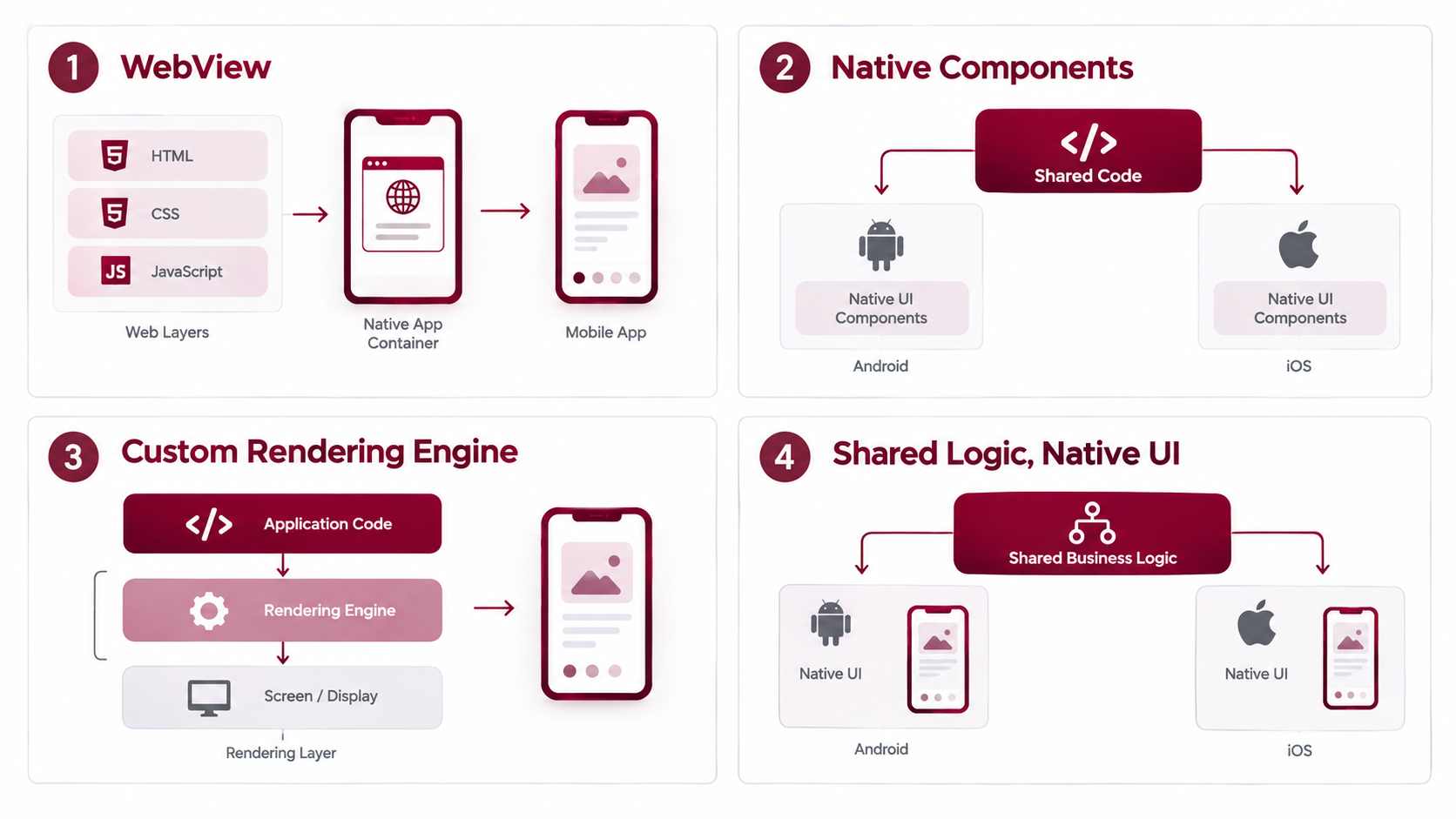
How Cross-Platform Frameworks Work: Four Architectures
Cross-platform frameworks use different architectures to build applications for multiple operating systems. Some display web content inside a native container, while others use native UI components, draw their own interfaces, or share business logic while keeping the UI platform-specific. These architectural differences affect how applications look and behave, how they access device features, and how developers maintain code across platforms.
Understanding these four approaches makes it easier to compare cross-platform frameworks based on an application's requirements.
1. WebView / Hybrid
WebView-based frameworks use web technologies such as HTML, CSS, and JavaScript to build the application interface. The interface runs inside a WebView within a native app container. Tools such as Capacitor and Cordova allow the web application to access device features, including the camera, location, and file system, through plugins or native integrations.
Examples: Ionic with Capacitor, Apache Cordova.
Best suited for: Applications that rely heavily on web technologies, teams with web development experience, and projects that need to reuse an existing web application.
2. Native Components
Frameworks using native components allow developers to write much of their application code in a shared language or codebase while displaying interface elements through native platform components or controls. This can help applications follow platform-specific design conventions and behaviour, although implementation details vary by framework.
React Native uses native UI components, while .NET MAUI provides cross-platform controls that map to native controls where supported. NativeScript also enables developers to build applications that interact with native platform APIs.
Examples: React Native, .NET MAUI, NativeScript.
Best suited for: Applications that need platform-native UI behaviour, access to device capabilities, and a shared codebase for much of the application.
3. Custom Rendering Engine
Frameworks using a custom rendering approach draw interface elements through their own graphics or rendering systems rather than relying entirely on native UI widgets. This gives developers greater control over visual consistency across platforms, including layouts, animations, and custom interface elements.
Flutter uses its own rendering engine, Impeller, to render its UI. Compose Multiplatform uses a different approach depending on the target platform; on iOS, its UI rendering is based on Skia through Skiko.
Examples: Flutter, Compose Multiplatform on iOS.
Best suited for: Applications that need a consistent visual experience across platforms, highly customised interfaces, or complex animations.
4. Shared Logic, Native UI
This approach focuses on sharing business logic while allowing each platform to use its own native user interface. Developers can reuse code for networking, data processing, validation, and other application rules while building separate interfaces for Android and iOS.
Kotlin Multiplatform supports this model, allowing teams to share selected parts of their codebase without requiring them to share the entire UI. Developers can use SwiftUI or UIKit for iOS and Jetpack Compose or Android Views for Android.
Example: Kotlin Multiplatform.
Best suited for: Applications that need shared business logic but require platform-specific UI design, native behaviour, or closer integration with existing native applications.
Why These Architectures Matter
The architecture determines how a framework builds and displays its interface, shares code, and interacts with platform features. WebView-based approaches reuse web development skills, native-component frameworks use platform UI elements, custom-rendering frameworks offer greater control over visual consistency, and shared-logic approaches preserve separate native interfaces.
There is no single architecture that is best for every application. The right choice depends on factors such as UI requirements, performance needs, platform integration, team expertise, and long-term maintenance.
Cross-Platform vs Native vs Hybrid vs PWA
Choosing the right app development approach depends on the project's requirements, budget, performance needs, and access to device features. Native development offers the closest integration with each operating system, while cross-platform frameworks allow developers to share code across platforms. Hybrid apps reuse web technologies inside native containers, and Progressive Web Apps (PWAs) deliver app-like experiences through web technologies without requiring a traditional app installation.
The following table compares these approaches to help you choose the right option for your application.
Which Approach Should You Choose?
- Choose native development when your application needs advanced graphics, specialised device capabilities, or deep operating system integration.
- Choose cross-platform development when you want to support multiple platforms while sharing much of the codebase.
- Choose hybrid development when your team has strong web development expertise or you want to reuse an existing web application inside a mobile app.
- Choose a PWA when browser access, easy distribution, and a lightweight app-like experience are priorities.
Best Frameworks for Developing Cross-Platform Mobile Apps
Each framework below includes its current status, key features, recommended use cases, and limitations. Some frameworks support general-purpose mobile development, while others are better suited to specific technologies or existing applications. The right choice depends on your team's expertise, target platforms, UI requirements, and long-term maintenance needs.
1. Flutter (Active)
Flutter, developed by Google, is a UI toolkit for building applications for mobile, web, and desktop platforms using a shared codebase. It uses Dart and provides a widget-based approach to creating customised interfaces.
Status: Actively developed by Google.
Key Features of Flutter
Single Codebase: Build applications for Android, iOS, web, Windows, macOS, and Linux, with platform-specific adjustments where necessary.
Customisable Widgets: Create consistent interfaces, custom layouts, and animations using Flutter's widget library.
Hot Reload: Preview many code changes without restarting the entire application.
Impeller Rendering Engine: Supports modern graphics rendering on supported platforms.
Native Device Access: Access device capabilities through plugins and platform-specific integrations.
Best For
Applications requiring highly customised interfaces and animations.
Products that need consistent visual design across platforms.
Startups developing minimum viable products (MVPs).
Teams comfortable adopting Dart.
Limitations
Smaller Talent Pool: Dart has a smaller developer talent pool than JavaScript and TypeScript in many markets.
Custom Rendering: Flutter draws much of its UI using its own rendering system, which can require extra work to reproduce platform-specific interface conventions.
OS Updates: Adopting new platform features may require framework updates or additional development.
Web Limitations: Flutter web is generally better suited to app-like experiences than content-heavy websites that depend on traditional HTML, text indexing, and search engine optimisation.
2. React Native (Active)
React Native, developed by Meta, enables developers to build Android and iOS applications using JavaScript or TypeScript and React. It supports code reuse while allowing platform-specific functionality and native UI components.
Status: Actively developed by Meta and the open-source community.
Key Features of React Native
Code Reusability: Share much of the application code between Android and iOS.
Native UI Components: Use native platform views to create familiar mobile interfaces.
New Architecture: Modernises rendering and communication between JavaScript and native code.
Fabric: Provides the framework's modern rendering system for working with native views.
JavaScript Interface (JSI): Enables more direct interaction between JavaScript and native functionality.
TurboModules: Supports a modern approach to loading and accessing native modules.
Expo: Offers tools for development, testing, builds, and deployment.
Best For
Existing React and JavaScript or TypeScript teams.
Consumer applications targeting Android and iOS.
Products that need native UI components and third-party integrations.
Startups looking to reuse existing web development expertise.
Limitations
Third-Party Dependencies: Some device capabilities require external packages or custom native modules.
Varying Library Quality: Community packages differ in maintenance, documentation, and platform support.
Upgrade Effort: Framework upgrades can require changes to dependencies and native project configuration.
Architecture Compatibility: Older libraries may not fully support the New Architecture, so teams should verify compatibility before migrating.
3. Kotlin Multiplatform (Active)
Kotlin Multiplatform (KMP), developed by JetBrains, allows teams to share code across platforms while retaining the option to build platform-specific interfaces. Developers can reuse business logic, networking, data handling, and other common functionality without requiring a shared UI.
Status: Stable for production use, with active development by JetBrains. Compose Multiplatform is an optional solution for sharing UI, with iOS support reaching stable status in May 2025.
Key Features of Kotlin Multiplatform
Shared Business Logic: Reuse networking, validation, data processing, and core application logic.
Native UI Support: Build Android interfaces with Jetpack Compose or Android Views and iOS interfaces with SwiftUI or UIKit.
Optional Shared UI: Use Compose Multiplatform when sharing interface code is appropriate.
Platform-Specific Implementations: Use Kotlin's
expectandactualmechanisms to provide platform-specific functionality.Existing Project Integration: Introduce shared Kotlin modules into suitable Android and iOS applications.
Best For
Android and Kotlin development teams.
Existing mobile applications that need shared business logic.
Projects that want to retain native iOS and Android interfaces.
Teams gradually introducing code sharing into an established architecture.
Limitations
Smaller Ecosystem: Some libraries, integrations, and learning resources are less widely available than those for Flutter or React Native.
iOS Expertise: Native iOS development may still require knowledge of Swift, SwiftUI, UIKit, and Apple's development tools.
Optional UI Sharing: KMP does not automatically provide a shared UI; Compose Multiplatform must be evaluated separately.
Integration Effort: Teams need to assess compatibility between shared modules and platform-specific dependencies.
4. .NET MAUI (Active)
.NET MAUI (Multi-platform App UI), developed by Microsoft, is a framework for building native mobile and desktop applications using C# and XAML. It supports Android, iOS, macOS, and Windows through a shared project structure.
Status: Actively developed by Microsoft. It is the successor to Xamarin.Forms for cross-platform .NET application development.
Key Features of .NET MAUI
Single Project Structure: Organise shared code, resources, and platform-specific configuration within one project.
Native Controls: Use platform controls to create interfaces that follow operating system conventions.
.NET Ecosystem: Integrate with .NET libraries, tooling, and Microsoft technologies.
C# and XAML: Build application logic and define interfaces using familiar .NET development tools.
Xamarin.Forms Migration: Provides a migration path for many existing Xamarin.Forms applications.
Best For
Enterprises already using C# and .NET.
Internal business applications and enterprise tools.
Applications that need both mobile and desktop support.
Teams with established Microsoft development workflows.
Limitations
Smaller Mobile Ecosystem: Some mobile-specific libraries and integrations may be less readily available than in larger cross-platform ecosystems.
Community Resources: Support resources can be more limited for certain specialised requirements.
Web Development: .NET MAUI is designed primarily for native mobile and desktop apps, not browser-based web applications.
Team Fit: Teams without existing .NET expertise may find other frameworks easier to adopt.
5. Ionic (Active)
Ionic is an open-source framework for building mobile and web applications using HTML, CSS, and JavaScript. It supports Angular, React, and Vue, while Capacitor enables web applications to access native device capabilities and run on mobile platforms.
Status: Actively developed. Capacitor is the recommended native runtime for new Ionic projects.
Key Features of Ionic
Web Technology Support: Build interfaces using HTML, CSS, and JavaScript.
Framework Integration: Work with Angular, React, or Vue.
Capacitor Integration: Package applications for mobile platforms and access native functionality.
Device Capabilities: Integrate camera, location, notifications, files, and other features through supported APIs and plugins.
Progressive Web Apps: Build browser-based applications alongside mobile experiences.
Cordova Compatibility: Support selected existing Cordova integrations where compatible.
Best For
Web development teams extending existing applications to mobile.
Projects that benefit from reusing HTML, CSS, and JavaScript.
Progressive Web Apps and content-driven mobile experiences.
Applications with standard device integration requirements.
Limitations
WebView Rendering: Ionic primarily renders its interface using web technologies inside a WebView, which may be less suitable for some graphics-intensive applications.
Plugin Dependencies: Access to certain device features depends on plugin availability and compatibility.
Native Interaction: Some applications may require additional work to match platform-specific interaction patterns.
Performance Testing: Complex animations and demanding interfaces should be tested on target devices.
6. NativeScript (Niche)
NativeScript is an open-source framework for building native Android and iOS applications using JavaScript or TypeScript. It provides access to native UI components and platform APIs while supporting selected frontend frameworks and JavaScript tooling.
Status: Niche. Evaluate current maintenance activity, plugin availability, and platform compatibility before adopting it for a new project.
Key Features of NativeScript
JavaScript and TypeScript: Build mobile applications using familiar development languages.
Native UI Components: Create interfaces using native platform views rather than rendering the entire UI inside a WebView.
Native API Access: Call Android and iOS platform APIs through JavaScript or TypeScript.
Framework Integrations: Supports integrations with technologies such as Angular, Vue, and Svelte, depending on the project setup.
Plugin Ecosystem: Extend applications through compatible plugins and JavaScript packages.
Best For
Teams that want to build native mobile applications using JavaScript or TypeScript.
Projects requiring access to native UI components and platform APIs.
Developers familiar with its supported framework integrations.
Existing NativeScript applications that are already established in production.
Limitations
Smaller Community: Fewer community resources may be available than for React Native.
Plugin Availability: Teams must verify the maintenance and compatibility of plugins required by their application.
Hiring: Finding developers with production experience may be more difficult in some markets.
Long-Term Support: Review release activity and the project's current ecosystem before making a long-term commitment.
7. Framework7 (Niche)
Framework7 is an open-source framework for creating mobile and web applications using HTML, CSS, and JavaScript. It provides ready-made UI components and supports integrations with frameworks such as React and Vue.
Status: Niche. Its suitability depends on current maintenance, ecosystem support, and the project's UI requirements.
Key Features of Framework7
Ready-Made UI Components: Provides components for forms, lists, cards, navigation, and common mobile interface patterns.
Web Technologies: Uses HTML, CSS, and JavaScript.
Framework Integration: Supports React and Vue integrations.
Mobile-Focused Design: Includes mobile-oriented layouts, themes, and interaction patterns.
Packaging Options: Can be combined with compatible tooling to package web applications for mobile platforms.
Best For
Lightweight mobile and web applications built with web technologies.
Teams that want prebuilt mobile UI components.
Projects that fit Framework7's design conventions.
Developers who want to reuse existing web development skills.
Limitations
Smaller Ecosystem: Its ecosystem is smaller than those of leading cross-platform frameworks.
Platform Styling: Achieving a highly customised or platform-specific look may require additional styling.
Native Capabilities: Access to device APIs depends on the integrations and packaging tools used.
Maintenance Checks: Verify current releases, compatibility, and community activity before adopting it.
Note: Framework7 was identified as one of the alternatives to consider when Adobe ended PhoneGap. It is not a direct replacement for every PhoneGap application.
8. Solar2D (Niche)
Solar2D, formerly known as Corona SDK, is an open-source framework for creating cross-platform applications, particularly 2D games and interactive experiences. It uses Lua and provides tools for graphics, animation, and game development.
Status: Niche. Primarily suited to 2D games and selected interactive applications.
Key Features of Solar2D
Open Source: Provides an open-source development framework.
2D Graphics: Supports 2D games, animations, and interactive experiences.
Lua Programming: Uses Lua, a lightweight scripting language.
Cross-Platform Development: Allows developers to share code across supported platforms.
Rapid Prototyping: Supports testing gameplay mechanics and interactive ideas during development.
Best For
2D mobile games.
Lightweight interactive applications.
Teams familiar with Lua.
Projects that benefit from Solar2D's specialised graphics and game-development workflow.
Limitations
Limited General-Purpose Use: It is less suited to conventional business applications and complex enterprise software.
Specialised Ecosystem: Its tools and libraries are more focused on games than general mobile application development.
Team Availability: Developers with relevant production experience may be harder to find.
Feature Compatibility: Verify that the framework supports the required platforms and integrations before starting development.
9. Node.js (Backend Companion, Not a UI Framework)
Node.js is a JavaScript runtime used to build server-side applications and backend services. It does not create mobile app screens, but it can provide APIs, authentication, database access, and business logic for applications built with cross-platform UI frameworks.
Status: Actively developed and widely used for backend development.
Key Features of Node.js
Backend APIs: Build services that mobile applications use to exchange data with servers.
JavaScript Across the Stack: Use JavaScript for both frontend and backend development.
Database Integration: Connect to databases through compatible drivers and libraries.
Authentication and Business Logic: Implement server-side authentication, authorisation, and application workflows.
Framework Compatibility: Support applications built with Flutter, React Native, Ionic, KMP, and other frameworks.
Best For
Teams building JavaScript-based backend services.
Mobile applications that need APIs and database integration.
Applications requiring server-side authentication and business logic.
Teams that want to share JavaScript expertise across frontend and backend development.
Limitations
Not a UI Framework: Node.js does not build mobile interfaces or replace Flutter, React Native, or other UI frameworks.
Backend Expertise: Production applications still require appropriate knowledge of security, API design, deployment, and database management.
Architecture Requirements: The backend must be designed around the application's performance, reliability, and security needs.
Important: Node.js is included as a complementary technology, not as a direct competitor to cross-platform mobile UI frameworks.
Legacy and Discontinued Frameworks: What to Know Before You Start
Older frameworks may still power existing applications, but their current support status, compatibility, and migration options should be reviewed before they are used for new development. The frameworks below are primarily relevant to legacy maintenance or migration planning.
10. Xamarin (Discontinued)
Xamarin allowed developers to build Android and iOS applications using C# and .NET. It supported code sharing and access to native platform APIs. Microsoft ended support for Xamarin products on May 1, 2024.
Status: Discontinued. Not recommended for new projects.
Key Features of Xamarin
C# Development: Build mobile application logic using C#.
Code Sharing: Share selected code across Android and iOS.
Native API Access: Integrate with platform-specific functionality.
.NET Integration: Use compatible .NET libraries and development tools.
Xamarin.Forms: Build shared interfaces for supported mobile platforms.
Best For
Existing Xamarin applications that require maintenance.
Teams assessing migration options for older .NET mobile applications.
Projects that need to identify reusable business logic before a framework transition.
Migration Considerations
Successor Framework: Evaluate .NET MAUI for applications moving toward Microsoft's current cross-platform .NET approach.
Dependency Compatibility: Review third-party packages and platform-specific code before migrating.
Migration Effort: The work required depends on the application's architecture and dependencies.
Upgrade Planning: Consult Microsoft's migration guidance and test the proposed changes before moving production workloads.
11. Appcelerator Titanium (Legacy)
Appcelerator Titanium was a framework for building mobile applications using JavaScript and native UI components. It aimed to let developers share application logic while accessing platform-specific functionality.
Status: Legacy. Verify current maintenance and tooling availability before considering it for any new development.
Key Features of Appcelerator Titanium
JavaScript Development: Build application logic using JavaScript.
Native UI Components: Create interfaces using native platform components.
Code Sharing: Reuse selected application logic across supported platforms.
Platform API Access: Integrate with device capabilities through platform APIs.
Mobile Application Development: Support the creation of mobile applications from a shared development approach.
Best For
Existing Titanium applications that need maintenance.
Teams evaluating the effort required to replace legacy components.
Projects where preserving existing functionality is more practical than an immediate rewrite.
Migration Considerations
Current Support: Verify the availability of maintained tooling and compatible SDKs.
Platform Compatibility: Assess whether the existing application can support current operating system versions.
Dependency Review: Identify unsupported packages, services, and integrations.
Replacement Planning: Compare maintained alternatives based on the team's skills and the application's requirements.
12. PhoneGap (Discontinued)
PhoneGap was Adobe's distribution of technology built around Apache Cordova. It allowed developers to package web applications built with HTML, CSS, and JavaScript for mobile platforms and access device features through plugins. Adobe ended PhoneGap support on October 1, 2020.
Status: Discontinued. Apache Cordova remains a separate project and should be evaluated independently.
Key Features of PhoneGap
Web Technologies: Build application interfaces with HTML, CSS, and JavaScript.
Web-to-Mobile Packaging: Package web applications for supported mobile platforms.
Plugin-Based Device Access: Integrate device capabilities through compatible plugins.
Code Reuse: Reuse web development skills and selected application code.
Cordova Foundation: Built around technology associated with Apache Cordova.
Best For
Existing PhoneGap applications requiring maintenance.
Teams assessing migration paths for older web-based mobile applications.
Projects where identifying reusable HTML, CSS, and JavaScript code is important.
Migration Considerations
Cordova: Evaluate Apache Cordova independently if the existing application depends on its architecture or plugins.
Ionic and Capacitor: Consider this combination for projects that want a maintained web-based mobile development approach.
Other Alternatives: Framework7, NativeScript, or native development may suit particular requirements.
Plugin Compatibility: Audit plugins and device integrations before deciding between migration and rewriting.
13. Sencha Touch (Legacy)
Sencha Touch was a framework for building mobile web applications using JavaScript, HTML, and CSS. It provided interface components and tools for creating mobile-oriented web experiences.
Status: Legacy. Not recommended as a default choice for new projects.
Key Features of Sencha Touch
JavaScript-Based Development: Build mobile web applications using JavaScript.
UI Components: Use prebuilt components for mobile-oriented interfaces.
HTML and CSS: Develop web-based application layouts and styling.
Data-Driven Interfaces: Support application interfaces that display and manage structured data.
Legacy Application Support: Remains relevant when maintaining existing applications built on the framework.
Best For
Existing Sencha Touch applications that still require maintenance.
Teams documenting legacy functionality before a migration.
Projects where preserving existing business workflows is a priority during a transition.
Migration Considerations
Current Support: Verify available tooling, compatibility, licensing, and maintenance options.
Replacement Framework: Evaluate maintained web or cross-platform frameworks against the application's requirements.
Progressive Migration: Consider replacing individual features or modules before undertaking a complete rewrite.
Data and Workflow Preservation: Identify essential business logic and integrations that must be retained during migration.
Final recommendation: For new cross-platform mobile projects, prioritise actively maintained frameworks that fit your team's skills and technical requirements. Treat niche frameworks as specialised options, and approach discontinued or legacy frameworks primarily through maintenance and migration planning.
Cross-Platform App Frameworks Compared: Pros, Cons and Status in 2026
The table below compares the main cross-platform frameworks by their strengths, limitations, current status, and documented examples. Company examples are included only when they appear in official framework showcases, case studies, or documentation.
The comparison shows that no single cross-platform framework is the right fit for every project. Flutter and React Native are strong options for teams building feature-rich mobile applications, while Kotlin Multiplatform suits teams that want to share business logic while retaining native UI. .NET MAUI is a natural choice for businesses already working with C# and the Microsoft ecosystem, whereas Ionic can suit web teams extending existing applications to mobile. Frameworks with niche, declining, or discontinued status require closer evaluation, particularly around maintenance and long-term support. Before making a final decision, consider your team's skills, target platforms, UI requirements, ecosystem support, and the framework's current development status.
Head-to-Head: Flutter vs React Native vs Kotlin Multiplatform vs .NET MAUI
Choosing between Flutter, React Native, Kotlin Multiplatform (KMP), and .NET MAUI depends on your team's technical expertise, UI requirements, target platforms, and how much code you want to share. Although all four support cross-platform development, they differ in how they build interfaces and reuse application logic.
How to Choose Between These Four Frameworks
- Choose Flutter if your application needs a distinctive visual identity, custom interfaces, and consistent rendering across platforms.
- Choose React Native if your team already uses React and JavaScript or TypeScript and wants to apply those skills to mobile development.
- Choose Kotlin Multiplatform if you want to share business logic while keeping the Android and iOS interfaces native. Compose Multiplatform is available if you also want to share UI.
- Choose .NET MAUI if your team works with C#, uses Microsoft's development ecosystem, and needs applications for mobile and desktop platforms.
The best choice depends on more than feature lists. Evaluate your team's existing skills, required platform support, third-party dependencies, maintenance needs, and the amount of platform-specific code your application will require before committing to a framework.
Key Benefits of Cross-Platform App Development
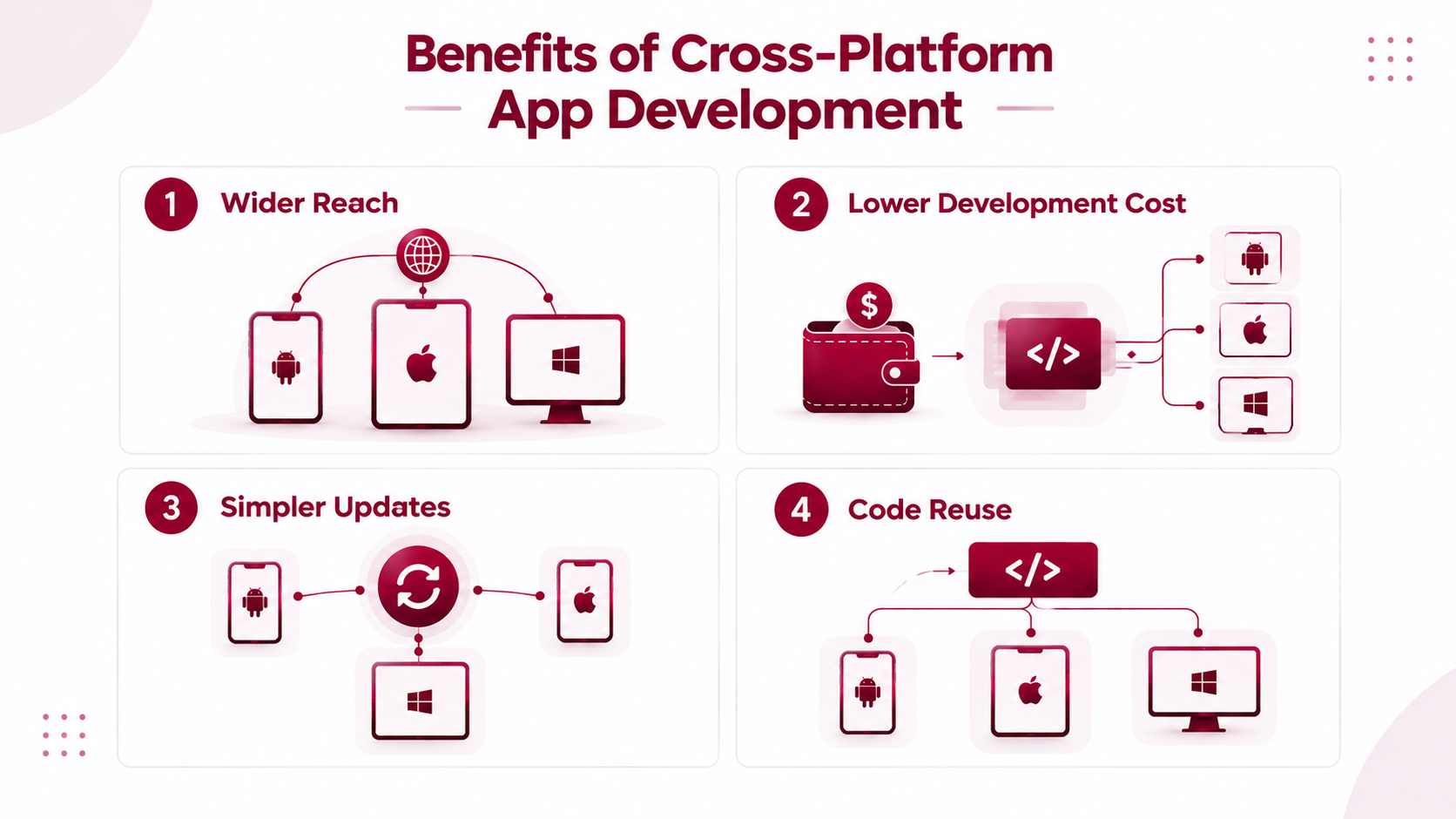
Faster App Development
A shared codebase can reduce development time compared with building and maintaining separate native applications for Android and iOS. However, the actual time savings depend on how much code can be shared, the complexity of the application, and the platform-specific work required.
Lower Development Costs
Sharing code across platforms can reduce development and maintenance costs by limiting duplicated work. However, cross-platform development does not automatically cost 50% less than native development. Actual savings depend on project requirements, team structure, integrations, and ongoing maintenance needs.
Wider Audience Reach
Cross-platform development allows businesses to release applications across multiple platforms, such as Android and iOS, using a shared codebase. This helps teams reach more users without building each application entirely from scratch.
Code Reusability and Easier Maintenance
A shared codebase reduces duplicated code and makes it easier to apply updates across platforms. Developers may still need platform-specific implementations to support individual device features, operating system requirements, and interface conventions.
Drawbacks of Cross-Platform Development, and When Native Is the Better Choice
Cross-platform app development works well for many applications, but it is not the right choice for every project. Although frameworks such as Flutter, React Native, and Kotlin Multiplatform allow developers to share code across platforms, some applications require platform-specific capabilities, specialised performance optimisation, or deeper integration with the operating system.
Graphics-Heavy Applications
Games, 3D visualisation tools, and applications with complex animations may benefit from native development, which offers greater control over platform-specific graphics APIs and performance optimisation.
Augmented Reality (AR)
Apps that depend heavily on AR features may require direct access to platform-specific frameworks, such as ARKit on iOS or ARCore on Android. Native development can make this integration easier to manage.
Day-One OS API Support
Newly released operating system features may not be immediately supported by cross-platform frameworks. Native development allows teams to access new APIs directly, without waiting for framework updates or community plugins.
Deep Operating System Integration
Applications that rely on specialised hardware, platform-specific services, or complex system-level functionality may require native code for reliable integration.
Custom Keyboards and Widgets
iOS and Android have different requirements for custom keyboards, home-screen widgets, and other system extensions. These features often require native implementation, even when the main application uses a cross-platform framework.
Background Processing
Apps that depend on continuous background tasks, scheduled jobs, location tracking, or platform-specific execution rules may need native code to work within each operating system's restrictions.
Application Size
Cross-platform frameworks may add runtime components, libraries, or other dependencies that increase the initial app size. The actual impact depends on the framework, included features, build configuration, and optimisation techniques.
Can Cross-Platform and Native Development Work Together?
Yes. Developers do not always have to choose between building an entirely native application and creating a fully cross-platform one. Frameworks such as React Native, Flutter, and Kotlin Multiplatform can be introduced incrementally into existing native applications.
For example, a development team can retain an application's existing native architecture while using Kotlin Multiplatform to share business logic, or introduce React Native or Flutter for selected screens and features. Platform-specific code can continue to handle functions that require deeper operating system integration.
This approach allows businesses to reuse code where it makes sense while retaining native capabilities where they provide a clear advantage. The right strategy depends on the application's performance requirements, technical architecture, development resources, and long-term maintenance needs.
How to Pick the Right Cross-Platform Framework
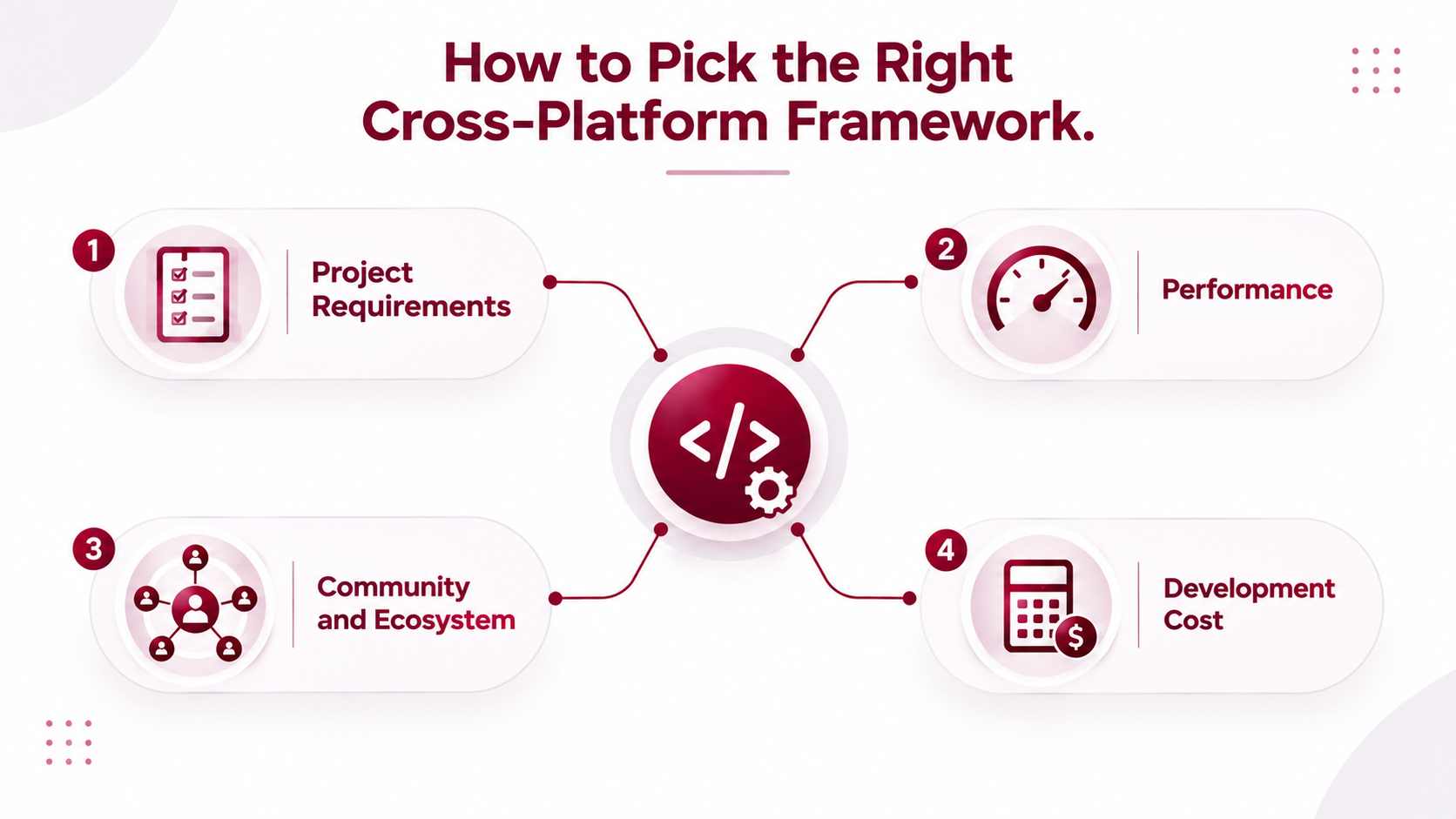
Choosing the right cross-platform framework depends on your project's requirements, your team's existing skills, the platforms you want to support, and the features your application needs. Consider the following factors before making a decision.
bestCrossplatform.png
Alt text: Factors to weigh when choosing a cross-platform app framework: project needs, performance, community and cost
Match the Framework to Your Team's Skills
Your team's existing technical knowledge can influence development time, training requirements, and maintenance effort. Choosing a framework that aligns with familiar programming languages can make adoption easier.
- JavaScript/React team: React Native
- Kotlin team: Kotlin Multiplatform (KMP)
- C# team: .NET MAUI
Decide Which Platforms You Need
Check which platforms your application must support before selecting a framework. Some frameworks focus primarily on mobile applications, while others also support web and desktop development.
iOS: Does the framework support your required iOS features?
Android: Can it meet your Android functionality and performance requirements?
Web: Can you reuse the codebase for browser-based applications?
Desktop: Does it support your target desktop operating systems?
Judge Long-Term Viability
A framework should remain practical to maintain as your application grows. Evaluate its long-term support and development ecosystem before committing to it.
Consider the maintainer's credibility, release activity, community engagement, plugin availability, documentation, and overall ecosystem. These factors can help you assess how easily your team will find updates, resolve issues, and maintain the application.
List Your Native Feature Needs
Identify the device capabilities and operating system features your application will use. Check whether the framework supports them directly or requires third-party plugins or native code.
Important requirements may include:
Camera access
Biometric authentication
Bluetooth connectivity
Background tasks
Payment integrations
Specialised or unusual hardware
Testing these requirements early can help identify integration challenges before development progresses too far.
Which Framework for Which Team?
The best framework depends on your technical background, application goals, and platform requirements. Use this comparison as a starting point when narrowing down your options.
These recommendations are starting points rather than strict rules. For example, a React Native team may still need native modules for specialised hardware, while a Kotlin Multiplatform project can share business logic without requiring a shared user interface. Before making a final choice, build a small proof of concept around your most demanding feature. Test performance, platform compatibility, third-party integrations, and maintenance requirements to confirm that the framework fits your project.
Illustrative Example
Consider a startup with a four-person development team that already maintains a React web application. The team wants to launch a mobile app for both iOS and Android while keeping development costs manageable.
Since the developers already understand JavaScript and React, React Native could be a practical choice. It would allow them to reuse relevant skills and share selected code between platforms. Expo could further simplify the development workflow, depending on the app's requirements.
Before committing, the team should evaluate its essential features, such as payment integration, biometric authentication, and background processing. It should also test whether the required functionality is supported directly or needs native modules. If the app depends heavily on platform-specific capabilities, the team may need additional native development.
In this scenario, React Native is a reasonable starting point because it aligns with the team's existing expertise and product goals. However, the final decision should follow technical validation rather than framework popularity alone.
Key takeaway: Team expertise + product requirements > generic framework rankings.
Choosing a Framework for AI-Powered App Features
AI-powered features are becoming an important part of mobile app development in 2026, from chatbots and voice assistants to personalised recommendations and image recognition. Choosing the right cross-platform framework requires more than checking UI support. Developers must also consider how the app connects to AI services, processes data, and presents AI-generated results.
1. Backend AI APIs
Many AI features communicate with a backend server, which sends requests to an AI provider and returns the results to the mobile application. This approach allows developers to manage API keys securely, handle business logic centrally, and integrate AI services without running large models directly on the device.
Frameworks such as React Native, Flutter, and .NET MAUI can connect to backend services through HTTP requests or WebSockets. The best choice depends on the application's security requirements, response handling, and existing backend architecture.
2. On-Device AI
Some applications need to run AI models directly on a phone or tablet. On-device processing can reduce dependence on network connectivity and help keep sensitive data on the device, although performance depends on the model and available hardware.
Important technologies include:
Core ML: Apple's framework for running machine-learning models on Apple devices.
TensorFlow Lite: A framework for deploying machine-learning models on mobile and other edge devices.
Platform bindings: Native integrations that allow cross-platform applications to access device-specific AI libraries and hardware capabilities.
When choosing a framework, check whether the required AI technology is supported directly or needs native modules, plugins, or platform-specific code.
3. SDK Availability
Before selecting a framework, verify how easily it integrates with your chosen AI provider. Check whether the provider offers:
SDK: An official software development kit for your framework or programming language.
REST API: An HTTP-based interface that allows the application or backend to communicate with the AI service.
Language support: Compatible libraries and documentation for JavaScript, TypeScript, Dart, Kotlin, C#, or other languages used by your team.
If an official mobile SDK is unavailable, a backend API may provide a practical alternative. Avoid embedding secret API keys directly in a mobile application, where they can be extracted.
4. Streaming UI
Some AI features return information progressively instead of waiting for the entire response. The framework should support a responsive interface that can display incoming data and handle interruptions or connection failures.
Streaming is especially useful for:
Chatbots: Displaying generated responses as they arrive.
Token streaming: Showing text progressively rather than waiting for the complete answer.
Voice features: Supporting live transcription, spoken responses, or interactive voice sessions.
Live recommendations: Updating suggestions as new information becomes available.
Developers should check support for streaming protocols such as Server-Sent Events (SSE) and WebSockets, depending on the AI provider's API. The UI should also handle loading states, cancellation, retries, and partial responses.
Final Consideration
For AI-powered applications, the best framework is the one that fits the team's skills and the product's AI architecture. Backend-based AI features can work with most major cross-platform frameworks, while on-device inference, streaming interfaces, and specialised hardware may require additional native integration. Evaluating these needs early helps teams choose a framework that supports both the core application and its AI features.
Security and Compliance Considerations
Cross-platform development does not remove an application's security obligations or compliance requirements. Whether an app is built with Flutter, React Native, Kotlin Multiplatform, or another framework, developers must protect user data, secure communication, and follow the regulations that apply to their industry and operating regions.
The framework is only one part of the security strategy. The application architecture, backend services, third-party libraries, data-handling practices, and deployment process also affect the overall security posture.
Key Security Practices for Cross-Platform Apps
Secure Storage
Store sensitive information, such as authentication tokens, using platform-protected storage mechanisms like iOS Keychain and Android Keystore-backed solutions. Avoid storing credentials or sensitive data in plain text.
TLS Encryption
Use HTTPS with current Transport Layer Security (TLS) configurations to protect data transmitted between the application and its servers.
Certificate Pinning
Consider certificate or public-key pinning for applications with higher security requirements. Implement it carefully, including certificate rotation and recovery strategies, to avoid breaking connectivity when certificates change.
Authentication
Use secure authentication flows, short-lived access tokens where appropriate, and server-side authorisation checks. Apply multi-factor authentication when required by the application's risk profile.
Biometric APIs
Integrate platform-supported biometric authentication for convenient access to protected features. Biometrics should complement secure authentication mechanisms rather than replace server-side access controls.
Dependency Hygiene
Regularly review framework packages, plugins, SDKs, and native dependencies. Update vulnerable components, remove unused libraries, and monitor security advisories.
Root and Jailbreak Detection
For applications with elevated security requirements, consider detecting rooted Android devices or jailbroken iOS devices. Treat detection as a risk signal rather than a complete security guarantee, since these checks can be bypassed.
Code Obfuscation
Use appropriate code obfuscation and build protections to make reverse engineering more difficult. These measures can raise the effort required to inspect an application but cannot replace secure architecture or server-side controls.
Privacy and Regulatory Compliance
Security measures must be supported by clear data-handling policies and appropriate compliance practices. Depending on the application, industry, and jurisdictions involved, teams may need to address the following:
Privacy Disclosures: Explain what personal data the application collects, why it is collected, and how it is used or shared. Keep privacy policies and app-store disclosures accurate.
Consent: Obtain valid consent where required, particularly for sensitive data collection, tracking, or optional processing. Provide appropriate controls for withdrawing consent.
Data Residency: Determine whether personal or regulated data must be stored or processed in specific geographic regions. Verify the locations used by cloud services, AI providers, analytics tools, and third-party processors.
For regulated applications, requirements may also include access controls, audit logs, retention policies, incident response procedures, and documented security assessments. Compliance depends on the applicable laws and standards, not simply on the choice of development framework.
Security Considerations for Industry-Specific Applications
Security requirements become especially important when applications handle financial transactions or sensitive health information. Teams building these products should consider industry-specific obligations from the architecture and planning stages.
Fintech applications: Explore Code B's fintech software development services for support with planning secure financial applications, transaction workflows, and data protection requirements.
Healthcare applications: Explore Code B's healthcare software development services for applications that need to account for sensitive health data, privacy controls, and applicable healthcare regulations.
The appropriate safeguards depend on the product, its users, the data it handles, and the regions in which it operates. Choosing a cross-platform framework can help share application code, but security and compliance must be designed, implemented, and tested across every supported platform.
Cost and Team Considerations
The cost of cross-platform app development depends on more than the framework you choose. Although sharing code between platforms can reduce duplicated development effort, the overall budget depends on the application's features, technical requirements, team expertise, and long-term maintenance needs.
Factors That Influence Development Cost
App Complexity
Applications with basic screens and standard functionality generally require less development effort than products with complex workflows, advanced integrations, or specialised features.
Native Integrations
Features such as Bluetooth connectivity, biometric authentication, background processing, and platform-specific APIs may require additional native development and testing.
Design Requirements
Custom interfaces, complex animations, platform-specific layouts, and accessibility requirements can increase design and implementation time.
Device Testing
Testing across different screen sizes, device models, and hardware configurations adds to quality assurance efforts.
Operating System Versions
Supporting multiple iOS and Android versions requires compatibility checks and testing to ensure features behave consistently.
Maintenance
Bug fixes, performance improvements, security updates, and support for new operating system releases contribute to ongoing costs.
Dependency Upgrades
Framework updates, third-party plugin changes, and native library upgrades may require code changes, regression testing, and compatibility fixes.
How Team Structure Affects the Budget
The development team's experience and working model also influence the overall cost. An experienced team may identify integration challenges earlier, select suitable libraries, and reduce avoidable rework. However, the required team size depends on the project's scope, deadlines, and technical complexity.
Businesses should evaluate whether they need an in-house team, an external development partner, or a distributed team. The decision should account for development expertise, communication, project management, testing, and ongoing support.
For a more detailed budget assessment, explore these Code B resources:
Mobile App Development Cost: Understand the factors that influence the overall budget for a mobile application.
Flutter App Development Cost: Evaluate the cost considerations associated with building applications using Flutter.
Hire Mobile App Developers: Explore development expertise and team requirements for your project.
Offshore Mobile App Development Team: Consider an offshore team model for your development and maintenance needs.
.svg&w=256&q=75)
Migrating From a Discontinued Framework
If your application relies on a discontinued or no-longer-maintained framework, migration planning can help reduce security risks, compatibility issues, and future maintenance challenges. However, replacing the entire application immediately is not always necessary. The right approach depends on the framework, the existing codebase, platform requirements, and available development resources.
The following table outlines potential migration paths for applications built with older frameworks.
How to Plan the Migration
Before selecting a replacement framework, audit the existing application to identify unsupported dependencies, essential features, platform-specific code, and integration requirements.
Next, assess the available migration tools and create a proof of concept for the most technically challenging features. Test compatibility with current operating systems, verify third-party library support, and estimate the effort required to adapt the existing codebase.
For larger applications, a staged migration may be more practical than a complete rewrite. Teams can prioritise critical features, replace outdated components incrementally, and validate each stage before moving forward.
The key takeaway: A discontinued framework does not automatically mean the entire application must be discarded. A planned migration helps teams preserve valuable business logic where possible while moving toward a supported technology stack.
Conclusion
The best cross-platform app framework is the one that fits your team, your product, and your timeline. Rather than choosing a framework based solely on popularity or generic rankings, evaluate its performance, platform support, native integration capabilities, development costs, and long-term maintenance requirements. The right choice will depend on your application's specific needs and your team's technical expertise.
Prototype first. Before committing to a framework, build and test the riskiest screen or feature in your top one or two framework choices. Evaluate performance, native integrations, device compatibility, and development effort. This practical approach helps identify technical limitations early and gives your team a stronger basis for making the final decision.
Frequently Asked Questions

 WhatsApp
 Call Us
 Mail Us