


A Practical Guide to Building LLM Applications



What Is a Large Language Model (LLM)?
A large language model is a neural network trained to understand and generate human language by learning patterns from large-scale text data. Modern transformer-based models can process long context and generate responses that align closely with user intent.
Models such as LLaMA, Claude, and Gemini are trained on billions of tokens and can handle tasks like reasoning, coding assistance, summarization, and conversational interaction without task-specific programming.
The role of LLMs has shifted from experimentation to daily usage. In the Stack Overflow 2025 Developer Survey, 84% of developers report using AI tools, with more than half using them every day. This indicates that LLMs are no longer isolated tools, but are being integrated into regular development workflows.
At a functional level, an LLM does not retrieve fixed answers. It generates responses based on probability, context, and input structure. This means the same model can produce very different outputs depending on how it is used.
In practice, an LLM acts as the core language engine within modern applications. It processes input, interprets intent, and generates outputs that power assistants, internal tools, and automated workflows. The effectiveness of these systems depends less on the model itself and more on how it is applied—through prompts, context, and system design.
Understanding this distinction is critical before moving into implementation. Building with LLMs is not centered on creating the model itself in most cases, but on designing how it is used within an application.
The next step is to break down how to build an LLM application and how these models are applied in real systems.
How to Build an LLM Application (Step-by-Step)
Building an LLM application is not a single integration step. It is a sequence of decisions that define how the model is used, how input is structured, and how responses are generated within a system.
Most applications are built using existing models. The focus is not on training, but on controlling how the model behaves within a defined workflow. Each step influences the next, which is why the system needs to be designed with clear intent from the start.
Step 1: Define the Use Case
Every LLM system starts with a clearly defined use case. This determines what kind of input the system will receive, what output is expected, and how precise or flexible the responses need to be.
A general-purpose chatbot, a document summarizer, and a domain-specific assistant behave very differently. If the use case is not clearly defined, the model defaults to generic responses.
This step sets constraints. Those constraints directly influence prompt design, model selection, and whether external data will be required later. A loosely defined use case leads to more rework in later stages.
Step 2: Decide How the Model Will Be Used
At this stage, the focus is on how the model will be used within the system rather than which model to pick. This decision defines the level of control, complexity, and flexibility the application will have.
Using API-Based Models
Most applications rely on pre-trained models accessed through APIs, such as Claude or Gemini. This approach allows faster development and avoids managing infrastructure. It is typically the starting point for building LLM applications.
Fine-Tuning a Model
Fine-tuning is used when the system needs more control over how responses are structured. This is relevant for domain-specific tasks where consistency in tone, format, or behavior is required. It adds complexity but improves output alignment.
Training a Model from Scratch
Training from scratch is rarely required. It is only considered when there are strict requirements around data control or model behavior that cannot be addressed using existing models. This approach requires significant resources and is usually limited to specialized use cases.
This choice directly shapes how the system is built. API-based setups rely more on prompt design and external context, while fine-tuned systems depend more on training data and controlled outputs. The decision sets the boundaries for how much control and flexibility the application will have.
Step 3: Design the Prompt Layer
The prompt layer defines how input is interpreted by the model. This is where behavior is shaped.
Instead of passing raw input, it is structured with instructions and roles that guide how the model responds.
messages = [
    {"role": "system", "content": "You are a precise technical assistant."},
    {"role": "user", "content": user_query}
]
The structure of the prompt determines consistency. A well-defined prompt reduces ambiguity, while an unstructured one leads to unpredictable outputs.
This step becomes more critical when the system needs to handle varied inputs. The prompt must align with the use case defined earlier and adapt to the type of responses expected.
Step 4: Connect the Application to the Model
Once the prompt is defined, the system needs to send it to the model and retrieve a response. This is the core interaction layer.
response = client.chat.completions.create(
    model="model-name",
    messages=messages,
    temperature=0.7
)

output = response.choices[0].message.content
At this stage, the application becomes functional. However, this is also where trade-offs begin to appear.
- Higher temperature increases variability but reduces consistency.
- Lower temperature improves predictability but may limit flexibility.
The way requests are structured here affects how stable and reliable the system feels in real usage.
Step 5: Introduce Context and External Data
Model responses are limited by what the model has already learned. For most applications, this is not sufficient.
To improve relevance, external data is introduced. This allows the system to generate responses grounded in specific information rather than general knowledge.
context = retrieve_documents(user_query)

messages.append({
    "role": "system",
    "content": f"Use the following context:\n{context}"
})
This step fundamentally changes how the LLM application behaves. Without context, responses remain generic. Once external data is introduced, outputs become more aligned with the task and the underlying information.
However, the effectiveness of this approach depends on how the context is handled within the system.
The way data is retrieved plays a critical role. If the system fetches irrelevant or loosely related information, the model produces weaker responses even if the prompt is well designed.
Retrieval needs to be precise enough to surface only the most relevant data for the given query.
At the same time, the amount of context passed to the model must be controlled. Too little context leads to incomplete answers, while too much introduces noise and reduces clarity.
Step 6: Build the Application Layer
The model interaction is then integrated into an application layer. This layer handles user input, request processing, and response delivery.
@app.post("/query")
def query_llm(user_input: str):
    return generate_response(user_input)
At this stage, the system becomes usable. The model is no longer isolated—it is part of a workflow that users interact with.
This layer also determines how the system scales in practice, including how requests are handled and how responses are delivered consistently.
Step 7: Test and Refine the System
The final step is not just testing whether the system works, but how it behaves under different conditions.
This includes evaluating:
- Consistency across similar inputs.
- Handling of ambiguous or incomplete queries.
- Alignment with the defined use case.
Refinement happens through adjustments in prompts, context handling, and system logic. Small changes at this stage can significantly improve reliability.
At this stage, the application can take input, process it through the model, and return a response. The core pieces are in place, but how they are connected will determine how reliable and consistent the system feels in actual use.
In practice, these components do not operate independently. The prompt layer, model interaction, and data integration all influence each other. Small changes in one part can affect the overall output.
The next step is to look at how these pieces are structured together and how an LLM system is organized beyond individual steps.
LLM Architecture and Core Components
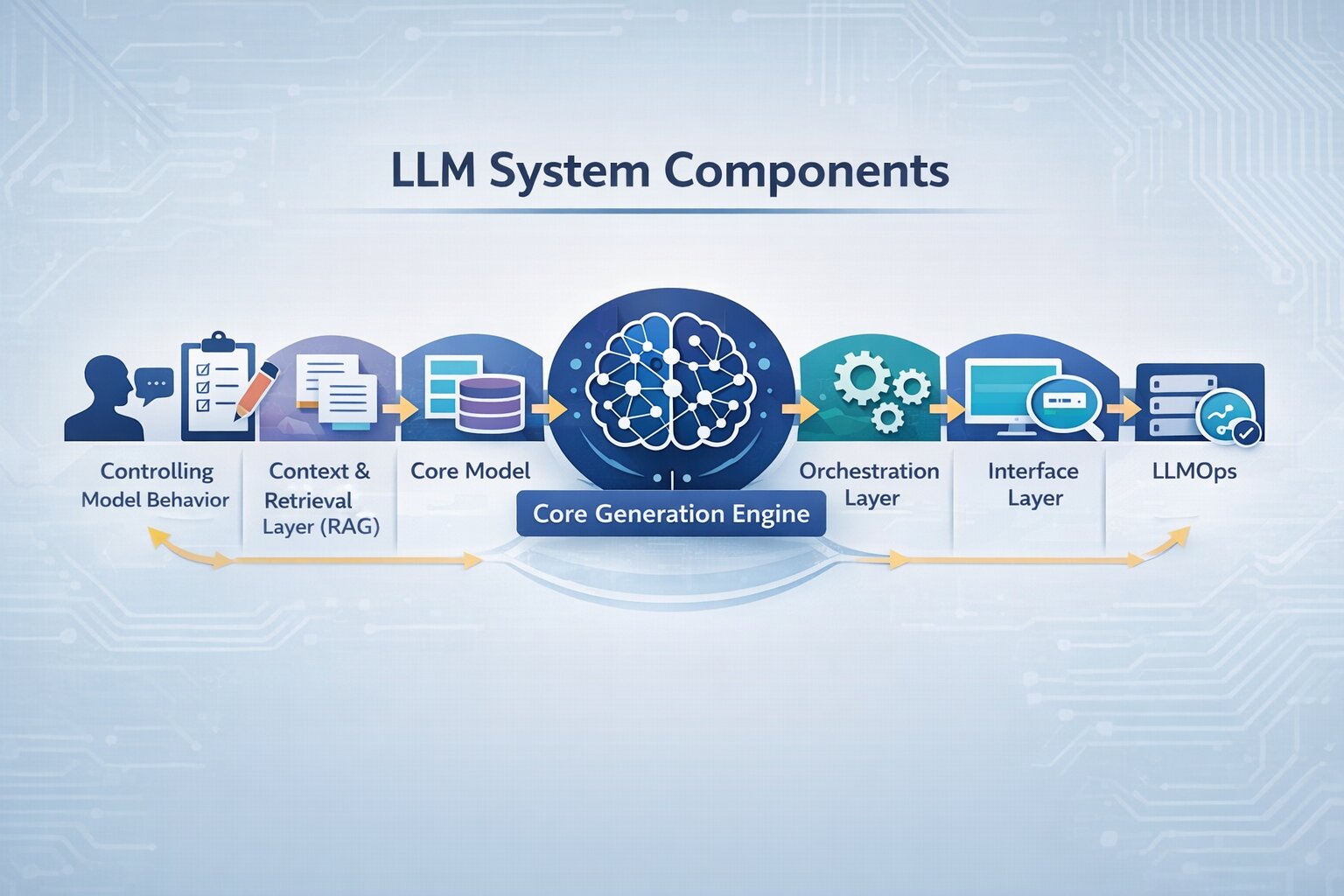
An LLM application is not a single model call. It operates as a connected system where user input flows through multiple layers, prompt construction, context retrieval, model processing, and response delivery.
This end-to-end flow forms a typical LLM pipeline, where multiple layers operate together as part of the Gen AI tech stack powering the application.
To build reliable LLM applications, it’s important to understand how each part of the system contributes to output quality and where issues typically arise.
Core Generation Engine
The model processes input and generates output based on learned language patterns. It does not retrieve fixed answers but predicts responses based on probability and context.
In most LLM systems, the model is rarely the main issue. Changing the model may improve performance slightly, but inconsistent outputs are usually caused by poor prompt structure or weak context.
In practice, improving an LLM application is less about switching models and more about how the system is designed around it.
Controlling Model Behavior
The prompt layer defines how input is interpreted. It includes instructions, constraints, and formatting that guide how the model responds.
This is typically the first place to debug when outputs are inconsistent. Small changes in prompt structure, such as clearer instructions or better formatting, can significantly improve response quality.
In most LLM workflows, prompt design directly impacts reliability more than model choice.
Context and Retrieval Layer (RAG)
Most modern LLM applications rely on retrieval-augmented generation (RAG) to connect the model with external data sources such as documents, databases, or APIs.
This layer retrieves relevant information and injects it into the prompt before the model generates a response, using LLM text embeddings to identify the most relevant context. It is one of the most critical parts of an LLM system.
If the retrieved context is irrelevant or excessive, outputs become inaccurate or unclear. Improving retrieval quality often has a greater impact than changing prompts or models.
Orchestration Layer
The orchestration layer controls how the LLM application operates. It manages how prompts are constructed, when context is retrieved, and how the model is called.
This is also where LLM integration happens, connecting the model with data sources, tools, and application logic.
In more advanced systems, this layer handles tool usage, where the model interacts with APIs or external services to complete tasks. Poor orchestration often leads to inconsistent behavior, even if individual components are working correctly.
Memory and Context Management
LLMs are stateless by default, meaning they do not retain information across interactions unless explicitly designed to do so.
Memory systems are introduced to manage context across conversations. Short-term memory handles the current interaction, while long-term memory stores information that can be reused across sessions.
Without proper memory handling, multi-step interactions break easily, and responses lose continuity
Interface Layer
The interface is where users interact with the system. It captures input and delivers responses, but it also influences how clearly queries are expressed.
In many LLM applications, unclear input leads to weak outputs even when the system is well designed. Guiding user input through structured interfaces improves overall system performance.
Infrastructure and Monitoring (LLMOps)
Production LLM systems require infrastructure to handle requests, monitor performance, and manage costs.
This includes tracking latency, response quality, and token usage within LLMOps practices in ML, along with applying guardrails to control unsafe or irrelevant outputs.
Without monitoring, it becomes difficult to identify where the system is failing or how to improve it over time.
These components define how an LLM application behaves in practice. When outputs are inconsistent or unreliable, the issue usually lies in how these layers are structured and connected. Understanding this makes it easier to identify what to adjust while building or improving the system.
Real-World Use Cases and Example Workflow
LLM applications are used across industries where large volumes of text need to be processed, interpreted, or generated. While the underlying system remains consistent, LLM use cases differ based on how context is applied and how outputs are controlled within each domain.
Customer Support Systems
One of the most common LLM use cases is in customer support, where NLP-based chatbots handle repetitive queries and assist agents with contextual responses.
Companies like Klarna have deployed AI assistants that handled over 2.3 million conversations in a single month, managing around two-thirds of all customer chats and reducing resolution time from 11 minutes to under 2 minutes.
This shows that the impact of LLM applications in support systems depends on how well they retrieve context and structure responses. Without accurate data grounding, even high-performing models can produce unreliable outputs.
Legal and Compliance Workflows
In legal and compliance, LLM applications are used to analyze contracts, extract clauses, and identify risks.
For example, JPMorgan Chase uses automated systems to process large volumes of legal documents, significantly reducing manual review effort.
These systems require stricter control over prompts and context. The focus is on precision and consistency, where even small variations in output can have a significant impact.
Healthcare and Documentation
In legal and compliance, LLM applications are used to analyze contracts, extract clauses, and identify risks.
Tools built on models like GPT-4 have shown strong performance in medical contexts. In standardized evaluations, GPT-4 achieved over 85% accuracy on medical licensing-style exams, demonstrating its ability to interpret and reason over complex medical information.
This highlights that in healthcare systems, reliability depends less on raw generation and more on structured prompts and controlled outputs.
Retail and E-commerce
LLM applications in retail focus on generating product descriptions, improving search relevance, and supporting personalization.
Companies like Instacart use generative systems to create product content and enhance user experience at scale.
Consistency becomes critical in these systems, where outputs must follow predefined formats across large product catalogs.
Software Development and Internal Tools
In software development, LLMs assist with code generation, debugging, and documentation.
Tools like Claude are used by engineering teams to accelerate development workflows and automate repetitive coding tasks.
These systems depend heavily on prompt structure and iterative refinement to produce reliable outputs.
How LLM Applications Are Built: A Real-World Example
To understand how LLM implementation works in practice, consider a real-world system developed at Code-B. The Mple project demonstrates how a context-aware application is built to generate responses from internal data rather than relying only on the model’s general knowledge.
Stage 1: Defining the Objective and Feasibility
In this implementation, the system was designed to enable users to retrieve accurate, context-driven responses from internal data. This defined how strictly outputs needed to be controlled and how the system would integrate with existing workflows.
Stage 2: System Design and Development
The system was structured to retrieve relevant internal data and incorporate it into the prompt. This ensured that responses were grounded in actual information rather than generic model output.
At the same time, prompts were designed to control how the model interprets input, ensuring consistency in tone and structure across responses.
Stage 3: Integration and Orchestration
The application was integrated into a workflow where input processing, context retrieval, and model interaction were connected through orchestration logic. This ensured that responses were generated consistently rather than through isolated model calls.
Stage 4: Validation and Iteration
The application was integrated into a workflow where input processing, context retrieval, and model interaction were connected through orchestration logic. This ensured that responses were generated consistently rather than through isolated model calls.
While the use cases vary, the way these systems are built follows a similar structure. The workflow outlined above reflects how LLM applications are implemented in practice across different environments.
Tools and Technologies for Building LLM Applications
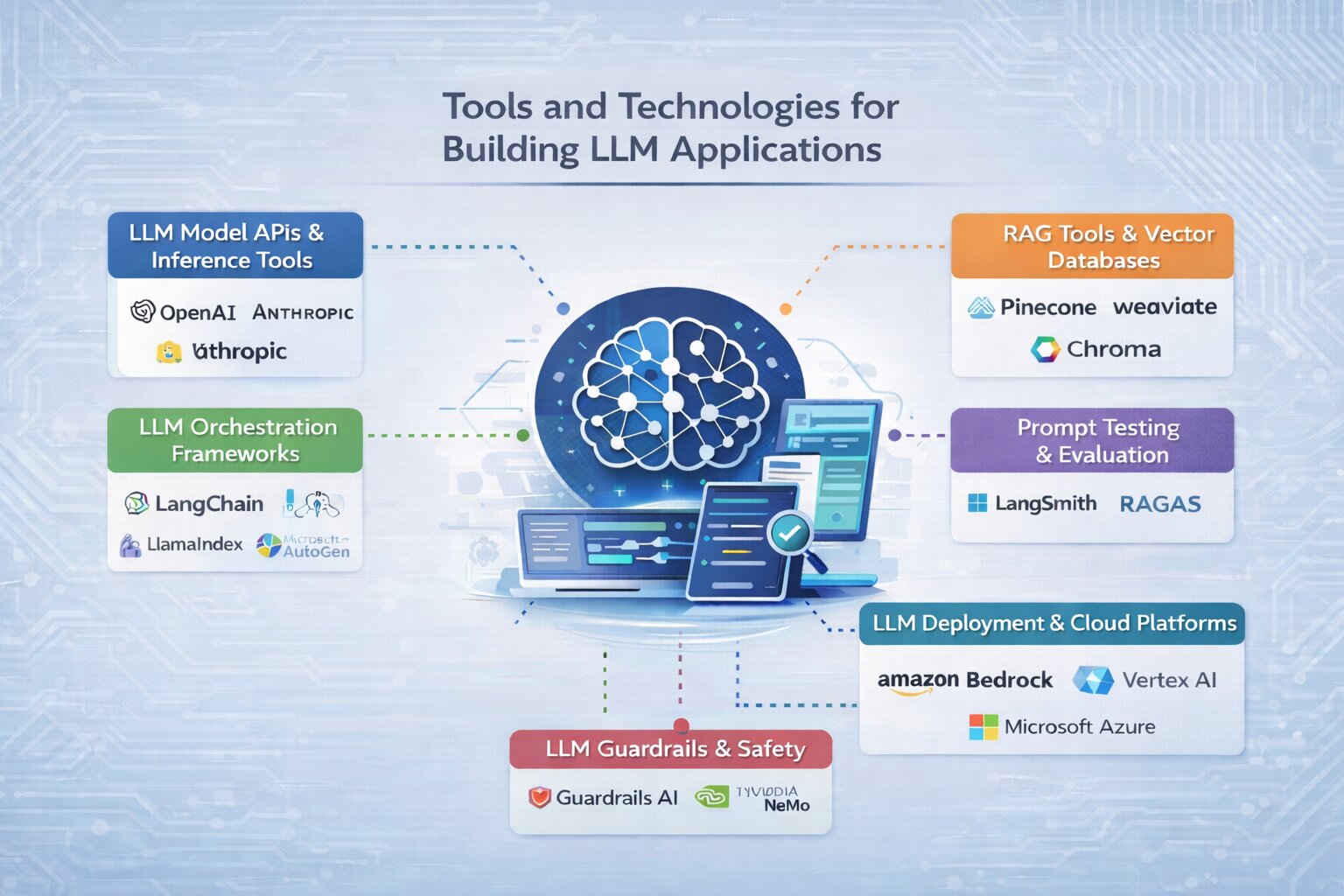
Building an LLM application requires selecting the right set of tools across different stages involved in building AI, from accessing models to retrieving data, managing workflows, and deploying the system. These tools form the practical stack used to implement an LLM pipeline in real-world applications.
LLM Model APIs and Inference Tools
To start building, you need access to a model that can generate responses. Most applications use hosted APIs from providers like OpenAI and Anthropic, which allow fast integration without managing infrastructure.
For open-source models, platforms like Hugging Face provide access to a wide range of pre-trained models. Tools such as Ollama are commonly used to run models locally during development, while vLLM is used to optimize performance when serving models in production.
The choice depends on whether the focus is speed, cost, or control.
RAG Tools and Vector Databases
To build applications that go beyond generic responses, retrieval-augmented generation (RAG) is widely used. This requires tools that can store and retrieve relevant data efficiently.
Vector databases such as Pinecone, Weaviate, and Chroma are commonly used to enable semantic search across documents, knowledge bases, or internal data.
These tools are essential when building LLM applications that depend on real-time or domain-specific information.
LLM Orchestration Frameworks
As applications grow beyond simple prompts, orchestration frameworks are used to manage workflows involving multiple steps.
Libraries like LangChain and LlamaIndex help structure how prompts, data retrieval, and model calls are connected through a system coordination layer, ensuring each step works together smoothly.
For more advanced systems, tools like LangGraph and Microsoft AutoGen support multi-step reasoning and agent-based workflows.
These frameworks are useful when the application involves complex logic rather than single-step responses.
Prompt Testing and Evaluation Tools
Improving output quality requires testing prompts and evaluating responses across different scenarios.
Tools such as LangSmith and RAGAS are used to analyze outputs, compare variations, and identify where the system needs improvement.
This becomes important as the application moves from prototype to production and needs consistent behavior.
LLM Deployment and Cloud Platforms
Once the system is built, it needs to be deployed in a way that can handle real usage. This includes managing scale, performance, and reliability.
Cloud platforms like Amazon Bedrock, Google Vertex AI, and Microsoft Azure AI provide managed environments for deploying LLM applications.
These platforms simplify infrastructure management and allow systems to scale as usage grows.
LLM Guardrails and Safety Tools
As LLM applications interact with users, controlling output becomes important. Guardrail tools are used to enforce constraints and improve response reliability.
Frameworks like Guardrails AI and NVIDIA NeMo Guardrails help define rules for how models should respond and reduce unintended or unsafe outputs.
This is especially relevant in applications where accuracy and consistency are critical.
These tools form the practical stack used to build and scale LLM applications. The choice of tools depends on the use case and system complexity, but most implementations evolve from simple setups to more structured workflows over time.
Challenges and Limitations of LLM Applications
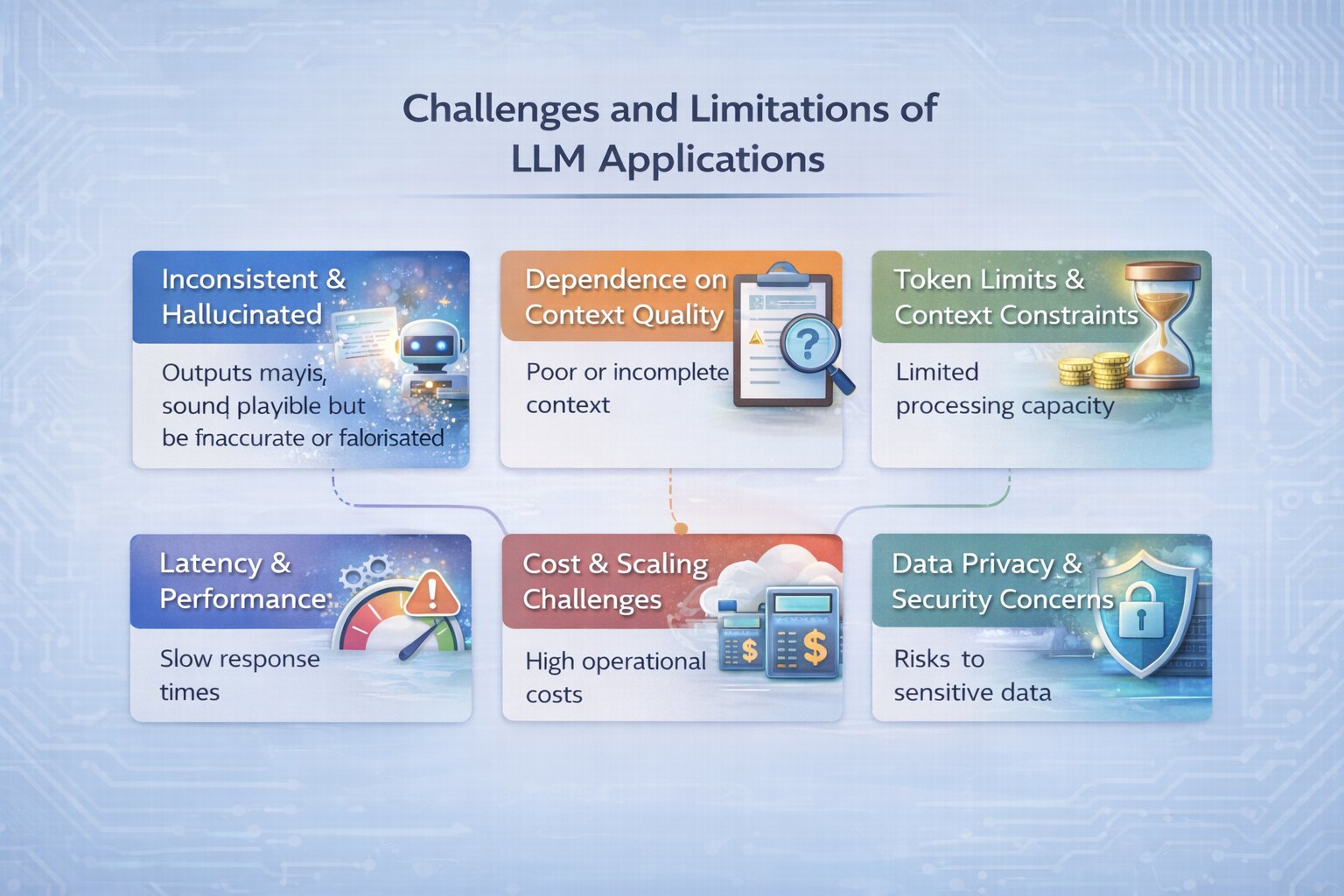
Building an LLM application involves more than integrating a model. While these systems are powerful, they come with practical limitations that directly affect reliability, cost, and performance. Understanding these challenges is important when designing and improving LLM applications.
Inconsistent and Hallucinated Outputs
LLMs generate responses through probability-based text generation, not factual verification. This can lead to outputs that sound correct but are inaccurate or fabricated.
This becomes a critical issue in applications that rely on correctness, such as legal, healthcare, or internal knowledge systems. Improving prompt structure and grounding responses with relevant context helps reduce this, but does not eliminate it.
Dependence on Context Quality
In retrieval-based systems, output quality depends heavily on the relevance of retrieved data. If the context provided is incomplete, outdated, or irrelevant, the model produces weak or incorrect responses.
Even well-designed systems can fail if the retrieval layer is not optimized. This makes data quality and retrieval accuracy a key challenge in LLM applications.
Token Limits and Context Constraints
LLMs can only process a limited amount of input at a time, defined by their context window. This restricts how much information can be passed to the model in a single request.
For applications working with large documents or multi-step workflows, managing context becomes a challenge. Poor handling can lead to missing information or reduced response quality.
Latency and Performance Issues
LLM applications often involve multiple steps: retrieval, prompt construction, and model inference, which can increase response time.
As system complexity grows, latency becomes more noticeable, especially in real-time applications. Balancing performance with system design is essential to maintain a smooth user experience.
Cost and Scaling Challenges
Most LLM applications rely on usage-based pricing, where a memory-efficient LLM reduces the number of tokens processed and overall cost.
As usage increases, costs can grow significantly, especially in systems with high traffic or complex workflows. Optimizing prompts, reducing unnecessary calls, and managing context size are important for controlling cost.
Data Privacy and Security Concerns
When LLM applications process sensitive or internal data, privacy becomes a key concern. Passing data to external APIs or storing it in retrieval systems introduces potential risks.
This requires careful handling of data, including access control, secure storage, and compliance with privacy standards.
Conclusion
Building an LLM application involves more than integrating a model. It requires a clear understanding of how the system is structured from defining the use case and designing prompts to managing context, workflows, and tools across the pipeline.
While the underlying concepts remain consistent, the effectiveness of an LLM system depends on how these elements are implemented in practice. Small decisions in prompt design, data retrieval, and system flow often have a greater impact than the model itself.
As LLM applications continue to evolve, the focus shifts from experimenting with models to designing reliable, scalable systems. Understanding this shift is key to building applications that deliver consistent and meaningful results.
Frequently Asked Questions

 WhatsApp
 Call Us
 Mail Us