


LLM Fine-Tuning with LoRA: Complete 2026 Guide



A budget Guide For LORA Fine Tuning 2026
LoRA Fine-Tuning in Production: Complete Cost, Infrastructure & ROI Breakdown
What Is LoRA Fine-Tuning for LLMs?
LoRA is a parameter-efficient fine-tuning method used to adapt a pre-trained large language model to new tasks without retraining the full model. Instead of updating billions of original parameters, LoRA adds a small set of trainable matrices to selected layers while keeping the base model weights frozen.
This approach lowers hardware demands, shortens training time, and creates lightweight adapters that are easier to store, share, and deploy. Because the original weights remain unchanged, the model retains much of its general language ability while learning task-specific behavior.
LoRA stands for Low-Rank Adaptation. The method is based on the idea that many useful fine-tuning updates can be represented in a smaller mathematical space than the full weight matrices inside a transformer model. Rather than modifying every parameter, LoRA learns compact updates that are added to selected layers during training.
In practice, only these inserted parameters are trained, while the original model remains untouched. After training, the adapter can be used separately or merged into the base model for inference, depending on deployment needs.
LoRA has become one of the most widely used methods for customizing open-source LLMs such as Meta Platforms Llama, Mistral AI Mistral, Alibaba Cloud Qwen, and Technology Innovation Institute Falcon because it offers a practical balance between training cost, speed, and output quality.
Why Full Fine-Tuning In LLMs Is Not Practical for Most Teams
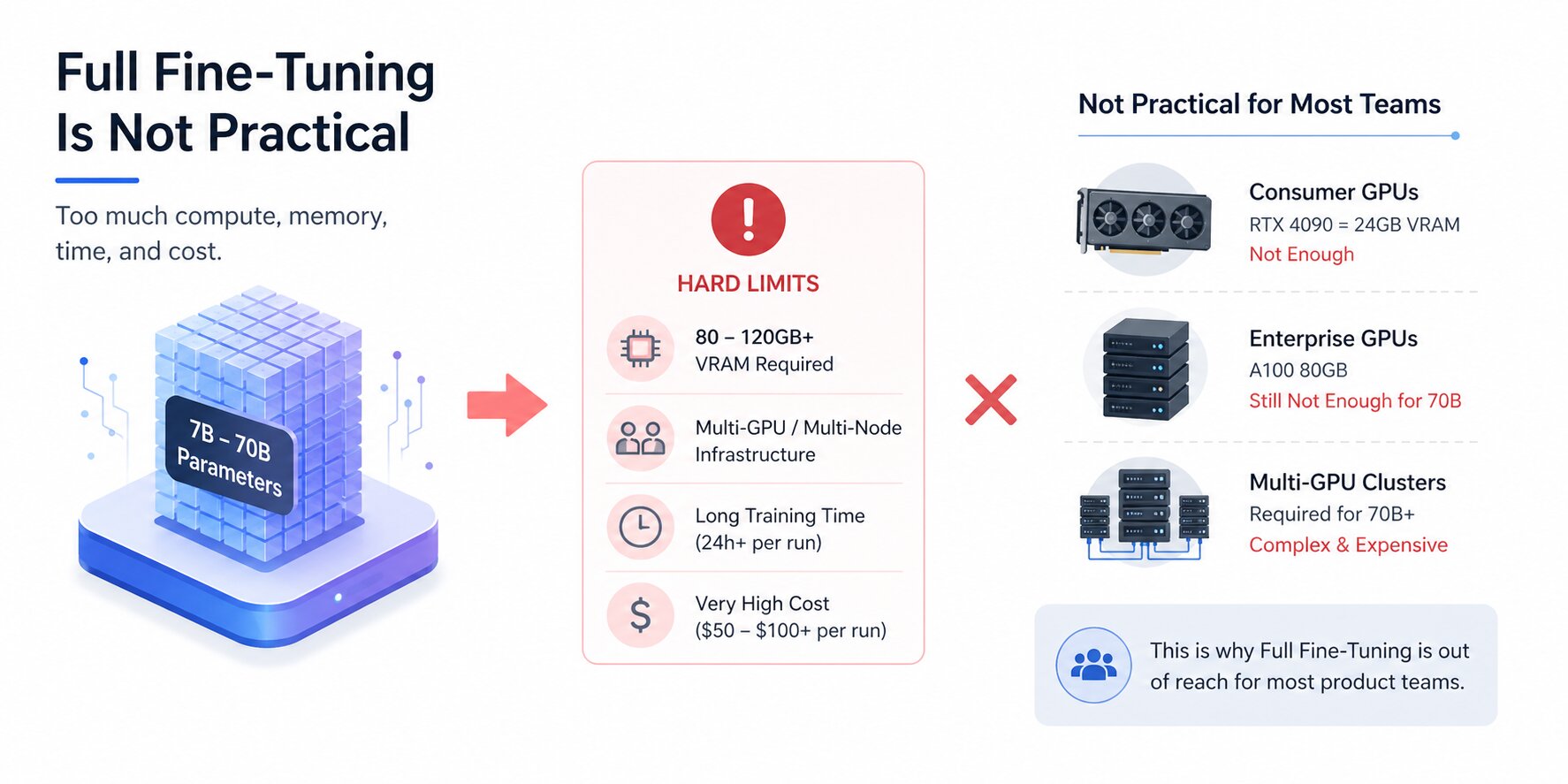
Full fine-tuning updates every weight in a model during training. For a 7B parameter model, that means modifying billions of numbers every single step, while simultaneously holding the original weights, updated weights, gradients, and optimizer states in memory at the same time.
The math compounds fast, and the result for most teams is a hard wall: the infrastructure required simply isn't available, and renting it long enough to run meaningful experiments is prohibitively expensive.
GPU Memory Requirements
A 7B parameter model in 16-bit precision requires roughly 14 GB just to load the weights. Add gradients (another 14 GB), Adam optimizer states (28 GB), and activations during the forward pass, and a full fine-tuning run on a 7B model demands upward of 80–120 GB of GPU VRAM in practice.
That's multiple high-end data center GPUs before training starts. For 13B models, the floor is higher, and for 70B models, full fine-tuning requires multi-node GPU clusters with fast interconnects, infrastructure that's out of reach for most teams outside large research labs and enterprise AI divisions.
Consumer GPUs like the RTX 4090 top out at 24 GB of VRAM. Even the A100 80GB, one of the most capable GPUs available on the cloud, cannot fit a 70B model for full fine-tuning on its own.
The hardware constraint isn't a configuration problem; it's a fundamental limitation of updating all model weights simultaneously.
Training Time and Compute Cost
Beyond memory, full fine-tuning is slow. A single fine-tuning run on a 7B model with a few thousand examples can take 24 hours or more on a single A100. For teams iterating on their dataset or trying different training configurations, that timeline makes experimentation painful.
A hyperparameter that doesn't work means another full day of training before you know. At cloud GPU pricing of $2–4 per hour for an A100 80GB, a single failed run costs $50–$100 before any results are in.
Multiply that across the iterations a real project requires, dataset changes, rank adjustments, prompt format experiments, and the cost of doing fine-tuning properly through full weight updates adds up to tens of thousands of dollars for teams that don't own the hardware outright. Research labs absorb that cost. Most product teams cannot.
Storage Challenges for Multiple Model Versions
Full fine-tuning produces a complete copy of the model for every task it's trained on. A fine-tuned 7B model checkpoint is around 14 GB. If your product needs three different domain-specific variants, one for customer support, one for legal review, and one for internal documentation, you're managing 42 GB of model storage minimum, with separate deployment infrastructure for each.
As models grow larger and use cases multiply, this approach doesn't scale. Storage costs compound, version management becomes a liability, and switching between model variants at inference time requires loading entirely different models rather than swapping lightweight adapters.
This is the operational problem that LoRA directly addresses, alongside the compute one.
Benefits of LoRA Fine-Tuning for LLMs
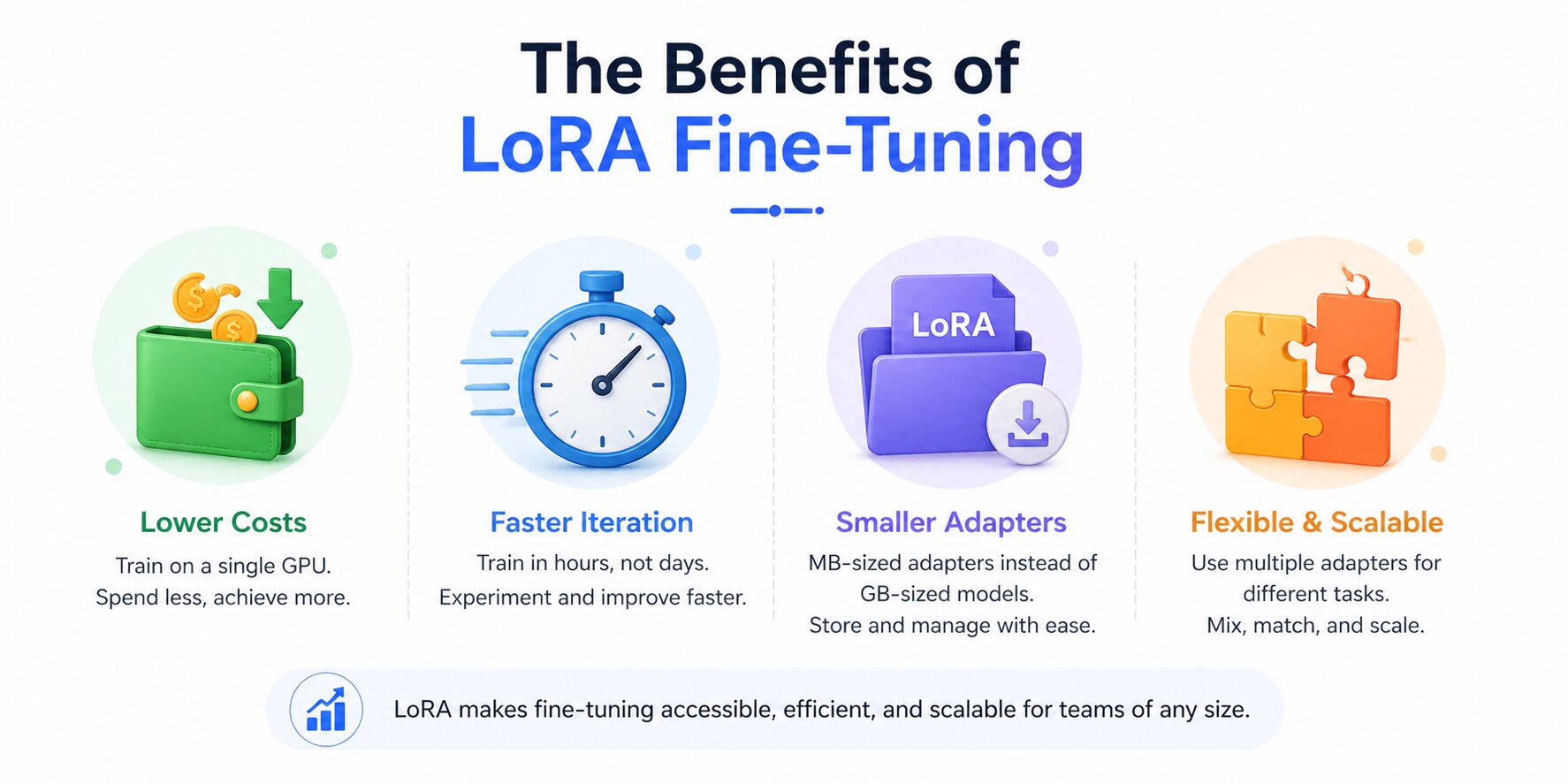
Understanding why LoRA works is one thing. Knowing what it actually changes about your workflow is another. The benefits aren't just theoretical efficiency numbers; they translate into concrete differences in how teams can operate, iterate, and deploy. Here's what changes in practice when you move from full fine-tuning to LoRA.
Lower Hardware Costs
The most immediate benefit is the hardware requirement drop. A 7B model that demands 80–120 GB of VRAM for full fine-tuning can be LoRA-fine-tuned on a single RTX 4090 (24 GB) in 16-bit, or on an RTX 4070 (12 GB) using QLoRA.
A 70B model that requires a multi-GPU cluster for full fine-tuning can be fine-tuned on a single A100 80GB with QLoRA. On cloud GPU platforms like RunPod or Lambda Labs, a complete fine-tuning run on a 7B model costs under $20. For teams that own mid-range hardware, the cost drops to electricity.
This accessibility shift matters beyond economics. It means individual engineers can run fine-tuning experiments without waiting for infrastructure provisioning, while leaner teams can use SLM (small language models) to reach a level of capability that was once reserved for well-funded organizations.
Faster Experiments and Iteration
Training time follows a similar curve. A 7B LoRA fine-tune on 5,000 examples typically completes in 2–4 hours on a single A100. Full fine-tuning of the same model and dataset could take 24 hours or more on the same hardware, if it even fits.
That 10× difference in wall-clock time is a difference in how many ideas you can test in a week.
Fast iteration is what makes good models: trying different dataset compositions, rank settings, and target module configurations requires running experiments, seeing results, and adjusting.
When each experiment takes two hours instead of a day, the quality of the final model improves.
Smaller Checkpoints, Multiple Adapters
A LoRA adapter checkpoint is the size of the adapter matrices only, not a copy of the full model. For a rank-16 adapter on a 7B model, that's typically 20–100 MB rather than 14 GB.
A team managing five domain-specific variants stores 100–500 MB of adapter files rather than five separate 14 GB model copies.
Version control becomes practical, deployment pipelines are simplified, and switching between task-specific behaviors at inference time becomes a matter of loading a different adapter file rather than loading an entirely different model.
Merged Adapters and Inference Speed
One concern with adapter-based approaches is the added inference overhead. LoRA eliminates this in the merged configuration.
After training, the adapter matrices B × A can be added directly into the frozen weight matrix W₀, producing a single merged weight matrix W₀ + BA that is mathematically identical to running inference with the adapter loaded separately, but with no extra computation at runtime.
The merged model has the same architecture and the same inference speed as the original base model. For latency-sensitive production applications, this matters: you get the adaptation without the overhead.
LoRA vs QLoRA - What’s the Difference and Which Should You Use?
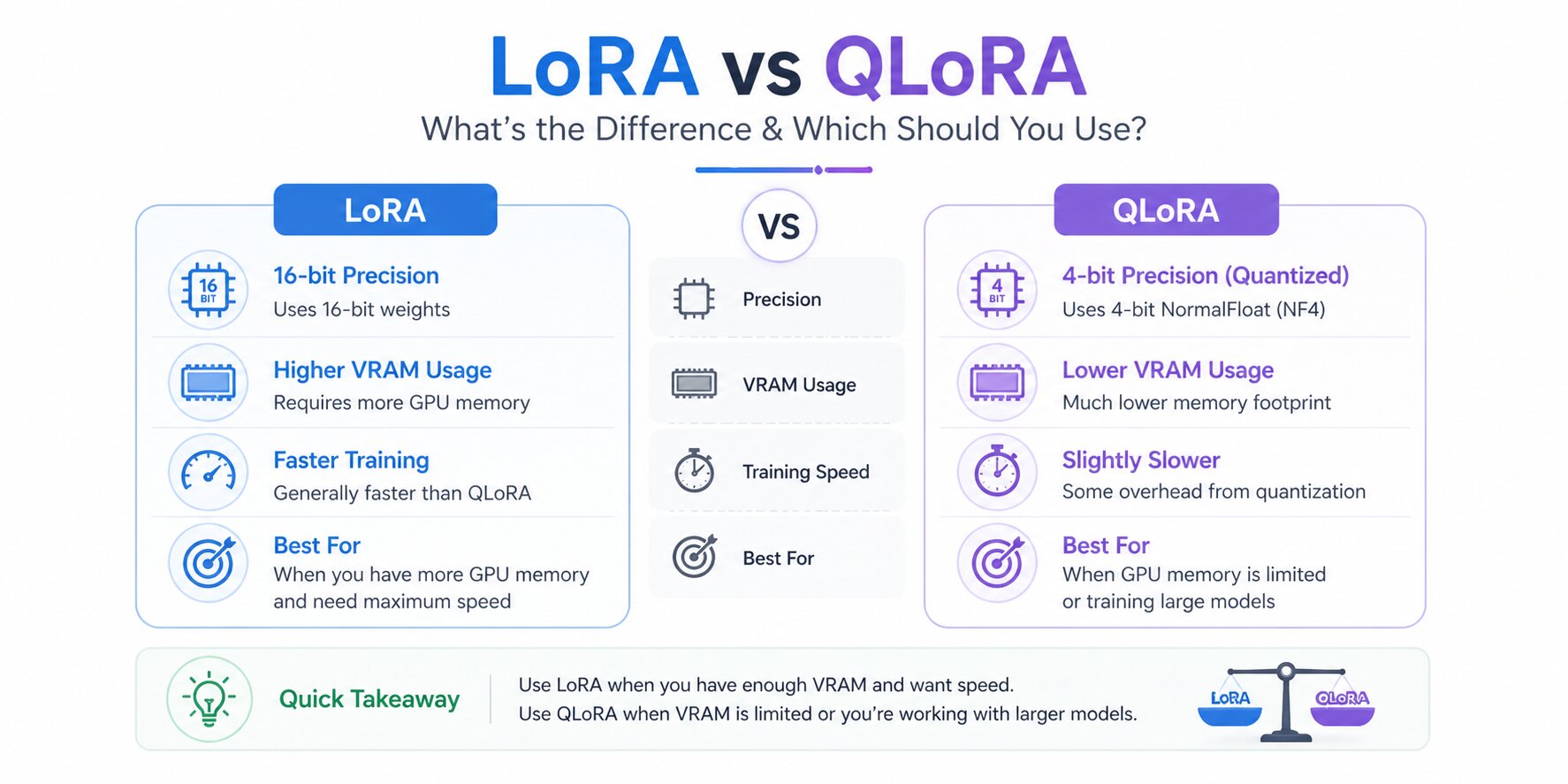
Once teams decide to fine-tune with LoRA, the next practical question is whether standard LoRA is enough or if QLoRA is the better fit. The two methods use the same adapter-based approach, but they differ in how the frozen base model is handled during training.
Standard LoRA keeps the base model in higher precision, while QLoRA loads it in quantized form to reduce memory usage. That difference can determine whether a model trains comfortably on existing hardware or requires more expensive GPU resources.
For most teams, the decision comes down to available VRAM, target model size, and how much performance margin the workload requires.
LoRA vs QLoRA
Both methods produce the same style of adapters and fit similar deployment workflows. The main difference is how efficiently they use hardware during training.
Practical Recommendation
LoRA remains the standard starting point for many LLM fine-tuning workflows because it offers a strong balance of training efficiency, model quality, and simpler deployment. Once teams choose LoRA, the next question is whether standard LoRA is sufficient or if QLoRA is needed for tighter hardware limits.
QLoRA does not replace LoRA. It extends the same adapter-based method by loading the frozen base model in 4-bit quantized form during training. This reduces memory usage and helps larger models run on smaller GPUs, while the core LoRA workflow remains the same.
For most teams, the real decision is whether available hardware comfortably supports standard LoRA or whether memory constraints make QLoRA the more practical option.
Once deployed, those models are frequently combined with LLM embeddings to power semantic search, recommendations, and retrieval workflows.
How to Fine-Tune an LLM with LoRA - Step by Step
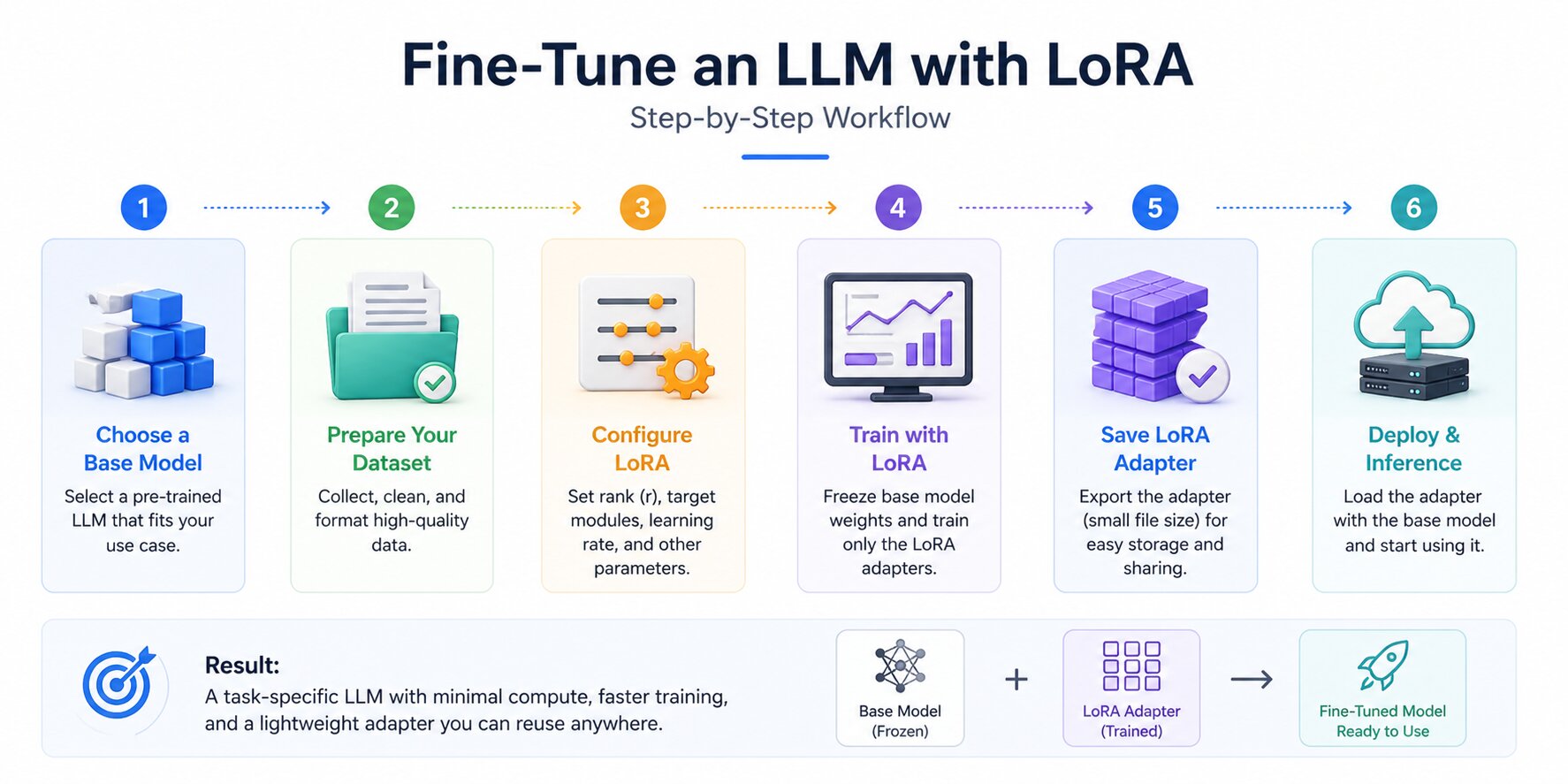
LoRA fine-tuning is far more approachable today than it was a few years ago. Modern libraries have simplified much of the setup, which means teams can focus less on infrastructure and more on model quality, training data, and evaluation.
The workflow itself is consistent across most projects: choose a suitable base model, prepare clean training data, configure the adapter, train carefully, and deploy in the format that fits your use case.
Choose a Base Model
The base model sets the upper limit of what your fine-tuned model can achieve. LoRA adapts behavior, formatting, tone, and domain performance, but it does not turn a weak model into a strong one. Starting with the best model your hardware can comfortably support is usually the right move.
7B range: Llama 3.1, 8B Instruct, Mistral 7B Instruct, Qwen 2.5, 7B Instruct
13B range: Llama 3.1 13B Instruct, Qwen 2.5 14B Instruct
70B range: Llama 3.1 70B Instruct, Qwen 2.5 72B Instruct (requires QLoRA on A100 80GB)
Prefer Instruct variants over Base variants for most fine-tuning tasks. Instruct models that already understand the instruction-following format and require less data to adapt. Base models need significantly more examples to learn prompt structure before learning your domain.
Prepare Your Training Dataset
Dataset quality is the single biggest predictor of fine-tuning success, more than rank, more than the choice between LoRA and QLoRA, more than any training hyperparameter.
LoRA adapters are small by design, which means they are sensitive to inconsistencies. Every contradictory example, every mislabeled output, every inconsistent format leaves a mark on the adapter.
The most effective format is instruction-response pairs: a clear input that matches how you'll prompt the model at inference, and the exact output you want it to produce. Outputs should be consistent in length, tone, and structure across all examples.
Using the base model's chat template throughout, the wrong template during training produces degraded outputs at inference, even when everything else is correct.
How much data you need depends on the task:
Style or tone adaptation: 500–1,000 high-quality examples
Domain-specific Q&A or task formatting: 2,000–5,000 examples
Significant domain shift or specialized vocabulary: 10,000–50,000 examples
If you don't have enough labeled examples, synthetic data generation using a capable model (GPT-4o, Claude, or a large open-source model) is a legitimate approach.
Tools like LlamaIndex can also help structure source data before training. Review a sample of the generated outputs before training to catch hallucinations or inconsistencies that the generating model introduced.
Configure Your LoRA Adapter
Once the base model and dataset are ready, the next step is configuring the adapter. This controls how much capacity the LoRA layer has and which parts of the model are updated.
A practical starter setup using Hugging Face PEFT and TRL looks like this:
from transformers import AutoModelForCausalLM, AutoTokenizer
from peft import LoraConfig, get_peft_model
from trl import SFTTrainer, SFTConfig

model_name = "meta-llama/Llama-3.1-8B-Instruct"

tokenizer = AutoTokenizer.from_pretrained(model_name)
tokenizer.pad_token = tokenizer.eos_token

model = AutoModelForCausalLM.from_pretrained(
    model_name,
    torch_dtype="auto",
    device_map="auto"
)

lora_config = LoraConfig(
    r=16,
    lora_alpha=32,
    lora_dropout=0.05,
    bias="none",
    task_type="CAUSAL_LM",
    target_modules=[
        "q_proj","k_proj","v_proj","o_proj",
        "gate_proj","up_proj","down_proj"
    ]
)

model = get_peft_model(model, lora_config)
model.print_trainable_parameters()
This is a practical baseline. Rank, alpha, dropout, and target modules can be adjusted later based on evaluation results.
Train and Validate
Training is where many teams focus too heavily on loss curves and not enough on validation quality. A falling training loss is useful, but the more important signal is whether the model improves on unseen evaluation prompts.
training_args = SFTConfig(
    output_dir="./lora-output",
    per_device_train_batch_size=4,
    gradient_accumulation_steps=4,
    num_train_epochs=3,
    learning_rate=2e-4,
    warmup_ratio=0.05,
    lr_scheduler_type="cosine",
    logging_steps=10,
    save_strategy="epoch",
    fp16=True,
    max_seq_length=512
)
Use a held-out validation split and compare outputs regularly. If validation quality stalls while training loss keeps dropping, overfitting may already be starting.
Deploy the Adapter
After training, you can either keep the LoRA adapter separate or merge it into the base model.
Keeping adapters separate is useful when one base model needs multiple domain-specific behaviors. Merging creates a standard checkpoint that can simplify deployment.
merged_model = model.merge_and_unload()
merged_model.save_pretrained("./merged-model")
tokenizer.save_pretrained("./merged-model")
If you deploy with tools like llama.cpp or Ollama, the merged model can later be converted into the required runtime format.
LoRA reduces the barrier to model customization, but successful results still depend on disciplined data preparation, careful evaluation, and sensible parameter choices.

LoRA Hyperparameters That Affect Fine-Tuning Results
Many LoRA fine-tuning runs underperform for reasons that have little to do with the method itself. More often, the issue comes from copied defaults, mismatched settings, or changing too many variables without clear evaluation. LoRA is efficient, but its results still depend heavily on configuration choices.
A small set of hyperparameters usually drives most of the outcome. Rank controls adapter capacity, alpha affects update strength, target modules decide where adaptation happens, and training settings such as dropout, learning rate, and batch size influence stability.
Understanding these controls turns fine-tuning from guesswork into a more repeatable process when customizing a text generation model for specialized tasks.
Rank (r)
Rank determines how many trainable parameters the adapter uses. In simple terms, it controls how much capacity the LoRA update has to learn new behavior.
Lower ranks train faster, use less memory, and often work well for formatting, tone control, or lightweight domain adaptation.
Higher ranks can capture more complex changes, but they also increase training cost and can overfit small datasets.
A practical starting point for many projects:
r = 4 to 8 for formatting or structured output tasks
r = 16 for general instruction tuning and domain adaptation
r = 32+ for larger behavioral shifts or complex tasks
If training loss improves while validation quality drops, reducing rank is often worth testing before changing multiple settings at once.
Alpha Scaling
Alpha controls how strongly the LoRA update is applied relative to the chosen rank. A common formulation is:
update strength=α/r
A widely used starting rule is setting alpha to roughly 2 × rank. For example:
rank 8 → alpha 16
rank 16 → alpha 32
If the fine-tuned model feels too aggressive, overly narrow, or less balanced than expected, lowering alpha can sometimes help without changing rank.
Target Modules
Target modules determine which layers receive LoRA adapters. Earlier setups often focused only on attention projections such as query and value layers.
Modern practice frequently includes both attention and feed-forward projection layers because these parts of the network influence behavior in different ways.
Common targets for many Llama-style models include:
target_modules = [
    "q_proj", "k_proj", "v_proj", "o_proj",
    "gate_proj", "up_proj", "down_proj"
]
If memory is extremely limited, narrower targeting can still be useful, but broader linear-layer coverage often improves adaptation quality.
Dropout, Learning Rate, and Batch Size
These training settings influence stability more than many teams expect.
LoRA dropout helps reduce overfitting on smaller datasets. Values around 0.05 to 0.1 are common starting points.
Learning rate for LoRA is often higher than full fine-tuning. A starting point such as 2e-4 is common, then adjusted based on convergence behavior.
Effective batch size matters for stable updates. If GPU memory is limited, gradient accumulation can help maintain a larger effective batch size without increasing per-device memory use.
effective batch size=per-device batch size×gradient accumulation steps\text{effective batch size}=\text{per-device batch size}\times\text{gradient accumulation steps}effective batch size=per-device batch size×gradient accumulation steps
When training is unstable, changing fewer variables at once usually leads to faster progress than tuning everything together.
LoRA tuning improves fastest when adjustments are measured against real evaluation prompts rather than training loss alone. Strong data quality and clear benchmarks often matter more than chasing perfect settings. Once these basics are in place, fine-tuning becomes far more predictable.
Real-World Use Cases for LoRA Fine-Tuning
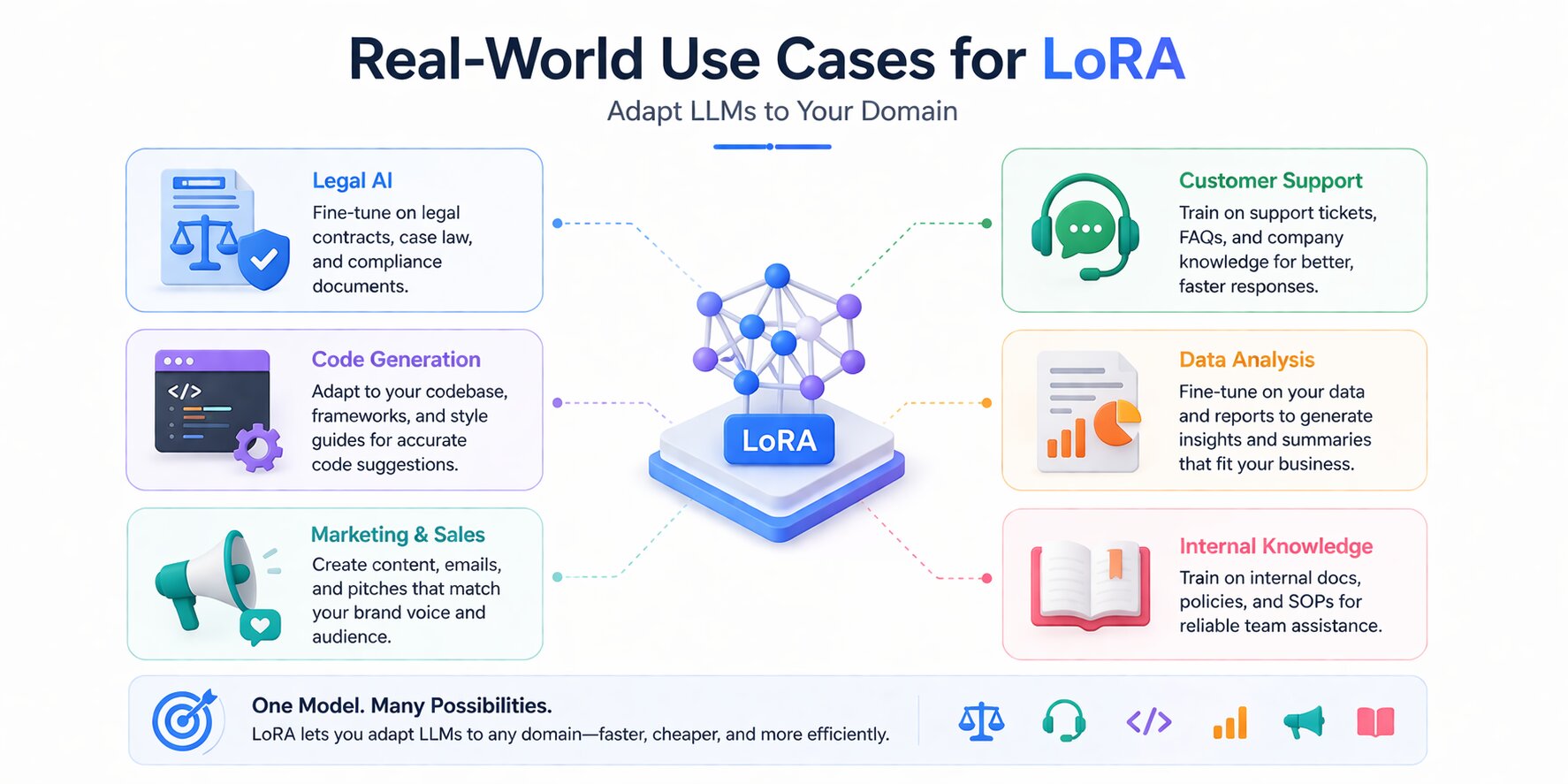
LoRA's efficiency isn't just an academic advantage; it directly enables use cases that wouldn't be economically viable with full fine-tuning. The ability to fine-tune quickly, cheaply, and maintain multiple adapters on a single base model has driven adoption across industries where generic LLMs are useful but not precise enough for the task at hand.
Domain-Specific Assistants - Legal, Medical, Finance
Adapting a general-purpose model to a specialized domain is the clearest production use case for LoRA. A legal assistant model needs to recognize clause structures, apply jurisdiction-specific conventions, and produce outputs that match legal drafting standards.
A clinical Q&A model needs to handle medical terminology accurately without hallucinating drug names or dosages. A compliance assistant needs to follow regulatory reporting language with precision that a general model doesn't reliably provide.
In each case, the base model already has strong general reasoning. LoRA fine-tuning on domain-specific instruction-response pairs teaches it the domain-specific patterns without sacrificing its general capability, making it a common approach for AI agent development firms building industry-specific solutions.
Research benchmarking LoRA on financial tasks found fine-tuned models achieving an average 36% performance gain over base models on domain-specific benchmarks, while general benchmark scores remained unchanged, confirming that domain adaptation didn't come at the cost of general ability.
Operationally, each domain team can maintain its own LoRA adapter on a shared base model, rather than running separate multi-billion-parameter deployments.
Customer Support and Internal Chatbots
Customer support is where the style and format consistency benefits of LoRA fine-tuning are most visible in production.
A fine-tuned support model consistently follows company-specific resolution workflows, uses approved language, avoids mentioning competitors, and structures responses in the format your team requires, without needing a lengthy system prompt that rebuilds these instructions every time.
Internal chatbots benefit similarly: a model fine-tuned on internal documentation, process guides, and historical Q&A pairs performs significantly better on domain-specific employee questions than a general model given the same context via RAG alone.
LoRA and RAG are complementary here, fine-tuning for behavioral alignment and retrieval for current document access.
Code Generation Models
Code generation tasks are well-suited to LoRA fine-tuning when distributed AI teams work across target codebases, language conventions, or framework idioms that differ meaningfully from the training distribution.
A model fine-tuned on your internal codebase produces suggestions that match your naming conventions, use your libraries, and follow your team's patterns, rather than generic suggestions that require significant editing.
Teams building internal developer tools, code review assistants, or automated documentation generators regularly use LoRA to close the gap between general code generation capability and codebase-specific quality.
Brand Voice and Style Adaptation
A large category of production applications involves teaching a model to write in a specific voice, a brand's content style, a publication's editorial conventions, or a company's internal communication tone.
These tasks don't require the model to learn new facts; they require consistent application of stylistic patterns that engineering alone doesn't enforce reliably at scale.
LoRA handles style adaptation well because stylistic consistency is inherently low-rank: the behavioral shift required is structured and repeatable, not deeply complex. A well-curated dataset of 500–1,000 brand-aligned examples can produce strong stylistic consistency across diverse inputs.
Popular Tools for LoRA Fine-Tuning
The LoRA ecosystem has matured quickly, and most teams no longer need to build custom training pipelines from scratch.
Reliable tools now exist for adapter setup, supervised fine-tuning, faster training runs, configuration-driven workflows, and local deployment.
Choosing the right tool usually depends on how hands-on you want to be. Some teams prefer code-level flexibility, while others want faster experimentation, reusable configs, or a simpler interface. In practice, a small number of tools cover most modern LoRA workflows.
Each tool addresses a different stage of the LoRA fine-tuning workflow. Some are built for adapter configuration and model training, others focus on faster experimentation, reproducible pipelines, or simplified setup.
Separate tools are often used after training for serving, local inference, or deploying merged models.
Choosing deployment tools like llama.cpp or Ollama is also a generative AI system design decision; it affects latency, quantization format, and how the merged model fits into your serving stack
Common Mistakes in LoRA Fine-Tuning
Even with the right tools and reasonable settings, LoRA fine-tuning can still produce weak results when a few common mistakes go unnoticed. Most of these issues are preventable, but they often surface only after wasted training runs, unstable outputs, or disappointing evaluations.
In many cases, the problem is not LoRA itself. It is usually the training data, the adapter setup, or the way results are being measured. Catching these issues early can save significant time and compute.
Most disappointing LoRA results trace back to execution, not the method, which is also why teams underestimate the full stack needed to ship an AI product responsibly.
Poor Dataset Quality
Poor dataset quality is one of the most common reasons LoRA fine-tuning underperforms. Because adapters learn from relatively small datasets, inconsistencies can have an outsized effect on results.
Typical issues include contradictory examples, incorrect labels, duplicate records, mixed response styles, or inconsistent prompt formatting. If one part of the dataset teaches concise answers while another teaches long-form responses, the model receives conflicting signals.
Before training, manually review a sample of records. Check output quality, formatting consistency, and alignment with the chat template used by the base model. If synthetic data was used, verify that it is accurate and relevant before adding it to the training set.
Wrong Rank Selection
Rank controls how much capacity the LoRA adapter has to learn new behavior. Selecting a rank that is too high for a small dataset can lead to memorization rather than generalization.
Many teams start too aggressively with high ranks without proving the task needs that capacity. For common formatting, tone, or domain adaptation tasks, moderate values such as r=8 or r=16 are often enough.
The opposite issue can happen as well. If the rank is too low, the model may train cleanly but fail to adapt in a meaningful way. When dataset quality is strong, and metrics remain flat, increasing rank can be a reasonable next step.
Relying Only on Training Metrics
A lower training loss does not automatically mean the fine-tuning is successful. Even validation loss on a held-out split can be misleading if the evaluation data looks too similar to the training set.
The better test is performance on prompts that reflect real deployment conditions. If the model is being tuned for support workflows, test it on unseen support tickets. If it is being tuned for structured outputs, evaluate it on fresh inputs from the same workflow.
It is also worth testing a small set of general prompts outside the target domain. This helps confirm that fine-tuning improved the intended behavior without weakening broader model capability.
Overfitting Small Datasets
Training too long on a small dataset is one of the clearest ways to reduce production quality. The usual pattern is training loss continuing to fall while validation performance stalls or declines.
When that happens, more epochs often make the model worse on unseen prompts rather than better.
Run evaluations at regular intervals, monitor validation metrics, and use early stopping when progress levels off. For smaller datasets, one or two strong passes through the data can be enough. Most disappointing LoRA results can be traced back to preventable execution errors rather than the limits of the method itself.
Weak training data, poor rank choices, and shallow evaluation routinely cause more damage than the adapter strategy ever does.
Teams that tighten these fundamentals usually improve results faster than teams chasing new models, new tools, or more compute.
When data quality, parameter choices, and evaluation discipline are in place, LoRA becomes a dependable and highly effective fine-tuning approach.
Frequently Asked Questions

 WhatsApp
 Call Us
 Mail Us