


Microservices in C#: Complete Guide with Architecture, Examples & Best Practices




Microservices in C# refer to building an application as a collection of small, independent services, where each service handles a specific business function and runs as its own process. Instead of one large codebase, the system is split into multiple services that communicate with each other through APIs.
In a typical C# setup, each microservice is implemented as a lightweight API using ASP.NET Core. Each service can be developed, deployed, and scaled independently, which makes it easier to manage larger and more complex applications over time.
Microservices in C# = small, independent services built around a single responsibility, communicating through APIs.
How Microservices Architecture Works in C# Applications
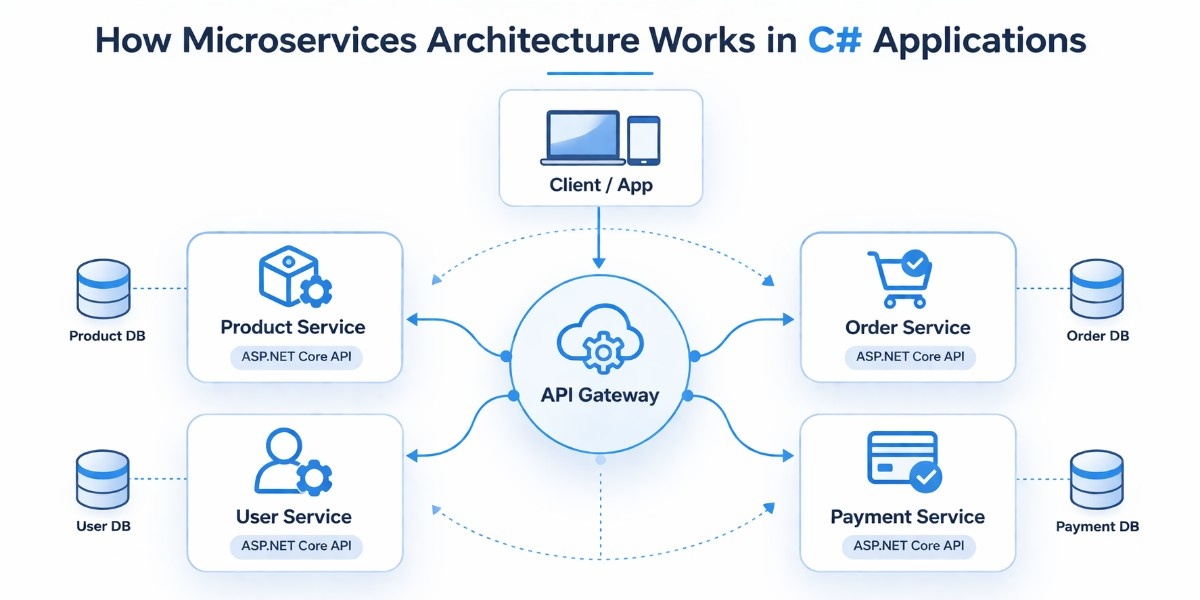
Before comparing architectures or looking at tools, it helps to understand how a microservices system is actually put together in a C# application. Instead of one large application handling everything, the system is divided into smaller services that each focus on a specific responsibility and communicate with each other to complete a request.
Service Structure
In a C# microservices setup, each service is built as its own ASP.NET Core Web API project, with its own endpoints, business logic, and data handling. This separation ensures that each service can run independently without depending on the internal structure of other services.
Each service is designed around a specific business function, such as managing products, processing orders, or handling users. This keeps the codebase focused and easier to understand, since each service deals with a clearly defined responsibility instead of trying to handle multiple concerns at once.
Because services are independent, they can be developed, tested, and deployed separately. This makes it possible to update or scale one service without affecting the rest of the system, which becomes increasingly important as the application grows in size and complexity.
API Gateway Role
When an application is split into multiple services, exposing all of them directly to the client can quickly become difficult to manage. An API Gateway serves as a single entry point, receiving all incoming requests and routing them to the appropriate service.
This simplifies how clients interact with the system, since they only need to communicate with one endpoint instead of knowing about every individual service. It also allows routing logic to be handled in one place, which keeps the system more organized.
In addition to routing, the gateway can take care of common concerns such as authentication, request validation, and basic logging, and the specific approach depends on the gateway pattern used.
This avoids repeating the same logic across multiple services and keeps individual services focused on their core responsibilities.
Service to Service Flow
Once a request reaches a service, it needs input from other services to complete its work. This interaction happens through well defined APIs or through messaging, depending on how the system is designed.
When an order is created, for instance, the Order service may call the Product service to confirm that the product exists and is available. This direct communication ensures that the request can be completed correctly.
In other scenarios, services communicate using events instead of direct calls. This allows actions like payment processing or sending notifications to happen independently, which reduces dependencies and keeps the system more flexible.
ASP.NET Core Web API as a Service
In most C# implementations, each microservice is built using ASP.NET Core Web API because it provides a structured and lightweight way to expose functionality over HTTP. It includes built-in support for routing, dependency injection, and middleware, which simplifies development.
Each service runs as its own application, which means it can be scaled based on its own requirements. For example, a service handling high traffic can be scaled independently without increasing resources for the entire system.
Using a consistent framework across services also makes the system easier to maintain. Developers can follow the same patterns and structure across all services, which reduces complexity and makes it easier to extend the application over time.
Difference Between Microservices and Monolithic Architecture in C#
When building applications in C#, one of the first architectural decisions is whether to use a monolithic structure or split the system into microservices. Both approaches are valid, but they solve different problems and come with different trade-offs.
A monolithic application is built as a single unit where all features, UI, business logic, and data access are part of one codebase. In C#, this is often a single ASP.NET MVC or ASP.NET Core application.
In contrast, microservices break the system into multiple smaller services, where each service is usually an independent ASP.NET Core Web API project focused on a specific function.
The differences become clearer when you compare them across key areas:
When a Monolith Works Better
A monolithic approach is a better choice when the application is small, the team is limited, or the product is still evolving. It allows faster development in the early stages because there is less overhead in managing multiple services. For many projects, starting with a monolith and moving to microservices later is a more practical path.
When Microservices Make Sense
Microservices become useful when the application grows in size and complexity. If different parts of the system need to scale independently, or multiple teams are working on different features, separating services can make development and deployment more manageable. It also helps when certain parts of the system change more frequently than others.
In practice, many C# applications start as a monolith and gradually move toward microservices as requirements become more complex. The goal is not to choose the more advanced architecture, but to choose the one that fits the current needs of the system.
When Microservices Are the Right Choice in C# Applications
Choosing microservices in a C# application should come from actual system needs, not from following a pattern. The trade-off is straightforward: you gain flexibility and independence, but you take on more operational and architectural complexity. The key is knowing when that trade-off is justified.
When Microservices Are a Good Fit
Microservices start to make sense when your application grows beyond a single team or a single domain. If different parts of the system, such as orders, payments, and users, are being actively developed and changed in parallel, separating them into services reduces conflicts and makes releases easier to manage.
It is also useful when scaling is uneven. For example, if order processing receives significantly more traffic than other parts of the system, isolating it as a separate service allows you to scale it without increasing resources for the entire application.
Another strong signal is when business domains are clearly defined. If your system naturally breaks into distinct areas with minimal overlap, structuring them as separate services can make the codebase easier to maintain over time.
When Microservices Add Unnecessary Overhead
Microservices introduce more moving parts, multiple services, deployments, and communication layers. If your application is small or still evolving, this overhead slows things down instead of helping.
For early-stage products or MVPs, a single ASP.NET Core application is usually the better choice. It keeps development straightforward and avoids the need to manage service boundaries, network communication, and deployment pipelines too early.
They also don’t add much value for simple applications where most features depend on the same data and logic. Splitting such systems mostly leads to duplicated effort and harder debugging without clear benefits.
Team Size and System Complexity
The structure of your team matters as much as the structure of your system. With a small team, managing multiple services can quickly become difficult, especially without dedicated support for deployment and monitoring.
As the team grows, microservices can help by giving each team ownership of a specific part of the system. This reduces coordination overhead and allows teams to work more independently, which becomes important as the application scales.
A Practical Middle Ground: Start Modular
Instead of committing to microservices early, many C# applications benefit from starting as a modular monolith. This means building a single application but organizing it into clearly separated modules with defined boundaries.
In ASP.NET Core, this can be done by structuring features into independent layers or modules within the same codebase. This keeps development simple while still maintaining separation. If the system grows and certain modules need to scale or evolve independently, they can be extracted into separate services later.
A practical approach is to start with a simpler structure, keep boundaries clean, and move to microservices only when there is a clear reason to do so.
Step by Step Guide to Building a Microservice in C# Using ASP.NET Core
At this point, it helps to move from concepts to something concrete. Instead of looking at isolated snippets, this section walks through how a simple microservices setup is actually structured and built in C#. The goal is to show how services are organized, how one service is created step by step, and how everything runs together.
Project Structure of a C# Microservices Solution
A typical setup separates each service into its own project while keeping related pieces grouped in a single solution. A simple structure looks like this:
/src
  /Services
    /ProductService        (ASP.NET Core Web API)
    /OrderService          (ASP.NET Core Web API)
    /UserService           (ASP.NET Core Web API)
  /Gateway                 (Ocelot or YARP)
  /Common                  (shared models, utilities)
Each service lives in its own folder and runs independently. The gateway sits in front to route requests, and the common folder is only used for lightweight shared models, not shared business logic. This separation is what allows each service to evolve without affecting the others.
Step 1: Creating a Service (ASP.NET Core Web API)
Each microservice starts as a standard ASP.NET Core Web API project. For example, the Product service can be created using the .NET CLI:
dotnet new webapi -n ProductService
cd ProductService
At this point, the service is just a basic API. What turns it into a proper microservice is how you structure responsibilities inside it and how it runs independently from other services.
Step 2: Adding a Service Layer
Rather than placing all logic inside controllers, it is better to introduce a service layer. This keeps the API layer focused on handling requests while the actual logic is handled separately.
public class ProductService
{
    private readonly List<Product> _products = new()
    {
        new Product(1, "Laptop", 80000),
        new Product(2, "Phone", 50000)
    };

    public IEnumerable<Product> GetAll() => _products;

    public Product? GetById(int id) =>
        _products.FirstOrDefault(p => p.Id == id);
}
Even though this example uses in-memory data, the structure reflects how real services are designed. The controller does not need to know how data is stored or retrieved, which makes it easier to change the implementation later without affecting the API layer.
Step 3: Adding a Controller
The controller is responsible for exposing endpoints and connecting incoming requests to the service layer. It should remain simple and avoid containing business logic.
using Microsoft.AspNetCore.Mvc;

[ApiController]
[Route("products")]
public class ProductsController : ControllerBase
{
    private readonly ProductService _service;

    public ProductsController(ProductService service)
    {
        _service = service;
    }

    [HttpGet]
    public IActionResult GetAll()
    {
        return Ok(_service.GetAll());
    }

    [HttpGet("{id}")]
    public IActionResult GetById(int id)
    {
        var product = _service.GetById(id);
        return product is not null ? Ok(product) : NotFound();
    }
}

public record Product(int Id, string Name, decimal Price);
This separation makes the service easier to test and maintain. If the logic grows more complex, it remains contained within the service layer instead of spreading across controllers.
Step 4: Registering Services with Dependency Injection
ASP.NET Core includes built-in dependency injection, which is used to connect different parts of the service. Registering the service layer ensures that it can be injected wherever needed.
var builder = WebApplication.CreateBuilder(args);

builder.Services.AddSingleton<ProductService>();
builder.Services.AddControllers();

var app = builder.Build();

app.MapControllers();

app.MapGet("/health", () => Results.Ok("Product service is running"));

app.Run();
This setup keeps object creation centralized and avoids tightly coupling components together. It also makes it easier to replace implementations later, for example when switching from in-memory data to a database.
Step 5: Adding a Database Context (Basic Setup)
In real-world services, each microservice manages its own data. Even if the initial version is simple, setting up a database layer prepares the service for growth.
using Microsoft.EntityFrameworkCore;

public class ProductDbContext : DbContext
{
    public ProductDbContext(DbContextOptions<ProductDbContext> options)
        : base(options) { }

    public DbSet<Product> Products => Set<Product>();
}
This keeps data ownership within the service. The ProductService controls its own data model, and no other service interacts with its database directly. This separation is what prevents tight coupling between services.
Step 6: Order Service (Separate Microservice)
The Order service follows the same structure but focuses on a different responsibility. It is created as a separate project and runs independently from the Product service.
using Microsoft.AspNetCore.Mvc;

[ApiController]
[Route("orders")]
public class OrdersController : ControllerBase
{
    [HttpGet]
    public IActionResult GetOrders()
    {
        var orders = new[]
        {
            new { Id = 1, ProductId = 1, Quantity = 2 }
        };

        return Ok(orders);
    }

    [HttpPost]
    public IActionResult CreateOrder([FromBody] Order order)
    {
        return Ok(new { Message = "Order created", order });
    }
}

public record Order(int ProductId, int Quantity);
Even though both services are part of the same system, they do not share runtime or internal logic. If needed, the Order service can call the Product service through an API instead of accessing its data directly.
Step 7: Health Check Endpoint
Each service exposes a simple health endpoint to indicate whether it is running. This is a small but important part of real systems.
app.MapGet("/health", () => Results.Ok("Service is healthy"));In production environments, this endpoint is used by monitoring tools, load balancers, or orchestration systems to check if a service is available and responding correctly.
Step 8: Dockerfile for Containerizing the Service
To run services consistently across environments, they are often packaged into containers. This ensures that the service behaves the same way in development, testing, and production
FROM mcr.microsoft.com/dotnet/aspnet:8.0 AS base
WORKDIR /app
EXPOSE 80

FROM mcr.microsoft.com/dotnet/sdk:8.0 AS build
WORKDIR /src
COPY . .
RUN dotnet publish -c Release -o /app/publish

FROM base AS final
WORKDIR /app
COPY --from=build /app/publish .
ENTRYPOINT ["dotnet", "ProductService.dll"]
This setup builds the application and prepares it to run as a container. Each service can be containerized in the same way and deployed independently.
Step 9: Running and Testing the Services
Each service runs as its own application and listens on its own port. You can start a service using:
dotnet runOnce the service is running, you can access its endpoints directly. ASP.NET Core provides Swagger by default, which makes it easy to test APIs through a browser. You can also use tools like Postman to send requests and verify responses.
For example, calling ( /products ) returns product data from the Product service, while ( /orders ) interacts with the Order service. Even though they are part of the same system, they operate independently.
What This Setup Represents
This setup reflects the core idea of microservices in C#. Each service is built as a separate application with a clear responsibility, its own API, and its own data handling. Services do not rely on shared internal code, and communication happens through defined interfaces.
While this example is simple, the same structure applies to larger systems. As the application grows, more services can be added, communication patterns can evolve, and deployment can become more advanced, but the foundation remains the same: independent services working together as a system.

Service Communication in C# Microservices
In a microservices setup, services rarely work in isolation. Most real workflows involve one service depending on another, which makes communication a core part of the system.
In C#, this communication is usually handled in two ways: synchronous calls using APIs, and asynchronous communication using messaging systems.
Choosing between them depends on how tightly coupled the interaction should be and how the system needs to behave under load or failure.
Synchronous Communication Using REST and gRPC
Synchronous communication means one service directly calls another and waits for a response. This is commonly used when an immediate result is required, such as validating data before processing a request.
REST is the most common approach, where services communicate over HTTP using JSON. It is simple, widely supported, and easy to debug. gRPC is an alternative that uses a binary protocol and strongly typed contracts, which makes it faster and more efficient, especially for internal service communication.
REST is usually preferred when simplicity and compatibility matter. gRPC becomes useful when performance and strict contracts are more important, especially in systems with frequent service-to-service calls.
gRPC Example in C#
A gRPC service starts with a contract defined in a ( .proto ) file. This defines how services communicate.
syntax = "proto3";

service ProductService {
  rpc GetProduct (ProductRequest) returns (ProductResponse);
}

message ProductRequest {
  int32 id = 1;
}

message ProductResponse {
  int32 id = 1;
  string name = 2;
  double price = 3;
}
This file is used to generate C# classes for both the server and client. A client can then call the service like this:
var channel = GrpcChannel.ForAddress("https://localhost:5001");
var client = new ProductService.ProductServiceClient(channel);

var response = await client.GetProductAsync(new ProductRequest { Id = 1 });
This approach ensures both services follow the same contract, reducing errors caused by mismatched data formats.
Asynchronous Communication Using Messaging
Asynchronous communication is used when services should not depend on each other being available at the same time. Instead of waiting for a response, a service sends a message or event, and other services process it when they are ready.
RabbitMQ is commonly used for task-based messaging and simpler workflows. Kafka is used when handling large volumes of events or streaming data. Azure Service Bus is often used in cloud-based C# applications, especially when working within Azure.
The choice depends on how the system handles data and events. For most applications, RabbitMQ is a practical starting point.
MassTransit Example for Messaging
MassTransit is commonly used in C# to simplify working with message brokers. It provides a structured way to publish and consume messages without handling low-level details.
A simple message definition:
public record OrderCreated(int OrderId, int ProductId, int Quantity);Publishing a message:
await publishEndpoint.Publish(new OrderCreated(1, 1, 2));Consuming a message:
public class OrderCreatedConsumer : IConsumer<OrderCreated>
{
    public Task Consume(ConsumeContext<OrderCreated> context)
    {
        var message = context.Message;
        Console.WriteLine($"Order received: {message.OrderId}");
        return Task.CompletedTask;
    }
}
This allows services to react to events without directly calling each other.
When to Use Synchronous vs Asynchronous Communication
Synchronous communication is useful when a service needs an immediate response, such as fetching product details before completing an order, this reflects a classic upstream and downstream dependency between services. It keeps the flow simple but creates a direct dependency between services.
Asynchronous communication is better when tasks can be processed later or independently. For example, after an order is created, sending a notification or processing payment can happen through events without blocking the main request.
In practice, most C# microservice systems use a mix of both. Synchronous calls are used for immediate operations, while asynchronous messaging is used for background processing and decoupling services.
Data Management in C# Microservices Systems
Data management in microservices is different from traditional applications. Instead of sharing a single database across the system, each service is responsible for its own data. This changes how data is stored, accessed, and kept consistent across the system.
Database per Service Pattern
In a C# microservices setup, each service owns its database, like the Product service manages product data, the Order service manages orders, and no service directly accesses another service’s database; all interactions happen through APIs.
This approach avoids tight coupling. If multiple services share the same database, changes in one area can affect others. By keeping data separate, each service can evolve its schema without breaking the system.
It also allows each service to choose a database that fits its needs instead of forcing a single solution across the application.
Choosing the Right Database
Different services may have different data requirements, so using the same database everywhere is not always the best choice.
If a service relies on strong relationships and transactions, a relational database like SQL Server or PostgreSQL is usually a better fit, but comparing database tools can help when evaluating options across services. If the data structure is flexible or changes often, a document database like MongoDB may be more suitable.
Setting Up EF Core in a Service
In most C# microservices, Entity Framework Core is used to manage database access. Each service has its own DbContext that represents its data model.
using Microsoft.EntityFrameworkCore;

public class ProductDbContext : DbContext
{
    public ProductDbContext(DbContextOptions<ProductDbContext> options)
        : base(options) { }

    public DbSet<Product> Products => Set<Product>();
}
This context is registered in the service configuration:
builder.Services.AddDbContext<ProductDbContext>(options =>
    options.UseSqlServer(builder.Configuration.GetConnectionString("DefaultConnection")));
This setup ensures that the Product service manages its own database connection and schema independently from other services.
Handling Distributed Transactions
When multiple services are involved in a single workflow, maintaining consistency becomes more complex. Traditional transactions across multiple services are difficult to manage and not practical.
Two common approaches are used instead:
- Two-Phase Commit (2PC) tries to coordinate transactions across services, but it is rarely used in microservices because it introduces tight coupling and can impact performance.
- Saga Pattern breaks a transaction into smaller steps across services. Each step completes independently, and if something fails, compensating actions are triggered to undo previous steps. This approach is more suitable for distributed systems.
Eventual Consistency in Microservices
In a microservices system, data is not updated instantly across all services. Instead of strict consistency, systems follow eventual consistency, where each service updates its own data, and the system becomes consistent over time.
For example, when an order is created, the Order service stores it and publishes an event. The Payment service processes the payment separately, and the Notification service sends confirmation later.
Each service updates its data independently, but the overall system reaches a consistent state after these steps are completed. This approach reduces direct dependencies between services and makes the system more resilient.
In practice, each service owns its data and communicates changes through APIs or events, which keeps the system flexible and easier to scale as it grows.
Securing APIs and Services in C# Microservices
Security in a microservices system is handled at multiple levels. Each service needs to verify incoming requests, and communication between services also needs to be protected. In C#, this is usually done using token-based authentication for users and controlled access between services.
JWT Authentication in ASP.NET Core
JWT is commonly used to secure APIs in microservices. A token is issued after a user is authenticated, and each request includes this token so the service can verify the user.
A basic setup in ASP.NET Core starts with configuring authentication:
using Microsoft.AspNetCore.Authentication.JwtBearer;
using Microsoft.IdentityModel.Tokens;
using System.Text;

var builder = WebApplication.CreateBuilder(args);

var key = Encoding.UTF8.GetBytes("your_secret_key_here");

builder.Services.AddAuthentication(JwtBearerDefaults.AuthenticationScheme)
    .AddJwtBearer(options =>
    {
        options.TokenValidationParameters = new TokenValidationParameters
        {
            ValidateIssuer = false,
            ValidateAudience = false,
            ValidateIssuerSigningKey = true,
            IssuerSigningKey = new SymmetricSecurityKey(key)
        };
    });

builder.Services.AddAuthorization();

var app = builder.Build();

app.UseAuthentication();
app.UseAuthorization();

app.MapGet("/secure", () => "This is a protected endpoint")
   .RequireAuthorization();

app.Run();
With this setup, any request to the protected endpoint must include a valid JWT token. This approach works well for securing individual services without maintaining session state.
OAuth 2.0 and OpenID Connect
While JWT handles token validation, OAuth 2.0 and OpenID Connect are used to manage authentication and identity. Instead of each service handling login, a central identity provider issues tokens.
In this setup, users authenticate through an identity service, and the issued token is passed to microservices. Each service validates the token but does not manage user credentials directly. This keeps authentication centralized and reduces duplication across services.
Service-to-Service Authentication
Not all communication is user-driven. Services also need to securely communicate with each other. This is usually handled in two ways:
- API keys can be used for simple scenarios where one service calls another and includes a predefined key in the request. This is easy to implement but less flexible for larger systems.
- Mutual TLS (mTLS) provides stronger security by verifying both the client and server using certificates. This ensures that only trusted services can communicate with each other.
The choice depends on the level of security required and the complexity of the system.
Security Layers in C# Microservices
Microservices rely on sensitive data such as connection strings, API keys, and tokens, which should not be stored directly in code or configuration files. In C# applications, tools like Azure Key Vault are used to store and retrieve these secrets securely at runtime, allowing updates without redeploying services.
Security is applied at multiple levels in the system. The API Gateway can validate incoming requests before routing them, while individual services still verify tokens to ensure each request is authorized. Communication between services is also secured separately based on the system’s needs.
Tech Stack for Building Microservices in C# Applications
In a C# microservices setup, the tech stack is not just a list of tools. Each part has a clear role in how services are built, how they communicate, and how they run in production. Understanding this helps you make better decisions instead of adding tools without a clear need.
ASP.NET Core for Building Microservices
Each microservice in C# is usually built as an ASP.NET Core Web API within the broader .NET ecosystem. It provides a structured way to handle requests, define endpoints, and manage application flow. Since every service runs independently, ASP.NET Core acts as the foundation for exposing functionality over HTTP.
It also includes built-in support for dependency injection, middleware, and configuration, which reduces the need for additional setup. This makes it suitable for both simple services and more complex ones that need structured request handling.
API Gateway in C# Using Ocelot and YARP
When multiple services exist, an API Gateway is used to route incoming requests to the correct service. In the C# ecosystem, Ocelot and YARP are two commonly used options.
Ocelot is designed specifically for microservices and focuses on routing requests between services. It works well when the gateway mainly handles request forwarding with minimal logic. It is easier to configure and is often used in setups where simplicity is preferred.
YARP is a more flexible option built on ASP.NET Core. It allows deeper control over request processing and routing behavior. It is better suited when you need custom handling, such as modifying requests, applying rules, or integrating gateway logic into your application.
The choice depends on how much control the gateway needs. For simple routing, Ocelot is usually enough. For more control and flexibility, YARP is a better fit, and if you're still deciding on the wider framework for your microservices setup, there are other options worth reviewing, too.
Containerization and Service Management
Microservices run as independent applications, so they need a consistent way to be packaged and deployed. Docker is used to bundle each service along with its dependencies, ensuring it behaves the same across different environments.
As the number of services increases, managing them manually becomes difficult. Kubernetes is used to handle deployment, scaling, and service coordination. It ensures that services are running, restarts them if they fail, and distributes traffic across instances.
In smaller setups, Docker alone may be enough. Kubernetes becomes relevant when the system grows and requires automated management of multiple services, and its Gateway API offers a more structured way to control traffic routing at that scale.
Messaging Systems for Service Communication
In addition to direct API calls, microservices mostly communicate using messaging systems. This is useful when services should not depend on each other being available at the same time.
RabbitMQ is commonly used for straightforward message-based communication where services send and receive tasks or events.
Kafka is used in systems that process large volumes of data or events continuously. Azure Service Bus is often used in cloud-based C# applications, especially when working within Azure.
Choosing between them depends on the scale and type of communication. Simpler systems usually start with RabbitMQ, while more complex systems handling high data flow may use Kafka.
Common Libraries Used in C# Microservices
Along with core tools, several libraries are used to handle common concerns within services.
Polly is used to manage failures when services communicate with each other. For example, if a request fails due to a temporary issue, Polly can retry the request instead of failing immediately.
MassTransit simplifies working with message brokers by providing a structured way to send and receive messages. It reduces the amount of boilerplate code needed for messaging.
MediatR is used to organize internal request handling within a service. It helps separate different parts of the application logic, especially in more structured designs.
Serilog is used for logging. It captures logs in a structured format, making it easier to track issues across multiple services instead of relying on plain text logs.
How These Tools Work Together
In a typical C# microservices system, each service is built using ASP.NET Core and runs independently. An API Gateway, such as Ocelot or YARP, routes incoming requests to the correct service.
Services communicate either through HTTP or through messaging systems like RabbitMQ. Docker is used to package services, and Kubernetes manages them when the system scales.
The goal is not to use every tool from the beginning, but to introduce them as the system grows. Starting with a simple setup and adding components only when needed keeps the system easier to manage while still allowing it to scale over time.
Key Microservices Design Patterns in C# Applications
As your system grows, certain problems start to repeat, services fail, workflows span multiple services, and data needs to stay consistent without tight coupling.
These patterns help solve common challenges that come with microservices, such as handling failures, managing workflows, and keeping services independent. For a broader view of how these patterns apply across architectures, the underlying principles remain consistent regardless of language.
Preventing Failure Cascades
The circuit breaker pattern is used to stop repeated calls to a failing service. When one service keeps calling another that is already down or slow, it can create more pressure and affect the entire system.
By temporarily blocking requests after a failure threshold is reached, the system avoids unnecessary load and gives the failing service time to recover. This helps keep failures isolated and improves overall system stability.
Separating Read and Write Operations
The CQRS pattern separates read operations from write operations so they can be handled differently. In growing systems, reads and writes often have different performance and complexity requirements.
By splitting them, you can optimize queries for speed while keeping write operations structured and controlled. This leads to clearer code and better performance, especially in systems with complex data handling.
Managing Distributed Workflows
The saga pattern is used when a process involves multiple services working together. Instead of relying on a single transaction, the process is broken into smaller steps handled by different services.
Each service completes its part and communicates through events. If something fails, compensating actions are triggered to maintain consistency. This makes long workflows easier to manage without tightly coupling services.
Centralizing Request Handling
The API gateway pattern provides a single entry point for all incoming requests. Instead of exposing multiple services directly, requests are routed through one layer.
This simplifies how clients interact with the system and allows common concerns like authentication and routing to be handled in one place. It keeps service interactions organized and reduces duplication across services.
Ensuring Reliable Event Processing
The outbox pattern is used to keep data changes and message delivery in sync. When a service updates data and sends a message, there is a risk that one succeeds while the other fails.
By storing messages along with the data and processing them later, the system ensures that no events are lost. This improves reliability, especially in event-driven communication between services.
Migrating from Monolith to Microservices
The strangler pattern allows gradual migration from a monolithic system to microservices. Instead of replacing everything at once, parts of the system are moved step by step.
New functionality is built as separate services, while existing parts are slowly replaced. This reduces risk and allows the system to evolve without major disruptions.
Monitoring Service Health
The health check pattern provides a simple way to verify if a service is running correctly. Each service exposes an endpoint that indicates its current status.
This allows monitoring systems to detect issues early and take action, such as restarting services or stopping traffic to failing instances. It helps maintain reliability in a distributed system.
Why These Patterns Matter
These patterns help solve common challenges that come with microservices, such as handling failures, managing workflows, and keeping services independent.
You do not need all of them at once, but applying the right pattern at the right time makes the system easier to maintain, more reliable, and better suited for growth.
Practical Example of E-Commerce Microservices in C#
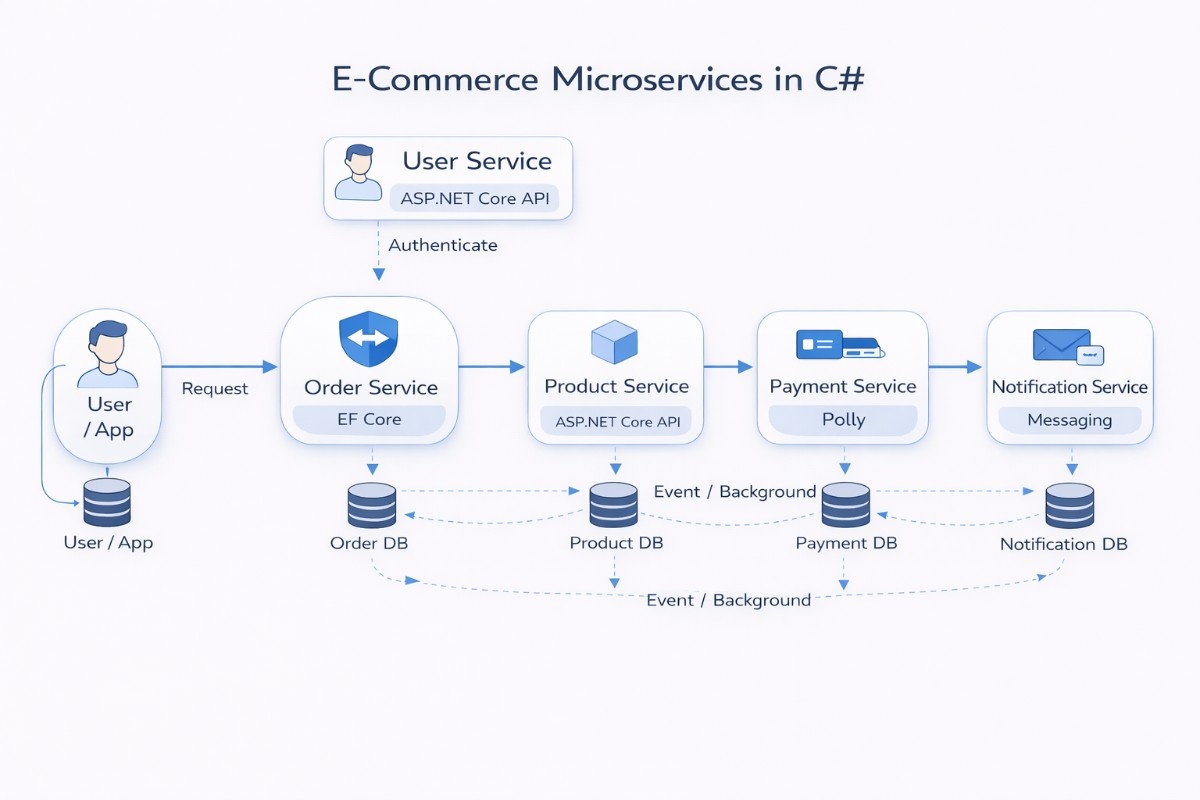
To make this easier to understand, let’s walk through a simple e-commerce system built using microservices in C#. Instead of one large application handling everything, the system is split into smaller services, each responsible for one part of the flow.
System Overview
In this setup, the application is divided into separate services so that each part can run on its own. This walkthrough covers the C# implementation side, while the overall e-commerce system design goes deeper into the architecture decisions behind it.
Instead of mixing everything in one place, each service focuses on a single responsibility. All services are built as ASP.NET Core APIs and run independently. This means you can update or deploy one service without affecting the others, which makes changes safer and easier to manage.
The system still works as a whole because these services communicate with each other through APIs or events, rather than sharing internal code or databases.
Core Services Breakdown
The Product service handles everything related to products, such as listing items, prices, and availability. It acts as the source of truth for product data.
The Order service is responsible for creating and tracking orders. When a user places an order, this service handles the request and coordinates the next steps.
The Payment service handles transaction processing, while the User service manages login and user data. The Notification service sends updates like order confirmations or status messages.
Data Ownership per Service
Each service stores and manages its own data instead of sharing a common database. The Product service has its own data store, and the Order service has a separate one.
This setup avoids situations where one service accidentally breaks another by changing shared data. It also allows each service to design its data in a way that fits its own needs.
If a service needs data from another, it does not access the database directly. It requests the data through an API or receives it through an event.
Tools Used in Each Service
Even though all services are written in C#, they don’t all use the same tools internally. The Product and Order services usually rely on Entity Framework Core to handle database operations.
The Payment service often includes retry logic using Polly, since it may depend on external systems that can fail or respond slowly.
The Notification service uses messaging tools like MassTransit to process events, while the User service focuses on authentication and token handling.
Communication Between Services
Services talk to each other in two main ways, depending on what the situation requires. For actions that need an immediate response, one service calls another using an API. For example, the Order service may call the Product service to check if an item is available before placing the order.
For tasks that don’t need to happen instantly, services use events. This allows actions like payment processing or sending notifications to happen in the background without delaying the main request.
Order Processing Flow
The process begins when a user places an order through the application. The request is routed to the Order service, which is responsible for handling the entire flow.
The Order service first validates product details by calling the Product service. Once validated, it creates the order and stores it in its own database.
After the order is created, an event is published. The Payment service processes the payment based on this event, and the Notification service sends a confirmation to the user.
Why This Approach Works
This structure keeps things organized because each service has a clear responsibility. Changes in one part of the system do not affect everything else.
It also makes scaling easier. If order traffic increases, only the Order service needs to handle that load, instead of scaling the entire application.
Over time, this setup makes the system easier to maintain and extend, since new features can be added as separate services without changing the existing ones.
Common Challenges of Using Microservices in C# and Solutions
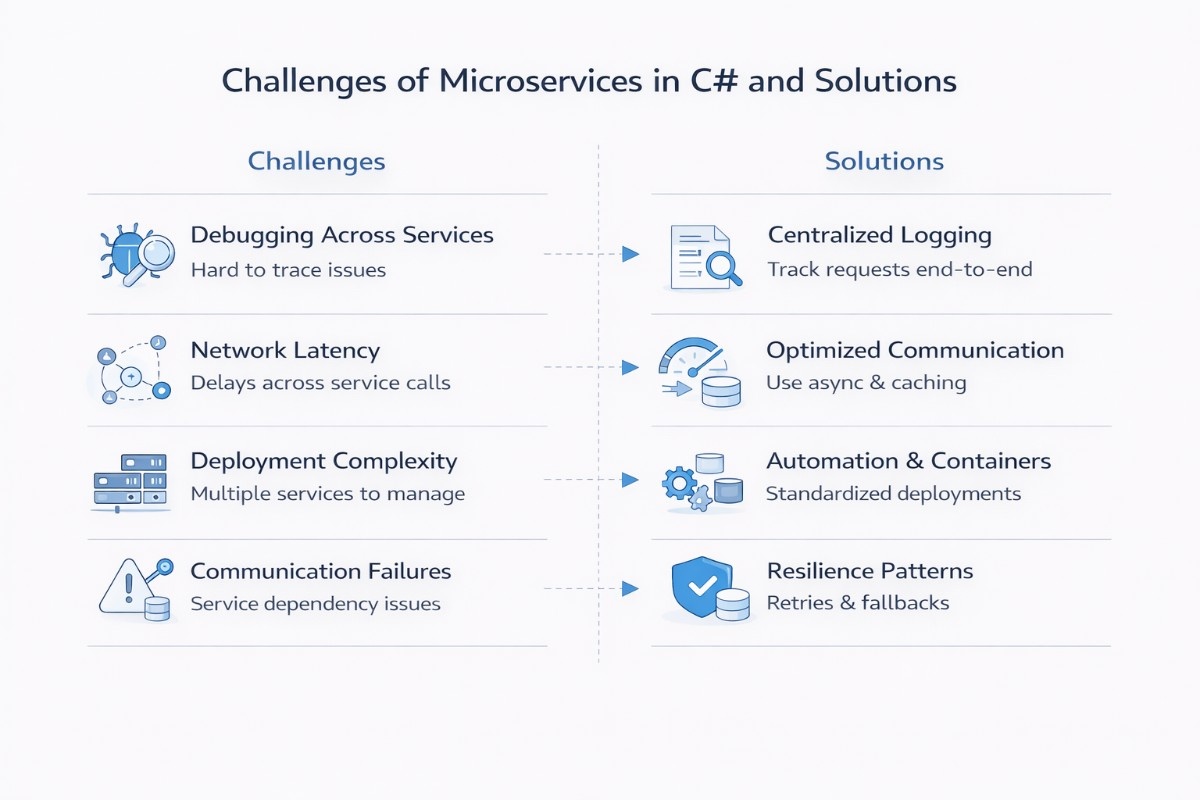
Working with microservices introduces a different set of challenges compared to a single application. Understanding these early helps you design systems that are easier to manage as they grow.
Debugging Across Services
When a request passes through multiple services, it becomes difficult to trace where something actually failed. Logs are spread across different services, and without a clear connection between them, identifying the root cause can take time and effort.
This is usually handled by introducing centralized logging and request tracing. By linking logs with a common request ID and collecting them in one place, you can follow the full path of a request and quickly understand where things broke down.
Network Latency Between Services
In a microservices setup, services communicate over the network instead of direct function calls. This adds small delays to each interaction, and when several services are involved in one request, those delays can start to add up.
To manage this, it helps to reduce unnecessary service calls and keep communication efficient. Using asynchronous processing where possible, along with caching frequently used data, can significantly improve response times, and testing your APIs under realistic traffic early is a practical way to catch latency problems before they reach production.
Deployment Complexity
Managing multiple services means dealing with multiple builds, deployments, and environments. Even small changes can require coordination across services, which makes the release process more involved compared to a single application.
This is addressed by standardizing how services are built and deployed. Containerization and automated pipelines help keep deployments consistent, reduce manual steps, and make it easier to release changes without affecting the entire system.
Service Communication Failures
Since services depend on each other through APIs or messaging, any delay or failure in one service can affect the overall flow. A slow response or temporary outage in one service can create issues for others that rely on it.
To handle this, systems are designed to be more resilient. Adding retries, timeouts, and fallback mechanisms allows services to handle temporary failures gracefully, so the system continues to function even when some parts are not fully available.
These challenges are part of the trade-offs that come with flexibility and scalability. With the right structure and practices, they can be managed without affecting the overall stability of the system.
Best Practices for Microservices in C# Applications
Microservices give you flexibility, but that flexibility comes with responsibility. The way you structure services and handle communication early on has a direct impact on how maintainable the system will be later.
Defining Clear Service Boundaries
Each service should represent a clear business capability, such as orders, payments, or users. When responsibilities are mixed, services start depending on each other in unclear ways, which makes changes harder to manage.
A good approach is to align services with business domains instead of technical layers. When boundaries are clear, teams can work independently, and changes remain contained within a single service instead of affecting the entire system.
Keeping Services Loosely Coupled
Services should communicate only through APIs or messaging and should not rely on shared databases or internal code from other services, since microservices are designed as loosely coupled independent services. Tight coupling creates hidden dependencies that make the system fragile.
Loose coupling allows services to change without breaking others. If one service needs to be updated or replaced, it can be done without rewriting other parts of the system, which keeps development more flexible over time.
Logging and Monitoring
In a distributed system, issues are harder to trace because requests move across multiple services. Without proper visibility, debugging becomes slow and uncertain.
Using structured logging and basic monitoring gives you insight into how requests flow through the system, which becomes essential in distributed microservices architectures where multiple services handle a single request.
It becomes easier to detect failures, measure performance, and understand where problems are occurring.
Handling Failures Gracefully
Failures are unavoidable in microservices, especially when services depend on network communication. If not handled properly, a small issue in one service can affect the entire workflow.
Adding retries, timeouts, and fallback logic helps services handle temporary failures without crashing the system. This keeps the application stable and ensures that users are not affected by short-lived issues.
Keeping Services Independently Deployable
Each service should be deployable on its own without requiring other services to be updated at the same time. When deployments are tightly linked, releasing changes becomes slow and risky.
Independent deployment allows teams to release updates faster and isolate issues more easily. If something goes wrong, only the affected service needs to be rolled back instead of the entire system.
These practices help keep microservices practical and manageable as the system grows. Following them consistently makes it easier to scale, update, and maintain the application without introducing unnecessary complexity.
Conclusion
Microservices in C# make sense when your application starts growing, different parts need to scale on their own, or multiple teams are working on separate areas. For smaller or early-stage projects, keeping everything in a single application is usually simpler and faster. It’s better to choose what fits your current needs instead of planning too far ahead.
In practice, many applications begin as a well-structured monolith and gradually evolve into microservices as complexity increases. This allows you to avoid unnecessary overhead early on while still preparing the system for future scaling and changes.
FAQs

 WhatsApp
 Call Us
 Mail Us