


Multi-Cloud vs Hybrid Cloud: Key Differences & Use Cases




Modern systems rarely rely on a single cloud environment. As applications grow, teams need to decide how workloads are distributed, managed, and scaled across different infrastructures.
This is where multi-cloud and hybrid cloud come in. While both involve multiple environments, they solve different problems. Understanding how they work is key to choosing the right approach for your system.
What Is Multi-Cloud and How Does It Work?
Multi-cloud uses multiple public cloud providers within a single system, where each provider handles specific workloads. It focuses on flexibility, allowing services to run independently across environments without tight integration.
How multi-cloud architecture is structured
Multi-cloud architectures distribute workloads across multiple public cloud providers, where each provider handles specific services or components. These environments are typically independent, with minimal or no required integration between them.
In practice, teams map specific workloads to the provider that fits best for example, running compute-heavy services on one cloud while using another for analytics or data pipelines. This keeps systems flexible but introduces the need to standardize deployments, monitoring, and access control across different platforms.
Why companies adopt a multi-cloud strategy
Organizations adopt multi-cloud to reduce dependency on a single vendor and to gain flexibility in choosing services that best fit their technical needs. It also allows teams to optimize for pricing, performance, or regional availability.
This approach shows up a lot in growing products where different parts of the system evolve separately. Instead of forcing everything into one ecosystem, teams pick tools based on what works best for each component, even if that means operating across multiple providers.
What Is a Hybrid Cloud and How Does It Work?
Hybrid cloud introduces a different model where public and private environments are combined. Instead of distributing across providers, the focus is on connecting different types of infrastructure.
How hybrid cloud architecture is structured
A hybrid cloud connects private infrastructure with public cloud services through secure networking and shared orchestration layers. Systems are designed to exchange data and workloads across environments while maintaining consistency.
A common pattern is keeping core systems, like databases or internal services, inside a private environment while exposing APIs or frontend layers through the public cloud. The setup works only if data flows reliably between both sides, which makes network design and access control a key part of the architecture.
Why companies adopt a hybrid cloud strategy
Hybrid cloud is often used when organizations need to retain control over sensitive data or maintain existing infrastructure while still using public cloud resources. It allows teams to extend their systems without fully migrating everything to the cloud.
You’ll usually see this in setups where moving everything isn’t practical either due to compliance requirements or because legacy systems are too tightly coupled to replace quickly. Instead of rebuilding from scratch, teams layer public cloud capabilities on top of what already exists.
Difference Between Multi-Cloud and Hybrid Cloud
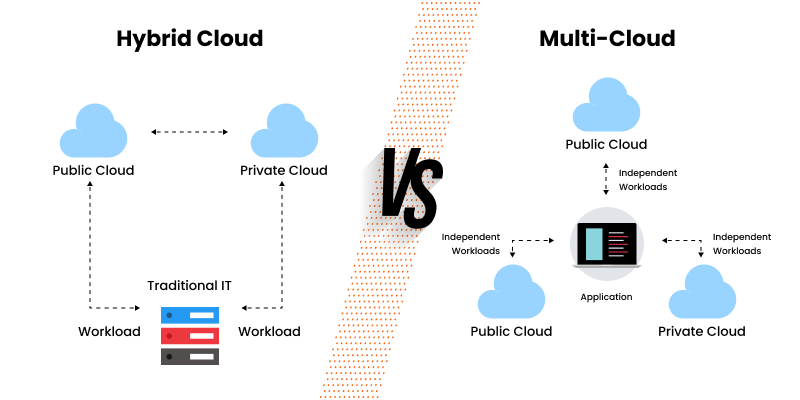
Now that the basic structure of multi-cloud and hybrid cloud is clear, the difference comes down to how systems are designed, connected, and managed over time. This section focuses on practical distinctions that directly impact architecture, operations, and decision-making.
Architecture and system design differences
Multi-cloud architectures distribute workloads across multiple public cloud providers, where each environment can operate independently within the overall cloud-based system architecture. This gives teams flexibility in choosing services and scaling components without being tied to a single ecosystem.
Hybrid cloud architectures are built around coordination between public and private environments. Systems are designed with defined dependencies, where data and services need to stay in sync across both sides of the setup.
Integration and data flow differences
In a multi-cloud setup, data flow between providers is optional and usually limited to specific use cases. Many systems are intentionally kept separate to reduce interdependency and simplify failure isolation.
Hybrid cloud depends on consistent data exchange between environments. Applications often rely on shared data and services, which makes network design, API reliability, and data consistency critical for the system to function properly.
Security and control differences
Multi-cloud environments rely on the security models of each provider, which means policies and configurations can vary across platforms. Maintaining consistency across environments becomes part of the operational overhead.
Hybrid cloud allows organizations to keep sensitive data within private infrastructure while using public cloud resources where appropriate for data security. This creates a clearer separation between critical systems and externally exposed components.
Cost and operational management differences
Multi-cloud involves multiple billing systems and pricing models, which can make cost tracking and optimization harder at scale. While teams can choose cost-efficient services, visibility across providers often requires additional tooling.
A hybrid cloud includes both infrastructure costs for private environments and usage-based costs for public cloud services. Managing this setup usually involves balancing fixed investment with variable cloud usage.
Complexity and maintenance differences
Multi-cloud increases operational complexity due to managing multiple providers, tools, and environments. Standardizing deployments, monitoring, and access control across platforms becomes a key challenge.
Hybrid cloud introduces complexity at the architecture level, especially around integration, networking, and maintaining consistency between environments. Poor integration can quickly lead to performance issues or fragmented systems.
Multi-Cloud vs Hybrid Cloud: Decision Comparison Table
If your system can run as loosely coupled services across providers → multi-cloud fits better.
If your system relies on shared state, internal dependencies, or tight integration → hybrid cloud is the right direction.
What is the difference between public and private clouds?
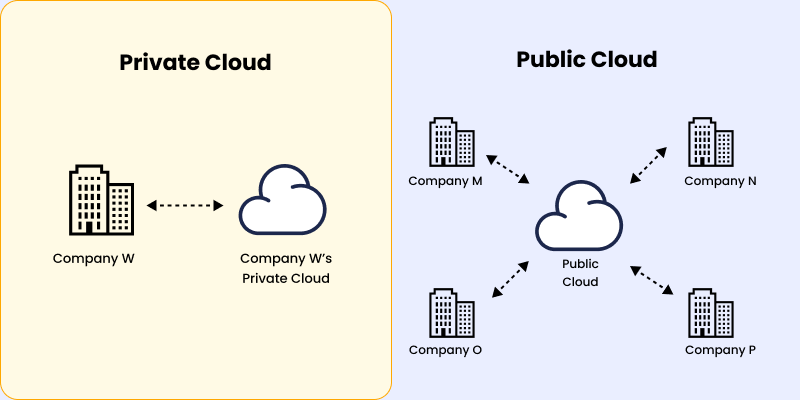
Understanding public and private clouds is necessary before comparing multi-cloud and hybrid setups. Multi-cloud builds on public cloud providers, while hybrid cloud depends on combining public and private infrastructure.
What is a public cloud?
A public cloud is a shared infrastructure managed by third-party providers like AWS, Azure, or Google Cloud. Resources such as compute, storage, and networking are provisioned on demand and billed based on usage.
This allows teams to deploy services without managing physical infrastructure and scale resources based on demand, which makes it suitable for systems with changing workloads.
What is a private cloud?
A private cloud is a dedicated environment used by a single organization, either hosted on-premise or managed by a provider. It provides full control over infrastructure, data, and access policies.
This setup is typically used when systems require strict control over data, predictable performance, or specific configuration requirements that cannot be handled in shared environments.
What to consider in public vs private cloud
The choice between public and private cloud comes down to how much control and responsibility a system requires. Public cloud reduces the need to manage infrastructure and works well when teams want to move quickly without upfront setup.
A private cloud gives direct control over how systems are configured and secured but requires managing infrastructure, access, and maintenance internally. The decision usually depends on whether flexibility or control is more important for the system being built.
If you want faster deployment with less infrastructure overhead → public cloud fits better.
If control over systems and data is critical → private cloud is the better choice.
What Is Multi-Cloud Architecture and When Is It Used?
Multi-cloud architecture refers to using multiple public cloud providers within a single system. Instead of relying on one platform, workloads are split across providers based on what each one does best.
You’ll usually see this in product-driven systems where different components evolve independently and need flexibility across services or regions.
How multi-cloud architecture works
In a multi-cloud setup, each cloud provider handles a specific part of the system. One provider might run core backend services, while another is used for data processing or analytics.
These environments don’t need tight integration, so services can run independently. That makes it easier to scale or update parts of the system, but it also means teams have to manage consistency across multiple platforms.
How workloads are assigned across providers
Workloads are mapped based on capability rather than convenience. Teams pick providers based on what fits the requirement instead of forcing everything into one ecosystem.
This works well when services are loosely coupled. If components depend heavily on each other, splitting them across providers can introduce unnecessary coordination overhead.
When should you use a multi-cloud strategy?
Multi-cloud is useful when systems benefit from flexibility across providers instead of being tied to one. It’s often used when different workloads need different infrastructure capabilities or when teams are planning a move to multiple cloud providers.
It also makes sense when teams want to avoid vendor dependency or when applications need to operate across regions with better coverage.
When multi-cloud becomes a good fit
Multi-cloud works best when services can operate independently without relying on shared state or constant interaction. Systems that are modular are easier to distribute across providers.
If your system depends on tight integration or shared data, multi-cloud can increase complexity instead of improving flexibility.
Example of a multi-cloud setup
A multi-cloud setup splits responsibilities across providers based on their strengths. Each part of the system runs in the environment that best supports it.
This allows teams to optimize individual components without forcing everything into a single platform.
Example of a real-world multi-cloud architecture
A typical setup might use AWS for backend services, Google Cloud for data processing, and Azure for enterprise integrations.
Since services are not tightly coupled, teams can scale or update one part without affecting the rest, but managing multiple environments requires consistent tooling and processes.
If your system is modular and services can run independently → multi-cloud fits well.
If your system depends on shared data and tight integration → multi-cloud can add unnecessary complexity.
What Is Hybrid Cloud Architecture and When Is It Used?
Hybrid cloud architecture combines public cloud services with private infrastructure, such as on-premise systems or dedicated environments. Instead of distributing across providers, the focus is on connecting different environments.
This approach is more common in systems where data control, compliance, or existing infrastructure plays a major role.
How hybrid cloud architecture works
In a hybrid setup, private infrastructure handles sensitive or critical workloads, while the public cloud is used for external services or variable workloads like traffic spikes.
Both environments are connected, and systems rely on data flowing between them. This makes integration a core part of the architecture, not an optional layer.
How workloads are split between private and public environments
Sensitive data and internal systems are typically kept in private infrastructure, while frontend services, APIs, or scalable components run on the public cloud.
This setup works when there’s a clear boundary between what needs control and what can run externally. Without that clarity, integration can become difficult to manage.
When should you use a hybrid cloud strategy?
Hybrid cloud is used when systems need to balance control with flexibility. It’s common in setups where data cannot be fully moved to the public cloud due to compliance or operational constraints.
It’s also used when organizations already have on-prem infrastructure and want to extend it instead of replacing it entirely.
When hybrid cloud becomes a good fit
Hybrid cloud works best when systems require tight control over certain components while still benefiting from public cloud capabilities.
If your system is fully cloud-native with no dependency on private infrastructure, hybrid cloud can add unnecessary complexity without clear benefits.
Example of a hybrid cloud setup
A hybrid cloud setup separates workloads based on sensitivity and function. Private infrastructure handles critical systems, while the public cloud supports scalable or external-facing services.
This creates a balance between control and flexibility without fully migrating everything to the cloud.
Example of a real-world hybrid cloud architecture
A typical setup might keep customer data in an on-premise database while running frontend applications and APIs on the public cloud.
This allows organizations to maintain control over sensitive data while still using cloud resources for scalability and external access.
If your system needs strict control over data and internal systems → hybrid cloud fits better.
If your system can run fully in the public cloud without constraints → a hybrid cloud may add unnecessary complexity.
How to Choose Between Multi-Cloud and Hybrid Cloud
Choosing between multi-cloud and hybrid cloud depends on how your system is structured and what constraints you’re working with. The decision is less about features and more about how your services interact, where your data lives, and how much control you need.
Most teams make the mistake of choosing based on trends or tooling. In practice, the right choice comes from understanding how your system behaves under real conditions.
When multi-cloud is the better choice
Multi-cloud works best when your system is made up of independent services that don’t rely heavily on shared data or constant coordination. It allows teams to use different providers for different workloads without being tied to a single ecosystem.
It’s a strong fit for SaaS products, global applications, and systems that need flexibility across regions. If your services depend on each other frequently, spreading them across providers can introduce latency and operational overhead.
When hybrid cloud is the better choice
Hybrid cloud is more suitable when your system depends on shared data, internal services, or strict control over certain components. It allows sensitive workloads to stay in private infrastructure while using the public cloud for scalable or external-facing services.
This approach is common in systems with compliance requirements or existing on-premise infrastructure. If your application can run entirely in the public cloud without restrictions, a hybrid cloud can add unnecessary complexity.
How to Decide Between Multi-Cloud and Hybrid Cloud
Most teams assume the decision comes down to cost or performance, but those are secondary. The real factor is how your system behaves, specifically how tightly services are connected and how data flows between them.
If services can run independently, multi-cloud is easier to manage. If your system depends on shared data or coordinated workflows, the hybrid cloud becomes the more practical choice. Cost, tooling, and performance only matter after the architecture aligns.
Key Factors for Choosing the Right Cloud Approach
Instead of comparing features across providers, map your system requirements to how each approach works in practice.
If your system is independent by design → multi-cloud works better.
If your system depends on coordination and control → hybrid cloud is the safer choice.
.svg&w=256&q=75)
Real-World Use Cases of Multi-Cloud and Hybrid Cloud
Understanding when to use multi-cloud or hybrid cloud becomes clearer when you look at how they are applied in real systems. The choice depends on whether flexibility or control is the bigger constraint in how the system operates.
Where multi-cloud is used in modern systems
Multi-cloud is commonly used in systems where different components have different requirements and can operate independently. Product-driven applications often rely on multiple providers to avoid being limited by a single platform.
You’ll see this in SaaS platforms, global applications, and systems built on distributed architectures where services are designed to scale independently.
For example, at Code B, we built a microservices-driven backend where services were structured as independent units with their own scaling and deployment layers for platforms like MyGlamm.
This makes it easier to distribute workloads across environments based on performance and system requirements.
Where multi-cloud works best in practice
Multi-cloud fits systems that are modular and loosely coupled. When services don’t depend heavily on shared data, teams can distribute them across providers without introducing tight coordination.
This setup works well for applications that need flexibility in choosing tools or scaling specific components without affecting the rest of the system.
Where hybrid cloud is used in enterprise systems
Hybrid cloud is more common in systems where data control and existing infrastructure play a major role. Instead of moving everything to the cloud, teams keep critical systems in private infrastructure and extend them using public cloud services.
This approach is widely used in large-scale platforms and enterprise environments. For example, platforms like Netflix operate with a mix of controlled infrastructure and cloud-based scaling, reflecting how hybrid setups are used to balance performance, control, and availability.
Where hybrid cloud is the better fit
Hybrid cloud works best when systems rely on shared data or internal services that need to stay within a controlled environment. Public cloud is then used for external-facing services, scaling, or non-critical workloads.
It is also a practical choice when organizations want to extend existing infrastructure instead of rebuilding systems entirely.
How to map your system to these use cases
Most systems don’t fall cleanly into one category. The decision comes down to how your services interact and what constraints exist around data and infrastructure.
If your system is modular and can run independently across components, it aligns more with multi-cloud. If it depends on shared data, internal systems, or strict control, hybrid cloud is usually the better fit.
Managing Multi-Cloud and Hybrid Cloud Operations
Once systems run across multiple environments, the main challenge shifts from provisioning infrastructure to maintaining consistency. Each provider introduces its own deployment workflows, networking setup, and scaling behavior, which makes it difficult to keep services aligned as the system grows.
Teams handle this by standardizing how applications are deployed, configured, and scaled across environments, instead of relying on provider-specific approaches for each setup.
Maintaining consistency across multi-cloud deployments
In multi-cloud setups, services are distributed across providers, which often leads to differences in deployment pipelines and configuration management. Over time, this creates drift between environments and makes systems harder to maintain.
To address this, teams define deployments, services, and scaling rules in a consistent format that can be reused across providers.
Container orchestration platforms like Kubernetes are used to manage how applications are deployed and scaled across environments without relying on provider-specific tooling.
Infrastructure provisioning is handled using tools like Terraform, allowing teams to define and replicate infrastructure consistently across providers.
Application packaging is standardized using containers, ensuring services behave the same way regardless of where they are deployed.
Keeping hybrid environments operationally aligned
Hybrid environments require workloads to run across private and public infrastructure while still behaving as part of the same system. In practice, this creates issues around network boundaries, service-to-service communication, and differences in how environments handle scaling and failover.
To handle this, teams define clear boundaries between what runs in private infrastructure and what runs in the cloud. Internal services and sensitive data are kept within controlled environments, while external-facing services are exposed through APIs or gateways, ensuring interaction remains predictable across both sides.
Consistency is maintained by aligning how services are deployed and exposed in both environments. Even if the infrastructure differs, the way services are structured, accessed, and scaled follows the same patterns to avoid unexpected behavior.
When standardization becomes necessary
As systems grow, teams often work across multiple environments with their own tools, configurations, and workflows. Over time, even small inconsistencies in how development and deployment are handled begin to impact how reliably systems behave.
Deployment pipelines diverge, configurations drift, and teams begin maintaining separate processes for each environment, including local setups and IDE configurations, which increases the risk of inconsistencies and failures.
This usually shows up when the same service behaves differently across environments or when releases take longer because each environment needs separate handling. At this stage, managing environments independently stops being practical.
Standardization becomes necessary when these inconsistencies begin to affect reliability or slow down development. Teams move toward shared deployment workflows and reusable infrastructure definitions to reduce variation and keep systems predictable as they scale.
Conclusion
Choosing between multi-cloud and hybrid cloud comes down to how your system is structured and what constraints you’re working with. The decision is less about features and more about how your services interact, where your data lives, and how much control you need over your infrastructure.
Multi-cloud works best when services can operate independently and you want flexibility across providers. Hybrid cloud fits better when systems depend on shared data, internal infrastructure, or regulatory requirements that limit how workloads can be distributed.
In practice, most teams don’t choose based on trends they choose based on what their system demands. Understanding how your architecture behaves is what ultimately determines the right approach.
Frequently Asked Questions (FAQs)

 WhatsApp
 Call Us
 Mail Us