


Top Databases for Machine Learning and AI




Production Database Architecture for AI Systems
A practical guide to building the data foundation for machine learning in production.
Artificial intelligence and machine learning systems are only as effective as the data infrastructure behind them. While algorithms and models often receive the most attention, databases are the foundation that makes AI applications possible. They store raw data, organize training datasets, manage features, power real-time predictions, and increasingly support semantic search and retrieval for large language models (LLMs).
Whether you are building a fraud detection engine, recommendation system, predictive maintenance platform, or a Retrieval-Augmented Generation (RAG) application, your database architecture directly affects model accuracy, scalability, latency, and operational costs.
Why Database Choice Is Critical in ML/AI
Most engineers treat database selection as an afterthought in ML projects, a box to check before the interesting work begins. That is a costly mistake. The database layer shapes your model's performance ceiling, your pipeline's operational complexity, and your infrastructure cost at every stage of the ML lifecycle.
Here is why it matters at each stage:
Data ingestion and storage: Raw training data comes from many sources: logs, user events, sensor streams, documents, and images. Before any of that data reaches a model, it goes through cleaning, normalization, and transformation steps that directly affect what your database needs to handle, and you need a system that can ingest this data fast, store it reliably, and make it queryable.
A poor choice here means slow, brittle ETL pipelines before training even begins. Feature engineering: Turning raw data into model-ready features requires complex queries, joins, and transformations.
SQL databases excel here. But if your features need to be served in real time at inference, you also need a feature store or a low-latency key-value store, not just a warehouse.
Model training: Training large language models requires scanning massive datasets repeatedly. You need high-throughput sequential reads, efficient columnar storage, and ideally the ability to run computation close to the data to avoid expensive network transfers.
Inference and serving: At inference time, the requirements flip. Latency matters more than throughput. You might need sub-10ms lookups of pre-computed features, vector similarity search against millions of embeddings, or real-time scoring of streaming events.
Retrieval and RAG: In 2026, a large proportion of AI applications are retrieval-augmented. The model does not just generate from memory; it retrieves relevant context from a database before answering. This requires a vector database that can perform semantic similarity search at scale and return results quickly enough to avoid breaking the user experience.
Types of Databases Used in Machine Learning
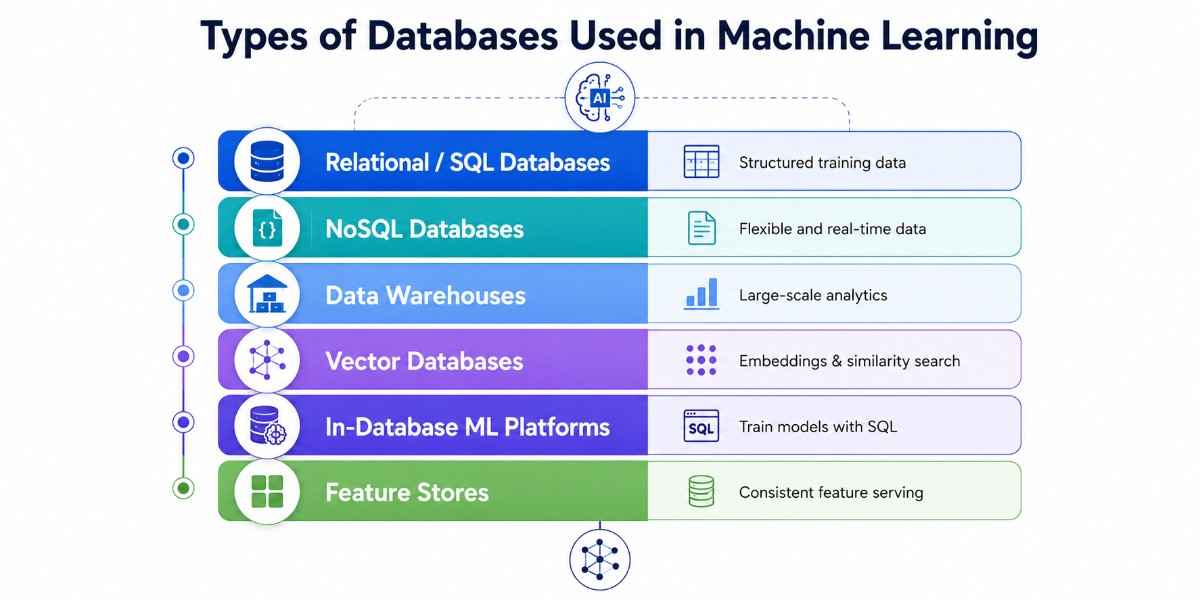
Before recommending specific tools, it helps to understand the six database categories that appear in ML pipelines and why each one exists. Each solves a different problem.
Relational / SQL Databases
SQL databases store data in structured tables with defined schemas, support complex joins and transactions, and enforce data integrity through ACID guarantees.
In ML pipelines, they are the workhorses of feature engineering, storing labeled datasets, feature tables, experiment metadata, and model evaluation results. Their strength is queryability: you can write complex analytical queries without moving data anywhere.
Their weakness is that rigid schemas make them awkward for the unstructured or rapidly evolving data that raw ML inputs often look like. It is best for labeled training datasets, feature tables, experiment tracking, and structured business data as ML input.
NoSQL Databases
NoSQL is a broad category covering document stores (MongoDB), key-value stores (Redis, DynamoDB), column-family stores (Cassandra), and graph databases (Neo4j).
What they share is flexible schemas, horizontal scaling, and optimized performance for specific access patterns. In ML, document stores handle unstructured or semi-structured training data. Key-value stores serve pre-computed features at inference time with microsecond latency.
Column-family stores handle time-series and IoT streaming data feeding into real-time models. It is suitable for unstructured training data, real-time feature serving, high-write streaming workloads, and graph-based ML (fraud detection, recommendations).
Data Warehouses
Data warehouses are purpose-built for large-scale analytical queries, reading enormous volumes of data, aggregating it, and returning results fast. They use columnar storage, which is efficient for the kinds of full-column scans that training data preparation requires.
In 2026, modern cloud data warehouses like BigQuery and Snowflake have added native ML capabilities, letting you train and deploy models directly inside the warehouse using SQL, eliminating the data movement that traditional ETL pipelines require.
It is best for batch training pipelines at petabyte scale, exploratory data analysis, and in-database ML.
Vector Databases
Vector databases are the defining new database category of the AI era. Instead of storing and querying scalar values, they store high-dimensional numerical vectors (embeddings) and support similarity search, finding the vectors closest to a query vector in geometric space.
This is what powers semantic search, recommendation engines, and retrieval-augmented generation (RAG) in LLM applications.
Every time you ask an AI assistant a question, and it retrieves relevant context from a document collection, a vector database is doing that retrieval. It works best for RAG pipelines, semantic search, embedding storage, recommendation engines, and multimodal AI.
In-Database ML Platforms
In-database ML is a paradigm shift: instead of extracting data from a database, processing it in an external ML framework, and loading results back, you run ML algorithms natively inside the database engine itself.
This eliminates data movement, reduces pipeline complexity, and keeps data within security boundaries. BigQuery ML lets you train models with SQL. Redshift ML connects directly to SageMaker Autopilot. Oracle ML and MySQL HeatWave AutoML offer similar capabilities.
This category is underused and underappreciated. It fits best for teams with data already in a cloud warehouse who want to add ML without building a separate pipeline.
Feature Stores
Feature stores are specialized ML infrastructure that sits between your raw data and your models, storing pre-computed features with both online (low-latency) and offline (batch training) access patterns. They solve a specific, painful problem: features computed during training need to be available at inference time, consistently, without recomputation.
Without a feature store, teams end up with training-serving skew, the most common cause of models that perform well in evaluation but poorly in production. It is suitable for production ML systems, teams managing many models and features, and reducing training-serving skew.
Best Vector Databases
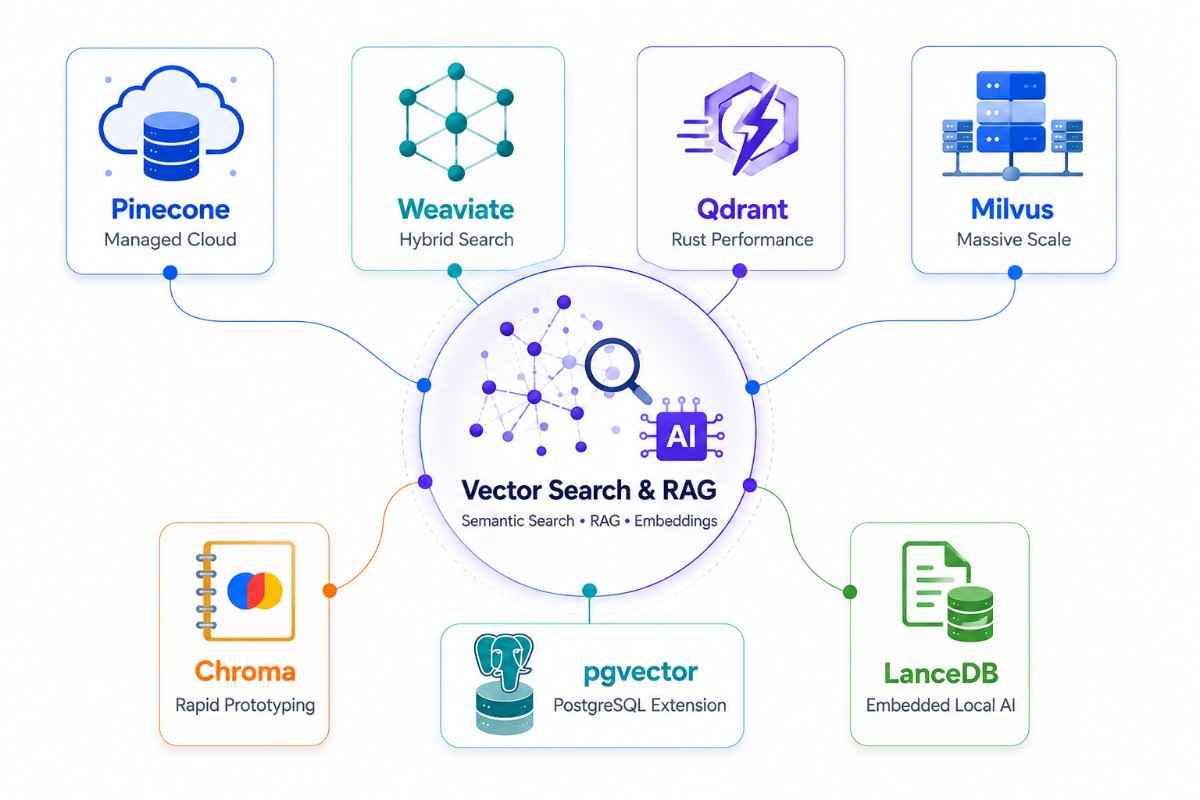
Vector databases have moved from a niche curiosity to essential infrastructure in two years. The reason is the dominance of retrieval-augmented generation (RAG) as the architecture of choice for production LLM applications.
In a RAG system, user queries are converted to vectors using an embedding model, and the vector database retrieves the most semantically similar documents from a knowledge base. Those documents are passed to the LLM as context, grounding its response in your actual data.
What to Look For in a Vector Database
Before comparing tools, understand the dimensions that actually differentiate them in production:
1. Managed vs self-hosted
Managed services (Pinecone) take zero operational overhead but give up control and can get expensive at scale. Self-hosted options (Qdrant, Milvus, Weaviate) require Kubernetes expertise and initial setup time but offer more flexibility and lower cost at scale.
2. Hybrid search support
Pure vector search is often not enough. Many production applications need hybrid search, combining vector similarity with keyword (BM25) matching for more accurate results. Not all vector databases support this natively.
3. Metadata filtering
Can you filter results by document type, date, user ID, or other attributes while performing a vector search? The quality of metadata filtering varies significantly between databases and matters a lot in multi-tenant AI applications.
4. Scale ceiling
Some databases are designed for prototyping and struggle beyond a few million vectors. Others are built for hundreds of billions.
5. Deployment model
Cloud-only, self-hosted, or embedded (runs in-process alongside your application).
Pinecone
Pinecone is the most widely used fully managed vector database. You do not manage servers, configure clusters, or tune indexes; you create a namespace, push vectors, and query. This is its core value: zero operational overhead.
Pinecone is particularly well-suited for production RAG pipelines where teams want to focus on building AI products rather than managing infrastructure.
It is widely used for semantic search in SaaS applications and multi-tenant AI platforms where each customer has an isolated namespace.
For startups and enterprise teams that want to ship quickly without hiring dedicated infrastructure engineers for the data layer, Pinecone is often the fastest path to production.
Strengths: Easiest to get started with, handles scaling automatically, strong performance for standard RAG workloads, no infrastructure knowledge required, and solid SDK support for Python and JavaScript.
Weaknesses: Fully proprietary with no self-hosted option, pricing can become significant at high query volumes, less control over indexing strategies, and potential vendor lock-in.
Weaviate
Weaviate is an open-source, AI-native vector database that stands out for its modular vectorizer architecture and strong hybrid search. You can plug in embedding models from OpenAI, Cohere, Hugging Face, or run your own, and Weaviate handles the vectorization pipeline.
Its hybrid search combines vector similarity with BM25 keyword matching in a single query, which often produces better results than pure vector search for enterprise applications.
Weaviate is especially effective for enterprise knowledge management, document retrieval, and hybrid search systems where keyword relevance and semantic similarity both matter.
It also supports multimodal AI with text and image vectors, making it a strong choice for advanced RAG pipelines that require fine-grained metadata filtering. Teams that need hybrid search, want open-source flexibility, or are building multimodal AI applications will find Weaviate particularly compelling.
Strengths: Open-source under Apache 2.0, modular vectorizer support, native hybrid search (vector + BM25), strong GraphQL API, schema-based data management, can scale to one trillion objects per collection, and managed cloud availability.
Weaknesses: HNSW indexing requires higher memory than some alternatives, tuning parameters such as ef and efConstruction require experimentation, and the learning curve is steeper than Pinecone.
Qdrant
Qdrant is an open-source vector database written in Rust, which gives it excellent raw performance and memory efficiency. It has emerged as a preferred choice for teams that want self-hosted vector search with production-grade reliability.
Its metadata filtering engine is one of the strongest in the category, allowing complex Boolean filters across large payloads while maintaining fast similarity search.
Qdrant excels in high-performance similarity search workloads where metadata filtering is central to retrieval quality. It is widely used in self-hosted deployments where data sovereignty is important and in production AI systems that need both speed and operational control.
Teams that prioritize serious metadata filtering, prefer self-hosting, or want the performance advantages of a Rust-based system are often best served by Qdrant.
Strengths: High throughput and low memory overhead, excellent payload filtering, supports both in-memory and disk-based indexes, strong REST and gRPC APIs, robust Python and JavaScript client libraries, and Qdrant Cloud as a managed option.
Weaknesses: Smaller community than Weaviate or Milvus and fewer built-in integrations with embedding models, so vectorization is typically managed separately.
Milvus
Milvus is the vector database built for enterprise scale. It supports more indexing algorithms than any other option in this list, including GPU-accelerated indexes, and is designed for environments where billions to trillions of vectors must be searched efficiently.
Milvus is a natural fit for large-scale recommendation systems, image and video search, genomics, and enterprise AI platforms operating at massive scale.
It is particularly attractive to organizations handling hundreds of millions of vectors and above, where performance and flexibility in indexing strategies become critical. Teams that require GPU-accelerated vector search or expect internet-scale workloads should strongly consider Milvus.
Strengths: Broadest index type support (HNSW, IVF, ANNOY, DiskANN, and GPU variants), horizontal scaling across multiple nodes, strong consistency guarantees, excellent Python SDK, and proven deployments at companies such as Salesforce and Shopee.
Weaknesses: Higher operational complexity than simpler alternatives, Kubernetes is effectively required for production deployments, and it is often excessive for prototypes and small applications.
Chroma
Chroma is a developer-friendly, lightweight vector database that has become a default choice for RAG prototyping. It runs embedded directly within Python applications, requires no infrastructure setup, and integrates seamlessly with popular orchestration frameworks.
For teams building AI features directly in the browser or Node.js, client-side machine learning in JavaScript follows many of the same lightweight, embed-first patterns.
Chroma is ideal for local development, Jupyter notebook experiments, and small-to-medium RAG applications where simplicity matters more than scale.
It is particularly well-suited to teams that are learning, validating ideas, or building early-stage AI products that do not yet require enterprise-grade infrastructure.
Strengths: Zero setup, Python-native, works embedded or as a standalone server, excellent integration with LangChain and LlamaIndex, open-source under Apache 2.0, and extremely easy to learn.
Weaknesses: Not designed for production at large scale, limited advanced features such as GPU support, and performance does not match dedicated production vector databases on very large collections.
pgvector
pgvector is a PostgreSQL extension that adds vector similarity search to the world's most popular open-source relational database. It lets you store vector embeddings alongside your regular data and query them with standard SQL.
The appeal is obvious: if you are already running PostgreSQL, you can add vector search capabilities without introducing a new system to operate, monitor, and maintain.
-- Create a table with a vector column
CREATE TABLE documents (
  id SERIAL PRIMARY KEY,
  content TEXT,
  embedding vector(1536)
);

-- Similarity search using cosine distance
SELECT id, content, 1 - (embedding <=> $1) AS similarity
FROM documents
ORDER BY embedding <=> $1
LIMIT 10;
It is best for applications that are already on PostgreSQL that need to add semantic search, smaller-scale RAG applications, and teams that want to minimize infrastructure complexity.
Strengths: No new system to operate, full SQL alongside vector queries, familiar tooling, ACID transactions, excellent integration with existing PostgreSQL ecosystems (Supabase, Neon, RDS).
Weaknesses: Performance does not match dedicated vector databases at large scale (tens of millions of vectors); HNSW and IVFFlat indexes have tuning requirements; not designed from the ground up for vector workloads.
LanceDB
LanceDB is an open-source, embedded vector database built on the Lance columnar format. It runs in-process, requires no server, and supports both vector search and rich analytical queries on the same data.
LanceDB is particularly well-suited for local AI applications, edge deployments, and offline retrieval systems where infrastructure simplicity is a priority.
It also performs well in analytical pipelines where file-based vector search matters and in developer tools such as local code assistants.
Teams building local-first AI products, edge applications, or data science workflows that benefit from embedded storage will find LanceDB to be a highly practical choice.
Strengths: Embedded and serverless with no infrastructure requirements, supports both vector and analytical queries, integrates naturally with the PyData ecosystem, including Pandas and PyArrow, handles multimodal data effectively, and is evolving rapidly.
Weaknesses: Less mature than Pinecone or Weaviate, has a smaller community, and its cloud scaling options are still developing.
Best Relational and SQL Databases for ML Pipelines
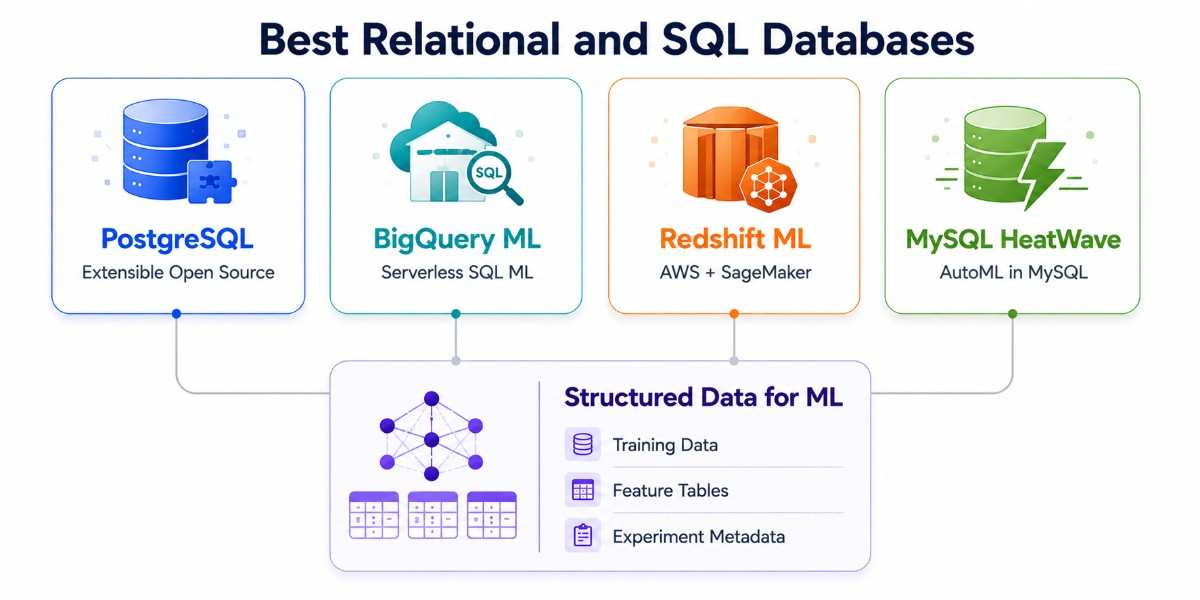
Relational databases continue to form the foundation of most machine learning pipelines. They may not attract as much attention as vector databases, but they remain indispensable for storing structured training data, feature tables, experiment metadata, and production application records.
Their strengths, data integrity, SQL querying, and mature tooling, make them one of the most dependable choices for AI development.
PostgreSQL
PostgreSQL is the most versatile open-source relational database and the default starting point for many ML pipelines that work primarily with structured data. Its extension ecosystem is exceptionally powerful: pgvector adds vector search, TimescaleDB adds time-series capabilities, and PostGIS enables advanced geospatial analysis.
It integrates naturally with Python through psycopg2 and SQLAlchemy, and pairs well with the core Python frameworks most data science teams already use, making it a comfortable and highly productive environment for data science teams. In machine learning workflows, PostgreSQL is commonly used to store labeled training datasets, feature tables, experiment tracking metadata, and application data that feeds predictive models.
Its ACID transaction guarantees help ensure that training data remains consistent and auditable, which is especially important in regulated industries such as finance and healthcare.
Teams already building on a PostgreSQL-based application stack can often extend their existing infrastructure to support both traditional ML and vector-based AI use cases.
Strengths: Highly extensible with pgvector and TimescaleDB, strong Python integration, ACID compliance for reproducible training data, mature ecosystem, and excellent fit for small-to-medium scale ML systems.
Weaknesses: Horizontal scaling is more limited than distributed cloud warehouses, and very large analytical workloads may require additional infrastructure.
Google BigQuery & BigQuery ML
Google BigQuery is the gold standard for serverless, petabyte-scale analytics on structured data. It requires no infrastructure management; you run a query, it scales automatically, and you pay for what you process. For ML teams working with large training datasets that live in Google Cloud, BigQuery is often already the home of the data.
BigQuery ML is where it gets particularly powerful for ML use cases. It lets you train and deploy machine learning models using standard SQL commands, without ever extracting your data from the warehouse. This eliminates the ETL overhead that traditional training pipelines require.
-- Train a logistic regression model directly in BigQuery
CREATE OR REPLACE MODEL `project.dataset.churn_model`
OPTIONS(model_type='logistic_reg', labels=['churned']) AS
SELECT
  monthly_charges,
  tenure,
  contract_type,
  churned
FROM `project.dataset.customer_data`;

-- Run predictions on new data
SELECT *
FROM ML.PREDICT(MODEL `project.dataset.churn_model`,
  (SELECT monthly_charges, tenure, contract_type
   FROM `project.dataset.new_customers`));
Strengths: Fully serverless at petabyte scale, in-database model training with BigQuery ML, deep integration with Vertex AI and Google Cloud Dataflow, pay-as-you-go pricing, and zero infrastructure management.
Weaknesses: Costs can increase significantly with inefficient queries, and organizations outside the Google Cloud ecosystem may face integration friction.
Amazon Redshift & Redshift ML
Amazon Redshift is AWS's flagship cloud data warehouse and a natural choice for machine learning teams operating on Amazon Web Services. Redshift ML integrates directly with Amazon SageMaker Autopilot, allowing teams to create models using SQL.
Redshift exports training data to Amazon S3, SageMaker identifies the best model through AutoML, and the resulting prediction function is registered back in Redshift for use in SQL queries.
This approach allows data teams to build and operationalize models without managing separate machine learning infrastructure.
It is particularly attractive for AWS-centric organizations where training data is already stored in Redshift and where close integration with services such as AWS Glue and AWS Lambda simplifies orchestration.
Strengths: Tight SageMaker integration, SQL-based model creation, strong AWS ecosystem connectivity, and Redshift Spectrum support for querying data lakes in S3.
Weaknesses: Best suited to AWS environments, and cluster sizing and cost management can become complex for variable workloads.
MySQL
MySQL is one of the most widely deployed relational databases in the world and remains a dependable platform for storing structured data that feeds machine learning pipelines. It is well understood, broadly supported by ORMs and Python libraries, and often powers the operational systems that generate training data.
Its AI capabilities have expanded significantly with Oracle MySQL HeatWave, which adds in-database analytics, AutoML, and accelerated query processing.
For organizations already standardized on MySQL, HeatWave can reduce the need to move data into separate ML environments and allows teams to add machine learning functionality with minimal architectural disruption.
Strengths: Ubiquitous and familiar, excellent ecosystem support, strong Python and ORM integration, and HeatWave AutoML for in-database machine learning.
Weaknesses: Core MySQL is less extensible than PostgreSQL, and advanced ML capabilities are primarily available through Oracle's managed HeatWave offering.
SQL Databases Comparison
Best NoSQL Databases for AI Workloads
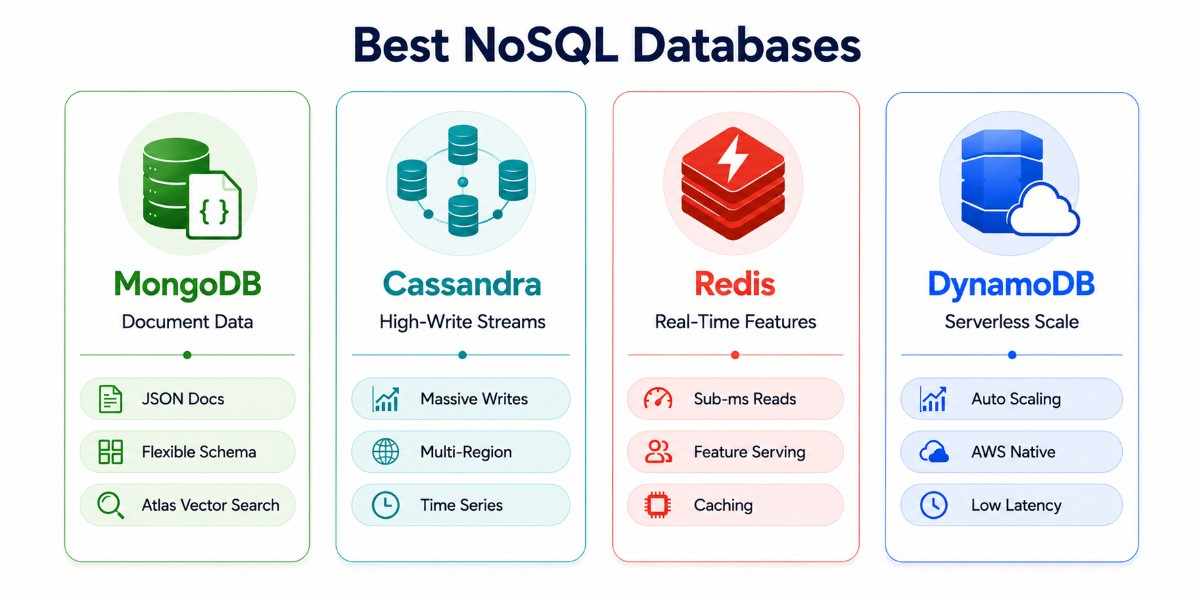
Not all ML training data comes in neat rows and columns. Text documents, user event streams, sensor readings, and raw JSON from APIs are the raw material of many AI systems. NoSQL databases handle this variety of data shapes at scale.
MongoDB
MongoDB is the leading document database and one of the most versatile tools in the machine learning data stack. It stores data as flexible, JSON-like documents, allowing schemas to evolve as your understanding of the problem matures.
This is particularly valuable in AI projects, where feature definitions and data structures often change during experimentation. MongoDB is an excellent fit for NLP training corpora, unstructured document collections, recommendation systems based on user behavior, and data lakes with heterogeneous schemas.
With MongoDB Atlas Vector Search, it can also store and query embeddings alongside documents, enabling teams to build RAG pipelines without introducing a separate vector database.
Organizations working with semi-structured data or rapidly evolving AI applications often choose MongoDB because it combines flexibility with strong operational maturity.
Strengths: Flexible document model, powerful aggregation framework for feature engineering, Atlas Vector Search for embeddings, robust cloud and self-hosted deployment options, and excellent Python integration through PyMongo.
Weaknesses: Complex joins are less efficient than in relational databases, and large-scale analytical workloads may be better served by dedicated data warehouses.
Apache Cassandra
Apache Cassandra is the preferred database for write-intensive workloads that must remain available under all conditions. Its masterless, peer-to-peer architecture eliminates single points of failure and enables linear scaling across multiple data centers.
For machine learning systems that ingest massive streams of sensor data, clickstream events, or operational logs, Cassandra offers exceptional resilience and throughput.
Cassandra is particularly well-suited to IoT pipelines, real-time analytics, time-series feature storage, and geographically distributed AI applications. Its tunable consistency model allows teams to balance availability and data consistency based on the needs of each workload.
Organizations processing millions of writes per second or operating global AI platforms where downtime is unacceptable frequently adopt Cassandra as the ingestion layer for machine learning data.
Strengths: Linear horizontal scaling, masterless architecture, outstanding write performance, tunable consistency, multi-datacenter replication, and a SQL-like query language through CQL.
Weaknesses: Data modeling requires careful upfront design, and ad hoc analytical queries are more limited than in SQL databases.
Redis
Redis is the fastest database in the machine learning stack and plays a highly specialized but critical role: serving precomputed features and contextual data to models at inference time with microsecond to sub-millisecond latency.
When a model needs a user's recent transactions, session context, or online behavioral signals before making a prediction, Redis can deliver that information faster than virtually any other database, which is why it appears in nearly every production model serving setup where real-time latency is non-negotiable.
Redis is widely used for real-time feature serving, caching expensive model outputs, session management, and online personalization systems. With RediSearch, Redis also supports vector and full-text search, making it a viable option for latency-sensitive RAG applications.
Teams building recommendation engines, fraud detection systems, or conversational AI products often use Redis as the low-latency serving layer that sits directly in front of production models.
Strengths: Sub-millisecond read latency, in-memory architecture, rich data structures such as hashes and streams, RediSearch for vector and text search, and fully managed deployment through Redis Cloud.
Weaknesses: In-memory storage can become costly at large data volumes, and Redis is typically used as a specialized serving layer rather than a primary analytical database.
Amazon DynamoDB
Amazon DynamoDB is AWS's fully managed key-value and document database. It scales automatically, requires no capacity planning, and maintains consistent single-digit millisecond latency regardless of dataset size.
This makes it a natural fit for serverless and event-driven machine learning architectures built on AWS.
DynamoDB is commonly used as an operational feature store, session store for conversational AI, and backend for high-traffic inference systems. Events captured through applications can trigger AWS Lambda functions that update feature records, while model-serving services read those records in real time.
Teams building Lambda-based ML pipelines or seeking a zero-operations NoSQL database within the AWS ecosystem often choose DynamoDB for its simplicity and scalability.
Strengths: Fully managed with no infrastructure overhead, automatic scaling, predictable low latency, DynamoDB Streams for event-driven pipelines, and deep integration with the AWS ecosystem.
Weaknesses: Data modeling is optimized around access patterns, and costs can rise quickly if throughput and indexing are not designed carefully.
Best Data Warehouses and Distributed Systems for Large-Scale AI
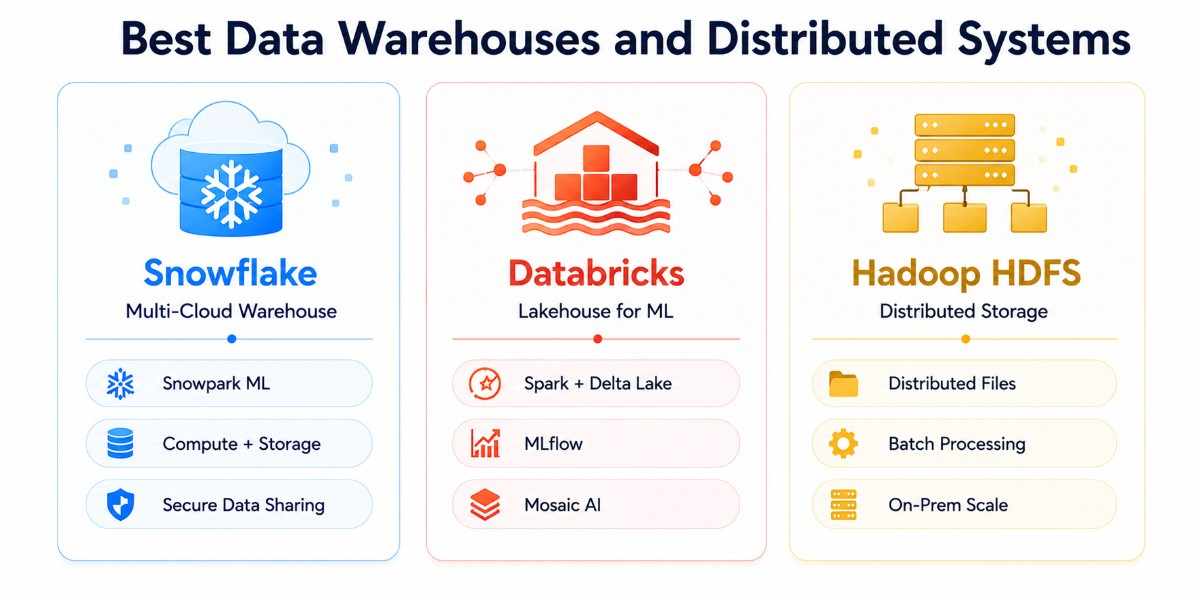
When your machine learning pipeline outgrows single-node databases, training datasets measured in hundreds of terabytes, feature engineering across billions of events, and analytical queries spanning years of business history, you need distributed systems built for scale.
These platforms separate storage from compute, parallelize processing across clusters, and integrate directly with modern machine learning tooling.
Snowflake
Snowflake is one of the leading cloud data warehouses for enterprises that want flexibility, performance, and operational simplicity. Its architecture separates compute from storage, allowing teams to scale query processing independently from data storage.
This is especially valuable for machine learning workloads, where compute demand can spike during feature engineering or training data preparation and then scale back down when those jobs complete.
Snowflake has become significantly more powerful for AI with Snowpark ML, which enables data scientists to write Python-based transformations, build scikit-learn-compatible pipelines, and train models directly inside Snowflake's compute layer.
Because data never leaves the warehouse, teams can reduce ETL overhead while maintaining strong governance. Snowflake is also widely used when multiple business units or external partners need to share data securely for collaborative machine learning initiatives.
Organizations operating across AWS, Azure, and Google Cloud often choose Snowflake for its multi-cloud flexibility and cost-efficient burst compute model.
Strengths: Snowpark ML for in-warehouse Python machine learning, compute-storage separation for cost optimization, secure data sharing across organizations, strong integration with dbt and transformation tools, and broad multi-cloud support.
Weaknesses: Costs can grow quickly if virtual warehouses are not managed carefully, and some advanced ML workflows still require complementary tools.
Databricks (Delta Lake)
Databricks is the dominant platform for large-scale machine learning in enterprise environments. Built on Apache Spark and the Delta Lake storage format, it combines data engineering, analytics, and machine learning into a unified lakehouse platform.
Raw data is stored in object storage and accessed through both SQL and distributed Spark processing.
Databricks provides one of the most complete AI ecosystems available, including MLflow for experiment tracking, Feature Store for reusable features, AutoML for automated model selection, and Unity Catalog for governance.
In 2026, Mosaic AI has further strengthened Databricks as a platform for LLM fine-tuning and foundation model development.
Enterprises preparing petabyte-scale datasets, operationalizing hundreds of models, or training proprietary language models frequently standardize on Databricks because it unifies the entire machine learning lifecycle.
Strengths: Deep ML tooling integration, distributed Spark for massive data preparation, Delta Lake for ACID reliability and data versioning, Unity Catalog governance, and Mosaic AI for large language model workflows.
Weaknesses: Higher platform complexity, substantial cost for large clusters, and a steeper learning curve for teams without Spark expertise.
Apache Hadoop HDFS
Hadoop HDFS remains an important storage layer in organizations with significant on-premise infrastructure and legacy data engineering investments.
It distributes data across commodity hardware with built-in replication and is optimized for high-throughput sequential reads, which align well with large batch machine learning workloads.
Although cloud object storage has replaced HDFS in many new architectures, it continues to power production systems in enterprises that operate private data centers or require strict control over infrastructure.
HDFS integrates closely with tools such as Spark, Hive, and Impala, making it suitable for large-scale batch processing and historical training data management without dependence on public cloud services.
Strengths: High-throughput sequential access, cost-efficient storage on commodity hardware, mature ecosystem integration, and strong fit for on-premise big data environments.
Weaknesses: Operational complexity is significantly higher than that of managed cloud platforms, and new cloud-native architectures are generally more flexible.
In-Database Machine Learning
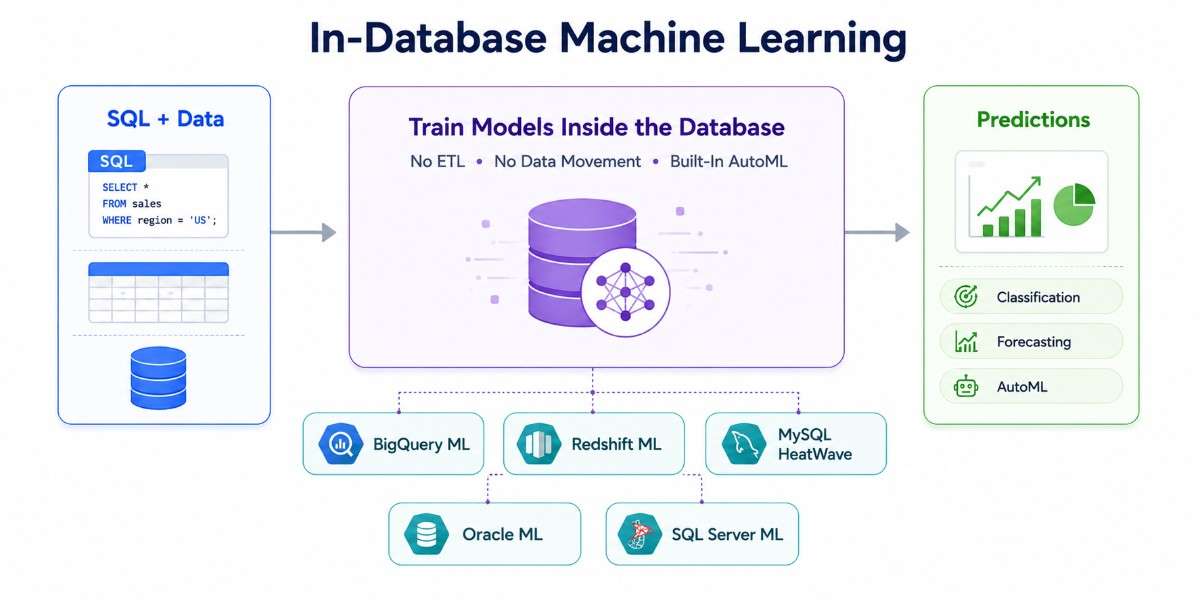
In-database machine learning - running ML Without Moving Data. It is one of the most underused approaches in the ML toolbox. The concept is simple: instead of extracting data from a database, moving it to an external ML system, training a model, and loading results back, you run ML algorithms natively inside the database engine. The data never moves.
This matters for three reasons. First, speed: moving petabytes of training data across networks is slow. In-database ML eliminates that latency. Second, security, many regulated industries (healthcare, finance) require that sensitive training data never leave a controlled environment. In-database ML keeps data within the database's security boundary. Third, simplicity, removing the ETL pipeline removes an entire class of engineering problems.
BigQuery ML
BigQuery ML is the most mature in-database ML platform. It supports the complete ML lifecycle, data exploration, feature engineering, model training, evaluation, and prediction, using SQL syntax. No Python, no infrastructure, no data movement.
Supported model types include: linear regression, binary and multi-class logistic regression, K-means clustering, matrix factorization (product recommendations), ARIMA+ for time-series forecasting, XGBoost for classification and regression, deep neural networks via TensorFlow, and AutoML Tables for automated model selection.
-- Evaluate model performance
SELECT *
FROM ML.EVALUATE(MODEL `project.dataset.churn_model`,
  (SELECT * FROM `project.dataset.validation_data`));

-- Generate explanations for predictions
SELECT *
FROM ML.EXPLAIN_PREDICT(MODEL `project.dataset.churn_model`,
  (SELECT * FROM `project.dataset.new_customers`),
  STRUCT(5 AS top_k_features));
Strengths: Complete SQL-based workflow, serverless scalability, support for many model types, and deep integration with Vertex AI.
Weaknesses: Advanced deep learning architectures and highly customized training workflows may still require external platforms.
Amazon Redshift ML
Redshift ML brings machine learning to SQL by integrating directly with SageMaker Autopilot. Using a CREATE MODEL statement, Redshift exports training data to Amazon S3, SageMaker automatically performs model selection and hyperparameter tuning, and the resulting model is registered as a SQL prediction function.
This design is particularly useful for AWS-centric teams that want to apply AutoML to data already stored in Redshift while avoiding the operational burden of building custom training infrastructure.
Strengths: Automated model selection, tight SageMaker integration, and seamless use within existing AWS analytics pipelines.
Weaknesses: Best suited to AWS environments and offers less control than fully custom machine learning workflows.
MySQL HeatWave AutoML
MySQL HeatWave extends MySQL with in-database analytics and AutoML capabilities accelerated by Oracle Cloud infrastructure. It enables teams to train models, perform feature selection, and generate explainability reports directly against operational application data.
For organizations already running MySQL-based web applications, HeatWave offers a low-friction path to machine learning because no separate warehouse or ETL pipeline is required.
Strengths: Native integration with MySQL, AutoML and explainability features, and accelerated processing for large analytical workloads.
Weaknesses: Advanced capabilities are tied to Oracle's managed HeatWave environment rather than the open-source MySQL core.
Oracle Machine Learning
Oracle Machine Learning provides SQL, Python, and R interfaces for building models directly inside Oracle Autonomous Database. It includes more than 30 built-in algorithms and supports enterprise-grade governance, security, and automation.
Organizations already standardized on Oracle infrastructure can leverage a complete machine learning environment without introducing additional data platforms.
Strengths: Broad algorithm library, multi-language support, and tight integration with Oracle's enterprise ecosystem.
Weaknesses: Most compelling for companies already invested in Oracle technology; adoption outside that ecosystem is less common.
Microsoft SQL Server Machine Learning Services
SQL Server Machine Learning Services allows data scientists to run Python and R code directly inside SQL Server. It also integrates with SparkML in SQL Server Big Data Clusters, enabling scalable analytics and model development for organizations in the Microsoft ecosystem.
This approach is especially useful for enterprises whose data engineering and analytics infrastructure is already centered around Microsoft technologies.
Strengths: Native Python and R support, strong enterprise tooling, and seamless integration with Microsoft's broader data platform.
Weaknesses: Best fit for organizations already committed to SQL Server and Azure-centric architectures.
When In-Database ML Is the Right Choice
Use in-database ML when: your training data is already in a supported warehouse, your team is more comfortable with SQL than Python ML frameworks, data governance requirements prevent data movement, or you want to minimize operational complexity.
Skip in-database ML when: you need cutting-edge model architectures (transformers, diffusion models) that warehouse ML platforms do not support, you need fine-grained control over training infrastructure (custom hardware, distributed training), or your pipeline already has mature Python ML tooling.
How to Choose the Right Database for Your ML and AI Project
After reviewing dozens of database technologies, one conclusion becomes clear: there is no single best database for machine learning. The right choice depends on the type of AI system you are building, the data you need to store, and the operational requirements of your application.
A Retrieval-Augmented Generation (RAG) chatbot has very different needs than a fraud detection system. A real-time recommendation engine requires different infrastructure than a batch forecasting model.
Some teams prioritize zero-operations managed services, while others need self-hosted deployments for compliance and data sovereignty.
The most effective way to choose a database for AI development is to start with the workload, then select the database architecture that matches your data structure, scale, and latency requirements.
Complete Decision Matrix
5 Questions to Ask Before Choosing
Q1: What stage of the ML pipeline are you building for?
- Training data storage → relational (PostgreSQL, BigQuery) or NoSQL (MongoDB)
- Feature serving at inference → Redis, DynamoDB
- Embedding retrieval / RAG → vector database
- Large-scale batch training → data warehouse (Snowflake, Databricks)
Q2: What does your data look like?
- Structured, tabular data with a defined schema → SQL
- Semi-structured or schema-flexible data → MongoDB, Cassandra
- Text, images, or any data you will convert to embeddings → vector database
- High-volume time-series events → Cassandra, InfluxDB, TimescaleDB
Q3: What is your scale?
- Development / under 1 million records → PostgreSQL, SQLite, Chroma
- Production, millions of records → any cloud-managed option
- Large enterprise, hundreds of millions+ → Databricks, Snowflake, Milvus
Q4: Cloud-managed or self-hosted?
- Zero ops preferred → Pinecone, BigQuery, DynamoDB, Snowflake
- Self-hosted / open-source → PostgreSQL, MongoDB, Qdrant, Weaviate, Milvus
Q5: Do you need real-time or batch access?
- Real-time inference (sub-10ms) → Redis, DynamoDB
- Batch training (throughput matters) → BigQuery, Databricks, Snowflake
- Both → feature store pattern (batch write to warehouse, online serve from Redis)
The best database for machine learning is the one that aligns with your specific workload, data types, and operational constraints. Most successful AI systems use a combination of technologies: training warehouses, NoSQL databases for ingestion, Redis for inference, and vector databases for retrieval.
By answering five simple questions about your architecture, you can narrow the field quickly and choose a database strategy that supports both experimentation and long-term scale.
Database Requirements for Modern AI in 2026
The definition of a database for AI development has changed significantly over the past two years. In earlier machine learning systems, databases primarily stored structured training data and feature tables.
In 2026, they play a much broader role: retrieving context for large language models, powering hybrid search, storing multimodal embeddings, maintaining agent memory, and coordinating multiple specialized storage systems.
The result is a new generation of AI architectures where databases are active components of the intelligence layer rather than passive storage systems.
Retrieval-Augmented Generation (RAG) Is the Default Architecture for LLM Applications
The most important shift in modern AI is the widespread adoption of Retrieval-Augmented Generation (RAG). Instead of retraining a large language model every time new information becomes available, organizations convert documents into embeddings, store them in vector databases, and retrieve the most relevant context during inference.
This architecture has become the standard for enterprise chatbots, internal copilots, document assistants, and knowledge search systems because it improves factual accuracy and allows models to work with proprietary data. As a result, vector databases such as Pinecone, Weaviate, and Qdrant are now core infrastructure for AI applications.
Hybrid Search (Vector + BM25) Has Become the New Standard
Pure vector search captures semantic meaning, but it can miss exact terms such as product IDs, legal clauses, and technical keywords. To improve retrieval quality, modern AI systems increasingly use hybrid search, which combines vector similarity with traditional keyword ranking methods such as BM25.
This approach consistently delivers better results in enterprise environments where both conceptual understanding and precise term matching are important. Databases including Weaviate, Pinecone, MongoDB Atlas Vector Search, Redis, and Turbopuffer all support hybrid retrieval natively.
Multimodal AI Requires Databases That Handle More Than Text
AI systems increasingly work with images, audio, video, and other non-text data, particularly with models that process visual input alongside language, becoming more common in production.
Each modality can be represented as embeddings, which means the same vector search techniques used for text can also power image search, video retrieval, and multimodal recommendations.
This trend is driving the adoption of databases that can manage high-dimensional embeddings regardless of modality. Platforms such as Weaviate, Milvus, and LanceDB are widely used in multimodal AI pipelines.
AI Agents Need Databases as Memory Backends
Autonomous agents and multi-step workflows require persistent memory to store conversation history, retrieved facts, tool outputs, and intermediate states. Without this storage layer, agents lose context between actions and sessions.
As a result, databases are increasingly used as memory backends. Redis provides ultra-low-latency short-term memory, while vector databases and embedded systems such as LanceDB enable long-term semantic memory and retrieval.
Polyglot Persistence Has Replaced the One-Database Approach
The most significant architectural change in modern AI is the shift from monolithic databases to polyglot persistence. Rather than forcing one database to handle every workload, production AI systems combine multiple specialized technologies, each optimized for a specific role.
This approach reflects the reality that storing raw documents, preparing training data, serving features in milliseconds, and retrieving embeddings semantically are fundamentally different tasks with very different performance requirements.
A typical 2026 AI architecture may include: Amazon S3 for raw documents and datasets, Snowflake or Databricks for analytics and model training, PostgreSQL for metadata and transactional records, Redis for caching and feature serving, Pinecone or Qdrant for semantic retrieval.
Edge AI and Local-First Storage
As AI moves onto laptops, mobile devices, and edge hardware, lightweight embedded databases are becoming increasingly important. These systems allow semantic search and retrieval to run locally without relying on cloud infrastructure.
LanceDB, Chroma, and SQLite are popular choices for offline copilots, private on-device assistants, and edge AI deployments where low latency and data privacy are critical.
Key Takeaway
The future of AI databases is defined by convergence and specialization at the same time. Databases are becoming more capable by combining transactional storage, vector retrieval, analytics, and memory functions, while also expanding into multimodal and edge environments.
For teams building AI applications in 2026, understanding these trends is essential. The most effective architectures will take advantage of hybrid databases, agent memory systems, lakehouse integration, and local-first storage to create faster, more scalable, and more intelligent systems.
Common Database Challenges in AI Projects
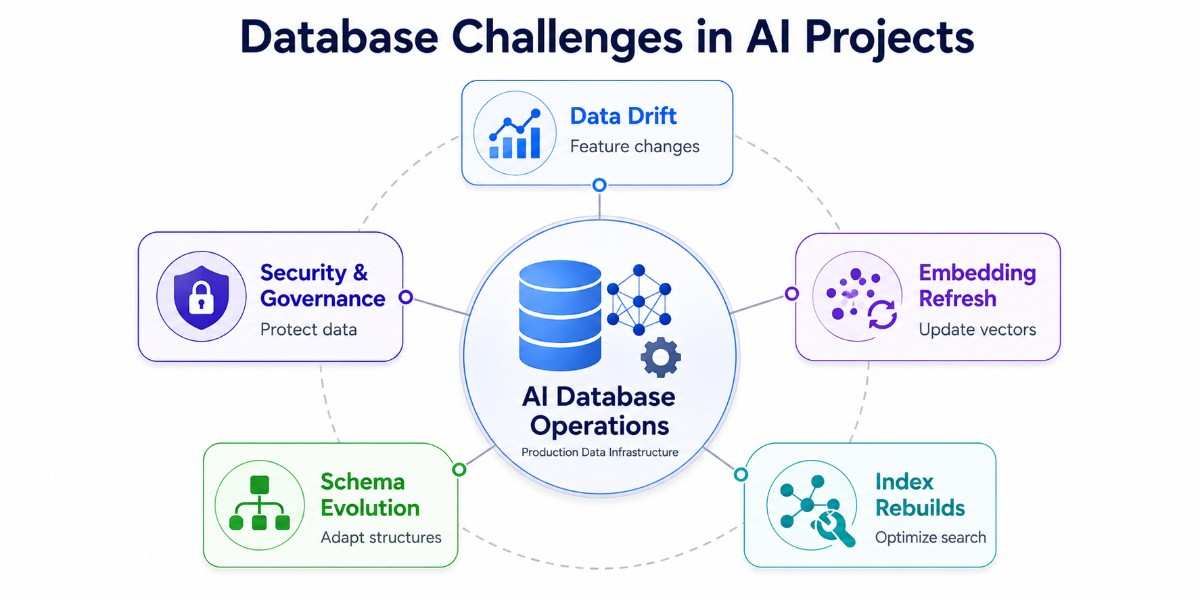
Choosing the right database is only the beginning. Once an AI system moves into production, the database layer becomes an ongoing operational responsibility. Training data changes, embeddings become outdated, indexes grow larger, schemas evolve, and compliance requirements become stricter.
Data Drift
Data drift occurs when the characteristics of incoming data begin to differ from the data used to train the model. Customer behavior changes, market conditions shift, and new products or user segments alter the underlying patterns in your feature data. As this divergence increases, model accuracy gradually declines because the model is making predictions on data it was not optimized to handle.
The most effective response is to continuously monitor feature distributions and model performance, store historical snapshots, and trigger retraining when significant deviations are detected. By identifying drift early, teams can refresh models before accuracy degrades, ensuring predictions remain reliable and business decisions continue to reflect current conditions.
Embedding Refresh
In generative AI applications, embeddings are numerical representations of documents, products, conversations, and other content. Whenever the source data changes, the existing embeddings become stale. This can lead to weaker semantic search results and RAG systems that return outdated or incomplete information.
A robust embedding refresh pipeline detects content changes, regenerates only the affected embeddings, and updates the vector database incrementally. This keeps retrieval aligned with the latest knowledge base and ensures that chatbots, copilots, and search applications consistently return accurate and relevant responses.
Index Rebuilds
As datasets expand and embeddings are updated, indexes can become fragmented or suboptimal, increasing query latency and reducing retrieval performance. This is particularly important in vector databases, where indexing structures such as HNSW and IVF directly influence both search speed and accuracy.
Teams maintain performance by rebuilding or optimizing indexes during low-traffic periods and validating new index configurations before deploying them broadly. Regular index maintenance preserves fast response times, supports growing data volumes, and keeps large-scale AI applications responsive under production workloads.
Schema Evolution
Machine learning projects rarely operate with fixed schemas. New features are added, external data sources are integrated, and business requirements change over time. Databases and pipelines that are too rigid can slow experimentation and introduce compatibility issues when data structures evolve.
Flexible schema design, feature versioning, and backward-compatible pipeline updates allow teams to adapt without disrupting production systems. This approach supports faster experimentation, smoother deployments, and a data architecture that evolves naturally as the AI application becomes more sophisticated.
Security and Governance
AI systems often process highly sensitive information, including customer records, financial transactions, healthcare data, and proprietary documents. Without strong security and governance controls, organizations face risks related to unauthorized access, regulatory violations, and loss of trust.
Organizations address these challenges through role-based access controls, encryption, audit logging, and clear governance policies for both structured data and embeddings. Strong governance not only protects data but also makes AI systems more auditable, compliant, and suitable for enterprise deployment.
The most significant database challenges in AI projects emerge after deployment rather than during initial development. Data drift affects model accuracy, embeddings must be refreshed continuously, indexes require maintenance, schemas evolve with the business, and governance requirements become more demanding over time.
Conclusion
The best database for machine learning and AI depends on the role it needs to play in your architecture. PostgreSQL is a strong foundation for structured training data, MongoDB works well for flexible and unstructured datasets, Snowflake and Databricks support large-scale analytics and model development, Redis enables real-time inference, and vector databases such as Pinecone and Qdrant power RAG and LLM applications. Most successful AI systems use several of these technologies together. By starting with your specific use case, training, retrieval, serving, or scale, you can choose the right database strategy and build an AI system that performs reliably as your data and models grow.
FAQs

 WhatsApp
 Call Us
 Mail Us