


Top AI development Tools & Platforms to Consider using as a Programmer
.png)



AI development tools are now part of everyday software work. The Developer Productivity Statistics with AI Tools (2025) study by Index Dev's productivity statistics report that AI tools contribute to around 41% of all code written, with 84% of developers using or planning to use AI tools for tasks such as coding, testing, and debugging.
As this usage increases, choosing the right tools has become harder. A typical AI development setup spans programming languages like Python, machine learning frameworks such as TensorFlow or PyTorch, pretrained model libraries, cloud-based training platforms, and supporting tooling for deployment, monitoring, and model updates.
Many of these are grouped under the same AI development platform label, despite serving different stages of development.
AI development tools and platforms across the development lifecycle
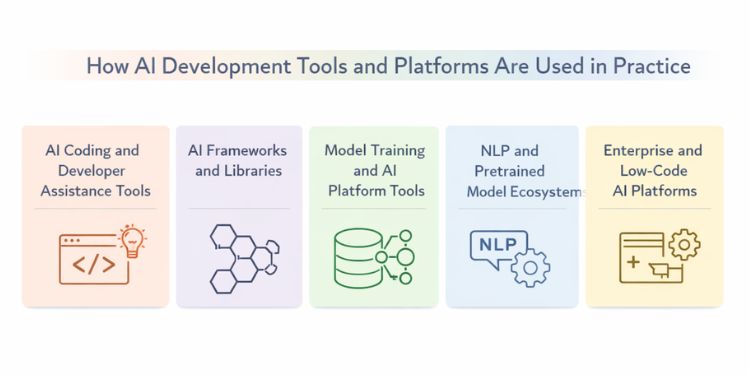
AI development tools serve different purposes depending on where a project sits in the development process. Grouping them by usage helps clarify what each tool is meant to solve and when it should be used during development.
AI coding and developer assistance tools
These tools support developers during coding, debugging, refactoring, and documentation. They are typically used inside code editors or alongside existing development workflows to reduce manual effort and improve code understanding.
OpenAI GPT-4
GPT-4 is used to generate code snippets, explain complex logic, and assist with debugging tasks. Developers often rely on it to understand unfamiliar codebases, review logic flow, or draft initial implementations. Manual validation is still required before using generated code in production systems.
GitHub Copilot
GitHub Copilot integrates directly into popular code editors and suggests code as developers type. It is commonly used to reduce repetitive coding tasks and speed up feature implementation. Teams usually combine it with code reviews to maintain consistency and correctness.
Google Gemini
Gemini assists with coding, testing, and documentation-related tasks. It is often used by teams working within Google’s development and cloud ecosystem. The tool helps improve productivity by supporting code explanations and test generation.
Amazon CodeWhisperer
Amazon CodeWhisperer provides inline code suggestions with a focus on common patterns and security considerations. It is frequently used in projects built on AWS services. Developers use it to catch potential issues early while writing code.
Tabnine
Tabnine offers AI-based code completion trained on open-source repositories. It runs inside code editors and supports multiple programming languages. Teams often choose it when they want editor-level assistance with predictable suggestions.
AI frameworks and libraries
Frameworks and libraries form the technical foundation of most AI systems, with core deep learning frameworks determining how models are designed, trained, and evaluated.
TensorFlow
TensorFlow is widely used for building machine learning models intended for long-term use. It supports structured workflows for training, evaluation, and deployment. Teams often choose it when they need consistency across environments.
PyTorch
PyTorch is commonly selected for experimentation and research due to its flexible model design. Its straightforward debugging process makes it easier to iterate on ideas. Many teams start development in PyTorch before adapting models for deployment.
Scikit-learn
Scikit-learn is used for classical machine learning tasks such as classification, regression, and clustering. It works well with smaller datasets and interpretable models. Developers often use it for baseline models and quick experimentation.
Keras
Keras provides a high-level interface for building neural networks. It is frequently used to prototype models quickly without writing extensive boilerplate code. Keras is often paired with TensorFlow for training workflows.
XGBoost
XGBoost is used for structured data problems involving tabular datasets. It is widely adopted in prediction and ranking tasks. Teams choose it when performance and consistency matter for numeric data.
Model training and AI platform tools
These platforms help manage datasets, train models, and track experiments. They are typically used once projects move beyond early experimentation into structured development.
Amazon SageMaker
SageMaker supports model training, evaluation, and deployment within the AWS environment. It provides tools for managing datasets and tracking experiments. Teams using AWS infrastructure often adopt it to centralize workflows.
Microsoft Azure Machine Learning
Azure Machine Learning offers tools for experiment tracking, model management, and deployment. It integrates well with Microsoft-based data and application services. Organizations using Azure often rely on it for coordinated ML workflows.
Google AI Platform (Vertex AI)
Vertex AI supports model training and management within Google Cloud. It is commonly used in projects that depend on BigQuery or other Google data services. The platform helps teams manage models across environments.
Databricks Machine Learning
Databricks ML combines data processing with model training workflows. It is frequently used for projects that involve large datasets and analytics pipelines. Teams rely on it to align data engineering and model development.
MLflow
MLflow is used to track experiments, manage models, and record training results. It helps teams maintain consistency across development environments. Developers often use it to compare model versions and results.
NLP and pretrained model ecosystems
These tools focus on language-based AI tasks and reduce the need to train models from scratch. They are commonly used in text-heavy applications.
Hugging Face
Hugging Face provides access to pretrained models for tasks such as text classification, translation, and summarization. Developers use it to accelerate NLP development without building models manually. It supports both experimentation and deployment workflows.
spaCy
spaCy is used for text processing tasks such as tokenization and entity recognition. It is commonly chosen for production NLP pipelines that require predictable behavior. Teams use it to process large volumes of text efficiently.
NLTK
NLTK focuses on linguistic analysis and educational use cases. It is often used for research and experimentation with text data. Developers rely on it to explore language features and structures.
Sentence Transformers
Sentence Transformers are used to create embeddings for semantic search and similarity tasks. They are frequently applied in search, recommendation, and document comparison systems. Teams use them to measure meaning rather than exact wording.
OpenNMT
OpenNMT is used to build custom machine translation systems. It supports training and deploying translation models for specific languages. Organizations use it when off-the-shelf translation tools do not meet requirements.
Enterprise and Low-Code AI platforms
These platforms support structured workflows or reduced coding effort. They are often used in business-focused environments where teams need guided development.
IBM Watson
IBM Watson provides AI services for language analysis, document processing, and decision support. It is commonly used in enterprise environments with defined operational requirements. Teams rely on it for structured AI use cases.
RapidMiner
RapidMiner offers a visual interface for building machine learning workflows. It is often used by teams that want to test ideas without extensive coding. The platform helps simplify early experimentation.
DataRobot
DataRobot supports automated model building and evaluation. Organizations use it to compare multiple models quickly. It is commonly adopted in data-driven business teams.
H2O.ai
H2O.ai provides tools for automated machine learning and model development. It is used in analytics and prediction-focused projects. Teams rely on it to streamline model creation.
KNIME
KNIME offers a workflow-based interface for data analysis and machine learning. It allows teams to build pipelines visually. Organizations use it when collaboration across technical and non-technical users is required.
How to Choose an AI Development Platform
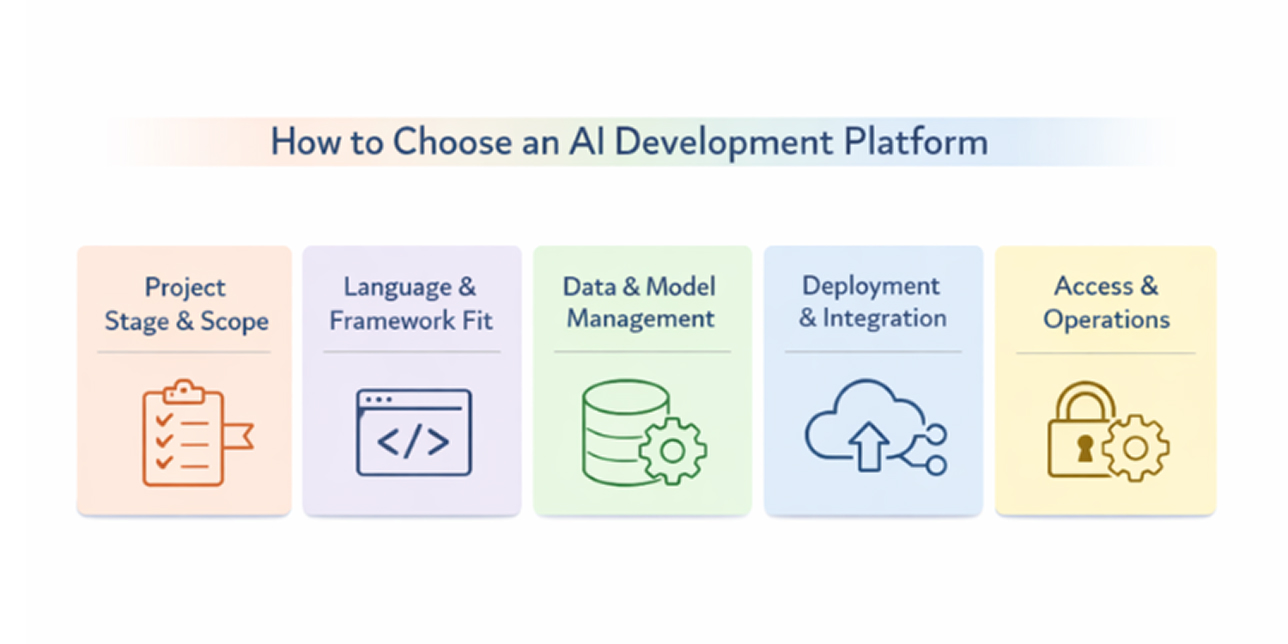
Choosing an AI development platform depends on what you are building and how the project is expected to evolve. Some platforms focus on a narrow part of the workflow, while others support multiple stages such as training, testing, and deployment. Identifying these differences early helps teams avoid switching tools later.
Instead of looking for a single platform that claims to cover everything, it is more effective to evaluate how well a platform fits existing workflows and long-term requirements. The factors below help clarify what matters when comparing options.
Project Stage and Scope
AI platforms are often designed with a specific stage of development in mind. Early experimentation usually benefits from lightweight frameworks or model libraries that allow quick testing and iteration without heavy setup.
As projects move closer to production, expectations change. Teams often need consistent training processes, model tracking, and controlled updates over time. Platforms that support these needs help maintain stability as development continues.
Language and Framework Compatibility
Most AI development relies on Python, but platform support for frameworks such as TensorFlow or PyTorch can differ. This is closely tied to the programming languages commonly used in AI development, which influence tooling compatibility and long-term maintenance.
Before choosing a platform, teams should confirm that it works smoothly with their existing codebase and preferred libraries. This reduces the risk of refactoring work and keeps development workflows consistent.
Data Handling and Model Management
AI systems depend heavily on data preparation and frequent model updates. Platforms that simplify dataset handling and experiment tracking make it easier to stay organized as projects grow.
Strong model management features help teams compare results across experiments, track changes, and reproduce outcomes when needed. This becomes increasingly important as more models and datasets are introduced.
Deployment and Integration Requirements
Some AI tools focus only on model creation, while others help integrate AI features into real applications. The difference becomes clear when models need to be used by end users.
For web or mobile projects, platforms should align with existing backend services and deployment workflows. This helps ensure AI components fit naturally into the broader system without added complexity.
Access Control and Operational Considerations
Teams working with sensitive data need to understand how platforms manage permissions and operational boundaries. Access control plays a key role in maintaining accountability across teams.
Reviewing how a platform supports auditability and usage restrictions early helps prevent issues later. These considerations are especially relevant in projects involving shared environments or multiple contributors.
Understanding the trade-offs between AI tool categories
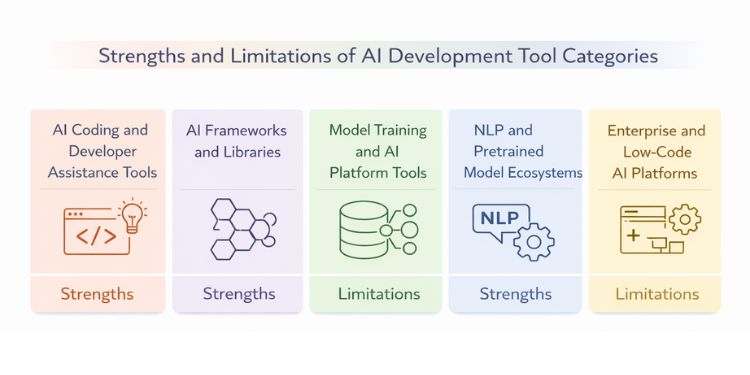
AI development tools are often chosen together rather than in isolation. The trade-offs usually come from the type of tool being used, not the individual product name. Understanding these differences helps developers combine tools intentionally instead of stacking overlapping solutions.
AI coding and developer assistance tools
Strengths
AI coding assistants help with writing, reviewing, and understanding code during day-to-day development. Tools such as OpenAI GPT-4, GitHub Copilot, Google Gemini, and Amazon CodeWhisperer are commonly used to reduce repetitive work and speed up iteration. They are especially useful when exploring new features or navigating unfamiliar codebases.
Limitations
These tools operate with limited project context. Suggestions often require manual review to ensure they align with architecture, performance expectations, and security requirements. Overuse without verification can lead to hidden logic issues or inconsistent coding patterns.
AI frameworks and libraries
Strengths
Frameworks and libraries give developers direct control over model design and training behavior. Tools like TensorFlow, PyTorch, Scikit-learn, and XGBoost allow fine-grained customization and deeper understanding of how models behave. This makes them well-suited for projects that require flexibility and experimentation.
Limitations
Working directly with frameworks involves more setup and maintenance effort. Developers need a solid understanding of machine learning concepts, and building complete workflows can take time. For teams focused on rapid feature delivery, this approach may feel heavy.
Model training and AI platform tools
Strengths
AI platforms help organize training workflows, datasets, and experiment tracking in one place. Tools such as Amazon SageMaker, Azure Machine Learning, Google Vertex AI, and Databricks Machine Learning are often used to manage models as projects mature. These platforms improve visibility across experiments and simplify collaboration.
Limitations
Platform-based tools usually work best within specific cloud ecosystems. Adopting them can introduce dependency on certain services and workflows. Teams may have less flexibility compared to building pipelines directly with frameworks.
NLP and pretrained model ecosystems
Strengths
Pretrained model ecosystems make it easier to add language-based features without training models from scratch. Libraries and platforms like Hugging Face, spaCy, Sentence Transformers, and OpenNMT help developers implement tasks such as text classification, search, and summarization quickly.
Limitations
Pretrained models may not fully match domain-specific requirements. Fine-tuning still requires careful data preparation, and customization options can be limited. Developers often need to balance convenience with control depending on the use case.
Enterprise and Low-Code AI platforms
Strengths
Enterprise and low-code platforms focus on guided workflows and reduced coding effort. Tools such as IBM Watson, RapidMiner, DataRobot, H2O.ai, and KNIME are commonly used in business-driven environments. They make collaboration easier between technical and non-technical teams.
Limitations
These platforms can restrict flexibility for advanced customization. Teams may become dependent on platform-specific features, making it harder to adapt workflows later. This approach works best when requirements are well-defined from the start.
How to read this comparison
These categories are not mutually exclusive. Many projects combine coding assistants for daily development, frameworks for model design, and platforms for training and deployment. Understanding the strengths and limits of each category helps teams choose combinations that fit their workflow instead of forcing everything into a single tool.
Comparing AI development tool categories
Best practices for using AI development tools
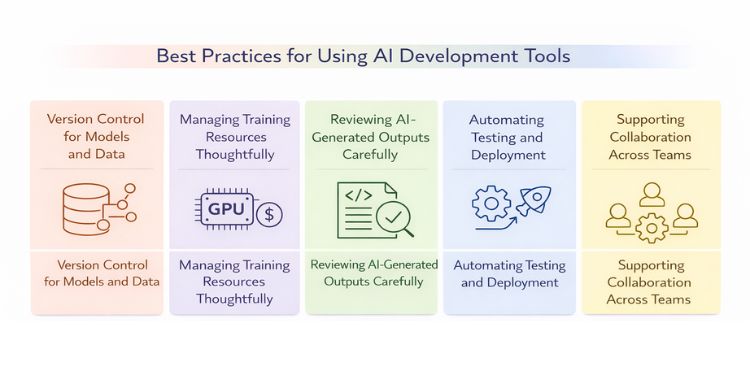
Once tools are selected, the bigger challenge is using them in a way that stays manageable as projects evolve. These best practices focus on keeping AI workflows understandable, reviewable, and easier to maintain over time.
Version control for models and data
AI projects change in more ways than traditional software. Model behavior can shift due to changes in training data, parameter adjustments, or even small preprocessing updates. Without clear tracking, it becomes difficult to explain why results differ from one version to the next.
Treating models and datasets as first-class assets helps maintain clarity as experiments grow. This usually involves:
- tracking model versions alongside application code
- recording which datasets were used for each training run
- linking experiments, results, and model outputs clearly
These habits make it easier to reproduce results and review decisions later.
Managing training resources thoughtfully
Training workflows can consume significant time and compute if not planned carefully. Teams often run into delays when every idea is tested at full scale from the start or when resource usage is not monitored during experiments.
A more deliberate approach helps keep experimentation practical, such as:
- Validating ideas on smaller samples before full training
- Observing resource usage while experiments run
- Selecting hardware setups that match the workload
This allows teams to iterate without unnecessary bottlenecks.
Reviewing AI-Generated outputs carefully
AI tools are effective at assisting development, but they do not understand business rules, system constraints, or edge cases by default. Outputs generated by models or coding assistants should be treated as starting points rather than final decisions.
Teams reduce risk by:
- Reviewing generated code or predictions before use
- Checking assumptions and edge cases explicitly
- Noting why certain AI-generated outputs were accepted
This keeps quality under control and prevents subtle issues from surfacing later.
Automating testing and deployment where possible
As models are updated, manual deployment steps increase the chance of inconsistencies. Without clear testing and release processes, it becomes harder to know which version is active and why changes occurred. Automation helps maintain consistency by validating models before release and integrating them into automated CI/CD pipelines.
Automation helps maintain consistency by:
- Validating models before they are released
- Tracking which version is deployed in each environment
- Allowing controlled rollbacks when problems appear
These practices support steady updates without disrupting ongoing work.
Supporting collaboration across teams
AI development often involves multiple roles working together, including engineers, data specialists, and product teams. Without shared practices, information can fragment across tools and conversations.
Clear collaboration becomes easier when teams rely on:
- Shared repositories for code, models, and experiments
- Documented assumptions and outcomes for each iteration
- Consistent naming and versioning conventions
This coordination helps keep projects understandable even as contributors change.
Why AI development becomes difficult in practice
AI projects often become challenging after tools are already in use. Many issues do not appear during early experimentation and only surface as models interact with real data, users, and systems. These challenges are less about missing tools and more about how AI systems behave over time.
Data quality problems that appear late.
Data-related issues are rarely obvious at the beginning of a project. Small inconsistencies in preprocessing, labeling, or data sources can quietly influence training results and only become visible once models are evaluated or deployed. By then, multiple experiments and datasets may be involved, making root causes harder to isolate.
This often happens because:
- Training data evolves independently of model logic
- Preprocessing steps are adjusted incrementally
- Assumptions made early are no longer valid later
Training effort expands faster than planned.
As models improve and datasets grow, training effort increases quickly. What starts as a short experiment can turn into long-running jobs that slow iteration and affect delivery timelines. Teams often underestimate how quickly resource demands scale as complexity increases.
Model performance changes as inputs shift.
AI models rely on patterns present in their training data. When real-world inputs change, model behavior can degrade without clear signals. This makes it difficult to tell whether issues come from data shifts, model limitations, or downstream usage.
Common sources of this challenge include:
- Changes in user behavior
- New data sources entering pipelines
- Evolving business rules
High accuracy Is easier than clear explanation
Improving output quality is often more straightforward than explaining how results were produced. Complex models can perform well while remaining difficult to interpret, which complicates debugging and review. This becomes especially important when model decisions affect users directly.
Responsible use requires continuous attention
Ethical concerns do not end once a model is deployed. Bias, fairness, and transparency can shift as models are retrained or applied in new contexts. Teams frequently need to revisit earlier assumptions as applications reach broader or different audiences.
Conclusion
AI development relies on using multiple tools together rather than selecting a single platform. Coding assistants, frameworks, training platforms, and pretrained model ecosystems each play different roles across the development process. Knowing where each fits helps teams avoid unnecessary complexity and build workflows that match real requirements.
The right setup depends on project stage, team experience, and long-term goals. Early experimentation often benefits from flexible frameworks and pretrained models, while later-stage projects need clearer processes for training, updates, and collaboration. There is no universal best tool, only combinations that suit specific use cases.
By evaluating AI development tools based on how they are used in practice, teams can make more confident decisions and reduce rework as systems evolve. Understanding these trade-offs early helps keep AI features easier to maintain beyond the first release.
Frequently Asked Questions (FAQs)

 WhatsApp
 Call Us
 Mail Us