


How to Integrate Generative AI With CRM and ERP Systems



Most businesses already hold the answers they need. Customer history sits in one system, stock levels and invoices in another, and the people who need both are stuck switching tabs and writing the same emails and reports by hand. The problem is rarely a lack of data. It is how long it takes to reach it and turn it into something useful. That is where generative AI with CRM and ERP systems is starting to make a real difference.
A CRM system manages customer relationships, from the first enquiry through to renewal. An ERP system runs the internal side of the business: finance, inventory, procurement, and day-to-day operations. Generative AI integration connects to both, reads the records they hold, drafts responses, summarizes documents, and takes over routine steps. The result is business automation that supports your teams instead of adding another tool to learn.
This guide covers how the integration works, where it helps most, the steps to implement it, the technologies involved, and the challenges to plan for.
Understanding Generative AI in CRM and ERP Systems
Generative AI does not replace your CRM or ERP. It works alongside them, pulling in the records they store, understanding a request written in plain language, and producing something useful in return: a reply, a summary, a report, or a suggested next step. Your existing software remains the source of truth, and the AI becomes a faster way to read from it and act on it.
What Is Generative AI in CRM?
In a CRM, generative AI uses customer data such as purchase history, past conversations, and open tickets to write insights and personalized messages. It can answer routine support questions, condense a long lead record into a few lines, and help sales reps decide what to say next.
For example, after a sales call, the AI reads the contact’s history and the call notes, then drafts a follow-up email that references the product they asked about and the concern they raised. The rep reviews it, edits if needed, and sends it in a minute instead of fifteen.
What Is Generative AI in ERP?
In an ERP, the same technology works with financial, inventory, procurement, and operational data. It can write reports from raw figures, read incoming documents, and guide staff through multi-step workflows without hunting through menus.
For example, a purchasing manager asks for a summary of this week’s open purchase orders. The AI reads the records and replies that three orders from one supplier are delayed, one item is below its reorder level, and two approvals are still pending. What once meant exporting a spreadsheet becomes a single question.
Why Integrate Generative AI With CRM and ERP Systems?
The case for integration comes down to time and access. Your systems already contain what your teams need, but getting it out is slow, and much of the daily work is repetition. Connecting generative AI addresses both.
Repetitive work is the clearest gain. A support team that writes the same order-status reply fifty times a day, or an accounts team that keys in invoice details by hand, can hand that work to the AI and keep people for the cases that need judgment.
Access to information improves as well. Instead of waiting for an analyst to build a report, a finance head can ask why costs rose last quarter and get a readable answer in seconds, which speeds up decisions.
Customers feel the change too. When a support agent sees a full account summary before replying, the customer does not have to explain their problem again.
Integration also connects departments. Sales can see whether stock exists before promising a delivery date, and finance can see which accounts are slipping before it becomes a collections problem. Across all of this, employees spend less time on admin and more on work that moves the business forward.
Key Use Cases of Generative AI in CRM Systems
In a CRM, generative AI supports the people who talk to customers and close deals every day. Because the CRM already holds contact details, purchase history, conversations, and open issues, the AI has the context it needs to produce useful work instead of generic text.
The strongest uses sit in four areas: customer support, sales assistance, marketing communication, and feedback analysis.
AI-Powered Customer Support and Chatbots
An AI assistant connected to your CRM can answer customer questions using their actual account details, such as order status, plan type, or previous tickets, instead of giving generic replies. A customer asking where their refund stands gets a specific answer with the current status, not a link to a help page. This resolves many routine questions without a human agent and without long waits.
The same system also supports human agents. When a case is escalated, the AI summarizes the full conversation, including what the customer asked, what was already tried, and what is still unresolved, so the agent starts informed and the customer is not asked to repeat themselves. It can also suggest a reply based on how similar cases were resolved, which the agent can edit before sending.
Automated Lead Management and Sales Assistance
Sales reps rarely have time to read every note on every lead. Generative AI can condense a lead's record into a short brief, draft follow-up emails, and pull the key points from a long interaction history before a call. This keeps reps focused on the conversation rather than the preparation.
Before a renewal call, for example, a rep can ask for an account summary and see the recent conversations, open issues, and products in use in one place. After the call, the AI drafts the follow-up email and records the key points in the CRM, so details are not lost and no lead sits untouched for days
Personalized Customer Communication
Personalization at scale is difficult by hand. With CRM data behind it, AI can write marketing emails that reflect what a customer bought, suggest products they are likely to want, and adjust tone and content to their preferences and past behavior, without a marketer writing each version.
A customer who bought running shoes three months ago might receive a message about replacement insoles, while someone who has only browsed gets an introductory offer. A long-standing client may get a short, direct update, while a new lead receives a more explanatory message. The same campaign reaches both groups in a way that fits each one.
Customer Sentiment Analysis and Insights
Thousands of reviews, survey responses, and support transcripts are hard to read manually. Generative AI can summarize them, surface the complaints that keep recurring, and turn scattered conversations into clear insights that product and service teams can act on.
If late deliveries start appearing in a growing share of tickets, the summary can flag the pattern and include sample comments. Service and operations teams can then fix the cause instead of answering the same complaint repeatedly. The same approach can show what customers praise most, which helps sales and marketing teams highlight the right strengths.
Key Use Cases of Generative AI in ERP Systems
In an ERP, generative AI helps with the operational backbone of the company, where accuracy matters and manual effort adds up quickly. Finance, inventory, procurement, and documents all pass through the ERP, so even small time savings repeat across hundreds of transactions every week. The strongest uses sit in financial reporting, supply chain planning, document handling, and process automation.
Automated Financial Reporting and Analysis
Finance teams spend a large share of each month-end preparing reports. Generative AI can draft financial summaries from ledger data, explain what is driving a change in revenue or expenses, and prepare a first version of a report that an accountant then checks and finalizes.
A finance head can ask why operating costs rose last quarter and get a plain-language answer pointing to the vendors or one-time charges behind the change. A qualified person should still review anything that goes to leadership or auditors.
Inventory and Supply Chain Optimization
By reading stock, order, and supplier data, AI can summarize inventory positions in plain language and flag potential supply chain problems, such as late shipments or low stock on fast-moving items. Planners get a clear starting point instead of a wall of numbers.
For example, a planner can ask which products are likely to run out next month. The AI reviews recent sales, current stock, and open purchase orders, then lists the items at risk, so the team can reorder before a shortage reaches customers.
Intelligent Document Processing
Invoices, purchase orders, and contracts arrive in many formats. AI can extract key fields such as supplier name, amount, and due date, summarize longer documents like supplier contracts, and sort them by type so they reach the right team without manual filing.
Many businesses add a confidence check to this process. Clear documents move through automatically, while unusual or unclear ones go to a person for review, which keeps speed high without letting errors into the books.
Business Process Automation
Procurement and approvals often stall because someone has to chase the next step or gather missing information. AI can help assemble purchase requests, generate routine operational reports, and prepare the details an approver needs to decide quickly.
When a department requests new equipment, for instance, the AI can compile the request, compare quotes from approved suppliers, check the available budget, and present a short summary. Approval authority stays with people, and the AI follows your existing spending limits and sign-off rules.
How to Integrate Generative AI With CRM and ERP Systems: Step-by-Step
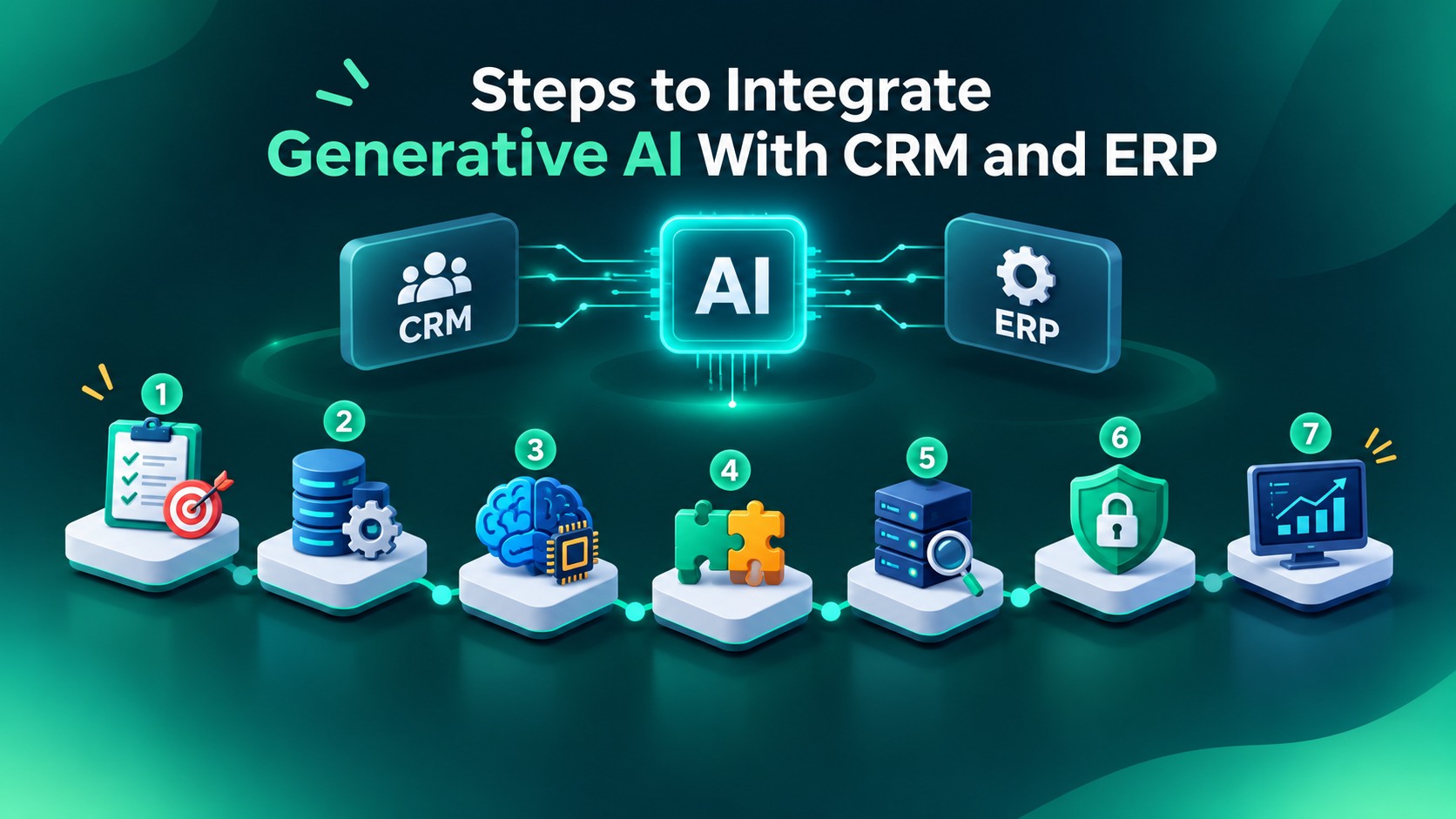
A successful integration follows a clear order. Business teams define what the AI should do, and development teams then build and secure the connection. Here is how the work usually unfolds.
Step 1 : Identify Business Requirements and AI Use Cases
Start with the problems, not the technology. List where your teams lose time or make errors, decide which workflows AI should handle, and attach a measurable goal to each, such as shorter reply times or faster invoice handling. Then rank the ideas by business value and how realistic they are to build, and begin with one or two.
Step 2 : Evaluate Existing CRM and ERP Infrastructure
Next, document what you run today. Identify your CRM and ERP platforms, check which APIs and integration options they offer, and review how your data is stored and formatted. This reveals compatibility gaps early, which is far cheaper to fix before development begins.
Step 3 : Select the Right Generative AI Models and Technologies
Choose a large language model (LLM) based on accuracy, speed, security, and the volume you expect to handle. You will also decide between a hosted AI API, which is quicker to start and maintained by the provider, and a self-hosted model, which offers more control over sensitive data but needs more infrastructure and skill to run.
The trade-off between the two options usually looks like this:
Step 4 : Connect AI Models With CRM and ERP Systems
The connection usually runs through APIs. A REST API lets your application request data from the CRM or ERP and send it to the model, while webhooks notify the AI layer when something changes, such as a new ticket or a received invoice. Authentication, commonly through tokens or OAuth, confirms that each call is allowed. A middleware layer often sits in between, translating formats and routing data between the CRM, ERP, and AI application.
Step 5 : Implement Data Processing and Retrieval Mechanisms
AI is only as reliable as the data it reads, so clean and standardize records first. Then convert your documents and records into embeddings, numerical representations that capture meaning, and store them in a vector database. This supports Retrieval-Augmented Generation (RAG), where the system first retrieves the relevant business information and then asks the model to answer using only that material. It keeps responses grounded in your data.
Step 6 : Configure Security and Access Controls
Set up authentication and authorization so only approved users and systems can reach the AI layer. Apply role-based access controls so the AI never shows a sales rep payroll data or a support agent confidential financials. Encrypt data in transit and at rest, and check privacy and compliance requirements that apply to your industry and region.
Step 7 : Test, Deploy, and Monitor AI Integration
Test outputs against real examples for accuracy, and confirm that data stays in sync between the CRM, ERP, and AI layer. Release to a small group first, then expand. After launch, keep tracking response quality and performance, and use feedback from the people using it to refine prompts, data, and workflows over time.
Technologies Used for Generative AI Integration With CRM and ERP
The right stack depends on your data, your budget, and how much control you need. Each layer plays a distinct role, and understanding why you would pick one option over another matters more than memorizing names.
Large Language Models (LLMs)
OpenAI’s GPT models, Anthropic’s Claude, and Google’s Gemini are the models most commonly used to read business records and generate responses. They differ in strengths such as reasoning depth, handling of long documents, pricing, and the cloud ecosystems they fit into, so it is worth testing two or three on your own data before committing.
APIs and Integration Frameworks
REST APIs move data between systems on request, and webhooks push updates the moment something happens. Middleware handles format translation and routing between platforms. AI orchestration frameworks coordinate multi-step tasks, such as retrieving a record, calling the model, and writing the result back, so that complex workflows stay manageable.
Databases and Vector Search Technologies
PostgreSQL is a dependable choice when you want vector search alongside your regular relational data in one place. Pinecone suits teams that want a managed, purpose-built vector database that scales without much setup. Either one works with embedding models that turn text into searchable meaning, which is what makes RAG possible.
Cloud Platforms and AI Infrastructure
AWS, Microsoft Azure, and Google Cloud supply the computing, storage, and managed AI services that run the integration. The practical choice is often the cloud your CRM or ERP already lives in, since that reduces data movement and simplifies security and compliance.
As a quick reference, here is when each layer fits best:
Common Challenges in CRM and ERP AI Integration
Most integration problems are predictable, and each has a workable answer if you plan for it early.
- Legacy system compatibility. Older platforms may lack modern APIs. A middleware layer or a lightweight connector can bridge the gap without replacing the core system.
- Poor or inconsistent data quality. Duplicate records and mismatched formats lead to weak answers. Audit and clean the data before connecting it, and set standards to keep it clean.
- Data security and privacy risks. Limit what the AI can access, apply role-based controls, encrypt data, and review how your model provider handles information.
- AI hallucinations and inaccurate outputs. Use RAG so responses draw on your own records, and require human review for anything consequential.
- Integration complexity. Roll out in small phases instead of connecting everything at once.
- Performance and scalability issues. Load-test before launch, cache common requests, and choose infrastructure that can grow with usage.
How Code B Can Help You
Connecting generative AI to a CRM or ERP is less about picking a model and more about getting the surrounding work right: clean data, secure APIs, access controls, and testing that catches wrong outputs before your teams see them. These are the stages where most integrations slow down, and having a partner who has handled them before saves time.
Code B works with businesses on both sides of this: building generative AI integrations into existing systems, and adding experienced engineers to teams that already have a roadmap. Whether you are starting with one use case, such as support summaries or invoice processing, or planning a wider rollout, you can choose the engagement that fits.
Best Practices for Successful Generative AI Integration
The companies that get lasting value from integration tend to follow the same habits, and none of them are complicated.
They begin with a specific business use case rather than a general wish to use AI, which keeps scope tight and results measurable. They treat data quality as ongoing work, since consistent records produce consistent answers.
They connect systems through secure, authenticated API integrations and never take shortcuts with credentials. They keep people involved where the stakes are high, such as financial approvals, contract terms, or customer-facing commitments, so the AI drafts and a person decides.
Finally, they review model performance on a regular schedule and watch how the integration behaves as usage grows. Models, data, and business needs all change, so a setup that works today needs periodic attention to keep working.
Measuring the ROI of Generative AI Integration
The most reliable way to judge impact is to compare results against a baseline you recorded before the integration. Note how long key tasks took, how many hours went into manual work, and how quickly customers got replies, then measure the same things afterward.
Useful indicators include the reduction in repetitive manual tasks, faster customer response times, improved employee productivity, shorter document processing time, easier access to business insights, and overall gains in operational efficiency. Tracking these against your own starting point gives you honest numbers, which are far more useful for budgeting than generic percentage claims from elsewhere.
Future of Generative AI in CRM and ERP Systems
The near-term direction is practical rather than dramatic. AI agents are beginning to handle multi-step enterprise workflows, such as checking stock, preparing a quote, and routing it for approval, with people supervising the outcome. CRM and ERP environments are becoming more connected, so customer and operational data can be used together instead of in isolation.
Natural-language access to business data is also becoming standard, letting staff ask questions in plain words instead of building reports. Alongside that, intelligent workflow automation and context-aware assistants that understand a user’s role and current task will make these tools feel less like add-ons and more like part of the systems themselves.
Conclusion
Integrating generative AI with CRM and ERP systems can make customer management faster, operations leaner, and everyday workflows less manual. The results depend on getting the fundamentals right: the right AI models, secure integrations, quality data, and continuous monitoring after launch.
If you are ready to move from planning to implementation, consider working with a team experienced in generative AI integration solutions that can map your systems, build the connection securely, and support it as your needs grow.
Frequently Asked Questions
How does generative AI integrate with CRM systems?

Can generative AI work with existing ERP systems?
What are the benefits of integrating generative AI with CRM and ERP?
Which AI models are used for CRM and ERP integration?
Is generative AI integration secure for enterprise data?
How long does CRM and ERP AI integration take?
 WhatsApp
 Call Us
 Mail Us