


Getting Started with Serverless Framework in Node.js


In today's cloud-first world, serverless architecture has emerged as a game-changing paradigm for building and deploying applications. This comprehensive guide will explore how to leverage serverless architecture using Node.js, complete with practical examples and best practices.
What is Serverless Architecture?
Serverless computing, despite its misleading name, doesn't mean there are no servers involved. Instead, it refers to a cloud computing execution model where the cloud provider automatically manages the infrastructure, allowing developers to focus solely on writing code. The "serverless" aspect indicates that developers don't need to worry about server maintenance, scaling, or infrastructure management.
Key Benefits of Serverless Architecture
Cost Efficiency: Pay only for actual compute time used
Automatic Scaling: Infrastructure scales automatically based on demand
Reduced Operational Overhead: No server management required
Focus on Business Logic: Developers can concentrate on writing application code
Understanding Serverless Architecture
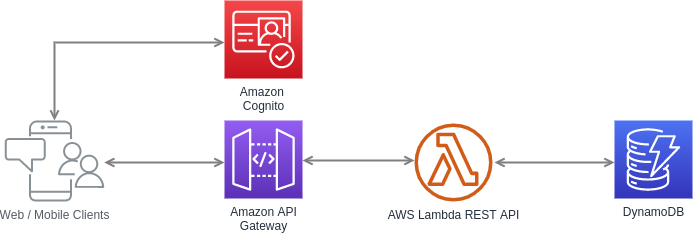
Contrary to what the name might suggest, serverless computing doesn't eliminate servers from the equation. Instead, it represents a paradigm shift in how we think about server management and application deployment. In a serverless model, developers can focus entirely on writing code while cloud providers handle all aspects of infrastructure management, including:
Server provisioning and maintenance
Operating system updates and security patches
Capacity planning and scaling
System monitoring and logging
High availability and fault tolerance
This abstraction of infrastructure management creates a more streamlined development process, allowing teams to focus on delivering business value rather than managing servers.
The Serverless Advantage for Node.js Applications
Node.js is particularly well-suited for serverless architectures for several compelling reasons:
Fast Startup Time: Node.js applications have minimal cold start times compared to other runtimes, making them ideal for serverless functions that may scale down to zero.
Event-Driven Architecture: Node.js's event-driven, non-blocking I/O model aligns perfectly with the serverless computing paradigm, which is inherently event-based.
Lightweight Runtime: The Node.js runtime is relatively lightweight, which helps optimize resource usage and reduces costs in pay-per-use serverless environments.
Rich Ecosystem: The npm ecosystem provides many packages that can be easily integrated into serverless functions, accelerating development.
AWS Lambda and Node.js: A Perfect Match
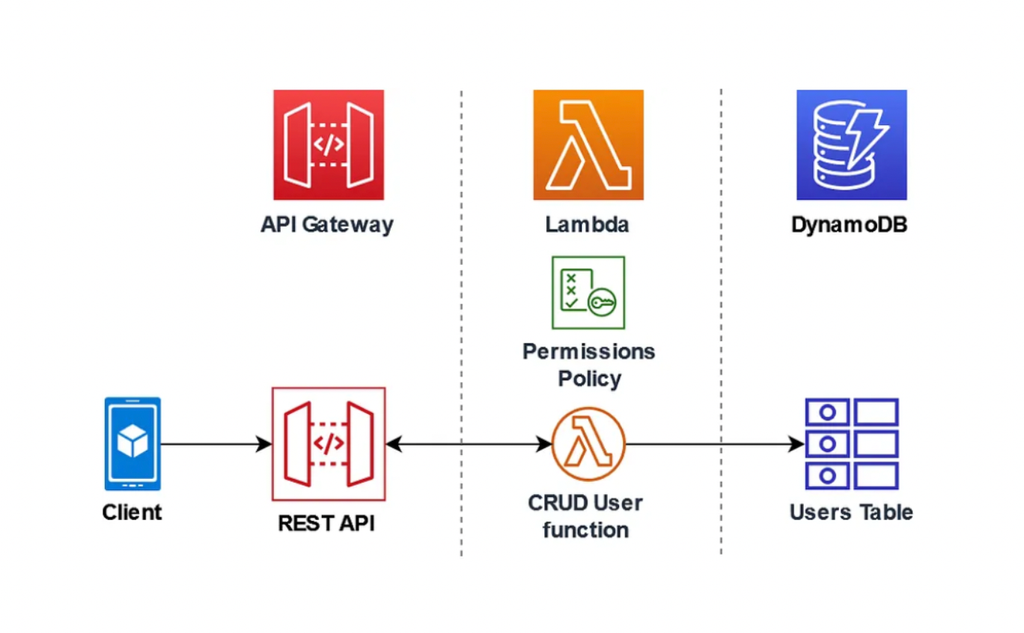
AWS Lambda stands out as one of the most mature and widely-adopted serverless computing platforms. When combined with Node.js, it offers a powerful platform for building scalable applications. Here's a basic Lambda function structure:
exports.handler = async (event, context) => {
    try {
        const result = await processBusinessLogic(event);
        return {
            statusCode: 200,
            body: JSON.stringify({ data: result })
        };
    } catch (error) {
        return {
            statusCode: 500,
            body: JSON.stringify({ error: error.message })
        };
    }
};
Architectural Patterns in Serverless Applications
Microservices Architecture
Serverless computing naturally complements microservices architecture. Each Lambda function can represent a distinct microservice, handling specific business capabilities. This approach offers several benefits:
Independent deployment and scaling of services
Improved fault isolation
Easier maintenance and updates
Better resource utilization
Event-Driven Architecture
Serverless applications often implement event-driven patterns, where services communicate through events rather than direct API calls. AWS provides several services that facilitate this:
Amazon SNS for pub/sub messaging
Amazon EventBridge for event routing
Amazon SQS for message queuing
This architectural style helps build loosely coupled systems that are more resilient and scalable.
Best Practices for Serverless Node.js Applications
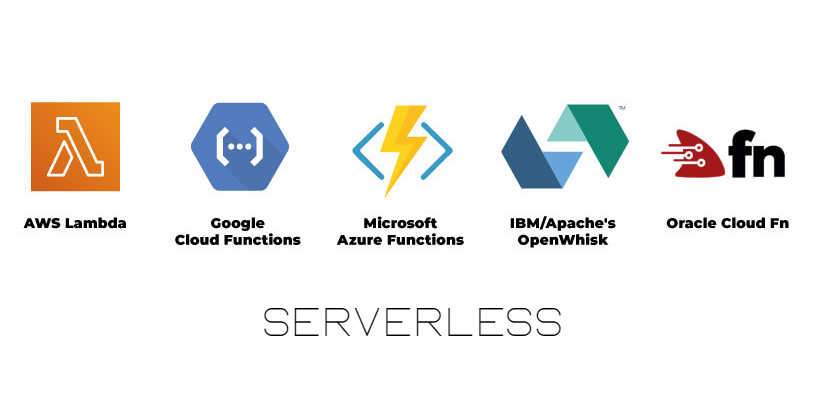
1. Function Size and Responsibility
Keep your Lambda functions focused and small. Each function should have a single responsibility. This approach:
Reduces complexity
Improves testing and debugging
Optimizes cold start times
Makes code maintenance easier
Here's an example of a well-structured Lambda function following single responsibility principle:
// userAuthentication.js
const jwt = require('jsonwebtoken');
const bcrypt = require('bcryptjs');

exports.handler = async (event) => {
    const { username, password } = JSON.parse(event.body);

    try {
        // Validate input
        if (!username || !password) {
            return {
                statusCode: 400,
                body: JSON.stringify({ error: 'Username and password are required' })
            };
        }

        // Authenticate user
        const user = await authenticateUser(username, password);
        const token = generateToken(user);

        return {
            statusCode: 200,
            body: JSON.stringify({ token })
        };
    } catch (error) {
        return handleError(error);
    }
};

const authenticateUser = async (username, password) => {
    const user = await getUserFromDB(username);
    const isValid = await bcrypt.compare(password, user.passwordHash);
    if (!isValid) throw new Error('Invalid credentials');
    return user;
};

const generateToken = (user) => {
    return jwt.sign(
        { userId: user.id, username: user.username },
        process.env.JWT_SECRET,
        { expiresIn: '24h' }
    );
};
2. State Management
Since serverless functions are stateless, proper state management is crucial. Consider these approaches:
Use DynamoDB for persistent storage
Implement caching with Redis or Elasticache
Utilize environment variables for configuration
Store session data in external services
Example of DynamoDB integration with proper error handling:
// userDataService.js
const AWS = require('aws-sdk');
const dynamoDB = new AWS.DynamoDB.DocumentClient();

class UserDataService {
    constructor() {
        this.tableName = process.env.USERS_TABLE;
    }

    async createUser(userData) {
        const params = {
            TableName: this.tableName,
            Item: {
                userId: Date.now().toString(),
                ...userData,
                createdAt: new Date().toISOString(),
                updatedAt: new Date().toISOString()
            },
            ConditionExpression: 'attribute_not_exists(email)'
        };

        try {
            await dynamoDB.put(params).promise();
            return params.Item;
        } catch (error) {
            if (error.code === 'ConditionalCheckFailedException') {
                throw new Error('User with this email already exists');
            }
            throw error;
        }
    }

    async getUserById(userId) {
        const params = {
            TableName: this.tableName,
            Key: { userId }
        };

        const result = await dynamoDB.get(params).promise();
        if (!result.Item) {
            throw new Error('User not found');
        }
        return result.Item;
    }
}

module.exports = new UserDataService();
3. Error Handling and Monitoring
Implement comprehensive error handling and monitoring strategies:
Use structured logging
Implement proper error classification
Set up appropriate monitoring alerts
Use AWS X-Ray for distributed tracing
// logger.js
class Logger {
    constructor(context = {}) {
        this.context = context;
    }

    log(level, message, meta = {}) {
        const logEntry = {
            timestamp: new Date().toISOString(),
            level,
            message,
            ...this.context,
            ...meta
        };

        // In Lambda, console.log writes to CloudWatch
        console.log(JSON.stringify(logEntry));
    }

    info(message, meta) {
        this.log('INFO', message, meta);
    }

    error(message, error, meta = {}) {
        this.log('ERROR', message, {
            ...meta,
            errorMessage: error.message,
            stackTrace: error.stack
        });
    }

    warn(message, meta) {
        this.log('WARN', message, meta);
    }

    debug(message, meta) {
        this.log('DEBUG', message, meta);
    }
}

// Usage example
const logger = new Logger({
    service: 'UserService',
    environment: process.env.STAGE
});

exports.handler = async (event) => {
    logger.info('Processing request', { eventType: event.type });

    try {
        // Process event
        logger.debug('Event processing details', { event });

        return {
            statusCode: 200,
            body: JSON.stringify({ success: true })
        };
    } catch (error) {
        logger.error('Failed to process event', error, { eventId: event.id });
        throw error;
    }
};
Performance Optimization
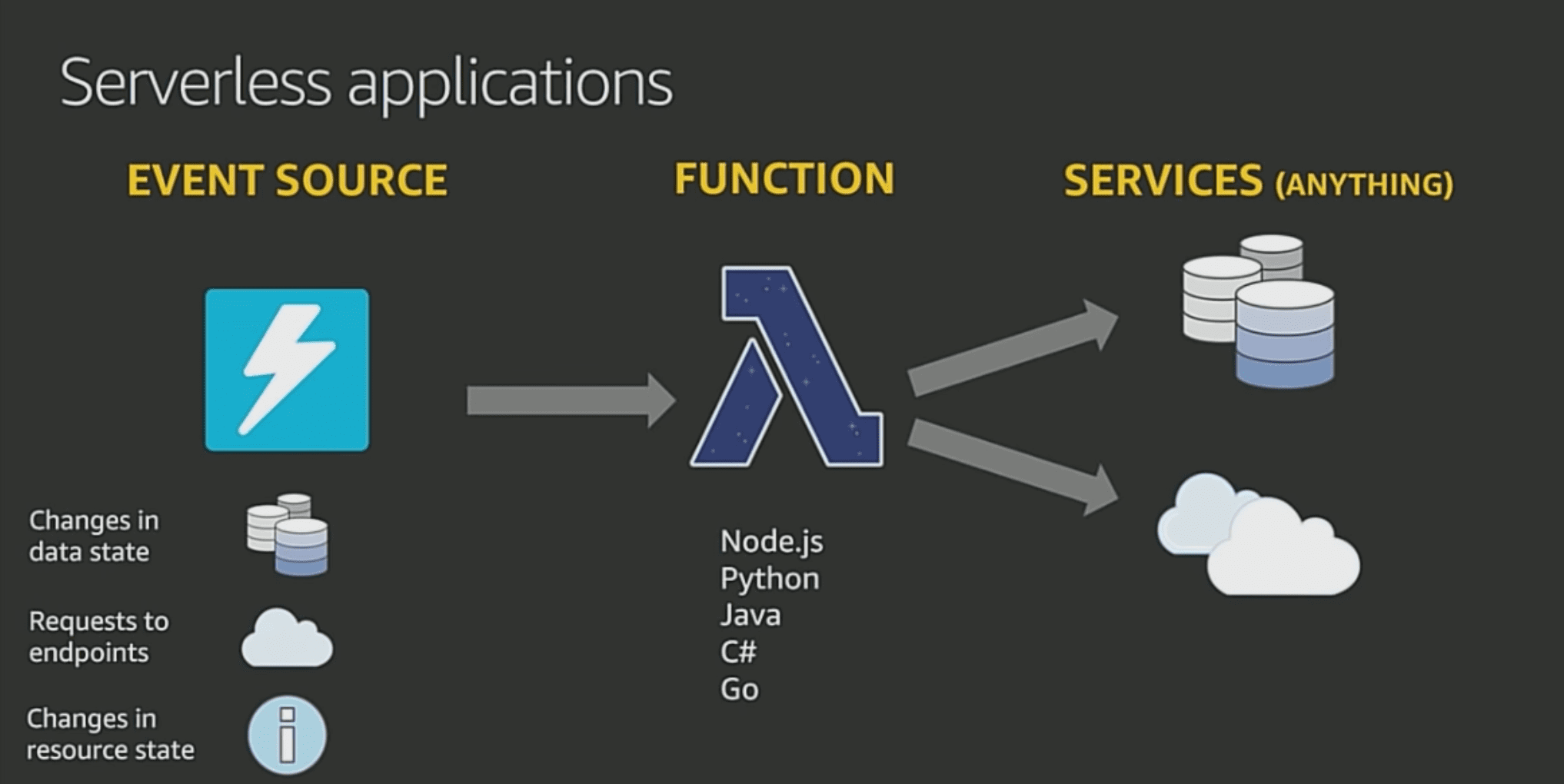
Cold Start Optimization
Cold starts can significantly impact serverless application performance. Minimize their impact by:
Code Optimization:
Keep dependencies minimal
Use webpack for code bundling
Implement lazy loading where appropriate
Memory Configuration:
Choose appropriate memory settings
Monitor and adjust based on performance metrics
Execution Environment:
Use Provisioned Concurrency for critical functions
Implement request coalescing for high-traffic scenarios
Cost Optimization Strategies
Serverless pricing models are based on actual usage, making cost optimization crucial:
Function Duration:
Optimize function execution time
Implement caching strategies
Use appropriate memory configurations
Invocation Patterns:
Batch processing for bulk operations
Implement request throttling
Use appropriate triggers and event filters
Security Considerations
Security in serverless applications requires special attention:
Authentication and Authorization:
Implement JWT or OAuth2
Use AWS IAM roles and policies
Implement proper API Gateway authorization
Data Security:
Encrypt sensitive data
Implement proper key management
Follow the principle of least privilege
Monitoring and Debugging
Effective monitoring is crucial for serverless applications:
CloudWatch Integration:
Set up appropriate metrics
Configure alarms for critical thresholds
Implement detailed logging
Distributed Tracing:
Use AWS X-Ray
Implement correlation IDs
Monitor function performance
Conclusion
Serverless architecture with Node.js represents a powerful approach to building modern applications.
It offers significant advantages in scalability, cost-efficiency, and developer productivity.
However, success with serverless requires careful consideration of architectural patterns, best practices, and potential challenges.
As you embark on your serverless journey, remember that the technology is still evolving.
Stay informed about new features and best practices, and always architect your applications flexibly.
While serverless isn't suitable for every use case, when applied appropriately, it can significantly reduce operational overhead and allow teams to focus on delivering business value.
Consider starting with small, well-defined projects to gain experience with serverless architecture before moving on to more complex applications.
This approach will help you better understand the nuances of serverless development and make more informed decisions as you scale your applications.
Visit
Ideal outsourcing alternative for:
Banks and fintech companies looking to simplify onboarding, reduce support costs, and introduce conversational banking through agentic AI- powered development.


 WhatsApp
 Call Us
 Mail Us