


Beginners Guide Subqueries in SQL



If you've been tinkering around with SQL and have mastered the basics like SELECT, JOIN, WHERE, and GROUP BY, chances are you've stumbled across the word subquery and paused for a moment. Maybe you saw it in a Stack Overflow answer or a tutorial you didn’t quite finish. Either way, let’s break it down in a way that actually makes sense without throwing you into the deep end.
What Even Is a Subquery?
A subquery is just a query inside another query. That’s it. It’s kind of like nesting boxes. One query runs first (the inner one), and then its result is used by the outer query. You can find them hanging out in places like SELECT, FROM, and WHERE clauses. The goal is usually to help the main query by handing it some values or a table that it couldn’t have gotten by itself.
Let’s say you want to find employees who earn more than the average salary. The average salary is calculated from the same table. So instead of calculating it in your head or in a separate query, you let SQL handle both tasks at once:
SELECT name, salary
FROM employees
WHERE salary > (SELECT AVG(salary) FROM employees);
That little part in parentheses? That’s a subquery. It calculates the average salary, and then the main query uses that result to filter employees.
Subquery Syntax
Here’s a quick look at how subqueries are typically written in different parts of a SQL query:
1. Subquery in the WHERE Clause:
SELECT column1, column2
FROM table1
WHERE column1 IN (SELECT column1 FROM table2 WHERE condition);
2. Subquery in the FROM Clause (Inline View):
SELECT avg_salary
FROM (SELECT AVG(salary) AS avg_salary FROM employees) AS avg_result;
3. Subquery in the SELECT Clause (Scalar):
SELECT name,
       (SELECT MAX(salary) FROM employees) AS highest_salary
FROM employees;
4. Correlated Subquery:
SELECT name, department_id
FROM employees e
WHERE salary > (SELECT AVG(salary)
                FROM employees
                WHERE department_id = e.department_id);
No matter where you’re using them, the basic form is:
(SELECT ... FROM ... WHERE ...)
Just remember: your subquery should return the right number of columns and rows based on how you’re using it. If you’re checking for equality, it should return one value. If you’re using IN, it can return a list.
Why Use Subqueries?
Here’s the deal — subqueries save time and keep your code cleaner when you’re working with results that depend on each other. You’ll use them when you:
- Need to compare a value against something dynamically calculated
- Want to filter based on a list of values from another table
- Don't want to write temporary tables or use joins unless you absolutely have to
They’re basically your shortcut when the logic gets a little more layered.
Types of Subqueries
Let’s walk through the main flavors you’ll bump into:
1. Single-row Subqueries
These return just one value — one row and one column. They’re great when you’re comparing one thing to one other thing. If your subquery returns more than one row, this kind of setup will throw an error.
Example:
SELECT name
FROM employees
WHERE department_id = (SELECT id FROM departments WHERE name = 'HR');
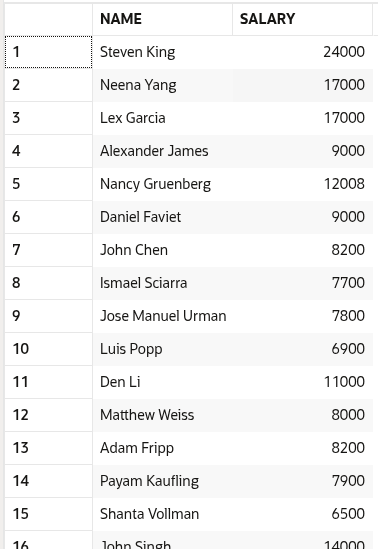
The inner query gets the id of the HR department. The outer query uses that to fetch employee names. Simple and to the point.
2. Multiple-row Subqueries
These return more than one row — but usually just one column. You’ll use them with operators like IN, ANY, or ALL.
Example:
SELECT name
FROM employees
WHERE department_id IN (SELECT id FROM departments WHERE location = 'New York');
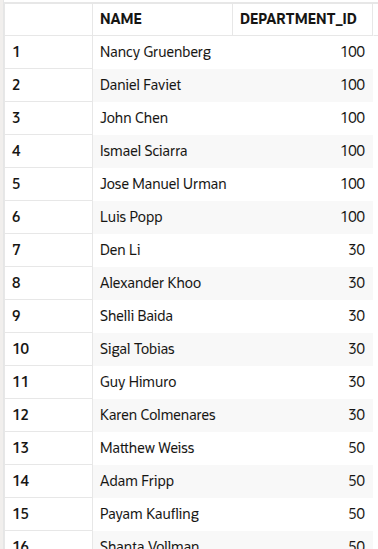
Here, we’re pulling a list of department IDs in New York and matching employees to those.
You can also use ANY or ALL if you're doing comparisons like this:
SELECT name
FROM employees
WHERE salary > ANY (SELECT salary FROM employees WHERE department_id = 2);
This returns employees whose salary is greater than any salary in department 2.
3. Multiple-column Subqueries
These return more than one column. Usually paired with row comparisons or used in the FROM clause.
Example:
SELECT name
FROM employees
WHERE (department_id, role) IN
      (SELECT department_id, role FROM roles_needed);
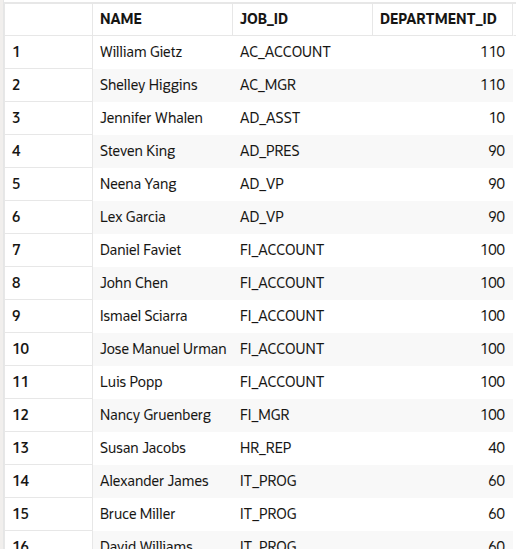
You’re comparing a combination of values instead of just one. The outer query is looking for rows where both department_id and role match something in the inner result.
You can also use multi-column subqueries in the FROM clause:
SELECT avg_salary, department_id
FROM (SELECT department_id, AVG(salary) AS avg_salary FROM employees GROUP BY department_id) AS dept_avgs;
This turns your subquery into a kind of mini-table you can use for further querying.
4. Correlated Subqueries
These are a bit more advanced. A correlated subquery isn’t independent — it runs once for every row in the outer query and depends on it to function.
Think of it like a loop within your SQL. Each row in the main query gets its own custom version of the subquery.
Example:
SELECT name
FROM employees e
WHERE salary > (SELECT AVG(salary)
                FROM employees
                WHERE department_id = e.department_id);
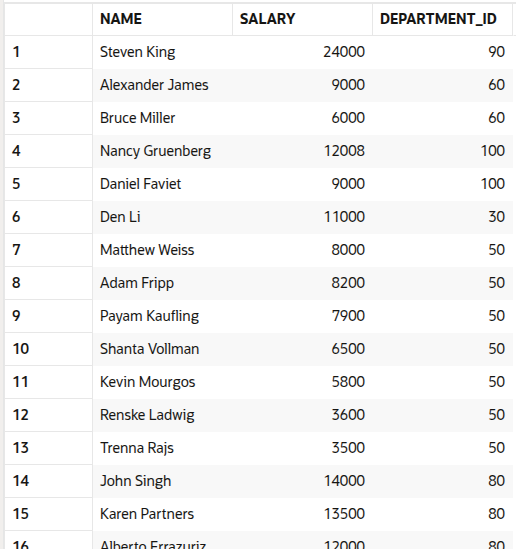
This checks each employee’s salary against the average salary in their department. That’s why the subquery references the outer query’s e.department_id. It’s like the two queries are talking to each other.
5. Scalar Subqueries
Scalar subqueries are used when you need a single value and want to plug it into a larger expression — especially handy in the SELECT clause or even inside mathematical operations.
Example:
SELECT name,
       (SELECT MAX(salary) FROM employees) AS max_salary
FROM employees;
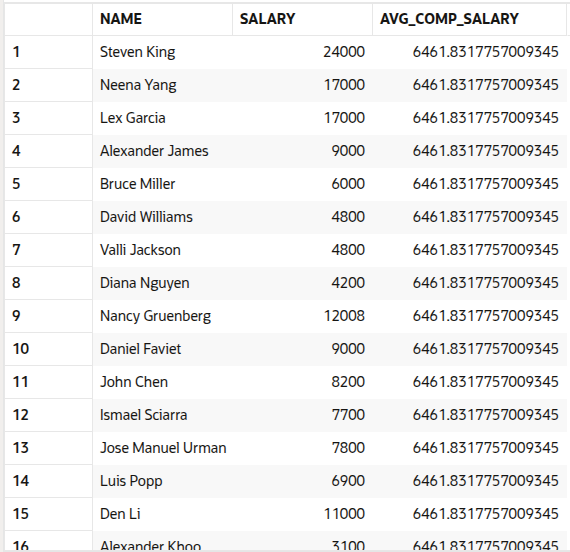
Each row will include the employee’s name and the company’s highest salary. The inner query only runs once, since it’s not correlated.
You can also use scalar subqueries in expressions:
SELECT name, salary,
       salary / (SELECT AVG(salary) FROM employees) AS salary_ratio
FROM employees;
6. Inline Views (Subqueries in FROM)
Sometimes you want to run a subquery, give it a name, and then treat it like a regular table.
Example:
SELECT dept_avg.department_id, dept_avg.avg_salary
FROM (SELECT department_id, AVG(salary) AS avg_salary
      FROM employees
      GROUP BY department_id) AS dept_avg;
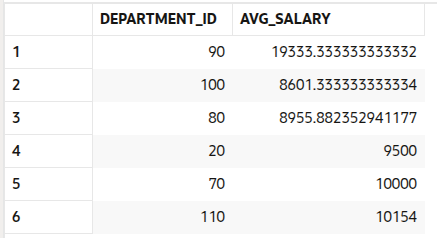
The subquery gives us average salaries by department. By placing it in the FROM clause and giving it an alias (dept_avg), we can reference it just like any other table.
Inline views are great when you’re breaking a problem into steps — kind of like writing helper functions in a coding script.
Where You Can Use Subqueries
You’ll mostly use subqueries in:
- WHERE clauses – For filtering based on dynamic conditions
- FROM clauses – When you want to treat the result of a subquery like a table
- SELECT clauses – If you want to calculate something per row
Here’s a quick FROM example:
SELECT dept, avg_salary
FROM (SELECT department_id AS dept, AVG(salary) AS avg_salary
      FROM employees
      GROUP BY department_id) AS dept_avg;
This kind of thing is useful if you want to get a table out of a subquery that you can keep playing with.
When Not to Use Subqueries
Subqueries are cool and all, but they’re not always the best route. Sometimes, joins are faster and easier to read especially if performance matters. Correlated subqueries in particular can be heavy if your tables are large. Because they run once for every row in the outer query, they can slow things down in a big way.
Another thing to keep in mind: subqueries can mess with readability if you go overboard. Once you start stacking them or nesting them inside each other, your query can get confusing real quick. Debugging becomes a pain, and sharing it with teammates? Even worse.
Also, not all SQL databases optimize subqueries well. Depending on your database engine, the exact same subquery might perform very differently sometimes worse than an equivalent JOIN or CTE.
If you find yourself writing a subquery that’s super slow, tricky to debug, or just too complicated, take a breath and see if a join, a CTE, or even breaking it into steps might do the same thing with less overhead and better clarity.
Real-World Use Case
Scenario:
You're a data engineer or analyst working on a dashboard for the Sales Team of a national retail company. The leadership team wants to highlight salespeople who are outperforming their peers, but they want this contextualized by region, since sales targets, customer behavior, and opportunities vary widely across regions.
Business Objective:
Identify salespeople whose individual performance exceeds the average performance of their region — not just company-wide top sellers. This helps ensure fair comparisons and provides insights into region-specific excellence.
Why a Correlated Subquery?
- Different regions = different baselines.
- You want to calculate the average sales per region dynamically.
- A correlated subquery recalculates the average based on the current row’s region — it adapts to the outer query’s context.
SQL Statement (Using SALES_DATA Table):
SELECT NAME, REGION, SALES
FROM SALES_DATA S
WHERE SALES > (
    SELECT AVG(SALES)
    FROM SALES_DATA
    WHERE REGION = S.REGION
);
Use Cases in the Real World
1. Performance Tracking Dashboard
Highlight region-wise top performers and drive competition within teams.
SELECT NAME, REGION, SALES,
       (SELECT AVG(SALES) FROM SALES_DATA WHERE REGION = S.REGION) AS REGIONAL_AVG
FROM SALES_DATA S
WHERE SALES > (
    SELECT AVG(SALES)
    FROM SALES_DATA
    WHERE REGION = S.REGION
);
2. Benchmarking and Incentives
Use this logic to calculate bonuses only for those exceeding their region’s expectations.
SELECT NAME, REGION, SALES, BONUS_PERCENT
FROM SALES_DATA S
JOIN BONUS_RULES B ON S.REGION = B.REGION
WHERE SALES > (
    SELECT AVG(SALES)
    FROM SALES_DATA
    WHERE REGION = S.REGION
);
3. Region-Specific Leaderboards
Show a live leaderboard per region — top 5 employees who are outperforming.
SELECT *
FROM (
  SELECT NAME, REGION, SALES,
         RANK() OVER (PARTITION BY REGION ORDER BY SALES DESC) AS RANK_IN_REGION
  FROM SALES_DATA
  WHERE SALES > (
      SELECT AVG(SALES)
      FROM SALES_DATA
      WHERE REGION = SALES_DATA.REGION
  )
)
WHERE RANK_IN_REGION <= 5;
A Note on Readability
Once you start chaining subqueries or nesting them a few layers deep, things can go sideways quickly in terms of readability. If your SQL starts looking like a spaghetti bowl, here are a few tips:
- Use smart indentation — even if it takes more lines, it’s worth it
- Don’t get too cryptic with aliases — s for sales, sure, but maybe avoid x1, x2, etc.
- Break complex logic into Common Table Expressions (CTEs) — it’ll read like steps in a recipe
Some developers flat-out prefer CTEs for this reason. It doesn’t change the output, but it sure helps your future self (or your teammates) understand what’s going on.
Wrapping It Up
Subqueries might seem a bit tricky at first glance, but once you start using them in your day-to-day SQL work, they become second nature. Think of them like a Swiss Army knife — not always needed, but really handy in the right situations.
That said, they’re not perfect. Performance can take a hit, especially with correlated subqueries on large datasets. And if you nest too many of them, your query can start looking like a puzzle. But that’s part of learning — figuring out when they make things easier and when they don’t.
Play around with subqueries in your practice queries or test databases. Break things. See what works. That’s how you get good.
Happy querying!
FAQs

 WhatsApp
 Call Us
 Mail Us