


How to Integrate AI Agents Into Existing Business Workflows in 2026



Most business automation breaks the moment a process stops following the script. A rules-based workflow can copy a form from one system to another, but it cannot read a vague supplier email, work out which of three systems holds the answer, and draft a sensible reply. AI agents can. An agent uses a large language model (LLM) to interpret a goal, decide which tools to call, and act through the APIs your business already runs on.
That matters because few companies can replace their CRM, ERP, or ticketing platform just to adopt AI. The practical route is integration: connecting agents to existing applications, databases, and APIs, with scoped permissions and human checkpoints. This guide covers what AI agents are, where they fit, a seven-step integration process, the tools involved, the challenges that cause projects to stall, and what to expect next.
What Are AI Agents and How Do They Work?
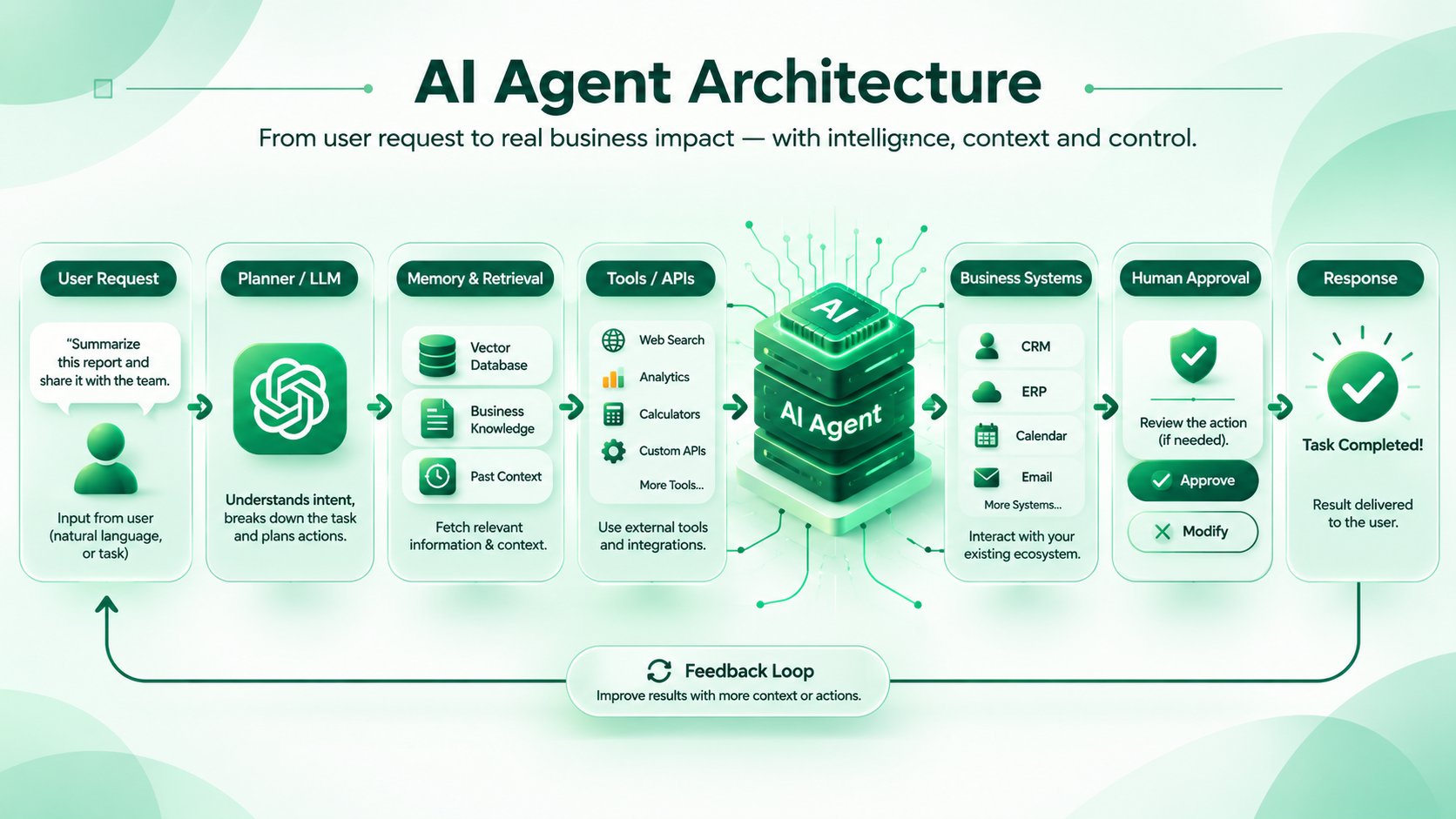
An AI agent is a software system that pursues a goal by reasoning about a task, choosing actions, using external tools, and adjusting based on the results. Unlike a script, it does not need every branch of the process defined in advance.
Understanding AI Agents and Autonomous Decision-Making
Give an agent a goal such as "resolve this billing dispute," and it breaks the goal into steps, looks up the customer record, checks the invoice, and proposes an outcome. Autonomy is a spectrum. Some agents only draft actions for approval; others execute within strict limits. Most business deployments sit toward the supervised end.
Key Components of an AI Agent (LLMs, Memory, Tools, APIs, and Planning)
- LLM: the reasoning layer that interprets instructions and decides the next step.
- Memory: short-term context for the current task, plus long-term storage of past interactions or facts.
- Tools and APIs: the functions the agent can call, such as querying a CRM, creating a ticket, or sending an email.
- Planning: the logic that sequences steps, handles errors, and decides when to stop or escalate.
AI Agents vs Traditional Automation vs AI Chatbots
The table below compares traditional automation, AI chatbots, and AI agents across four factors. The first is whether each approach can handle unstructured input such as emails, PDFs, and free-text requests. The second is whether it can take actions in other systems, such as updating a CRM record or creating a ticket.
The third is how it behaves when a step fails or something unexpected happens. The fourth is how predictable its output is, which matters for auditing and compliance. Together, these show where each approach fits and where it falls short.
The trade-off is worth stating plainly: agents gain flexibility and lose some predictability. For fixed, high-volume tasks, traditional automation is often still the better choice.
Why Businesses Are Integrating AI Agents Into Existing Workflows in 2026
Businesses are adding AI agents to existing workflows because the systems they already run are not the problem. The friction sits between those systems: manual handoffs, copying data from one tool to another, and waiting for a person to read, sort, or approve routine requests. Agents target that gap.
They take over repetitive, text-heavy tasks, give teams back time for work that needs judgment, and use current data from connected systems when making decisions. They can also link applications that were never built to talk to each other, without a full replacement or a custom integration for every pair.
Each of the four reasons below addresses a specific source of delay or cost in everyday operations, and each is measurable, such as handling time, error rate, or cost per task.
Automating Repetitive Business Processes
Triage, data entry, document classification, and status updates take up hours of skilled people’s time but rarely need human judgment. Traditional automation covers part of this work, but it breaks when the input varies, such as an invoice with a new layout or a customer email that mixes two requests. Agents handle those variable parts.
An agent can read an unstructured attachment, pull out the relevant fields, classify the request, and route it to the right queue or system. People then focus on exceptions instead of every routine case, and the process keeps running when formats change.
Improving Operational Efficiency and Productivity
Much of the delay in a workflow comes from handoffs, not from the work itself. A case sits in a queue, and then a person spends time finding the customer record, checking order history, and reading earlier messages before making a decision. An agent can gather that context before anyone opens the case and present a summary with a suggested next step.
This shortens handling time, reduces back-and-forth between teams, and makes outcomes more consistent across staff. Teams can measure the gain directly through handling time, rework rate, and cases resolved per person.
Enabling Real-Time Decision-Making
When an agent has live access to inventory, payment, or ticket data, it can act on current information instead of waiting for a nightly report or a manual export. For example, an agent can check stock levels before confirming a delivery date, or review a payment status before replying to a billing query.
Faster decisions only help if they are correct, so the result depends on the quality and freshness of the underlying data. Decisions that carry financial or legal risk should still pass through a human approval step.
Connecting Disconnected Business Applications
Many teams switch between five or six tools to finish a single task, copying information from a CRM into a ticketing system and then into a spreadsheet. Building a custom point-to-point integration for every pair of applications is slow and expensive to maintain.
An agent can act as a connective layer: it reads from one system, interprets what it finds, and writes to another through existing APIs or a standard such as Model Context Protocol. This lets companies keep the applications they already have while reducing the manual work between them.
How to Integrate AI Agents Into Existing Business Workflows: Step-by-Step
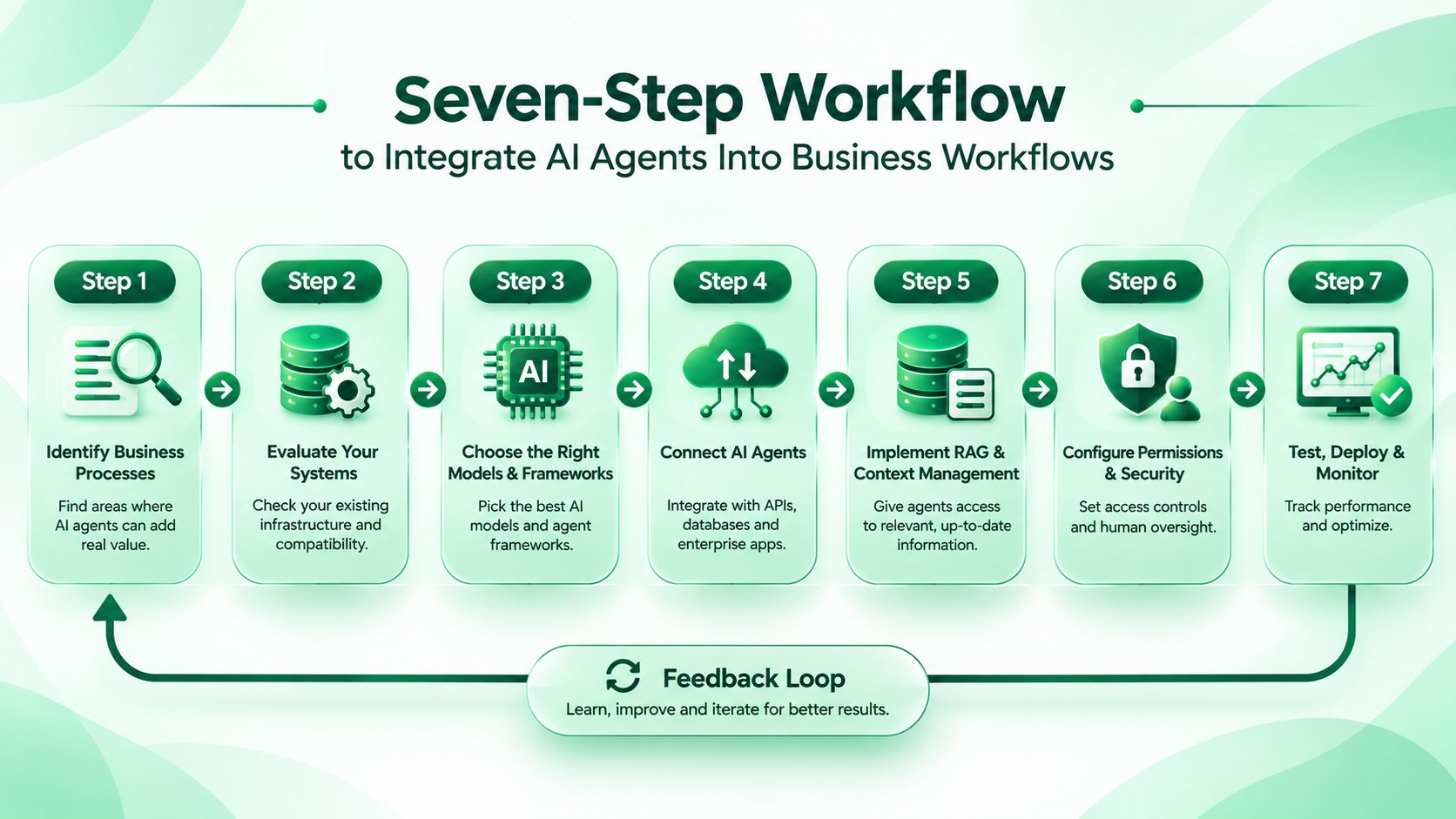
Integrating an AI agent works best as a staged process, not a single build. Each stage reduces a specific risk: choosing the wrong process, underestimating legacy systems, connecting the agent with too much access, or launching without a way to measure quality. The seven steps below follow the order most teams work in, from picking a workflow to monitoring it in production.
They apply whether you build in-house or work with a partner, and each step produces something you can review before moving to the next.
1. Identify Business Processes Suitable for AI Agent Integration
Good candidates are high-volume, text-heavy, and tolerant of occasional review, such as support ticket triage, invoice matching, or candidate screening. Poor candidates involve irreversible actions with no review step, or tasks so rare that the effort will never pay back.
Score each candidate on volume, variability of input, cost of an error, and availability of data. Then pick one process and define a measurable outcome, such as average handling time, first-contact resolution, or invoices processed without rework. Record the current numbers first, so you have a baseline to compare against.
2. Evaluate Your Existing Business Systems and Infrastructure
Map every system the process touches. For each one, note whether it has an API, how it authenticates, what rate limits apply, and who owns it. Check where the data actually lives, since information locked in PDFs, spreadsheets, or email threads will need extraction before an agent can use it.
Look at data quality too: duplicate records, missing fields, and outdated entries will limit what the agent can do, whatever model you choose. This audit usually reveals more risk than the model choice does, and it shapes the budget and timeline.
3. Choose the Right AI Models and Agent Frameworks
Match the model to the task. Multi-step reasoning across several tools may justify a larger model, while classification or data extraction often works well on a smaller, cheaper one. Compare candidates on your own sample cases, looking at accuracy, latency, cost per task, context length, and data-residency options.
For the framework, decide how much control you need over the workflow. A graph-based framework suits processes with fixed approval steps, a role-based framework suits multi-agent setups, and a thin custom layer can be enough for a single narrow task
4. Connect AI Agents With APIs, Databases, and Enterprise Applications
Expose each capability as a narrowly defined tool with clear inputs and outputs. For example, give the agent a “get_invoice_by_id” function rather than open access to “run any SQL.” Use existing REST or GraphQL APIs, or MCP servers where available, and validate every input the agent sends.
Make operations that change data idempotent, so a repeated call does not create a duplicate record or payment. Where a legacy system has no API, build an adapter service in front of it. That is safer than giving an agent direct access.
5. Implement RAG, Memory, and Context Management
Retrieval-augmented generation (RAG) lets the agent pull relevant policy documents, product data, or past tickets at query time instead of relying on what the model learned in training. This keeps answers tied to your current information and makes them easier to verify.
Prepare the content first: clean it, split it into sensible chunks, and attach metadata such as department, date, and access level. Then decide what the agent should remember between sessions, such as customer preferences, and what it should forget, such as sensitive details that are no longer needed.
6. Configure Agent Permissions, Security, and Human Oversight
Give the agent its own service identity with least-privilege access, not a shared or administrator account. Require human approval for actions that move money, delete data, change contracts, or contact customers. Treat all external content, such as emails and web pages, as untrusted input that may contain hidden instructions.
Log every tool call, input, and output so incidents can be traced and reviewed. Decide in advance who is notified when the agent fails or behaves unexpectedly, and how it can be switched off quickly.
7. Test, Deploy, Monitor, and Optimize AI Agents
Build an evaluation set from real historical cases, including difficult and unusual ones, and measure the agent against it before launch. Start in shadow mode, where the agent proposes actions and people carry them out, then widen its autonomy as accuracy data supports it.
After launch, track accuracy, escalation rate, cost per task, and latency, along with the business metric you set in Step 1. Review failures weekly, add them to your test set, and re-run the evaluation after any model, prompt, or data change.
Business Use Case Comparison at a Glance
The table below summarizes the five use cases side by side. For each one, it shows which systems the agent typically connects to, what the agent does, and which decisions should stay with people. Use it to compare use cases and decide where a first pilot fits best.
Key Business Use Cases of AI Agent Integration
AI agents deliver the most value where work is repetitive, text-heavy, and spread across several systems. The five use cases below are the ones businesses most often start with, because each has high volume, clear success metrics, and a natural place for human review.
For each, this section covers what the agent does, which systems it connects to, and where a person should stay in control. Starting with one of these is usually lower-risk than trying to automate a whole department at once.
AI Agents for Customer Support and Service Automation
Support teams spend much of their time on lookups: finding the customer, checking the order, and searching help articles before writing a reply. An agent reads the incoming ticket, identifies the intent, retrieves the customer’s order history and the relevant help articles, and drafts a response or routes the ticket to the right team.
It connects to the helpdesk platform, the order database, and the knowledge base. Refunds, policy exceptions, and sensitive complaints stay with a human, who can review the agent’s draft and context instead of starting from scratch.
AI Agents for Sales and CRM Workflow Automation
Sales teams often lose time to manual updates after calls and meetings. An agent can summarize call notes, update CRM fields, log follow-up tasks, flag deals that have stalled, and prepare account briefs before a meeting by pulling in recent emails and activity.
It connects to the CRM, email, and calendar. The output is only as good as the CRM data behind it, so incomplete or duplicate records should be cleaned up first. Pricing, discounts, and contract terms should remain with the sales team.
AI Agents for Finance and Invoice Processing
Invoice handling combines unstructured documents with strict rules, which suits an agent well. It can extract fields such as vendor, amount, and due date from invoices in varying formats, match them against purchase orders and receipts in the ERP, and flag mismatches or missing information for review.
This reduces manual data entry and speeds up the matching step. Approval and payment release should remain behind explicit controls, with every action logged for audit.
AI Agents for HR and Recruitment Workflows
HR teams handle a steady flow of repetitive requests. Agents can schedule interviews, answer policy questions such as leave or benefits, summarize applications, and help with onboarding tasks. They connect to the applicant tracking system, the HR information system, and internal policy documents. Screening and hiring decisions carry bias and legal risk, so humans should remain accountable for them. Limit access to personal data to what each task needs.
AI Agents for IT Operations and Internal Knowledge Management
Internal agents can answer routine questions such as “how do I request VPN access?” from documentation, open and update tickets, and run approved diagnostic scripts. They connect to the IT service management tool, the internal wiki, and monitoring systems.
This frees IT staff for complex problems and gives employees faster answers. Changes to production systems, access rights, and security settings should require human approval.
How Code-B Can Help You
Integrating AI agents is mostly integration work: connecting models to the CRM, ERP, databases, and APIs you already run, with the right permissions, retrieval, and oversight. Code-B’s teams work on this layer. They assess which workflow is worth automating first, connect LLMs to existing applications, build retrieval over your internal knowledge, and deploy agents with monitoring and human approval steps in place.
Whether you need a team to scope and deliver the integration or want to add AI engineers to a team you already have, there are two ways to start.
Generative AI Integration Services
From workflow assessment to deployment, we connect LLMs and AI agents to your existing applications, APIs, and data sources.
Hire Generative AI Developers
Add vetted engineers experienced in LLM integration, RAG, and agent frameworks to your team, on the engagement model that fits your project.
Technologies and Tools Used for AI Agent Integration
An AI agent is built from several layers, and each one involves a choice: the language model that does the reasoning, the framework that controls the workflow, the protocol or APIs that connect to business systems, the retrieval layer that supplies company knowledge, and the infrastructure that runs it all.
No single combination fits every project. The right stack depends on your data, your existing systems, your security requirements, and how much control you need over the agent’s behavior. The sections below explain what each layer does and the main factors to weigh when choosing.
Large Language Models (OpenAI, Claude, Gemini)
The language model is the reasoning layer of the agent. It interprets the request, decides which tool to call, and writes the output. OpenAI, Anthropic’s Claude, and Google’s Gemini all support tool calling and structured output, which agents depend on. The differences show up in context length, latency, cost per task, data-residency and privacy options, and how reliably each model follows multi-step instructions.
Many teams use more than one model: a larger model for complex reasoning and a smaller, cheaper one for classification or extraction. Test candidates on your own sample cases rather than relying on public benchmarks, and keep the model layer easy to swap, since offerings change quickly.
AI Agent Frameworks (LangChain, LangGraph, CrewAI)
Frameworks handle orchestration: how the agent plans steps, calls tools, keeps state, and recovers from errors. LangChain offers a broad set of integrations with models, tools, and data sources. LangGraph models workflows as graphs with explicit state, which suits processes that need predictable control flow, retries, and approval steps.
CrewAI focuses on role-based collaboration between multiple agents, for example a researcher agent and a reviewer agent. For a single narrow task, a thin custom orchestration layer can be simpler to maintain and debug than a full framework. Choose based on how much control and visibility you need, and how much extra complexity your team can support.
API Integration and Model Context Protocol (MCP)
Agents act on business systems through APIs. Model Context Protocol (MCP), introduced by Anthropic in November 2024, is an open standard for connecting AI applications to tools and data sources.
Instead of writing a custom connector for every model-and-system pair, you expose a system once as an MCP server, and any compatible agent can use it. Conventional REST and GraphQL integrations remain common and are often the better fit for simple, stable connections. Treat MCP servers as privileged code: review them, restrict what they expose, and give them least-privilege credentials, because an agent can call whatever they allow.
Vector Databases and Retrieval-Augmented Generation (RAG)
RAG, described in a 2020 paper by Lewis et al., combines a retrieval step with text generation so that answers draw on your own documents and records. Documents are split into chunks, converted into embeddings, and stored in a vector database, then retrieved by similarity when the agent needs them.
Common options include pgvector (an extension for PostgreSQL), Pinecone, Weaviate, and Qdrant. If you already run PostgreSQL, pgvector can avoid adding a new system. Chunking strategy, metadata filtering, and access controls often affect answer quality more than the choice of database, and retrieval should respect the same permissions as the source data.
Cloud Infrastructure and Deployment Platforms
The agent needs somewhere to run, along with logging, monitoring, and secure access to your data. AWS, Microsoft Azure, and Google Cloud each offer managed model hosting and agent tooling. Choose based on where your data and identity systems already live, which compliance requirements apply, and whether you need to keep data in a specific region. Also plan for observability: tracing tool calls, tracking token cost, and alerting on failures. Containerized deployment helps keep environments consistent across testing and production.
Common Challenges in Integrating AI Agents Into Business Workflows
Most AI agent projects that struggle do so for reasons that have little to do with the model itself. The problems tend to appear where the agent meets the rest of the business: older systems with limited APIs, sensitive data, unreliable outputs, growing integration complexity, and costs that rise faster than expected.
Knowing these challenges before the build starts makes them far cheaper to design around than to fix after launch. The five below are the ones teams most often run into.
Legacy System and API Compatibility
Many core business systems were built before modern APIs existed. They may expose only SOAP services or scheduled batch files, enforce strict rate limits, or offer no programmatic access at all. Connecting an agent directly to such a system is risky, because the agent can send unexpected requests or hit limits the system cannot absorb.
The usual solution is an adapter or middleware layer that translates between the agent and the legacy system, exposes a small set of well-defined functions, and handles authentication, retries, and rate limiting. This also keeps the agent from touching the legacy system in ways its original designers never planned for.
Data Privacy and Security Risks
An agent that reads emails, documents, or web pages is exposed to untrusted content, and that content can contain hidden instructions. This is known as prompt injection, and it can push an agent to leak data or take actions it should not. The OWASP Top 10 for LLM Applications lists it alongside excessive agency and sensitive data disclosure.
The practical defenses are to give each agent only the data and permissions its task needs, keep sensitive actions behind human approval, filter what goes into and comes out of the model, and log every tool call so incidents can be traced. Regulated data, such as personal or financial records, also raises questions about where the model runs and what the provider retains
AI Hallucinations and Unreliable Outputs
Language models can produce confident answers that are wrong, including invented order numbers, policy details, or citations. In a business workflow, that can mean a wrong refund amount or an incorrect compliance answer.
Several controls reduce the risk. Retrieval-augmented generation grounds answers in your own documents and records. Schema validation rejects outputs that are malformed or out of range. Requiring the agent to cite the internal record behind each claim lets reviewers check it quickly. For high-impact decisions, routing low-confidence cases to a person is safer than trying to push accuracy to a perfect level.
Integration Complexity and Scalability
Every tool and agent added to a workflow creates new ways for it to fail. An API call may time out, return partial data, or be repeated by the agent after an error, so operations that change data should be idempotent, meaning a repeat does not create a duplicate record or payment. Timeouts, retries with limits, and clear error handling matter more than in conventional software, because the agent decides what to do next.
As volume grows, throughput limits on downstream APIs often become the bottleneck before the model does. Start with a small number of tools and add more only when each one is tested.
Cost Management and Performance Monitoring
Costs come from token usage, repeated tool calls, retries, long context windows, and the engineering effort to maintain integrations. A single task can trigger many model calls, so costs can grow quickly when an agent loops or retries. Set a budget per task, cap the number of steps, and monitor cost alongside accuracy, latency, and escalation rate. Monitoring also catches quality drift after model or data changes.
Gartner has predicted that over 40% of agentic AI projects will be canceled by the end of 2027, citing escalating costs, unclear business value, and inadequate risk controls.
Best Practices for Successful Enterprise AI Agent Integration
Most successful agent deployments follow the same habits. They start small, keep people involved where mistakes are costly, set clear rules for what each agent can access, measure results against business goals, and expand only after the first workflow is stable.
The practices below apply whether you build in-house or work with a partner, and they address the problems that most often stall projects.
Start With a Clearly Defined Business Use Case
Tie the project to one process, one owner, and one measurable outcome, such as reducing average handling time or the number of invoices processed without rework. A narrow scope makes the agent easier to test, easier to secure, and easier to judge.
Vague goals like “improve productivity with AI” tend to produce agents that look impressive in demos and go unused in daily work. Record the current performance of the process before launch, so you have a baseline to compare against once the agent is running.
Adopt a Human-in-the-Loop Approach
Place approval gates where an error would be costly or hard to reverse, such as payments, contract changes, deletions, or messages sent to customers. Routine, low-risk steps can run without review. A practical pattern is to begin with the agent proposing actions and a person approving them, then loosen oversight step by step as accuracy data builds trust. Review rates can drop as measured accuracy improves, but sensitive actions should keep a human checkpoint.
Reviewers also need a clear way to correct the agent, since those corrections are useful feedback for improving it.
Implement Strong AI Governance and Access Controls
Document what each agent can access and do, who owns it, which data it may use, and how incidents are reported and handled. Give every agent its own identity with least-privilege permissions, rather than reusing a shared or administrator account, and keep audit logs of its actions. Governance also covers model and prompt changes, since an unreviewed update can alter behavior.
The NIST AI Risk Management Framework provides a useful structure for organizing these responsibilities, and it can be adapted to your size and industry.
Monitor Agent Performance and Business KPIs
Track technical metrics, such as latency, tool errors, token cost, and escalation rate, alongside business ones, such as resolution time, rework rate, and customer or employee satisfaction. Technical health alone can hide a poor business result, and the reverse is also true.
Review failed and escalated cases every week, and add them to your test set so the same mistakes are caught before future releases. Watch for quality drift after model updates or changes in the underlying data.
Scale Gradually Across Business Departments
Expand only once the first workflow is stable and its results are clear. Reuse shared components, such as authentication, logging, retrieval, and monitoring, so each new deployment costs less than the last.
Re-evaluate accuracy for each new domain, though, because an agent that works well on support tickets may perform poorly on legal documents. Move department by department, and let each one reveal gaps in data quality or permissions before the next begins.
What's Next for AI Agent Integration in 2026 and Beyond?
Several trends are shaping the next phase. Multi-agent systems, where specialized agents handle separate subtasks under an orchestrator, are moving from experiments to production pilots. MCP-based connectivity is reducing custom integration work, and support is spreading across vendors. Enterprise orchestration platforms are emerging to manage identity, policy, and observability across many agents.
Multimodal agents that read documents, screenshots, and audio will extend automation to work that is still manual. Autonomy will increase, but gradually and where evaluation data justifies it.
How Code-B Helps Businesses Integrate AI Agents Into Existing Systems
Code-B helps teams move from pilot to production without replacing the systems they depend on. Our work covers:
- Custom AI agent development and integration
- LLM and enterprise application integration
- RAG implementation and knowledge retrieval
- API and third-party software connectivity
- AI workflow automation and deployment
Engagements typically begin with a workflow and systems assessment, so the first agent targets a process where the value is measurable.
Ready to integrate AI agents into your business workflows? Explore Code-B's Generative AI Integration Services.
Frequently Asked Questions
What is AI agent integration?

How do you integrate AI agents into existing business applications?
Can AI agents work with existing CRM and ERP systems?
Which frameworks are best for building AI agents in 2026?
How much does AI agent integration cost?
Are AI agents secure for enterprise workflows?
What is the difference between AI agents and multi-agent systems?
Conclusion
Integrating AI agents into existing workflows is mostly an integration and governance exercise, not a model-selection one. The teams that get value pick one well-defined process, connect agents to current systems through narrow, permission-controlled tools, and keep people in the loop where mistakes are costly. They then measure results and widen autonomy only when the data supports it.
Agents will not replace every automation. Fixed, high-volume tasks still suit rule-based workflows. But for work involving unstructured input and decisions across several systems, agents are now a practical option.A sensible next step is to audit one workflow, list the systems it touches, and run a shadow-mode pilot. If you want help scoping that, Code-B’s team can start with an assessment.
 WhatsApp
 Call Us
 Mail Us