


What Is Stress Testing in Software Testing?




Stress testing in software testing is a type of performance testing that pushes an application beyond its normal capacity to find where it breaks, how it fails, and whether it recovers. Think of test-driving a car up a steep hill with a full load: you are not checking that it runs, you are checking what happens at the limit. You run the test so you find the cracks before your users do.
Why stress testing matters
Software rarely fails when you expect it to. Trouble tends to appear when servers are swamped, a flash sale brings far more users than planned, or an external service slows down. Stress testing prepares you for these what-if moments, such as a sudden traffic spike or a database going offline for a short time, and shows how the app recovers afterwards.
Beyond crashes, overload exposes problems that normal testing hides:
Data integrity risks
When a system operates under extreme load, transactions may fail midway through processing, leaving data partially updated or inconsistent. This can result in lost records, duplicate entries, incomplete payments, or corrupted database information, especially when rollback and retry mechanisms do not work as expected.
Security weak spots
Security controls and error-handling mechanisms that work correctly under normal conditions may behave differently when the system is overwhelmed. For example, failed authentication checks, incomplete permission validation, or poorly handled error messages could expose sensitive information or allow unauthorized actions.
Hardware and configuration limits
A system's capacity is not determined by server resources alone. Connection pool sizes, thread limits, available memory, database connections, and timeout settings can all become bottlenecks under heavy workloads. If these limits are reached, requests may queue up, time out, or fail even when the servers still have available processing capacity.
Cascading failures
When one service or external dependency becomes slow or unresponsive, the services that rely on it may begin to experience delays, accumulate pending requests, and consume additional resources while waiting for responses. This can trigger a chain reaction in which multiple services become unavailable, turning an isolated performance issue into a system-wide outage.
Recovery cost
The impact of a system failure depends not only on how it performs under pressure but also on how quickly it returns to normal. A system that recovers within minutes can limit downtime, customer frustration, and lost revenue. However, if performance remains unstable even after the load decreases, teams may need to investigate lingering resource exhaustion, restart services, restore data, or manually clear failed transactions, increasing recovery time and operational costs.
A load test only shows that the app copes with expected traffic. A stress test shows what happens when reality exceeds the plan.
Objectives and key features of stress testing
Key features
Focuses on system boundaries
Stress testing pushes an application beyond its expected operating capacity to identify the point at which performance begins to deteriorate or the system can no longer handle additional demand. This helps teams understand the maximum workload the system can sustain before it starts failing.
Observes behaviour under failure conditions
The test examines how the system responds when resources become insufficient or requests exceed its processing capacity. Teams assess whether the application fails gracefully, slows down while keeping critical functions available, or experiences complete failure that disrupts the user experience.
Evaluates the recovery process
Stress testing checks whether the system can return to normal operation once the excessive load is removed. It helps determine whether services resume automatically, resources are released correctly, and pending requests are handled safely, or whether manual intervention and restarts are required.
Identifies hidden performance bottlenecks
Excessive workloads can reveal weaknesses in application code, database queries, network connections, server resources, and infrastructure configuration that may not appear during routine testing. Identifying these bottlenecks helps teams address capacity limitations before they cause production incidents.
Core objectives
Every effective stress test should begin with a clearly defined question or outcome. The goal is not simply to overload an application but to understand its limits, evaluate its response to extreme conditions, and identify improvements that will make it more reliable. The following are the core objectives teams typically establish when planning stress tests.
Stress vs Load vs Soak vs Spike Testing: What's the Difference?
Each test examines a different aspect of application performance, from handling everyday traffic to surviving unexpected surges and recovering from overload.
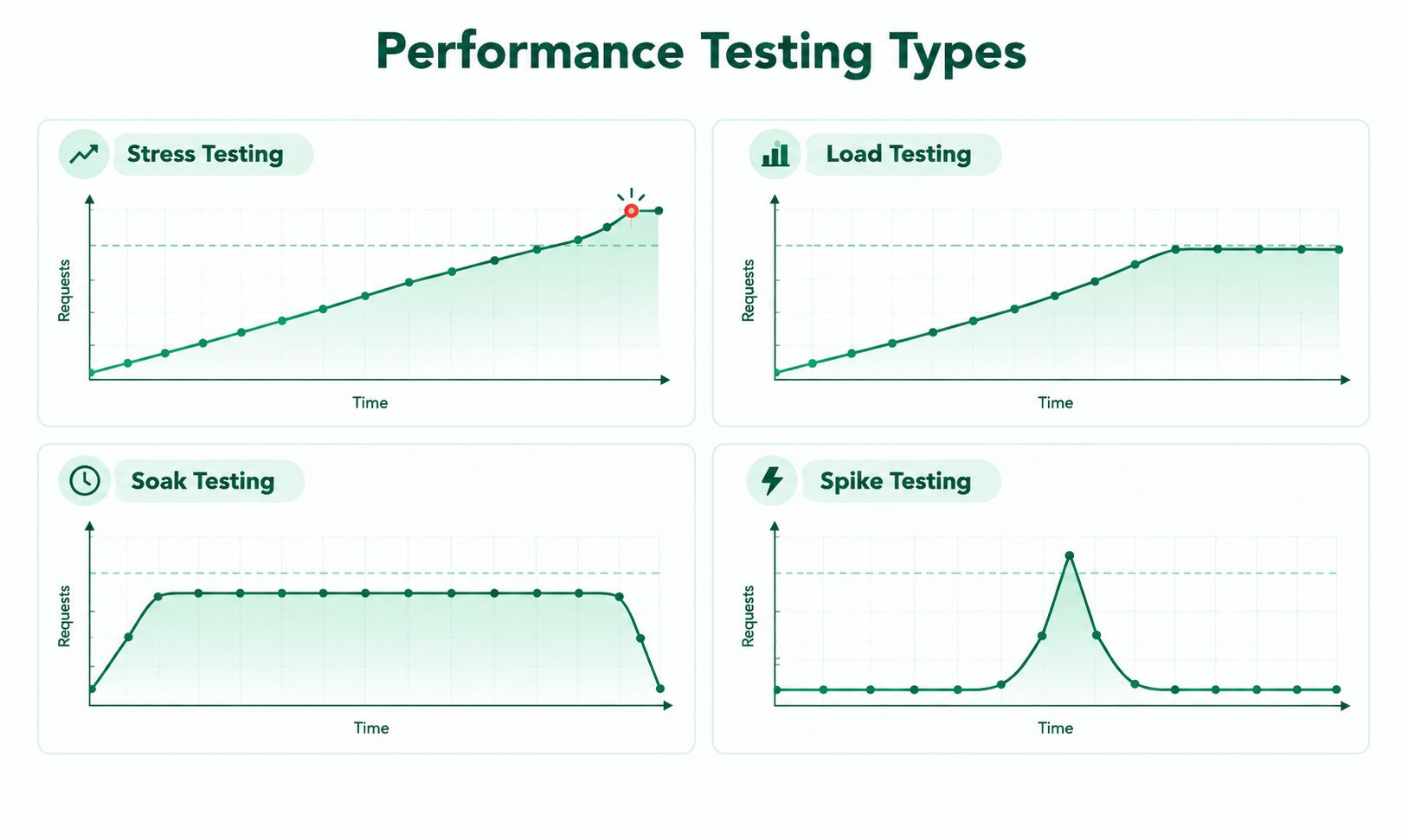
Stress testing vs load testing
Stress testing and load testing both evaluate software performance, but they serve different purposes. Load testing checks how a system performs under expected user traffic, while stress testing pushes it beyond normal operating limits to identify its breaking point and assess recovery. The table below highlights their key differences.
A load test usually has a pass or fail result against a service target. A stress test is more exploratory: it is designed to map the failure boundary and produce data for improvement, so the useful output is the shape of the degradation, not a green tick.
Types of stress testing
Stress testing can be performed in different ways depending on the application's architecture, workload and testing goals. Each type focuses on a specific area, from individual application components and distributed infrastructure to unexpected failures and high-volume transactions. Understanding these types helps teams identify performance bottlenecks, system weaknesses and potential failures under extreme conditions.
Application stress testing
Targets one part of the application, such as a login system or payment gateway, with extreme concurrency or request volume. It finds bottlenecks in code, database calls and resource handling before that component is combined with the rest.
Example: thousands of simultaneous users hitting the same checkout page.
Systemic stress testing
Tests the whole system, including databases, servers, network and third-party services, to see how the parts behave together under strain.
Example: overloading the database server and watching the effect across every dependent service.
Distributed stress testing
Used when the app runs across multiple machines, regions or environments. It checks that the pieces still work together when conditions turn bad, and that a problem in one node does not spread.
Example: generating load from several regions at once against a multi-region deployment.
Exploratory stress testing
Open-ended testing where you apply unexpected or random stress conditions to see what happens, such as killing a service mid-load or filling disk space.
Transactional stress testing
Focuses on the system's ability to process a very high volume of transactions along specific data paths. It is especially valuable for banking, payments and e-commerce, where it exposes processing bottlenecks, database locking and data integrity problems.
Example: a flood of simultaneous payment submissions to confirm that every order is recorded once and balances stay correct.
Which type should you run?
Key metrics to monitor during stress testing
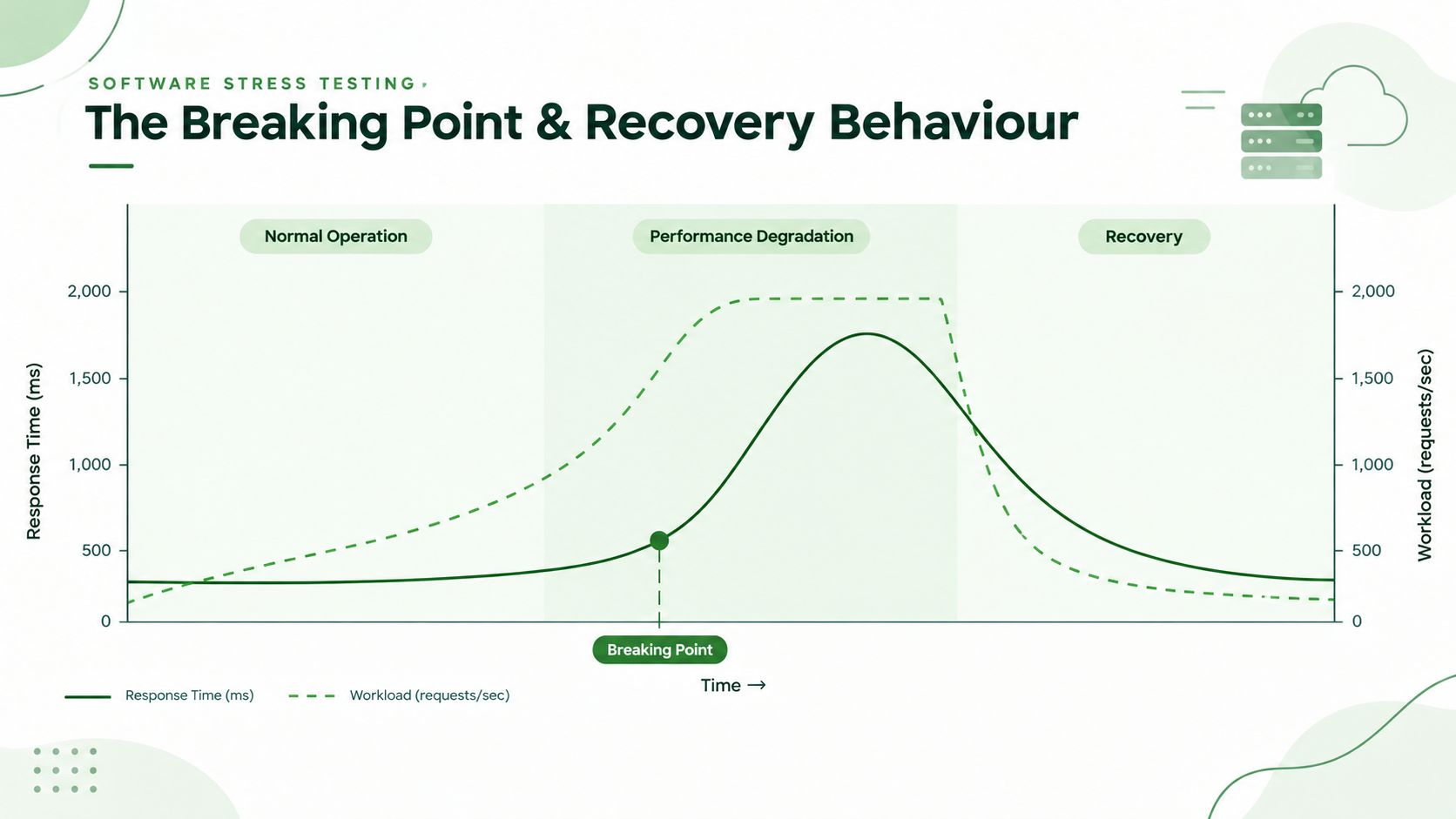
Look for the knee in the curve
As load rises, throughput usually climbs in step with it. The "knee" is the point where latency jumps and throughput stops increasing. That load level is your practical capacity limit, and it is usually reached long before the system actually crashes.
Define pass and fail before you run the test
Agree explicit thresholds up front so nobody rationalises the results after seeing the graphs. For example (illustrative values; set yours from your own service targets):
- p99 response time stays below 2 seconds on the checkout path until the load reaches the planned peak
- error rate stays below 1 percent at planned peak, and below 5 percent at the highest stress level
- the system returns to baseline latency within a set number of minutes after load is removed
- queues drain and no manual restart is needed
A system that survives the overload but stays unhealthy afterwards has not passed
How to Perform Stress Testing: A Step-by-Step Guide
Stress testing follows a structured process to determine how an application behaves under extreme workloads, where performance starts to decline, and whether the system can recover safely after the pressure is removed. Following these steps helps teams identify weaknesses, evaluate system stability, and make informed improvements before similar conditions affect production.
The Seven Steps of Stress Testing
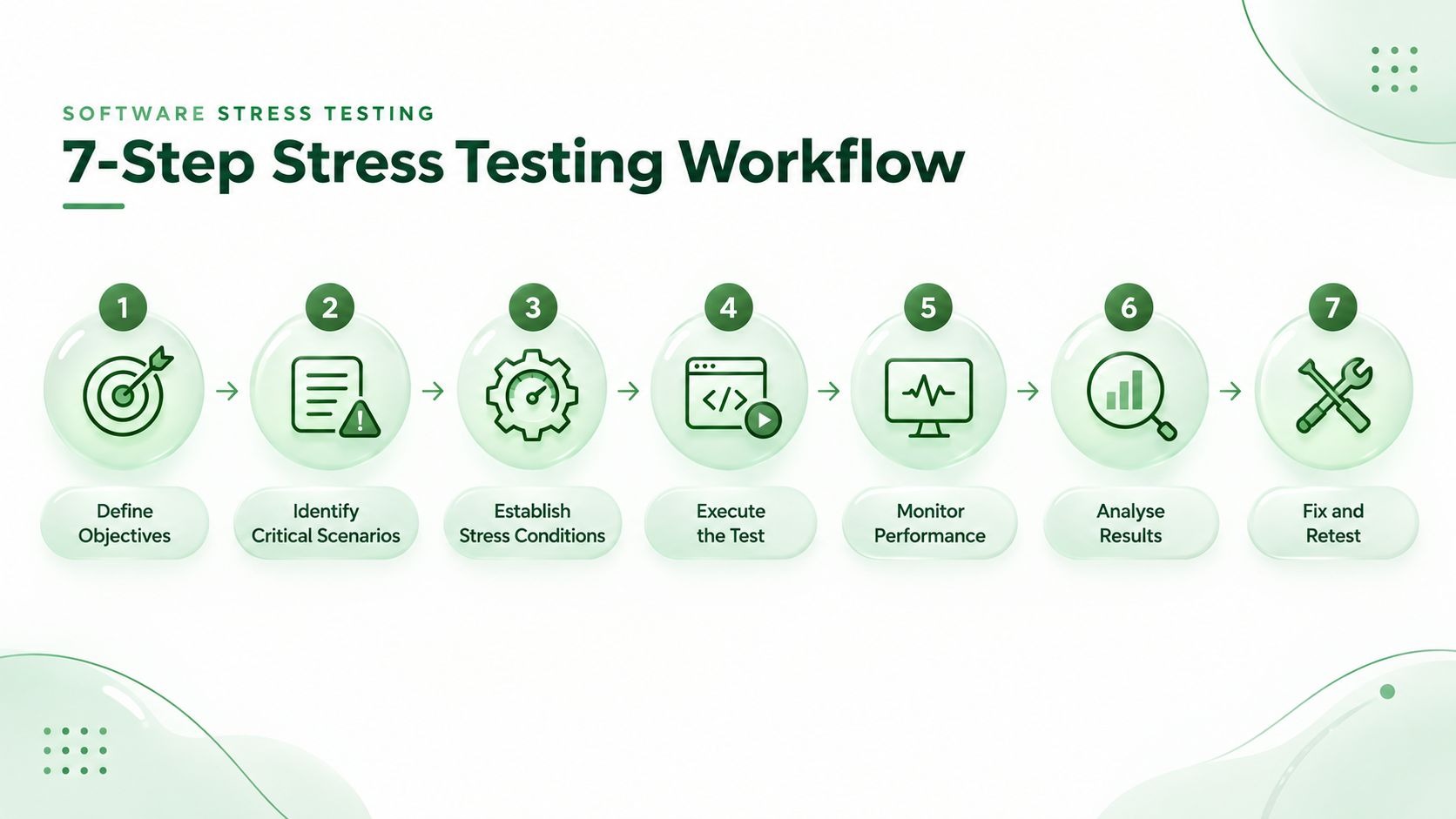
1. Define the testing objectives
Start by identifying what the stress test needs to evaluate. The objective could be to determine the maximum number of concurrent users the application can support, identify the point at which response times become unacceptable, check for transaction failures, or measure how long the system takes to recover. Clear objectives help teams select the right scenarios and performance metrics.
2. Identify critical user journeys and system components
Select the application functions and infrastructure components that are essential to business operations. These may include user authentication, product search, checkout, payment processing, database queries, or API requests. Prioritising these areas helps teams understand how excessive workloads could affect important transactions and the services that support them.
3. Define stress conditions and workload limits
Establish the conditions under which the application will be tested beyond its expected capacity. This may involve gradually increasing concurrent users, generating more requests than the system typically handles, restricting available resources in a controlled environment, or simulating a dependency failure. Define clear thresholds for acceptable performance, failure conditions, and recovery expectations before running the test.
4. Execute the stress test
Use a suitable performance testing tool to generate the planned workload and simulate the selected conditions. Increase the load according to the test plan while observing how the application responds. Run tests in a controlled environment wherever possible, particularly when testing scenarios that could cause service disruption, data corruption, or resource exhaustion.
5. Monitor performance and collect metrics
Monitor the application, database, network, and infrastructure throughout the test. Record key metrics such as response time, throughput, error rate, CPU and memory utilisation, database connections, and request timeouts. Continue monitoring after the load is reduced to capture recovery behaviour and determine whether the system returns to its normal operating state.
6. Analyse results and identify bottlenecks
Review the collected data to determine when performance began to deteriorate and which component reached its limit first. Investigate whether the failure originated in application code, database queries, connection pools, memory constraints, or an external dependency. Also examine whether errors affected data integrity, whether failures spread across connected services, and whether the application recovered automatically or required manual intervention.
7. Implement fixes and repeat the test
Use the findings to address the identified weaknesses. Improvements may include optimising database queries, adjusting resource limits, improving error handling, introducing appropriate timeouts, or strengthening recovery mechanisms. Run the same test again under comparable conditions to verify whether the changes improved system behaviour and whether any new bottlenecks have emerged.
A stress test is complete when the team has documented the system's limits, verified the effectiveness of corrective actions, and confirmed that the application can handle the tested failure conditions with an acceptable level of stability and recovery.
Best Practices for Effective Stress Testing
Set up the test environment
Use an environment that mirrors production in hardware, software, network setup and deployment topology, because results from a much smaller environment give a breaking point that does not apply to production. If an exact copy is too costly, replicate the parts that matter most: database performance, network configuration and the main dependencies. Isolate the system under test from shared infrastructure so you do not disturb real users or real data.
Prepare realistic test data
The quality of the data decides the quality of the findings. Use data that matches the variety and volume of real use, such as a mix of account types, balances and transaction sizes for a banking app. Never test with live personal data: use masked copies of production data or synthetic data that mirrors its statistical shape. Small datasets can hide expensive queries that only show up at realistic size.
Ramp the load gradually
Do not jump straight to the extreme. Start at a baseline, step up through expected peak, then keep climbing until you see degradation, then drop the load and observe recovery. A stepped ramp shows where performance starts to slip, not only where it ends.
Example: a stepped stress test script
This example uses k6, an open-source load testing tool written for developers. The script ramps the load in stages, stops automatically if errors pass 5 percent, and finishes with a drop to zero so you can watch recovery. Replace the URL and numbers with your own.
import http from 'k6/http';
import { sleep } from 'k6';

export const options = {
  stages: [
    { duration: '2m', target: 100 },   // baseline
    { duration: '5m', target: 200 },   // expected peak
    { duration: '5m', target: 400 },   // beyond peak
    { duration: '5m', target: 800 },   // stress level
    { duration: '5m', target: 1200 },  // push toward the breaking point
    { duration: '5m', target: 0 },     // remove load and observe recovery
  ],
  thresholds: {
    http_req_failed: [{ threshold: 'rate<0.05', abortOnFail: true }],
    http_req_duration: ['p(99)<2000'],
  },
};

export default function () {
  http.get('https://staging.example.com/api/products');
  sleep(1);
}
Run it with k6 run stress-test.js and watch your monitoring dashboards, not only the k6 summary.
Real-world stress testing examples
Stress testing is used across industries to understand how applications behave during sudden traffic spikes, unusually high transaction volumes and other extreme conditions. These real-world examples show how teams use stress testing to identify bottlenecks, protect data integrity and prevent service disruptions when demand exceeds normal operating levels.
A worked e-commerce scenario
Build the test around the path the business cannot afford to lose, with a realistic mix of behaviour instead of hammering one endpoint.
Most virtual users browse and search, as in real top-of-funnel traffic.
A smaller group adds items to the cart, which triggers inventory checks.
A smaller subset enters checkout, hitting tax, shipping, fraud and payment dependencies.
Background jobs keep running, so the system is not unrealistically quiet outside the front end.
This mix matters because the web tier can look healthy while the queue, the database or the payment handoff is already failing. A good finding reads like this: "checkout latency climbed after the database connection pool filled and retries then added load on the payment service," not just "the app got slow."
.svg&w=256&q=75)
Stress testing for cloud-native systems and in CI/CD
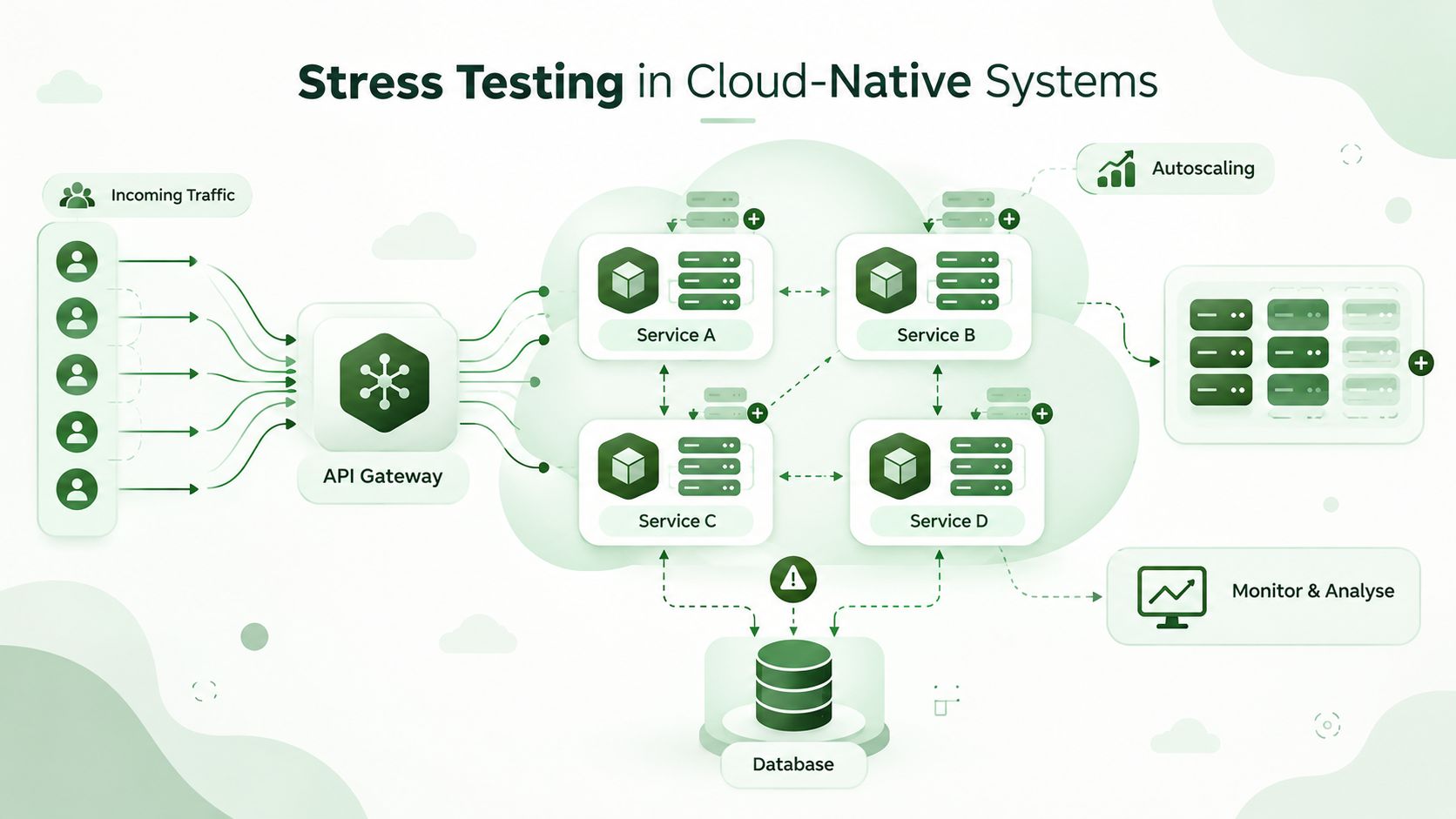
Microservices, autoscaling and serverless platforms change how stress tests should be designed, and stress testing now belongs inside the delivery pipeline.
What Changes in Cloud-Native Systems?
Elastic capacity and autoscaling
Cloud-native systems
often use platforms such as Kubernetes and serverless services to add or remove resources based on workload demand. During stress testing, teams need to evaluate whether these scaling mechanisms respond quickly enough to rising traffic. If new resources take too long to become available, the application may experience high response times, request failures, or service interruptions before additional capacity is ready.
Cold starts and throttling
Serverless functions and other on-demand computing services may introduce delays when new instances need to start before processing requests. Under heavy workloads, platforms may also enforce concurrency limits, request quotas, or resource restrictions that prevent the application from handling additional traffic. Stress testing helps identify these delays and limits before they affect users in production.
Dependency cascades across microservices
Cloud-native applications often rely on multiple interconnected services, APIs, databases, and external providers. If one dependency becomes slow or unavailable, the services that rely on it may begin to experience delays and resource exhaustion. Automatic retries can make the situation worse by sending additional requests to an already struggling service. Stress testing helps teams evaluate timeout settings, retry policies, circuit breakers, and other mechanisms designed to contain failures.
Global traffic distribution
Applications serving users across multiple regions must account for differences in network latency, regional infrastructure capacity, and the availability of dependent services. A test generated from a single location may not reveal performance problems experienced by users elsewhere. Running tests from multiple geographic locations helps teams identify regional bottlenecks and understand how traffic distribution affects response times and service availability.
Cloud infrastructure costs:
Autoscaling can help an application maintain availability during sudden traffic increases, but adding compute instances, database capacity, network resources, or serverless executions can significantly increase cloud spending. Stress testing should therefore evaluate resource consumption alongside application performance. Reviewing the cost of handling different workloads helps teams identify inefficient scaling behaviour and establish capacity limits that balance performance, reliability, and infrastructure expenses.
Put stress testing in your CI/CD pipeline
Stress testing should not be a one-off event before launch. A practical model:
Treat results as quality gates. Fail the release if critical workflows degrade past agreed thresholds, if the system does not recover after the load is removed, or if one failing dependency spreads to others. Keep the test scripts in version control, trigger them through your CI tool, and publish results to a shared dashboard so developers and leaders see the same picture.
Share ownership. Let a platform team provide standards and tooling, and let product teams own the tests for their own critical flows.
Popular stress testing tools
Several stress testing tools help teams simulate heavy workloads, identify performance bottlenecks and evaluate how applications behave under extreme conditions. They differ in scripting languages, protocol support, reporting features and deployment options. The following table compares popular tools and their best use cases to help teams choose the right option for their testing requirements.
GoReplay deserves a special note: because it replays real production traffic, it answers the most common stress testing problem, which is that invented traffic never quite matches how people really use the system.
How to choose a tool
Pick by fit, not by popularity.
Ask:
- Does it support the protocols and traffic patterns your system uses, including APIs, asynchronous flows and authentication?
- Can developers write and run focused tests themselves, with scripts kept in version control?
- Can it generate enough load, from enough locations, without the load generators becoming the bottleneck?
- Does it plug into your monitoring and CI/CD tools?
- Are the reports clear enough for both developers and non-technical stakeholders?
- What does it cost at the scale you need?
A small team will often start with an open-source tool such as k6, JMeter or Locust, while a large enterprise may prefer a commercial platform for support, governance and reporting. The tool matters less than the strategy: a clear goal, good monitoring and repeatable runs.
Best Practices for Effective Stress Testing
Following a structured approach to stress testing helps teams identify performance limitations, understand failure behaviour, and improve application reliability before problems affect production. These best practices make test results more accurate, repeatable, and useful for technical teams and business stakeholders.
Establish a performance baseline
Record the application's performance under normal operating conditions before introducing excessive workloads. Capture metrics such as response time, throughput, error rate, CPU utilisation, and memory consumption. Comparing these baseline measurements with stress test results helps teams identify when performance begins to deteriorate and how severely the system is affected.
Test early and regularly
Incorporate stress testing into the software development and testing lifecycle instead of postponing it until just before release. Testing during development helps teams identify architectural weaknesses and resource limitations while they are easier to address. Repeating tests after major code changes, infrastructure updates, or configuration adjustments also helps detect performance regressions.
Automate repetitive testing tasks
Use performance testing tools and automated scripts to execute predefined workloads, collect metrics, and generate reports. Automation makes it easier to repeat tests under consistent conditions and compare results across different builds. It also allows teams to evaluate more workload patterns without manually running every scenario, saving time and improving test consistency.
Simulate realistic failure scenarios
Design test scenarios around situations the application could encounter in production, such as a flash sale, a sudden increase in partner API requests, a database slowdown, or the temporary unavailability of a critical service. Realistic scenarios help teams understand how the system responds to business-specific demands and unexpected disruptions rather than relying solely on artificial traffic patterns.
Coordinate across development, QA, and operations teams
Ensure that developers, quality assurance engineers, infrastructure specialists, and operations teams understand the test objectives, expected workload, monitoring requirements, and potential risks. Collaboration helps teams interpret the findings accurately, identify the right people to investigate failures, and prioritise fixes based on their technical and business impact.
Increase the workload in controlled stages
Begin with normal traffic, move towards expected peak demand, and progressively increase the workload beyond the system's anticipated capacity. Monitor performance at each stage to identify the point where response times rise, errors increase, or resources become saturated. A gradual increase helps teams pinpoint performance limits more accurately than jumping directly to the highest workload.
Verify recovery after the test
Do not stop monitoring as soon as the workload decreases or the application reaches its breaking point. Observe whether response times return to normal, resources are released, pending requests are processed, and dependent services become healthy again. Record the recovery time and identify whether the system requires manual intervention, restarts, or other corrective actions.
Monitor the entire technology stack
Collect performance data from every component that contributes to the application's operation, including application servers, databases, caches, message queues, network connections, and third-party APIs. An application may appear healthy at the server level while database connection pools or downstream services are already overloaded. Monitoring the full stack helps teams identify the actual source of performance degradation.
Correlate performance metrics with logs
Analyse metrics, application logs, database logs, and distributed traces together to understand what happened when performance started to decline. For example, a sudden increase in response time combined with exhausted database connections and repeated timeout errors may point towards a database bottleneck. Correlating these signals helps teams distinguish the underlying cause from the symptoms of a failure.
Present results through clear visual reports
Use charts and dashboards to show how response times, error rates, throughput, and resource utilisation change as the workload increases and decreases. Highlight the point where degradation begins, the resources that reach their limits, and the time required for recovery. Clear visual reports help technical teams prioritise improvements and enable business stakeholders to make informed decisions about release readiness and operational risk.
Effective stress testing goes beyond finding the point at which an application fails. By following these practices, teams can understand why failures occur, verify that recovery mechanisms work as expected, and make evidence-based improvements to system reliability.
Common stress testing mistakes to avoid
Advantages of stress testing
Stress testing is about protecting the user experience as much as catching bugs.
Prevents crashes and outages in high-traffic situations
Builds confidence in the system's stability before launches
Improves error handling and recovery processes
Makes the app more reliable during real traffic surges
Shows where you are over- or under-provisioned, which can reduce infrastructure cost
Supports capacity planning with tested limits instead of estimates from a spreadsheet
Protects revenue and brand reputation by avoiding downtime and data loss
Challenges of stress testing and how to solve them
Despite these hurdles, the insight you gain usually outweighs the effort.
Frequently asked questions

Conclusion
Stress testing helps teams understand how applications behave under extreme workloads, identify performance bottlenecks, and evaluate recovery after failure. By testing realistic scenarios, monitoring critical resources, and addressing weaknesses early, businesses can improve system reliability and reduce the risk of unexpected downtime.
If you need help evaluating your application's performance limits, the Code-B team can help you design and execute stress tests tailored to your product's needs.
 WhatsApp
 Call Us
 Mail Us