


How to Develop a Chatbot: Steps, Cost, and Challenges



How Chatbots Work
A large share of customer interactions are repetitive order tracking, account access, and basic support queries. Handling these manually slows response times and increases operational load as volume grows.
This is why chatbots are used to manage structured, repeatable conversations. They respond instantly and reduce the need for manual handling of routine requests. Chatbot research from Jotform suggests they can handle up to 80% of such interactions, which explains the steady rise in adoption.
In practice, chatbots are used to answer common questions, guide users through processes, and support simple tasks across customer support, onboarding, and internal systems.
At a basic level, every chatbot follows the same flow. A user sends a message, the system processes it, identifies what the user is trying to do, and returns a response.
This involves interpreting the input, mapping it to a specific intent, and generating a relevant reply based on how the chatbot has been designed. Regardless of the implementation, this input–interpretation–response cycle is what defines how chatbots operate.
Understanding this core flow provides the foundation for exploring different types of chatbots and how they are designed to handle user interactions.
Types of Chatbots Explained
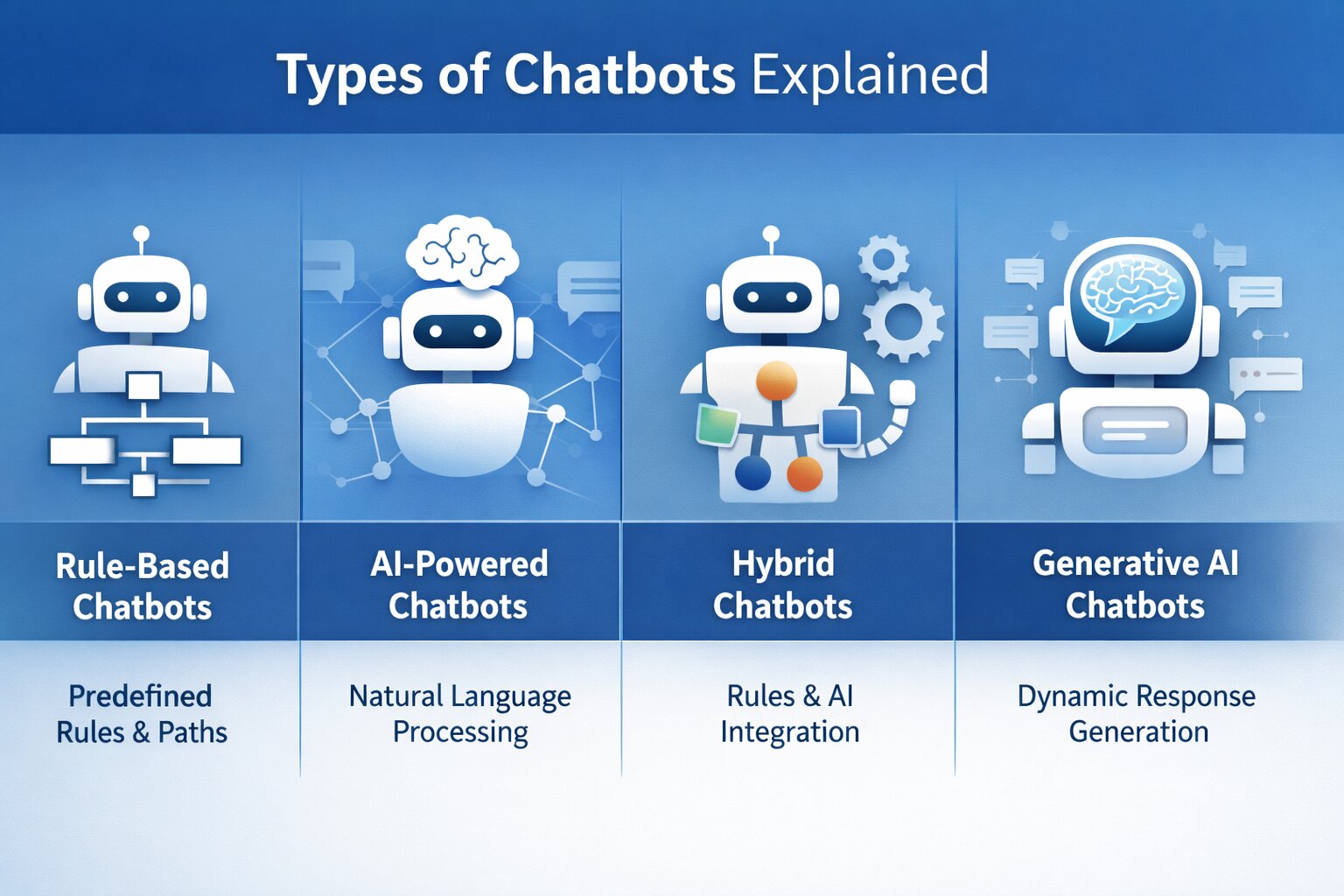
The way a chatbot is designed to handle input has a direct impact on how it performs in real use. Two chatbots can look identical on the surface but behave very differently depending on how they process queries, handle variation, and generate responses.
This is where most implementation gaps begin. When the underlying approach doesn’t match the nature of the interaction, the chatbot either becomes too rigid to handle real users or too unpredictable to rely on.
At a practical level, chatbot types differ in how they interpret input and control responses.
Rule-Based Chatbots
Rule-based chatbots operate within a fixed structure. They follow predefined paths where responses are triggered by specific inputs such as keywords, button selections, or decision trees.
The system does not interpret meaning it matches inputs against expected patterns. This keeps interactions predictable and easier to control, but limits how far the conversation can extend beyond the defined flow. Any deviation from expected inputs can result in failed or incomplete responses.
AI-Powered Chatbots
AI chatbots are designed to interpret user intent rather than rely on exact matches. They use natural language processing to understand how users phrase requests and map different variations to the same outcome.
This allows the system to handle less structured interactions and respond more flexibly. However, this flexibility depends on training quality and continuous refinement. Without proper tuning, responses can become inconsistent or inaccurate.
Hybrid Chatbots
Hybrid chatbots combine structured logic with intent-based handling. They rely on predefined flows for predictable interactions and shift to interpretation when inputs fall outside expected patterns.
This approach allows systems to maintain control where needed while still handling variation in user input. It is commonly used in production environments where both consistency and flexibility are required.
Generative AI Chatbots
Generative AI chatbots produce responses dynamically instead of selecting from predefined options. They rely on advanced language models to generate responses based on context and input.
This expands the range of interactions the chatbot can handle, especially in scenarios where responses cannot be predefined. However, it also introduces variability, making it harder to maintain consistent tone, accuracy, and control without additional constraints.
Comparison of Chatbot Types
The choice here affects how the chatbot behaves once it goes live. A structured setup works when interactions are predictable, while more flexible systems are needed when user input varies. In most cases, combining both approaches avoids common failure points.
How to Build a Chatbot Step-by-Step Process
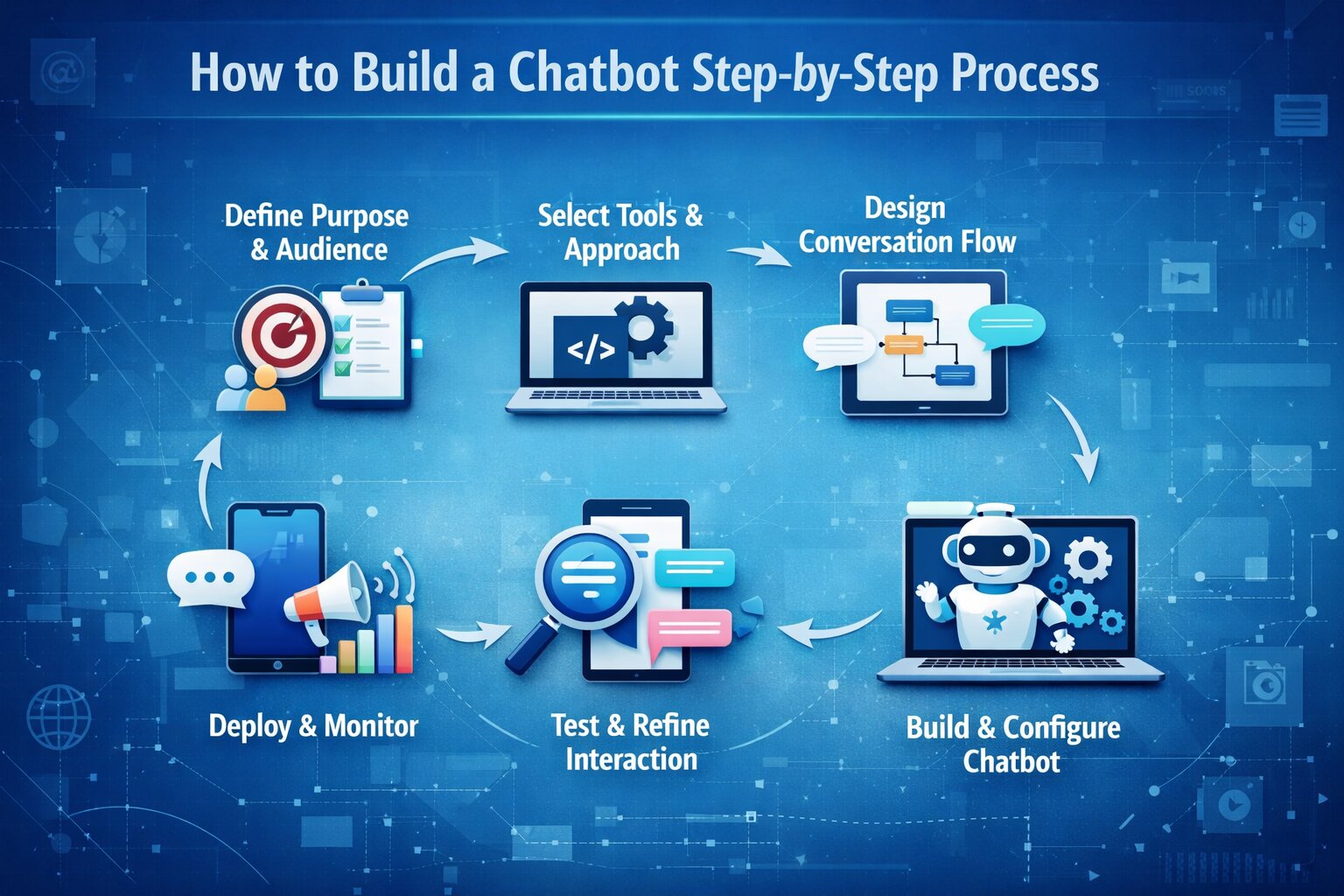
Building a chatbot follows a structured process, but the outcome depends on how well each stage is executed. Most issues, broken flows, inaccurate responses, or poor user experience stem from gaps in early decisions rather than the technology itself.
1. Define the Purpose and Audience
The first step is to narrow the chatbot to a specific function. Trying to cover multiple use cases often leads to inconsistent responses and unclear logic.
Define goals
Identify the exact outcome, such as reducing support tickets, qualifying leads, or automating internal queries. This determines what the chatbot is optimized for.
Set measurable indicators
Metrics like resolution time, completion rate, or drop-off rate help evaluate whether the chatbot is performing as expected once deployed.
Identify the audience
The way users interact, whether structured or conversational, affects how responses are designed and how much flexibility the system needs.
2. Select the Development Approach and Tools
The development approach defines how the chatbot processes input and how much control you have over its behavior.
No-code builders
Platforms like ManyChat or Chatfuel allow flows to be created visually, making them suitable for structured use cases with predefined paths.
AI platforms
Tools such as Google Dialogflow or Microsoft Copilot Studio support intent recognition, entity extraction, and conversational handling without full custom development.
Custom development
For more control, chatbots are built using languages like Python or JavaScript, often integrating NLP libraries and LLM-based tools alongside APIs from providers like OpenAI to process input and generate responses.
The choice here depends on how dynamic the interaction is and how deeply the chatbot needs to integrate with backend systems.
3. Design the Conversation Flow
Before development, the interaction model is defined in terms of how input is handled and how responses are triggered.
Map interaction paths
Define how users enter the conversation and how flows progress, often using decision trees or flow diagrams to avoid gaps.
Define intents and entities
In AI-based systems, intents represent user goals, while entities capture structured data such as names, dates, or product identifiers from input.
Plan fallback handling
When input cannot be matched to a known intent, the chatbot should prompt for clarification or route the conversation to a human agent instead of failing silently.
This stage determines whether the chatbot can handle variation in real-world conversations.
4. Build and Configure the Chatbot
With the flow defined, the chatbot is implemented by configuring how input is processed and how responses are generated.
Set up logic and responses
Define how inputs trigger specific responses, whether through rules or intent-based mappings. This ensures consistent behavior across interactions.
Prepare knowledge sources
Provide structured content such as FAQs, documentation, or indexed data that the chatbot can use to generate relevant responses.
Integrate external systems
Use API gateway designs to connect with CRM platforms, databases, or backend services so the chatbot can fetch or update real-time information.
5. Test and Refine the Interaction
Before deployment, the chatbot needs to be tested across realistic scenarios to ensure it behaves correctly.
Internal testing
Validate all conversation paths to identify broken flows, missing responses, or incorrect logic before exposing the system to users.
Limited user testing
Observe how real users interact with the chatbot and where they deviate from expected inputs or encounter issues.
Iterative refinement
Use logs and analytics to improve intent recognition, using embedding techniques for LLMs to adjust responses and expand coverage based on actual interaction data.
6. Deploy Across Channels and Monitor Usage
Once validated, the chatbot is deployed on platforms where users interact with it.
Website deployment
Embed the chatbot using a script or widget so users can access it directly within the interface.
Messaging platforms
Deploy through APIs or connectors on platforms like WhatsApp or Slack to reach users in their preferred channels.
Monitor performance
Track interaction data, drop-offs, and failures to continuously improve accuracy and response quality over time.
Cost of Developing a Chatbot
The cost of building a chatbot depends on how complex the system is, how it handles user input, and how deeply it integrates with other systems. A simple chatbot designed for predefined interactions can be built with relatively low effort, while AI-driven systems require training, data processing, and ongoing optimization.
Rather than a fixed price, chatbot development cost is best understood across different levels of complexity and implementation.
Cost by Chatbot Type
The cost of a chatbot varies significantly based on how it is built. At a high level, pricing is typically grouped by the type of chatbot being developed.
Cost Breakdown by Development Stage
While chatbot type defines the overall cost range, the actual budget is distributed across different stages of development.
What Actually Increases Chatbot Cost
The variation in chatbot cost comes from how much the system is expected to handle and how it is implemented.
As complexity increases, more effort is required to define intents, handle variations in user input, and maintain accuracy across different scenarios.
Integrations with systems such as CRM platforms, databases, or APIs also add to development time, especially when real-time data needs to be processed.
Another factor is deployment scope. Supporting multiple platforms such as websites, mobile applications, and messaging channels requires additional setup, testing, and maintenance.
Costs also continue after deployment, where AI-based chatbots rely on the GenAI tech stack that drives ongoing expenses through API usage, hosting infrastructure, and continuous updates to training data as user interactions evolve.
The cost of a chatbot is determined less by the tool used and more by how complex the interaction is and how many systems it connects to. Simpler use cases remain predictable, while more advanced implementations require ongoing investment as they scale.
Common Challenges in Chatbot Development
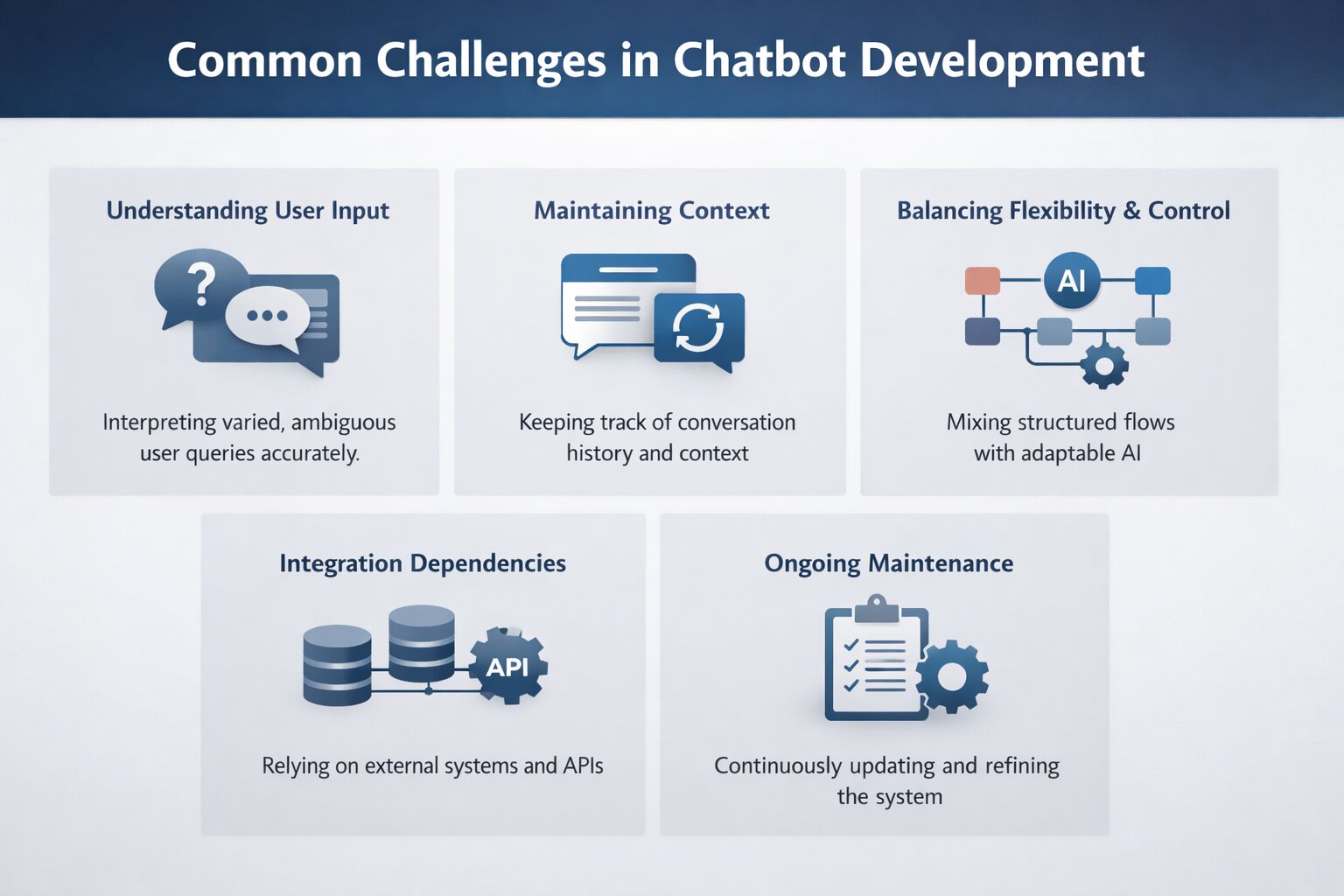
Building a chatbot involves more than defining flows or training models. Most challenges emerge when the system interacts with real users, where variation, ambiguity, and system dependencies expose gaps in design and implementation.
Understanding User Input
User input rarely follows a consistent pattern. The same request can be expressed in different ways, often with informal phrasing or missing details, making it harder to map queries accurately to intent.
This challenge becomes more evident in systems handling input preparation for machine learning, where variations in phrasing directly affect how input is interpreted.
Even in well-trained systems, closely related queries, such as asking about a refund policy versus requesting a refund, can be misinterpreted. In AI-based chatbots, gaps in training data can also lead to incorrect or fabricated responses when the system cannot confidently resolve a query.
Maintaining Context
Handling a single query is relatively straightforward; maintaining context across multiple turns is more complex. Chatbots frequently fail to retain key details shared earlier in the conversation, where generative AI solutions improve how context is preserved across interactions, forcing users to repeat information such as account details or order references.
Breakdowns also occur when users deviate from expected flows, making it difficult for the chatbot to return to the original task without losing continuity.
Balancing Flexibility and Control
A chatbot that relies too heavily on predefined flows can feel restrictive, while one that depends entirely on AI can become inconsistent. Without a clear structure, responses may vary unpredictably, but overly rigid flows can fail when users go off-script. Finding the balance between structured logic and flexible handling is one of the more difficult aspects of chatbot design.
Integration Dependencies
Chatbots often depend on external systems to perform real tasks, such as retrieving user data, updating records, or processing requests. Integrations with CRM platforms, databases, or APIs introduce additional complexity. Delays, failures, or incomplete responses from these systems directly affect how the chatbot behaves, making reliability dependent on more than just the chatbot itself.
Ongoing Maintenance
A chatbot does not remain effective without updates. As users interact with the system, new input patterns emerge that were not part of the original training data. Without continuous refinement, updating intents, expanding training phrases, and improving response handling, accuracy declines and the system becomes less reliable over time.
Conclusion
Chatbot development moves beyond implementation once the system is exposed to real interactions. At that stage, performance is shaped by how well it handles variation in input, maintains context across conversations, and responds through connected systems.
The difference between a working chatbot and a reliable one is not in how it is built, but in how it operates under real conditions. Systems designed with clear scope, structured interaction flows, and defined integration points tend to remain stable as usage increases. In contrast, gaps in intent handling, conversation design, or system dependencies become visible quickly once usage scales.
As complexity increases through broader use cases, AI-driven responses, or deeper integrations, the effort required to maintain accuracy and consistency grows with it. This makes chatbot development less of a one-time implementation and more of an evolving system that depends on continuous refinement.
 WhatsApp
 Call Us
 Mail Us