


How to Develop a Pharmacy App from Scratch (Complete Guide)



It is 11:47 PM. Your patient, a 68-year-old woman managing Type 2 diabetes, just ran out of metformin. The nearest open pharmacy is 14 kilometres away. Her prescription is on crumpled paper in a drawer somewhere.
She picks up her phone, opens an app, photographs the prescription, and has the medicine confirmed and dispatched within four minutes. By morning, it is at her door.
That is not a feature. That is the entire reason pharmacy apps exist.
The e-pharmacy market is no longer a convenience play. It is infrastructure, and the numbers confirm it. The global digital pharmacy market reached $134.92 billion in 2024 and is projected to exceed $483 billion by 2032, growing at a 17.3% CAGR.
This guide is written for founders building a new e-pharmacy platform, pharmacy owners looking to digitise their operations, and product teams scoping out what a medicine delivery app actually requires to function legally, technically, and operationally.
How a Pharmacy App Actually Works (End-to-End Flow)
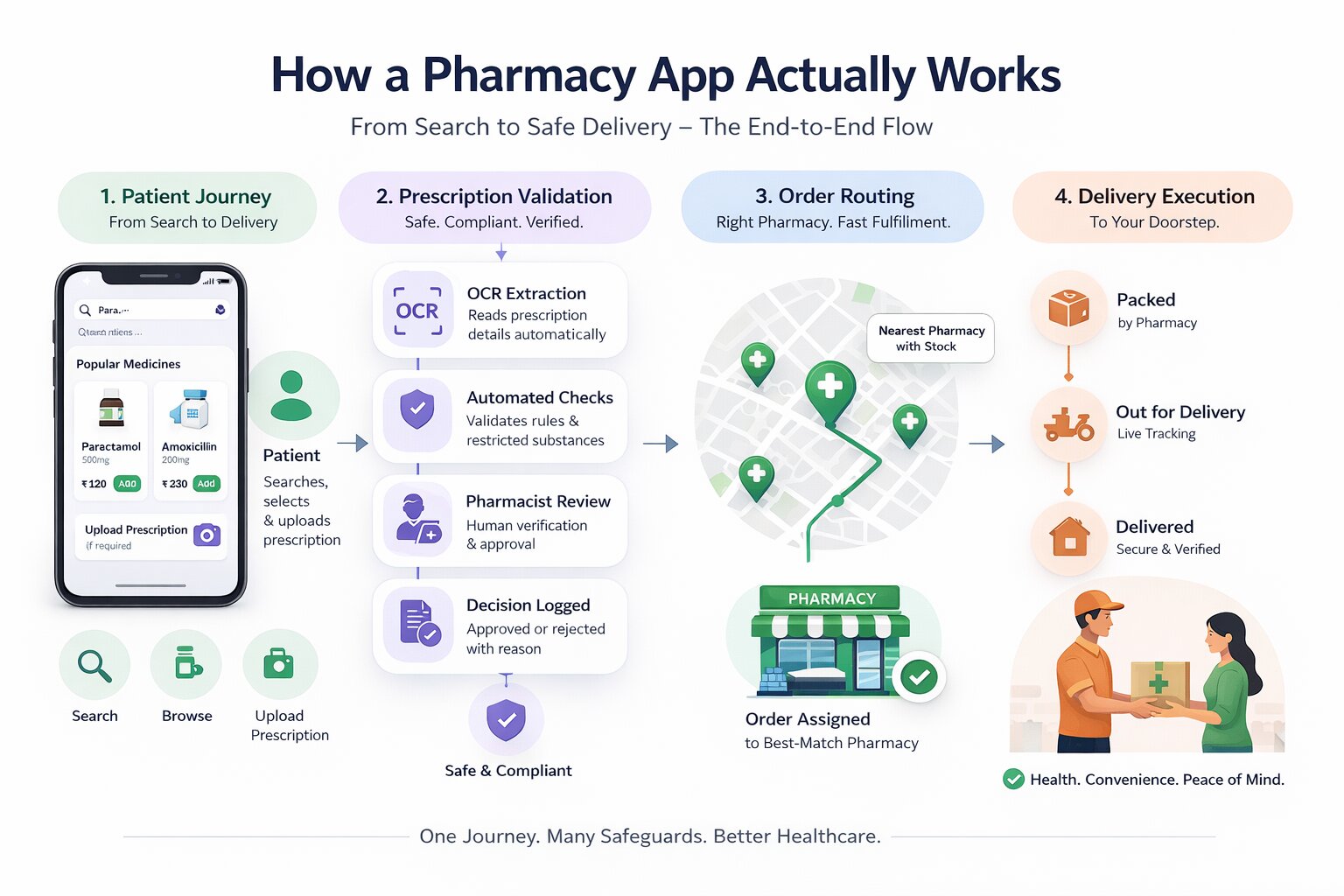
Before choosing a business model or picking a tech stack, you need to understand what a pharmacy app is actually doing at each stage of an order; decisions around app framework choices directly influence how these flows are implemented. Most discussions skip this and jump straight to features. That creates gaps, especially around prescription validation, which is where most apps fall short technically and legally.
Patient Journey from Search to Delivery
A user opens the app and searches for a medicine by brand name, generic name, or symptom. At its core, the app is designed to streamline access to healthcare services while handling discovery, availability, and ordering in a single flow.
The search layer queries the drug catalogue, either your own curated database or a third-party API. Results return with dosage options, manufacturer, price, and availability at nearby partner pharmacies.
If the medicine requires a prescription (Schedule H, H1, or H2 under India's Drugs and Cosmetics Rules), the app gates the add-to-cart action. The user photographs or uploads the prescription. This is where the prescription pipeline begins.
How Prescription Validation Works (Stage by Stage)
This is the most technically complex and legally critical part of the entire system, as it involves prescription validation requirements that go beyond standard eCommerce logic and require building healthcare-grade systems. Here is what happens inside the app after upload.
Stage 1: OCR Extraction
The image is processed by an OCR engine (Google Cloud Vision, AWS Textract, or a custom-trained model for Indian handwritten prescriptions).
The system extracts the doctor's name, registration number, patient name, date of prescription, medicines listed, dosages, and duration, which involves processing unstructured medical text from highly inconsistent prescription formats.
Stage 2: Automated Flags
The system checks whether any extracted drug name falls under Schedule H2 or the NDPS (Narcotic Drugs and Psychotropic Substances) Act. These cannot be dispensed through an e-pharmacy in India under any circumstances. If flagged, the order is automatically rejected, and the reason is logged.
Stage 3: Pharmacist Review
For Schedule H and H1 drugs, a registered pharmacist must manually approve the prescription. The pharmacist panel shows the prescription image alongside OCR-extracted data. The pharmacist either approves (after verifying the doctor's registration number if required) or rejects.
Stage 4: Rejection Handling
If a prescription is rejected, whether due to illegibility, expiry, missing doctor credentials, or a flagged substance, the system must not just notify the user. It must log the rejection reason, timestamp, and pharmacist ID. This is required for audit compliance under India's Draft E-Pharmacy Rules and is functionally necessary for any HIPAA-adjacent operation.
Stage 5: Order Placement
Once approved, the order is committed. Stock availability is confirmed against the assigned pharmacy's inventory. If stock is unavailable, the system either reassigns to another partner pharmacy or notifies the user of the delay.
Order Routing and Delivery Execution
The pharmacy assignment uses proximity logic (nearest available pharmacist + stock confirmation) or a rule-based routing system (SLA- or rating-based).
The assigned pharmacy receives the order on its panel, prepares it, and hands it off to delivery. The user tracks dispatch in the app. On delivery, the delivery agent scans or confirms that the order is closed.
Every prescription dispensed generates an audit record: patient details, prescribing doctor, medicine dispensed, quantity, pharmacist who approved, date, and time. This record must be stored and retrievable; it is not optional.
The Three Places Pharmacy Apps Break
Most pharmacy apps fail at three points. First, the OCR accuracy of Indian handwritten prescriptions is notoriously difficult for off-the-shelf models. Plan for a manual review fallback for any prescription where OCR confidence falls below a threshold (typically 85%).
Second, an inventory sync mismatch. The pharmacy panel shows a medicine as in stock, but it was dispensed physically 20 minutes earlier without a system update.
Third, the pharmacist's response time; if pharmacist approval takes two hours, the user abandons. Your SLA for prescription approval should be under 30 minutes. Build the panel to make that achievable, not just required.
How to Develop a Pharmacy App from Scratch Step by Step
This is the primary question this guide answers. Unlike generic app development guides, pharmacy app development has healthcare-specific constraints at every stage. Here is the honest, sequential process.
Step 1: Define Your Business Model and Compliance Requirements
Most founders start with the product. The correct starting point is the business model, because it determines your compliance requirements before you write any code.
If you are operating in India with an inventory model, you need a registered physical premise and a drug license before dispensing a single order. In a marketplace model, you rely on partner pharmacies, but your platform still needs to align with CDSCO requirements under evolving e-pharmacy regulations. If you are building for international markets, your system must be HIPAA-compliant from day one not retrofitted later.
Write your compliance checklist before your product requirements document. Every feature involving prescriptions, patient records, or drug transactions carries a regulatory implication.
Step 2: UX Flow Mapping
Do not start with wireframes. Start with consulting-led app planning, based on how the system behaves under real usage.
The patient flow should account for imperfect conditions, such as low-light prescription uploads, unclear handwriting, or mid-range device limitations. The pharmacist flow must be optimised for speed. If it takes more than a few interactions to approve a prescription, your SLA will fail under load.
The admin flow is where edge cases surface. When an order is disputed, wrong medicine, delayed, or missing an item, what is the escalation path? Who accesses the audit log? How is resolution triggered?
These are not UI questions. They are system decisions. Map them as decision trees before a single screen is designed.
Step 3: Backend Architecture and Database Schema Design
The prescription pipeline is the hardest thing to retrofit. Design your database schema around it from the start.
Your prescription table needs: prescription ID, patient ID, upload timestamp, OCR confidence score, extracted fields (doctor name, registration number, medicines, dosages, validity date), pharmacist ID who reviewed, review timestamp, decision (approved/rejected), rejection reason code, and audit log reference.
Your order table links to a prescription ID, not just a list of medicines. This linkage is what makes your audit trail legally defensible.
Design your RBAC matrix before the first sprint. Who can see what prescription data? Pharmacists see only what they need to process the order. Delivery agents see only the delivery address and order contents, no prescription details. Admin sees everything, with a logged access trail.
This separation has to be built directly into the data model, which database engineers handle when structuring how prescription data is stored and accessed across roles.
Step 4: Build Modules in Dependency Order
Development should follow system dependencies, not UI priorities.
Start with authentication and user management, because every action depends on identity. Build the drug catalogue next, as it powers discovery.
The prescription upload and OCR pipeline must come before the order system, because orders depend on validation output, and the communication between system modules needs to be clearly defined at this stage.
From there, move to order management, inventory integration within the pharmacy panel, payment handling, and delivery tracking. The admin panel and analytics layer come last, as they aggregate data across the system. Notification systems can be developed in parallel, but should only be finalised once state transitions are clearly defined.
Most teams reverse this and start with UI. That is the single most common cause of backend rework in pharmacy app development.
Step 5: Healthcare-Specific Testing
Standard QA misses the scenarios that matter in pharmacy apps. Your testing plan must include:
Prescription edge cases
Blurry upload, expired prescription, prescription for a Schedule H2 drug, prescription with the doctor's registration number missing, prescription in a regional language.
Test what the system does in each case, not what it should do, especially when automating validation workflows across different prescription scenarios.
Drug interaction logic
If you have implemented drug interaction alerts, test against known dangerous combinations. This is a patient safety issue, not a feature quality issue.
Inventory sync under concurrent load
What happens when two patients order the last unit of a medicine at the same time? Your order management system must handle this with a locking mechanism, not a first-come, first-served race condition.
Pharmacist panel under realistic volume
Simulate a scenario where 50 prescriptions arrive within 10 minutes. Does the panel degrade? Does notification delivery lag? This is a stress test, not a load test.
Audit log integrity
After a full order cycle from prescription upload through pharmacist approval, order placement, dispatch, and delivery, verify that the audit log is complete, timestamped correctly, and contains no gaps.
Step 6: Launch in a Controlled Environment
Launch in one city, with one pharmacy partner, to a defined beta group. This is not a soft launch for marketing reasons. It is the only way to validate the prescription pipeline, pharmacist response time, and delivery SLAs under real conditions before committing to scale.
Set operational health metrics before launch day: target pharmacist approval time (under 30 minutes), prescription acceptance rate (how many uploaded prescriptions are valid), order fulfilment rate (orders successfully delivered vs. placed), and delivery accuracy (right medicine, right patient, right quantity).
Measure these for 30 days before expanding. The data will tell you exactly where the operation breaks, and it will break somewhere.
Types of Pharmacy Apps and How They Differ
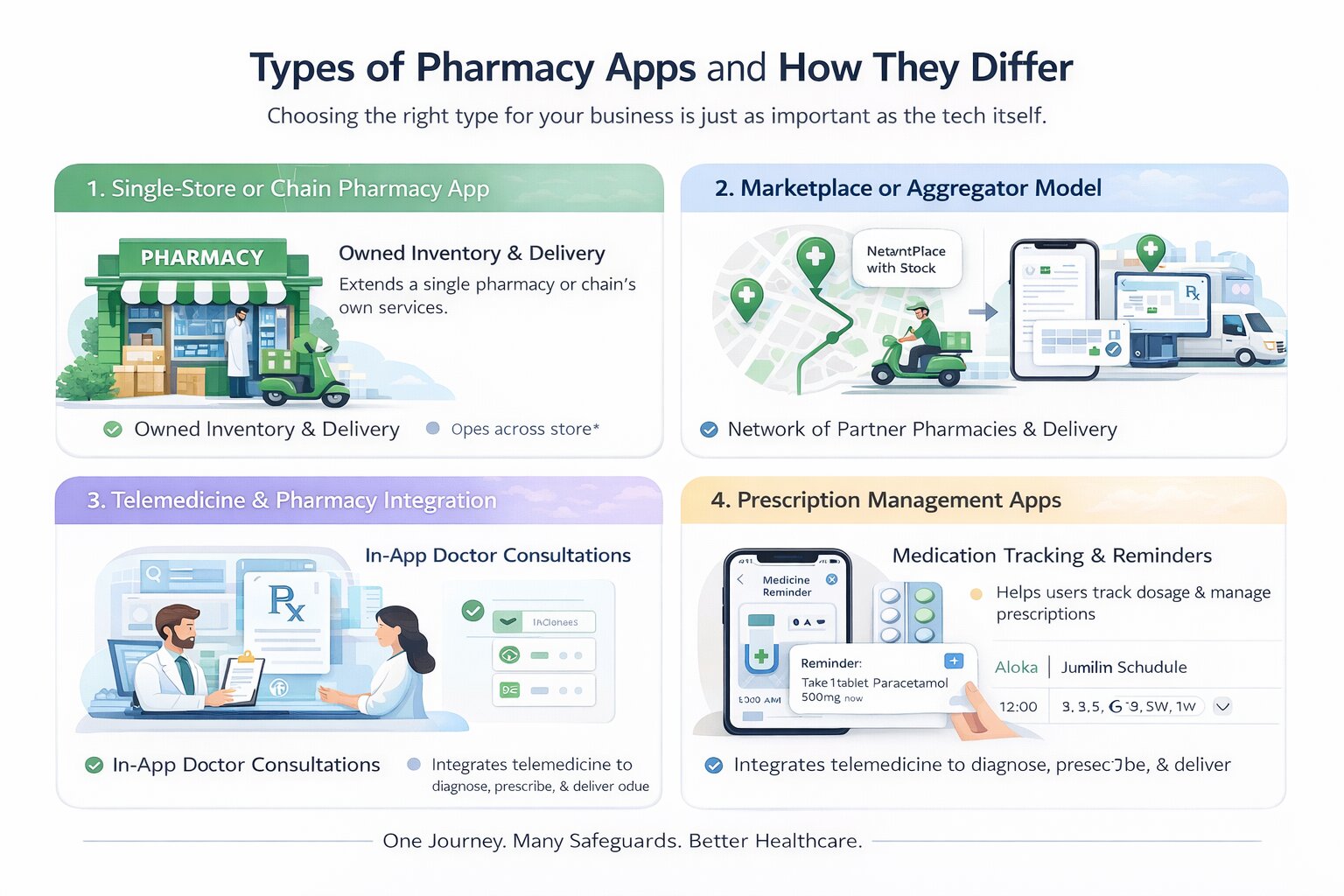
Every pharmacy app serves a fundamentally different business model, and the type you choose changes your compliance footprint, your backend architecture, and how much you spend building it. There are four core types, and understanding them is the prerequisite to everything else.
Single-Store or Chain Pharmacy App
In this model, the app is an extension of a single pharmacy or a pharmacy chain that owns its inventory. Every order placed through the app is fulfilled by that same business, using its own stock and delivery setup.
Because the inventory is controlled internally, the system is relatively straightforward. Stock levels, pricing, and fulfilment timelines are all managed within one ecosystem, without the need to coordinate across multiple vendors. This reduces complexity in routing and eliminates the need for real-time multi-pharmacy inventory synchronisation.
At the same time, this model concentrates responsibility. The pharmacy must handle storage, compliance, order fulfilment, and delivery without relying on external partners. It works best for established pharmacies that already have a functioning supply chain and are looking to digitise their operations rather than build a marketplace.
Marketplace or Aggregator Model
The marketplace model operates differently. Instead of owning inventory, the app connects users with a network of partner pharmacies. When an order is placed, the system identifies a suitable pharmacy based on availability and location and routes the order accordingly.
This expands coverage and allows the platform to scale without investing in physical stock. However, it introduces a new layer of complexity. Inventory data must be coordinated across multiple independent pharmacies, each with its own systems and update frequency. Order routing becomes a core function, not just a background process.
Platforms like PharmEasy operate on this model, where growth comes from expanding the partner network rather than increasing owned inventory. It is often the preferred choice for startups, but it requires careful handling of vendor onboarding, inventory consistency, and fulfilment reliability.
Telemedicine and Pharmacy Integration
Some platforms extend beyond medicine delivery by integrating doctor consultations directly into the app. In this model, the prescription is generated within the system itself, and the transition from consultation to order becomes seamless.
This changes both the user journey and the system design. Instead of validating external prescriptions, the platform must support doctor workflows, appointment scheduling, and prescription generation. The pharmacy layer then operates on top of that, fulfilling orders based on internally generated prescriptions.
While this reduces friction for the user, it significantly increases system complexity and regulatory scope. It is typically adopted by platforms aiming to build a broader healthcare ecosystem rather than a standalone pharmacy service.
Prescription Management Apps
Not all pharmacy-related apps handle ordering or delivery. Some are designed purely to help users manage their medications. These apps focus on storing prescriptions, tracking dosage schedules, and sending refill reminders.
Because they do not involve transactions or drug distribution, they operate with lower regulatory complexity and simpler system requirements. They are often used as standalone tools or as an entry point before expanding into a full e-pharmacy platform.
Business Models - Inventory, Marketplace, and Hybrid
The business model defines how a pharmacy app operates behind the interface, how inventory is managed, how orders are fulfilled, how revenue is generated, and where responsibility sits.
While these models differ in revenue structure, they also vary in operational complexity, compliance burden, and capital requirements. The differences are not visible to users, but they shape how the system behaves under real conditions.
Inventory Model
In the inventory model, the platform owns and manages the medicines, and every order is fulfilled from internal stock.
This creates a controlled system where pricing, availability, and fulfilment are handled within a single pipeline, without dependency on external vendors. Revenue comes from direct margins, typically in the range of 15–25% per order. The trade-off is capital and operational responsibility. Inventory must be procured, stored under proper conditions, and managed to avoid expiry losses. Since the platform handles dispensing, it carries full responsibility for compliance, prescription validation, and audit records.
Marketplace Model
In the marketplace model, the platform does not own inventory. Instead, it connects users with licensed pharmacy partners who fulfil the orders.
The system routes each order to a suitable pharmacy based on availability and location, while the platform manages discovery, prescription flow, and coordination. Revenue is generated through commissions, typically 10–20% per order, along with platform fees.
This reduces capital requirements but increases system complexity. Inventory must be synchronised across multiple pharmacies, and order routing becomes a critical function. Responsibility is shared, but the platform remains accountable for overall user experience and traceability.
Hybrid Model
The hybrid model combines internal inventory with a partner network.
The platform fulfils high-demand medicines from its own stock while relying on partners for broader coverage or specialised products. Orders are routed dynamically based on availability and system logic.
This allows the platform to balance margins and reach, earning both direct margins and commissions. However, it increases system complexity, requiring coordination between internal and partner inventory, along with consistent service standards across both.
Compliance responsibility is also layered, as both internal operations and partner activity must align with regulatory requirements.
How These Models Differ in Practice
How to Choose the Right Model Before You Write a Line of Code
This decision sits at the centre of everything that follows. The model you choose will determine your licensing requirements, backend architecture, team structure, and the minimum budget required to launch. Getting it wrong at this stage does not just slow you down it forces you to rebuild core parts of the system later.
Start With What You Already Have
The right starting point depends less on what you want to build and more on what you already have in place.
If you already operate a licensed pharmacy with storage and supply, the inventory model is the most direct path. You are not solving for vendor coordination or marketplace logistics. Instead, your focus is on building the patient-facing app, the pharmacist workflow, and the admin layer that ensures compliance. Because the operational foundation already exists, development timelines are shorter and more predictable.
If you are starting without physical infrastructure, your constraints are different. You are not equipped to manage stock or fulfilment directly, which shifts the problem toward building a platform that connects users with licensed pharmacies.
Inventory vs Marketplace: The First Split
At this point, the decision becomes clearer.
An inventory-based system keeps everything within your control. You manage stock, pricing, and fulfilment internally. This reduces system complexity but increases operational responsibility.
A marketplace model works the other way around. You rely on partner pharmacies for inventory and fulfilment while your platform handles discovery, validation, and routing. This allows faster expansion across locations, but introduces coordination challenges. Inventory must be synced across multiple vendors, and order routing becomes a core system function rather than a background process.
Budget Defines Scope
Even with the right model in mind, the budget determines how far you can take it in the first version.
With a limited budget, attempting a full marketplace or telemedicine-integrated platform often leads to incomplete systems and delayed launches. A narrower approach, a single-store or single-city MVP with prescription upload, order flow, and delivery tracking, allows you to validate the core system before expanding.
This is not a compromise. It is a way to test whether your prescription flow, pharmacist response time, and delivery process actually work under real conditions.
Build vs White-Label vs Custom
Alongside the model decision, you also need to decide how the product will be built.
White-label solutions offer the fastest path to market. They come with pre-built workflows, including prescription handling and basic compliance structures, and can be deployed within weeks. The trade-off is limited flexibility and reduced differentiation.
Custom development takes longer but gives you full control over how the system behaves. This includes user experience, validation logic, and how compliance is enforced within the product.
For some teams, a hybrid approach works best, launching quickly using a white-label frontend while building custom backend systems over time.
Whichever path you pick, who builds it matters more than which model you pick. Development teams that specialize in healthcare and pharmacy apps have usually already solved the OCR-fallback and audit-logging problems most general app teams hit for the first time on a project like this.
The trade-offs between these approaches can be summarised as follows:
Core Features of a Pharmacy App Role-by-Role Breakdown
A pharmacy app is not a single product. It is three interconnected systems: a patient app, a pharmacy panel, and an admin backend that must work together seamlessly. Most feature discussions collapse these into a single list, which hides how the system actually operates in practice.
Each feature exists within a workflow. What a user triggers, a pharmacist validates, and the system records. Breaking this down role by role makes those responsibilities clear.
Patient App Features
The patient app is the entry point of the system, where demand is created, and every downstream workflow is triggered from prescription validation to order fulfilment.
Medicine search and catalogue
Intelligent search by brand name, generic name, or condition, with filters for dosage form, manufacturer, price band, and availability. The catalogue must include drug information, side effects, contraindications, and storage instructions so patients can make informed decisions without leaving the app.
Prescription upload and management
Users should be able to upload prescriptions via image capture or file upload. The system must guide users when images are unclear and maintain a structured prescription history for reuse. Expired prescriptions should be identified automatically to prevent invalid orders.
Refill workflows for chronic patients
Users managing long-term conditions benefit from the ability to reorder medicines without repeating the full process. Refill systems, often linked with automated billing, reduce friction and improve adherence over time.
Order tracking and status updates
Once an order is placed, the user should be able to track it across stages of validation, preparation, dispatch, and delivery. Timely notifications reduce uncertainty and support dependency.
Voice search and accessibility support
Voice-based input improves usability for elderly users and those less comfortable with typing. For India-focused apps, supporting regional languages becomes particularly important.
Drug interaction alerts
If the system has access to past prescriptions or medication history, it should flag potential conflicts when new medicines are added. This is both a safety feature and a credibility builder.
Family profiles and shared access
A single account should support multiple patient profiles, allowing users to manage medicines for dependents. Basic permission controls can be included to maintain privacy within shared accounts.
Pharmacy Panel Features
The pharmacy panel is the operational core, where prescriptions are validated, stock is controlled, and every order is either approved, rejected, or fulfilled
Order queue and management
Incoming orders should be visible with clear status, attached prescriptions, medicine details, and patient information. Pharmacists must be able to approve, reject with a documented reason, or flag orders for clarification without switching contexts.
Inventory management
Stock levels must reflect actual availability. This includes low-stock alerts, expiry tracking, and near real-time updates. Every change here directly affects what users see as available in the app.
Prescription approval workflow
The panel should display the prescription image alongside OCR-extracted data. Approval must be quick, with structured rejection options and mandatory reason logging. Every action should be timestamped for traceability.
Delivery coordination
Once prepared, the order is handed off for delivery. The system should confirm pickup and continue tracking the order post-dispatch, ensuring visibility for both pharmacy staff and users.
Delivery Agent Panel
The delivery agent panel is the fourth system that most guides omit. Platforms like PharmEasy, 1mg, and Netmeds all operate a distinct delivery-agent interface.
Order assignment and pickup confirmation
Agents receive assigned orders with pharmacy location, patient address, and order contents. Pickup must be confirmed within the system.
Route optimisation
Integration with maps to determine the most efficient delivery sequence for multiple concurrent orders.
Delivery confirmation and proof
Agents must confirm delivery with a signature, OTP, or photo. This closes the order in the system.
Status updates to patients
Real-time location sharing or milestone updates so patients can track progress.
Admin Panel Features
The admin panel is the control layer, responsible for enforcing compliance, maintaining system integrity, and providing visibility across all operations.
User and vendor management
The admin panel manages onboarding and verification of pharmacy partners, along with user account controls. Access levels should be clearly defined to ensure only authorised actions are performed within the system.
Analytics and performance tracking
Operational visibility is critical. Metrics such as order volume, approval time, rejection rates, and delivery performance help identify bottlenecks and improve system efficiency.
Compliance and audit logging
Every prescription-related action viewed, approved, rejected, or fulfilled must be recorded with a complete audit trail. This is essential for both regulatory compliance and dispute resolution.
Dispute and issue management
Orders that are delayed, incorrect, or incomplete must be tracked through a structured resolution process. The admin panel should provide a clear interface for managing and closing such cases.
A simplified view of how responsibilities are distributed across these roles is outlined below:
Tech Stack for Pharmacy App Development
The technology choices for a pharmacy app are shaped by three requirements: cross-platform mobile delivery, prescription-grade security, and integrations with healthcare-specific services.
Here is how the stack typically maps across layers.
The tech stack choice has direct cost implications. React Native or Flutter reduces the need for separate iOS and Android developer teams.
Choosing between the two isn't just a coin flip; React Native and Flutter differ enough in performance and native-module support that it's worth deciding deliberately before OCR and payment SDKs get bolted on
Node.js and Python are both well-supported by India-based development teams at competitive rates.
Cloud infrastructure decisions also affect your compliance posture if you are targeting HIPAA compliance. Verify that your cloud provider can sign a Business Associate Agreement (BAA).
Pharmacy App Development Cost
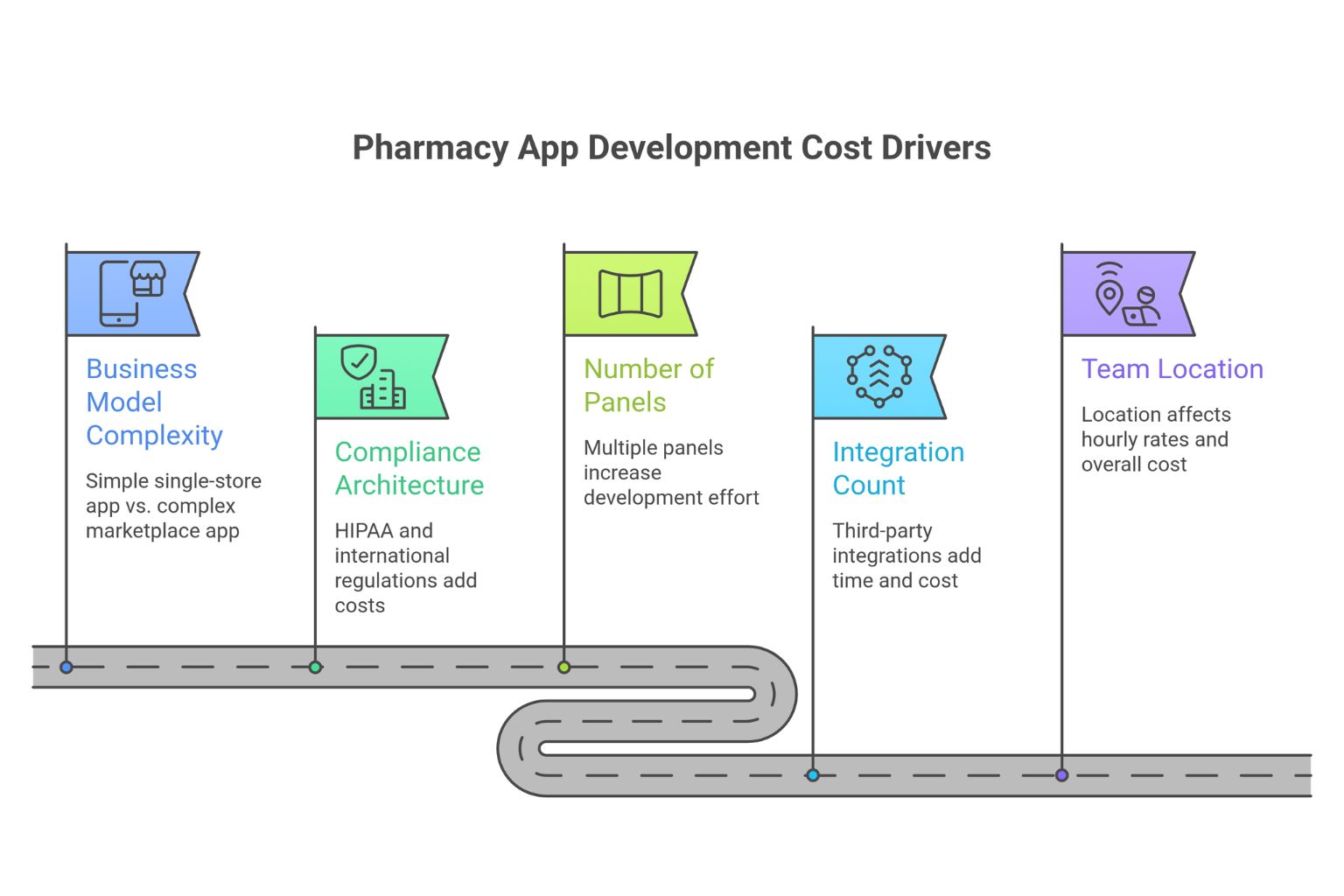
Most pharmacy app development guides list cost ranges without explaining what actually drives them. That makes the numbers misleading.
The cost of a pharmacy app is not a fixed estimate; it depends on system complexity. These same five levers- business model, panel count, compliance, integrations, and team location- show up in almost every mobile app development cost estimate. Still, pharmacy adds a compliance and prescription-validation layer most apps never touch.
What Actually Drives the Cost
Business model complexity
It is the largest driver. A single-store app where one pharmacy fulfils all orders is architecturally simple. A marketplace that routes orders across multiple pharmacies in real time requires inventory synchronisation, routing logic, and vendor coordination systems. Expect a 2–3× increase in cost between these models.
Compliance architecture
If you are building for international markets, requirements such as HIPAA affect your database design, encryption, access logging, and infrastructure setup. Compliance is not a feature; it is built into the system. This alone can add $10,000–$30,000 to development costs.
Number of panels
It directly multiplies effort. Each panel patient app, pharmacist dashboard, admin panel, and delivery app is a separate product with its own workflows, UI, and testing requirements. A four-panel system is not twice as complex as a two-panel system; it is typically 3–4× the effort.
Integration count
It increases both time and system dependency. Each third-party integration payments, maps, OCR, drug databases, notifications, and EHR systems requires separate development, testing, and ongoing maintenance. Budget roughly $2,000–$8,000 per major integration beyond the core system.
Team location
Team location determines execution cost. India-based teams typically charge $25–$60/hour, Eastern Europe $50–$100/hour, and US-based teams $100–$200/hour. For the same scope, an India-based team can cost 60–70% less than a US-based team.
Cost Estimates by App Type
Beyond development, Infrastructure includes cloud hosting, storage, and API usage. Compliance introduces ongoing costs such as licensing, pharmacist staffing, and audit processes. Operations include delivery, customer support, and vendor management.
Maintenance typically requires 15–25% of the initial build cost annually, covering updates, performance improvements, and regulatory changes.
Monetization Models for Pharmacy Apps
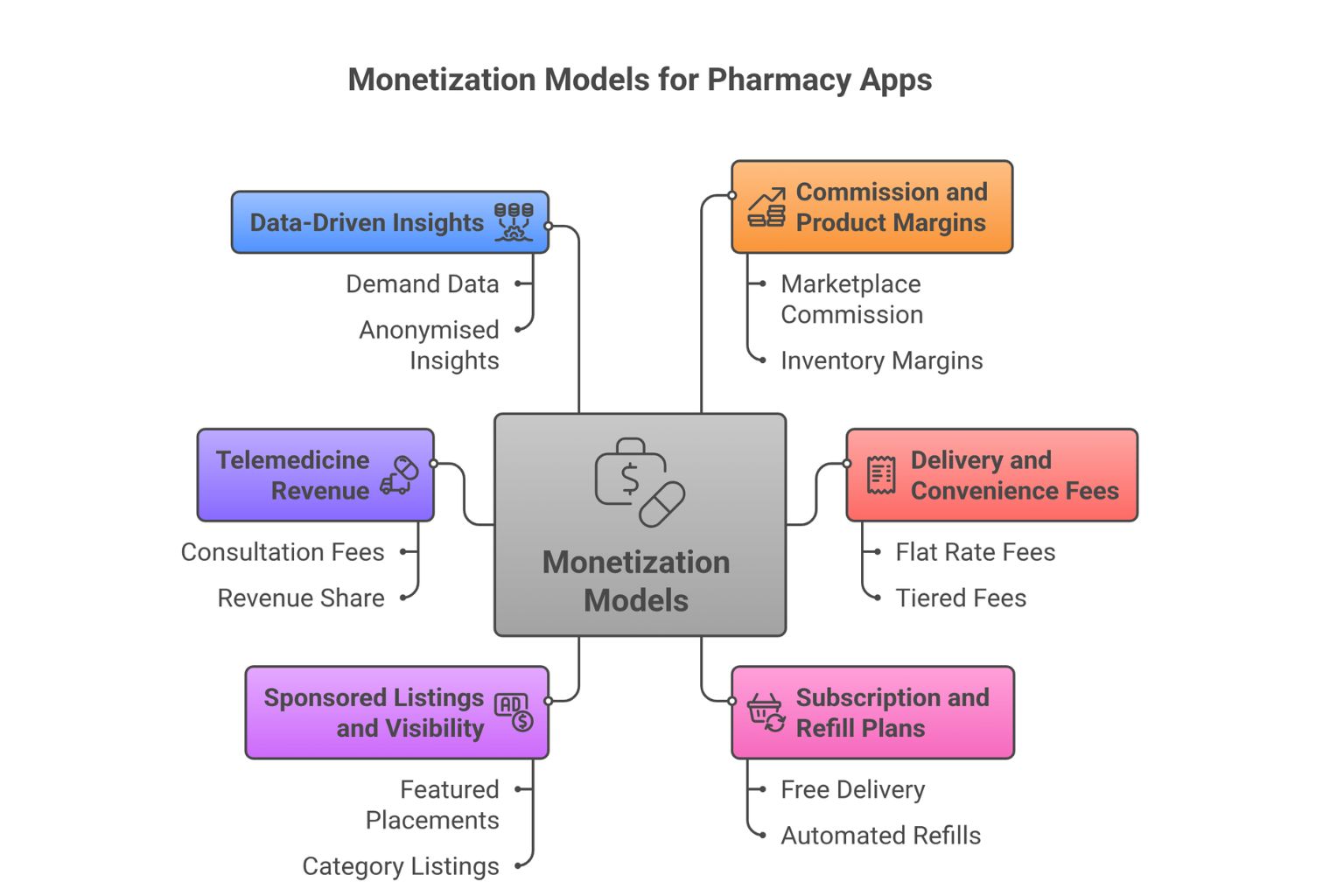
A pharmacy app rarely relies on a single revenue stream. The most stable platforms layer multiple sources early, rather than depending entirely on order-level commission.
Revenue in this space is a mix of transaction-driven income, service fees, and retention-led models. Each behaves differently as the system scales.
Commission and Product Margins
Commission per order is the primary revenue layer.
In marketplace models, this is typically 10–20% of the order value charged to the pharmacy partner. In inventory-based systems, the equivalent is the margin between procurement and selling price.
This stream scales directly with order volume, making it foundational but not sufficient on its own for long-term stability.
Delivery and Convenience Fees
Delivery charges can either be passed to the user or absorbed as a customer acquisition cost in the early stages.
Fees are usually structured as a flat rate per order or tiered based on distance and urgency, which depends on managing in-app payments across different pricing layers.
Faster delivery windows, such as same-day or two-hour fulfilment, can command a premium.
At scale, even small delivery fees contribute meaningfully to overall revenue.
Subscription and Refill Plans
Subscription models are one of the most defensible revenue streams, especially for chronic patients.
A typical plan ranges from $1–$4 per month (₹99–₹299) that includes benefits such as free delivery, automated refills, and priority access creates predictable revenue while improving retention.
These users tend to have significantly higher lifetime value, often 3–5× compared to one-time buyers, making this model critical for long-term growth.
Sponsored Listings and Visibility
Once the platform has consistent traffic, visibility itself becomes monetisable.
Pharmacy partners can pay for featured placements in search results or category listings. This revenue stream is volume-dependent—it becomes viable only after the platform has meaningful user activity.
Telemedicine Revenue
If the platform includes doctor consultations, each session becomes a revenue opportunity.
Consultation fees typically range between $1–$6 per session (₹100–₹500), with a revenue share where 60–70% goes to the doctor. This adds a service layer on top of medicine delivery, increasing both engagement and revenue per user.
Data-Driven Insights
At scale, aggregated demand data becomes valuable.
Insights such as which medicines are searched in specific pin codes or when demand peaks can be offered to pharmacy partners as a paid service. This must be handled with strict anonymisation, but it creates a B2B revenue stream independent of transactions.
Not all revenue streams behave equally. Transaction-based revenue drives volume, but retention-based models such as subscriptions drive long-term profitability.
Legal and Compliance Requirements Before You Launch
Compliance is not a post-launch audit. It is a pre-development design constraint. If your database schema, UX flows, and prescription pipeline are not built with compliance in mind, you will be forced to rework all three before you can legally operate.
Global Compliance Framework
While regulations vary by region, most markets enforce similar core principles.
In the United States, HIPAA (Health Insurance Portability and Accountability Act) governs how patient health information is stored, transmitted, and accessed.
This includes requirements such as end-to-end encryption, role-based access control (minimum necessary access), audit logging, breach notification within defined timelines, and Business Associate Agreements (BAAs) with all vendors handling protected health information.
In the European Union, GDPR (General Data Protection Regulation) introduces strict data protection rules, including the right of erasure.
Patients can request deletion of their data, which means your system must support clean removal of records without breaking database integrity.
Across regions, the pattern is consistent: systems must validate prescriptions, restrict access to controlled substances, and maintain traceable records of every transaction.
The Regulatory Grey Zone
The Draft E-Pharmacy Rules, 2018, proposed by the Ministry of Health and Family Welfare, have not been notified in the Official Gazette as of 2026.
This creates a legal situation that is neither fully defined nor fully ambiguous. The Delhi High Court has directed the Central Government to frame a definitive policy, but that policy is still pending.
What this means in practice: e-pharmacies in India currently operate under the offline drug laws. You must hold (or partner with entities that hold) the appropriate retail drug license, maintain a registered physical premise for storage, and have a registered pharmacist overseeing all prescription dispensing.
Operating without these does not make your app illegal per se, but it exposes you to enforcement risk, particularly given that CDSCO has issued show-cause notices to major e-pharmacy players in the past.
Data Privacy and Security
For products targeting the US market, HIPAA governs how patient health information is stored, transmitted, and accessed.
Key requirements include end-to-end encryption, access logging, minimum necessary data access (RBAC), breach notification within 60 days, and Business Associate Agreements (BAAs) with every vendor who handles protected health information, including your cloud provider, your OCR vendor, and your analytics platform.
If you design your India product to HIPAA-level standards, you gain two things: a stronger compliance posture domestically and a system that is ready for international expansion without architectural rework.
For EU markets, GDPR adds the right of erasure, so patients can request that their data be deleted. Design your database schema with this in mind from day one. A system where prescription records are deeply embedded across multiple tables without a clean deletion pathway creates a compliance liability.
Compliance is not enforced at the edges of your product; it is embedded in how the system operates.
If prescriptions can be approved without proper validation, if restricted drugs can enter the order flow, or if audit logs are incomplete, the system is not compliant regardless of intent.
The cost of fixing compliance after launch is significantly higher than designing for it from the beginning.
Conclusion
A pharmacy app is not an e-commerce app with medicines in the catalog. It is a regulated, multi-stakeholder platform where a design decision at the database schema level has legal consequences, where a UX choice in the pharmacist panel affects patient safety, and where an architectural shortcut in inventory sync causes operational failures at scale.
The good news is that every one of these challenges is navigable with the right sequencing. Define your model before your product. Sort compliance before your schema. Build the pharmacist panel as it matters — it does. Launch small, measure operationally, and expand only when the core loop works.
The market opportunity is real. The demand from chronic patients, urban professionals, and underserved geographies for reliable medicine delivery is not going away. The question is whether the platform you build can handle the responsibility that comes with operating in a space where getting it wrong has consequences beyond a bad review.
If you are at the start of this process, the most valuable thing you can do today is answer one question clearly: what is your business model? Everything else flows from there.
Frequently Asked Questions

 WhatsApp
 Call Us
 Mail Us