


FinOps for AI: A Practical Framework for Managing GPU, Token, & Inference Costs




For the first time, GPU spend has overtaken general cloud spend as the number one FinOps concern at AI-first companies. That's not a marketing stat; it's what practitioners themselves are reporting. And it lines up with what we keep seeing when we sit down with teams who are scaling AI: the bill grows faster than anyone's ability to explain it.
A proof of concept turns into three production models. A chatbot turns into an agent that calls itself. Finance asks a simple question: "Which team is spending this?" and nobody has a clean answer. That gap is what FinOps for AI exists to close. Not as a new buzzword bolted onto cloud cost management, but as a genuine rework of it, because AI workloads break almost every assumption traditional FinOps was built on.
Understanding FinOps for AI
FinOps for AI is the practice of managing the cost and business value of AI workloads GPU compute, model training, inference, and token-based API usage using the discipline traditional FinOps applies to cloud, adapted to how differently AI behaves. Unlike a server billing at a predictable hourly rate, AI spend moves with prompt length, model choice, GPU demand, and training frequency, so the same request can cost a different amount each time it runs.
It borrows the core FinOps loop inform, optimize, operate and applies it to a very different cost surface. Instead of a server humming along at a predictable hourly rate, you're dealing with GPU hours that swing wildly with demand, token bills that move with prompt length and context window, and training runs that can burn through a month's compute budget in a weekend.
AI for FinOps is the opposite direction, using AI and ML to automate the work itself, like flagging a runaway training run or forecasting next month's spend before it happens. One is the job. The other is a tool that helps you do the job faster. This guide is about the job.
What FinOps for AI Means for Modern Cloud Teams
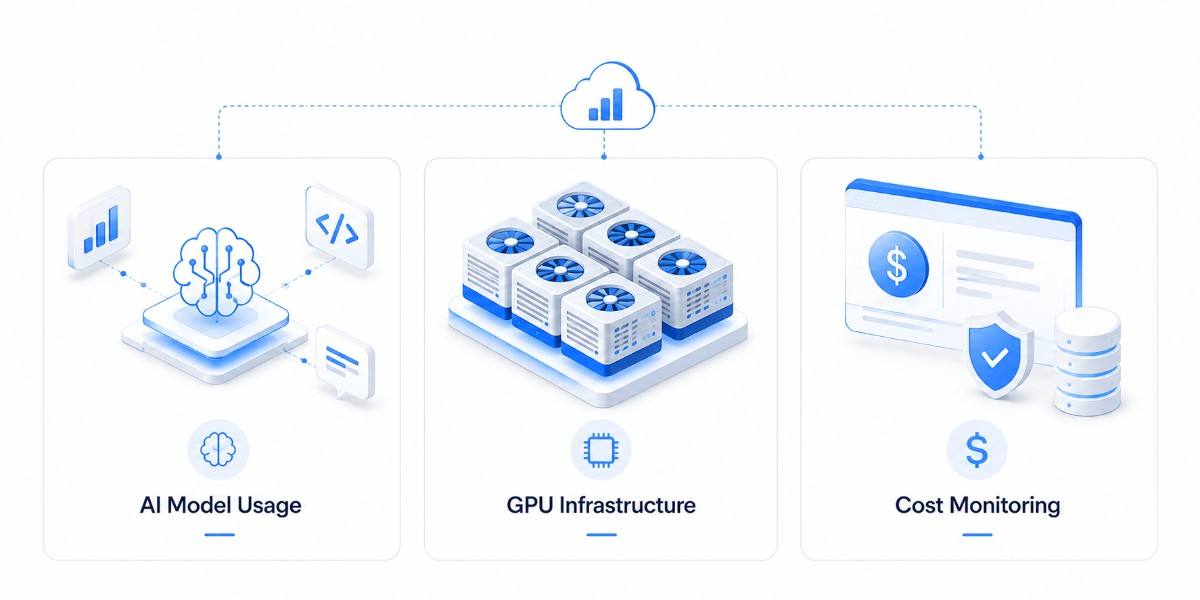
It's tempting to treat this as just another line item to monitor. It isn't, and the reasons come down to how AI spend behaves differently than everything FinOps teams have dealt with before.
Token pricing is a moving target.
Identical inputs don't produce identical costs. Because model outputs are probabilistic, the same prompt can return a longer or shorter response on each call, so cost per request varies even when the input is fixed. This non-determinism is why token spend can't be budgeted like a fixed compute hour; you're pricing a distribution, not a unit.
A token isn't a fixed unit the way a compute hour is. It swings with prompt length, context window size, and which model you're calling. Two requests to the same endpoint can cost wildly different amounts, and without deliberate tracking, nobody can tell you what a single feature actually costs to run.
As organizations adopt multiple foundation models and AI-powered features across products, this variability becomes even harder to manage. A chatbot, document summarizer, and code assistant may all rely on different models with different pricing structures, making it difficult to compare costs or forecast spending using traditional cloud budgeting methods. Without visibility into token consumption at the application level, even small inefficiencies can compound into significant monthly expenses.
GPU capacity is Constrained and Volatile
Unlike general-purpose compute, GPUs aren't sitting around in unlimited supply. Availability is constrained in many regions, pricing shifts with demand, and the rate you built your budget around can move after a single provider update.
On top of pricing changes, choosing the wrong GPU for a workload can quietly inflate costs. Teams often provision high-end accelerators for experimentation or inference jobs that don't require that level of performance, simply because they're easier to standardize on. Matching workloads to the right class of hardware and regularly reviewing utilization is becoming just as important as negotiating cloud discounts, especially as GPU demand continues to grow.
The resource lifecycle is compressed
A training cluster might spin up, run for 48 hours, and disappear long before your monthly cost review would have even flagged it. Processes built around weekly or monthly cadences miss the entire optimization window.
The same challenge extends beyond training. Temporary inference environments, evaluation pipelines, and short-lived experimentation clusters can all generate meaningful costs in a matter of hours. If spending is only reviewed after workloads have completed, the opportunity to right-size resources, stop unnecessary jobs, or prevent repeat inefficiencies has already passed. Effective FinOps for AI depends on monitoring costs while workloads are active, not after the bill arrives.
Here's what that looks like in practice. A GPU instance's advertised hourly rate rarely matches its real cost. Take a rented H100 priced at $3.99 an hour on-demand at a real, current market rate, but only running at 40% utilization on a given job. The instance costs the same $3.99 whether it's doing useful work or sitting idle between tasks, which means your effective cost per useful compute-hour isn't $3.99; it's nearly $10.
Most billing dashboards will happily report the $3.99 figure and call it a day. That gap between the sticker price and the real price is where a huge amount of AI spend quietly disappears, and it's why waiting for a quarterly review to catch this isn't good enough anymore.
What Drives AI and GPU Costs Across the Stack
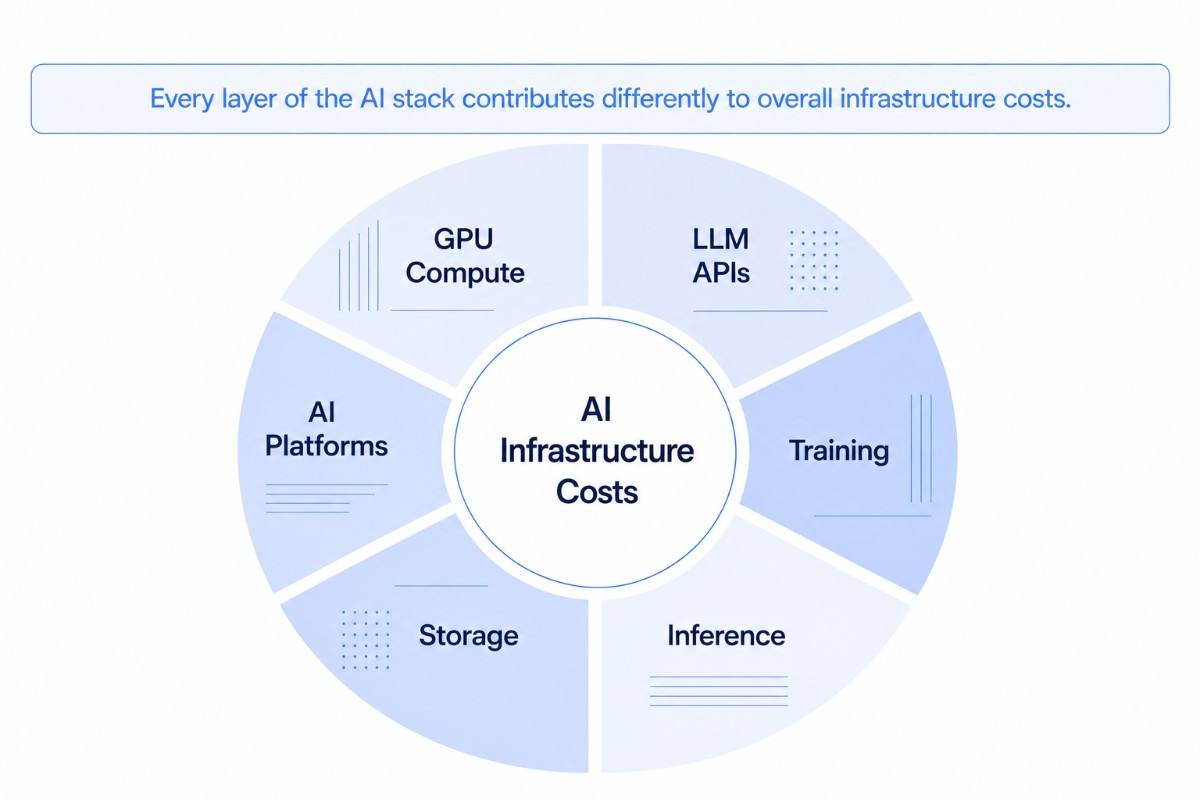
Before you can optimize anything, you need to know where the money is actually landing. Most AI spend falls into a handful of buckets, and mapping them out is the foundation everything else in this guide builds on.
GPU and accelerator compute
GPU and accelerator compute is usually the single biggest and most volatile line item in an AI budget. Whether you're training large models, fine-tuning existing ones, or serving inference requests, these specialized processors account for a significant share of infrastructure costs. Since GPU pricing varies by hardware type, region, and cloud provider, and demand can quickly affect availability, this is often the first area FinOps teams focus on when looking for optimization opportunities.
Token consumption on managed LLM APIs
When using managed LLM APIs, costs increase with every prompt sent and every response generated. Unlike traditional compute resources, token usage depends on factors such as prompt length, response size, context windows, and the model selected. Without detailed tracking at the application or feature level, it becomes difficult to understand which workloads generate the highest token costs or whether those costs align with the value being delivered.
Addressing this level of cost visibility is a key responsibility of the discipline around running large models in production, which focuses on monitoring, optimizing, and governing production AI workloads.
Training and fine-tuning runs
Training and fine-tuning workloads are typically resource-intensive, running for hours or even days while consuming large amounts of GPU compute. Although these workloads don't execute continuously, they often occur more frequently than expected during active development, experimentation, and the iterative tuning that adapting a model to a task demands. Small changes tested across multiple runs can significantly increase infrastructure costs if they aren't planned and monitored carefully.
Inference at scale
Individual inference requests may cost only a fraction of a cent, but those costs accumulate rapidly in production environments. AI assistants, recommendation engines, document processing systems, and customer support applications can generate thousands, or even millions, of requests every day. As adoption grows, inference frequently becomes the largest ongoing operational expense because it runs continuously long after model development is complete.
Storage and data transfer
AI workloads rely on much more than compute alone. Organizations also pay for storing training datasets, model checkpoints, embeddings, vector databases, logs, and model artifacts. Moving this data between regions, cloud services, or external applications introduces network egress charges that are often overlooked during budgeting.
Efficient data preparation and movement can help reduce unnecessary storage growth, duplicate datasets, and repeated data transfers throughout the AI pipeline. Together, storage and data transfer can represent a meaningful share of overall AI infrastructure costs and should be tracked alongside GPU spending.
Fragmented SaaS and PaaS AI add-ons
Many organizations also spend heavily on AI capabilities embedded within commercial platforms. Developer tools, productivity suites, analytics platforms, and data services increasingly include AI features with their own pricing models, usage limits, or subscription tiers. Because these expenses are spread across multiple vendors and billing systems, they're often excluded from AI cost reporting, making it harder to understand the organization's total AI investment.
Training Costs vs. Inference Costs
You'll see wildly different numbers for how much of an AI budget goes to training versus inference, anywhere from roughly half to nearly the entire spend. That variation isn't a contradiction; it reflects the maturity of the workload.
During development, training and fine-tuning consume most of the budget as teams experiment and iterate. Once an AI application reaches production, inference becomes the ongoing expense, serving user requests around the clock while training happens only when models need updating. Rather than relying on a fixed ratio, evaluate where your workload sits in its lifecycle before planning budgets or optimization efforts.
Why GPU Utilization Alone Isn't Enough
A common mistake is treating GPU utilization as the primary measure of efficiency. A GPU running at 95% utilization can still be a poor investment if it's processing low-value workloads or running on oversized infrastructure. High utilization simply means the hardware is busy, not that it's delivering value.
A more meaningful approach is to measure cost per outcome, such as cost per inference, GPU-hours per completed training run, or cost per customer interaction. These metrics connect infrastructure spending to business impact and provide a clearer picture of where optimization efforts will deliver the greatest return.
What FinOps for AI Actually Costs in 2026
Frameworks and behavior only take you so far; here's what the actual dollars look like right now, because the numbers make the case for everything above more concrete than any framework can.
GPU Rates Vary by Up to 9x Across Providers
On-demand hourly rates for a single H100 80GB, still the most commonly rented GPU for training and inference, range from roughly $1.50 to over $14 an hour depending on the provider.
Hyperscalers are consistently the most expensive route: AWS and Azure routinely charge 3- 6x what specialized GPU cloud providers charge for identical hardware, partly because they often price by the full 8-GPU instance rather than per GPU, which makes the sticker price look deceptively close to a smaller provider's per-GPU rate until you do the math. The market median sits around $3/hour, a useful number to sanity-check any quote against.
Owning GPUs Only Pays Off Past ~100 Days of Constant Use
A single purchased H100 typically runs $25,000-$30,000 upfront. Amortized over three years of continuous use, that lands close to the same per-hour cost as renting on-demand, putting the breakeven point at roughly 2,500-3,000 hours, or about 100-120 days running 24/7.
Below that usage level, renting almost always wins once power, cooling, and maintenance are factored in, costs that rarely make it into a quick buy-vs-rent comparison.
Token Prices Span a 150x Range Between Model Tiers
Per-million-token input pricing across major providers in 2026 ranges from a few cents to roughly $ 5- $ 7, with output tokens typically priced 3-6x higher than input on the same model.
A model defaulting to long, elaborate answers can cost several times more than the same model capped to concise output, serving identical request volume.
Routing a simple request to a budget model instead of a premium one can be the difference between paying $0.50 and $75 for the same million tokens- a 150x gap, not a rounding error.
Storage and Egress Add 15–25% on Top of Compute
Datasets, checkpoints, and embeddings are cheap to store individually, but moving them across regions or between providers isn't. Egress charges alone commonly add another 15 to 25% on top of raw compute spend.
Because they show up on a separate line item, they're frequently left out of the "what does this model cost us" conversation entirely, even though they scale with usage the same way compute does.
A Worked Example of One Feature's Monthly Bill
Picture a mid-size AI feature: a production inference service on 2 dedicated H100s running around the clock, plus a customer-facing chat feature doing roughly 100 million tokens a month at an 80/20 input-output split on a mid-tier model.
- GPU compute: 2 GPUs × ~$3/hour × 730 hours/month ≈ $4,380/month
- Token spend: 100M tokens at a blended mid-tier rate (~$2/M input, $10/M output, 80/20 split) ≈ $3,600/month
- Rough total before storage, egress, and training spend: ~$8,000/month
Add storage and egress at the 15–25% range above, and the realistic all-in number climbs closer to $9,500–$10,000/month, before counting a single training or fine-tuning run. Run the same workload on a poorly chosen provider or an unrouted premium model, and it can land at two to three times this figure for identical output quality. A Worked Example of One Feature's Monthly Bill
Picture a mid-size AI feature: a production inference service on 2 dedicated H100s running around the clock, plus a customer-facing chat feature doing roughly 100 million tokens a month at an 80/20 input-output split on a mid-tier model.
GPU compute: 2 GPUs × ~$3/hour × 730 hours/month ≈ $4,380/month
Token spend: 100M tokens at a blended mid-tier rate (~$2/M input, $10/M output, 80/20 split) ≈ $3,600/month
Rough total before storage, egress, and training spend: ~$8,000/month
Add storage and egress at the 15–25% range above, and the realistic all-in number climbs closer to $9,500–$10,000/month, before counting a single training or fine-tuning run. Run the same workload on a poorly chosen provider or an unrouted premium model, and it can land at two to three times this figure for identical output quality.
And that's only the ongoing infrastructure spend. It doesn't account for what it actually costs to build the application layer around the model in the first place, from backend services and integrations to user-facing features and deployment, which is a separate investment before a single inference request is ever served.
Treat These Numbers as a Snapshot, Not a Budget Line. GPU rental rates and token pricing have both shifted materially within 2026 alone. Use the figures above to reason about scale and proportion, not as fixed inputs; verify current rates before locking them into an actual budget.
Key KPIs and Metrics for FinOps for AI
General cloud KPIs don't translate well here. What you need are unit economics, numbers that connect spend to actual output in a way that means something to both an engineer and a CFO.
Here's the honest advice: don't try to track all eight of these. Pick the two or three that map to your biggest cost driver and your clearest business outcome, and actually watch how they trend month over month. A dashboard with eight KPIs nobody checks is worse than a dashboard with two that everyone actually looks at before making a decision.
Best Practices for FinOps for AI
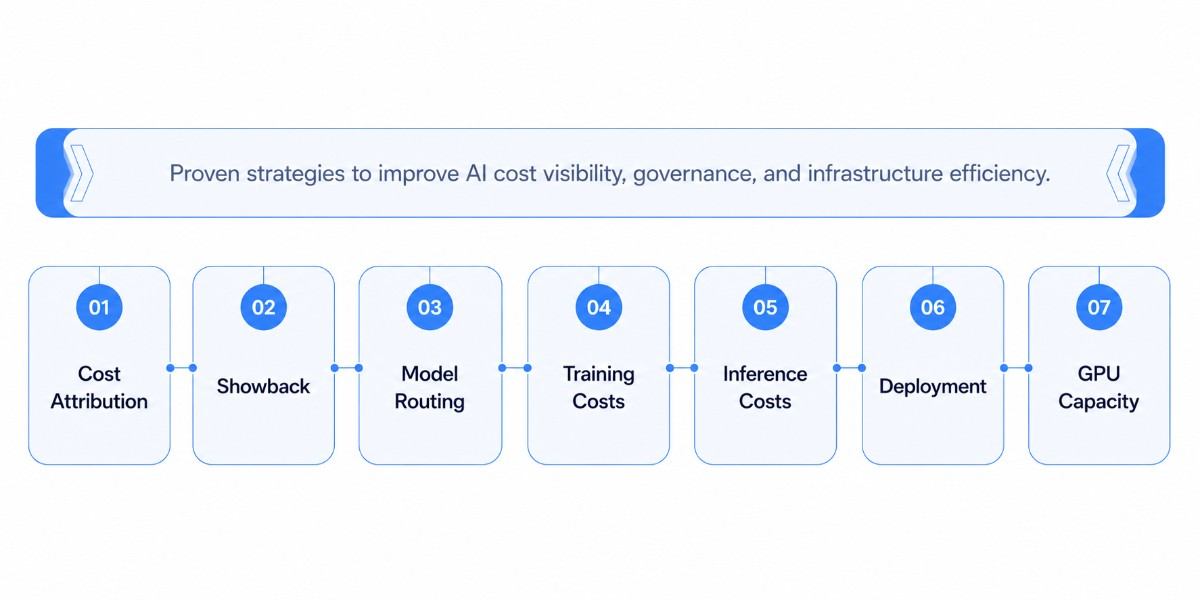
Understanding where AI costs come from is only the first step. The real value of FinOps comes from applying practices that improve visibility, optimize infrastructure, and ensure spending stays aligned with business outcomes. The following strategies are among the most effective ways to control AI costs without slowing innovation.
1. Establish Cost Attribution
Before optimizing costs, make sure every AI workload can be traced back to its owner. Without clear attribution, it's difficult to understand which teams, projects, or models are driving spending, making meaningful optimization almost impossible.
A practical tagging strategy should consistently capture five key dimensions: the team that owns the workload, the project it supports, the environment (development, staging, or production), the model or model version in use, and the cost center used for financial reporting. Together, these tags provide the visibility needed to allocate AI costs accurately.
Even one missing tag can create attribution gaps. For example, a workload assigned to the correct team but not the correct project may still be difficult to reconcile against a specific budget. Standardizing tagging policies early ensures AI costs remain accurate, traceable, and easier to optimize as workloads grow.
2. Adopt Showback Before Chargeback
Once tagging is reliable, organizations can allocate AI costs by team, project, model, or even token consumption for shared infrastructure.
Rather than charging teams immediately, begin with a showback approach. Showback gives teams visibility into the costs they would be responsible for without actually transferring budgets. This helps validate tagging accuracy, build trust in the reporting, and identify inconsistencies before introducing financial accountability.
After several weeks of consistent reporting, organizations can transition to chargeback, where AI costs are allocated directly to the teams or business units that generated them.
3. Optimize Model Routing
One of the fastest ways to reduce AI costs is to stop sending every request to the largest available model.
Reserve high-capability models for tasks that require advanced reasoning, planning, or complex decision-making. Simpler workloads, such as summarization, classification, or formatting, can often be handled by smaller, task-specific models with little or no impact on quality.
Effective model routing ensures organizations pay for performance only when it's genuinely needed.
4. Reduce Training Compute Costs
Training workloads are generally more tolerant of interruptions than production inference. That makes them well suited for spot or preemptible GPU instances, which are often available at significantly lower prices than on-demand capacity.
The key requirement is checkpointing. Training jobs should save progress frequently so they can resume from the latest checkpoint if an instance is reclaimed, minimizing lost work while taking advantage of lower-cost compute.
5. Optimize Inference Costs
Infrastructure isn't the only place where costs can be reduced. Optimizing how models run can significantly improve efficiency without changing the user experience.
Common optimization techniques include:
- Quantization to reduce model size and GPU requirements.
- KV-cache optimization to improve inference throughput by avoiding repeated computation.
- Prompt caching to serve repeated requests without generating a new response every time.
Each technique has trade-offs, so they should be evaluated based on workload requirements, latency expectations, and acceptable accuracy levels.
6. Choose the Right Deployment Model
One of the biggest architectural decisions is whether to run models yourself or consume them through managed APIs.
Managed APIs generally make more sense for new products, unpredictable workloads, and rapid experimentation because they eliminate infrastructure management. Self-hosting becomes more attractive when workloads are stable, predictable, and consistently generate high request volumes that justify the operational investment.
The right choice depends on usage patterns, engineering capacity, compliance requirements, and long-term operating costs, not just API pricing. They also shape how a model actually gets into production, from infrastructure selection to deployment strategy, so it's worth planning both decisions together.
7. Balance GPU Capacity
Owning GPU infrastructure isn't always the most economical option, just as renting everything isn't always the most flexible.
Many organizations achieve the best balance by maintaining enough dedicated capacity for predictable workloads while relying on rented cloud GPUs to handle temporary demand spikes, experimentation, or seasonal growth. Short-term capacity commitments such as machine learning capacity blocks that reserve GPUs for days or weeks rather than years offer a middle path between on-demand rates and rigid multi-year contracts, matching spend to actual project windows. As utilization patterns stabilize, infrastructure decisions can be based on actual usage rather than assumptions.
A Step-by-Step Roadmap to Implementing FinOps for AI
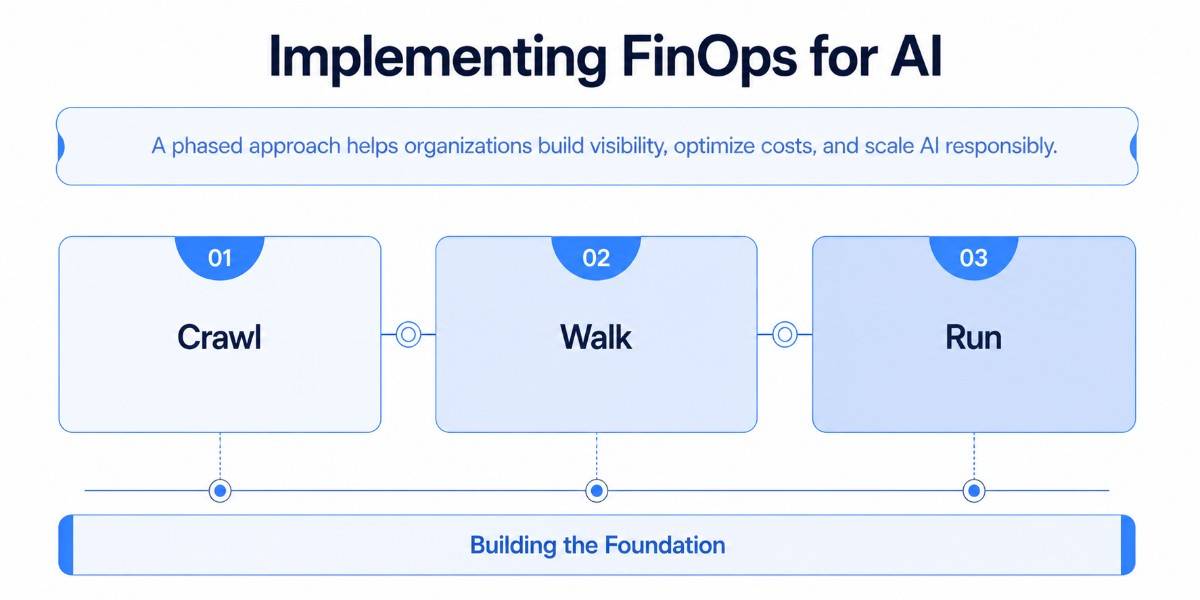
Adopting FinOps for AI is a gradual process. Trying to implement advanced automation before establishing visibility often leads to inaccurate reporting and poor optimization decisions. A phased approach helps organizations build reliable cost controls while allowing AI initiatives to scale with confidence.
1.Crawl
The first step is understanding where AI spending is happening. Consolidate AI costs into a single view, identify your largest cost drivers, and implement a consistent tagging strategy for teams, projects, models, and environments. At this stage, simple dashboards, manual reporting, and basic budget tracking are sufficient. The objective isn't perfect optimization; it's creating enough visibility to understand how AI resources are being used.
2.Walk
Once cost data is reliable, the next step is to automate reporting and improve accountability. Track spending at the team, project, and model level, set up anomaly detection to identify unexpected cost spikes, and introduce showback so teams understand the financial impact of their workloads. This stage also provides the data needed to make informed optimization decisions rather than relying on assumptions.
3.Run
In the final stage, FinOps becomes part of the engineering workflow rather than a separate financial exercise. Automated rightsizing recommendations, model routing, infrastructure optimization, and ongoing cost reviews help teams improve efficiency without slowing development. Cost is evaluated alongside performance, quality, and business value whenever new models or AI features are deployed, making optimization a continuous process rather than a periodic review.
Building the Foundation
Organizations often want to move directly to automation, but skipping the earlier stages rarely produces good results. Without accurate cost attribution and reliable reporting, automated recommendations are based on incomplete or misleading data. Establishing strong visibility first creates a solid foundation for long-term AI cost optimization and governance.
Building the Right Team Structure for AI Accountability
Managing AI costs isn't the responsibility of a single team. While finance may own the budget, engineering teams make infrastructure decisions, product teams influence AI usage, and data scientists determine how models are developed and deployed. Without shared ownership, organizations often end up with limited visibility, inconsistent cost controls, and unclear accountability.
FinOps for AI works best as a cross-functional practice where every stakeholder understands both the technical and financial impact of AI workloads. The goal isn't to slow innovation; it's to ensure AI investments deliver measurable business value.
Roles and Responsibilities
Although responsibilities vary by organization, a typical ownership model looks like this:
No single team can manage AI costs effectively on its own. Engineering understands infrastructure, finance understands budgets, and product teams understand business outcomes. FinOps brings these perspectives together so cost decisions are made with complete context rather than in isolation.
Governance That Works in Practice
Strong governance doesn't mean adding unnecessary approval processes. It means putting practical controls in place that help teams identify issues before they become expensive problems.
Some of the most effective guardrails include:
- Budget alerts that notify teams when AI spending reaches predefined thresholds, allowing corrective action before monthly budgets are exceeded.
- Team and project quotas that prevent individual workloads or experiments from consuming unlimited GPU or token resources.
- Anomaly detection that identifies unexpected spikes in GPU usage, token consumption, or inference traffic within hours instead of waiting for month-end reports.
- Lifecycle policies that automatically stop idle development environments, unused GPU instances, and temporary experimentation clusters once they're no longer needed.
- Regular cost reviews where engineering, finance, and product teams evaluate AI spending, optimization opportunities, and business outcomes together.
These controls are most effective when they're automated wherever possible. Relying on manual reviews alone makes it easy for short-lived training jobs, idle infrastructure, or rapidly growing inference workloads to go unnoticed.
Build Accountability Without Slowing Innovation
The objective of governance isn't to reduce AI adoption, it's to ensure every team understands the financial impact of the resources they use. When ownership is clearly defined, costs become easier to attribute, optimization opportunities are identified earlier, and AI investments can scale with greater confidence.
Organizations that establish these responsibilities and guardrails early are better positioned to manage growing AI workloads without sacrificing speed, visibility, or financial control.
Compliance and Sustainability Factors in AI Operations
AI costs extend beyond GPUs, tokens, and cloud infrastructure. Organizations also need to account for regulatory obligations, governance requirements, and long-term sustainability goals. While these expenses may not appear directly on a cloud invoice, they influence the overall cost of building, deploying, and operating AI systems.
Plan for Compliance
Regulatory and compliance requirements should be treated as part of AI budgeting rather than an afterthought. Data privacy laws, industry-specific regulations, model licensing agreements, bias assessments, security controls, and data retention policies all introduce operational costs that need to be planned for from the outset.
Including these requirements early in the planning process helps avoid unexpected compliance expenses, reduces the risk of costly rework, and ensures AI initiatives remain aligned with legal and organizational policies as they scale.
Improve Sustainability
AI infrastructure has both a financial and an environmental cost. Training large models and running underutilized GPU clusters consume significant amounts of electricity, increasing both cloud spending and energy usage.
The good news is that many FinOps optimization practices benefit both. Improving GPU utilization, rightsizing infrastructure, scheduling workloads efficiently, and eliminating idle resources reduce operating costs while also lowering the environmental footprint of AI workloads.
Standardize Cost Reporting
As organizations adopt multiple cloud providers, AI platforms, and foundation models, comparing costs across different services becomes increasingly difficult. The industry is gradually moving toward standardized reporting frameworks that make AI usage and spending easier to measure consistently across providers.
You don't need to adopt these standards immediately, but building consistent tagging, cost attribution, and reporting practices today will make future migrations and cross-platform reporting significantly easier as AI FinOps continues to mature.
Conclusion
FinOps for AI isn't a discipline you bolt on once the bill gets uncomfortable, it works best when it's part of how a team designs and ships AI from the start. The organizations getting this right aren't the ones with the fanciest dashboards; they're the ones that got tagging and attribution right early, picked two or three KPIs that actually mattered, and built budget guardrails before an agent or a training run had the chance to run away with the spend.
Everything else in this guide, the frameworks, the metrics, the maturity model, only works once that foundation is in place. Start there, and the rest becomes a lot more manageable than it looks from the outside.
 WhatsApp
 Call Us
 Mail Us