


Building Modern AI Applications with a Generative AI Tech Stack


Most teams building their first generative AI application make the same mistake, they pick a model and figure out the rest later.
Six months in, they're dealing with unpredictable costs, inconsistent outputs, a retrieval layer that doesn't scale, and an orchestration setup held together with workarounds.
A generative AI tech stack is the full set of components that makes an AI application work in production covering how data is ingested and retrieved, how models are selected and served, how workflows are orchestrated, and how outputs are delivered to users reliably at scale.
It's what separates a compelling demo from a product people can actually depend on.
Who This Guide is For?
Whether you're a startup founder evaluating your first AI integration, an engineer tasked with building a RAG pipeline, or a product manager trying to understand what your team is actually building , this guide is structured to give you a working mental model, not just a glossary.
By the end, you'll know what each layer of a generative AI stack does, why specific tool choices matter, how these layers combine into a real application, and where most teams go wrong.
Core Layers of a Generative AI Tech Stack
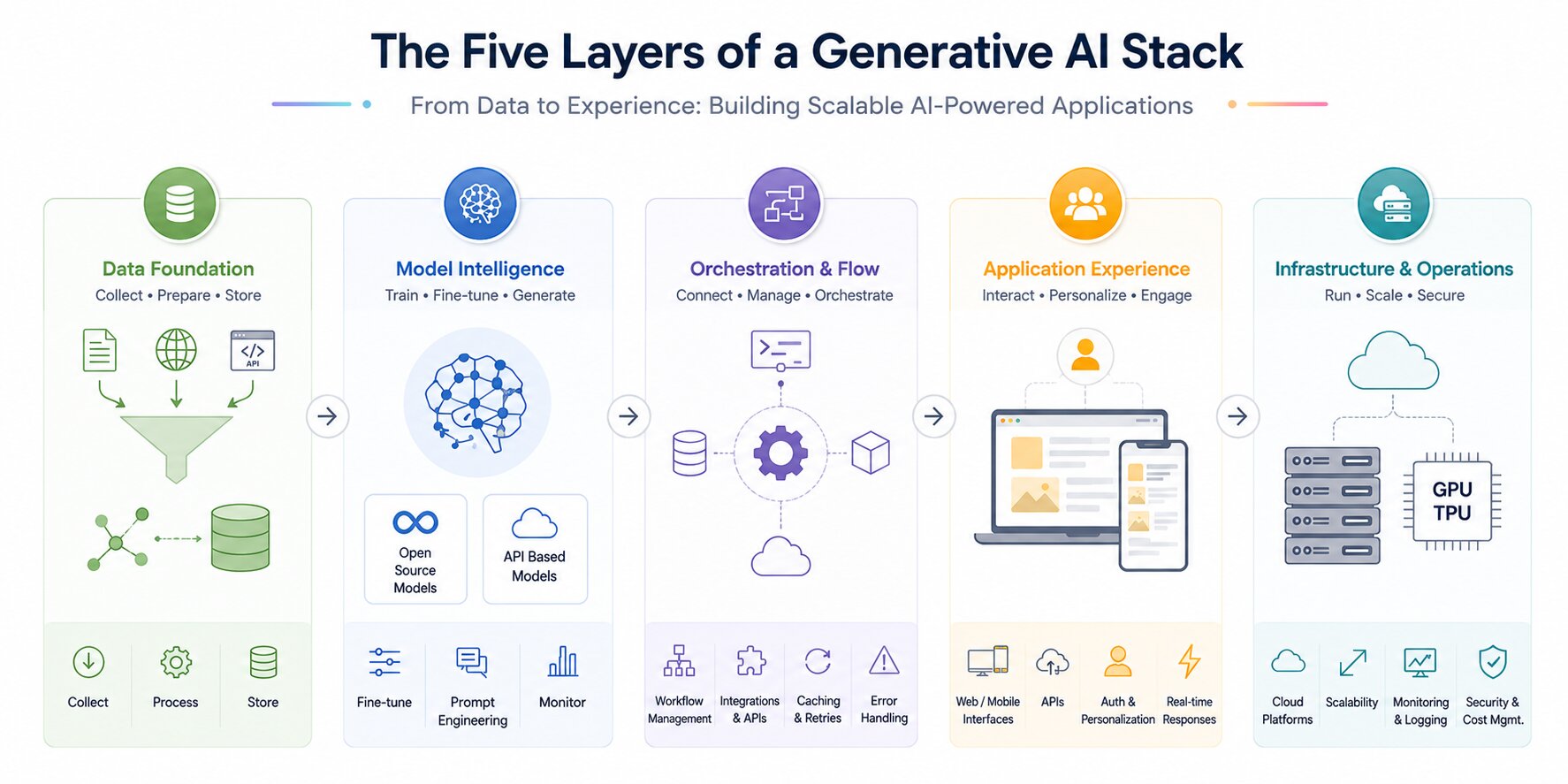
A generative AI stack is organized into layers, where each layer handles a specific part of the system, from data processing to user interaction.
These layers work together to build scalable and efficient AI-powered applications.
Data Layer
This layer focuses on collecting and preparing data from sources such as documents, APIs, and user input. The data is cleaned, structured, and transformed to make it usable for models.
It also includes generative embeddings and storing data in systems like data lakes or vector databases. Efficient retrieval delivers faster, more relevant outputs. Data quality and governance play a key role in ensuring accurate results.
Languages and tools commonly used at this layer:
Python is the dominant language for data layer work in generative AI, primarily because of the maturity of its data ecosystem.
The libraries most teams rely on are:
- LangChain / LlamaIndex: Used for document loading, chunking, and connecting data sources to your pipeline.
- Apache Spark or Pandas : Used for large-scale data cleaning and transformation before ingestion.
- Unstructured.io : Used for parsing complex file formats like PDFs, Word documents, HTML, and images into clean text.
- Hugging Face Datasets : Implemented loading and managing structured training or evaluation datasets.
- SQLAlchemy / Psycopg2 : Used for connecting to relational databases when structured data is part of your retrieval system.
- boto3 (AWS SDK) / Google Cloud Storage client :Used for reading from and writing to cloud data lakes.
For embedding generation specifically, the most commonly used libraries are OpenAI's Python SDK (for text-embedding-3-small or text-embedding-3-large), sentence-transformers from Hugging Face for open-source alternatives, and Cohere's embed API for multilingual use cases.
Vector storage at this layer is typically handled by Pinecone, Weaviate, Qdrant, or FAISS each with its own Python client for inserting, updating, and querying embeddings.
Most teams obsess over model choice and underinvest in data quality. In practice, a well-structured data layer with clean chunking, rich metadata, and reliable ingestion pipelines will outperform a better model fed poor context every single time.
Let me help you undertsand with an example:
Notion's AI features rely heavily on structured ingestion of user-generated content. The model isn't doing anything exotic; the data layer is doing the heavy lifting by surfacing the right page context before inference even begins.
What to get right early:
- Define your chunk sizes before you start embedding. A common starting point is 512 tokens with 10–15% overlap.
- Tag every document chunk with metadata (source, date, category) at ingestion time — you'll need it for filtered retrieval later.
- Don't skip data validation. Silent data quality issues are the hardest bugs to find in a production RAG system.
A minimal Python snippet for chunking and embedding with LangChain:
from langchain.document_loaders import PyPDFLoader
from langchain.text_splitter import RecursiveCharacterTextSplitter
from langchain.embeddings import OpenAIEmbeddings
from langchain.vectorstores import Pinecone

loader = PyPDFLoader("company_policy.pdf")
documents = loader.load()

splitter = RecursiveCharacterTextSplitter(chunk_size=512, chunk_overlap=50)
chunks = splitter.split_documents(documents)

embeddings = OpenAIEmbeddings(model="text-embedding-3-small")
vectorstore = Pinecone.from_documents(chunks, embeddings, index_name="hr-policies")
Model Layer
This is the core intelligence layer where content generation occurs using models such as large language models or image generators.
Teams can use open-source models for flexibility or API-based models for quick integration. It may involve fine-tuning models on specific datasets to improve performance.
Prompt engineering is also used to guide model outputs. Monitoring maintains consistent quality.
Languages and tools commonly used at this layer:
Python remains the primary language here as well. The key libraries and tools are:
- OpenAI Python SDK / Anthropic SDK / Google Generative AI SDK :Implement either of these to make API calls to hosted models
- Hugging Face Transformers : Standard library for loading, running, and fine-tuning open-source models like Llama 3, Mistral, and Falcon.
- PEFT (Parameter-Efficient Fine-Tuning) : Used for applying techniques like LoRA and QLoRA without retraining the full model.
- bitsandbytes :Used for model quantization, reducing memory requirements when self-hosting large models.
- vLLM / Ollama / Text Generation Inference (TGI) :Used for serving open-source models efficiently in production.
- Weights & Biases / MLflow : Used for tracking experiments, logging model versions, and comparing fine-tuning runs.
For prompt engineering specifically, tools like PromptLayer and LangSmith let you version, test, and compare prompts systematically rather than editing them manually.
The Model is not the Product.
This is one of the most important mindset shifts for teams new to building with AI. The model is a component. What surrounds it , the data it receives, the prompts that guide it, the guardrails that constrain it determines the quality of your output far more than which model you chose.
How to select the right model:
If you're in early validation: start with Claude Sonnet or GPT-4o via API. Don't self-host yet.
If your use case involves very long documents (contracts, research papers, full codebases): Claude's 200K context window is a genuine differentiator.
If cost at scale is the problem: look at Mistral 7B or Llama 3 8B fine-tuned on your domain data. A smaller fine-tuned model frequently outperforms a larger general model on narrow tasks. We call Claude through the Anthropic SDK to handle prompt execution and generate responses within the application.
import anthropic

client = anthropic.Anthropic()

message = client.messages.create(
    model="claude-sonnet-4-20250514",
    max_tokens=1024,
    system="You are a helpful HR assistant. Answer only based on provided policy context.",
    messages=[
        {"role": "user", "content": "How many sick days do I get per year?"}
    ]
)

print(message.content[0].text)
In production, the user message would include retrieved context chunks injected before the question, this is where your orchestration layer hands off to the model layer.
Reference: Andrej Karpathy's breakdown of how LLMs work internally- Video link
Orchestration Layer
This layer connects all components and manages the flow between them. A well-designed orchestration layer handles prompt construction, model calls, and integration with external tools or APIs.
Workflow management ensures that inputs and outputs move smoothly across the system. It also manages retries, caching, and error handling.
Languages and tools commonly used at this layer:
- LangChain :The most widely adopted orchestration framework, handling prompt templates, chains, memory, and tool integrations.
- LangGraph : LangChain's graph-based extension for building stateful, multi-step agentic workflows with explicit control flow.
- LlamaIndex : Stronger choice when orchestration is primarily retrieval-heavy rather than agentic.
- Haystack (by deepset) : A production-focused alternative favored in enterprise RAG pipelines.
- AutoGen (Microsoft) : For multi-agent orchestration where multiple AI models collaborate on a task.
- CrewAI : Implement to define agent roles, goals, and collaboration patterns in multi-agent systems.
- Redis : Commonly used for caching model responses and managing session state across requests.
- Celery & RabbitMQ / AWS SQS : For managing async task queues when orchestration involves background jobs.
What a real orchestration layer handles:
Constructing the final prompt by assembling the system instruction, retrieved context chunks, conversation history, and user query in the right order and within the token limit.
Deciding which tool to call in an agentic system (web search, database lookup, code execution) and handling the result.
Managing retries with exponential backoff when a model API returns a 429 or 500.
Caching identical or semantically similar requests to avoid redundant API spend.
A LangChain orchestration example RAG chain with prompt construction:
from langchain.chat_models import ChatAnthropic
from langchain.prompts import ChatPromptTemplate
from langchain.schema.runnable import RunnablePassthrough
from langchain.vectorstores import Pinecone
from langchain.embeddings import OpenAIEmbeddings

vectorstore = Pinecone.from_existing_index("hr-policies", OpenAIEmbeddings())
retriever = vectorstore.as_retriever(search_kwargs={"k": 4})

prompt = ChatPromptTemplate.from_template("""
You are an HR assistant. Answer only based on the context below.
If the answer is not in the context, say so clearly.

Context: {context}
Question: {question}
""")

model = ChatAnthropic(model="claude-sonnet-4-20250514")

chain = (
    {"context": retriever, "question": RunnablePassthrough()}
    | prompt
    | model
)

response = chain.invoke("How many sick days do I get per year?")
print(response.content)
This chain retrieves relevant chunks, constructs the prompt, and calls the model , all in a single declarative flow. In production you'd add retry logic, streaming, and LangSmith tracing around this.
LangChain is the most widely used framework for this layer, though teams with complex production needs are increasingly moving to LangGraph for its explicit state management. LlamaIndex tends to be the stronger choice when your orchestration is primarily retrieval-heavy rather than agentic.
Application Layer
This is the user-facing layer where users interact with the system through web or mobile interfaces. It includes APIs that connect frontend and backend services for seamless communication.
Features like authentication, personalization, and real-time responses are implemented here.
A good application layer ensures a smooth and intuitive user experience. It directly impacts usability and engagement.
Languages and tools commonly used at this layer
Backend:
- Python with FastAPI : The most common backend choice for AI applications due to its async support, automatic API documentation, and clean integration with Python-based AI libraries.
- Node.js with Express : Preferred when the team has a JavaScript-first background or needs tight frontend-backend code sharing.
- Flask : Lighter alternative to FastAPI for simpler applications or internal tools.
- JWT / OAuth2 : Use for authentication and session management.
- Pydantic : Use for request/response validation, especially when working with structured model outputs.
Frontend:
- React / Next.js : The dominant choice for AI chat interfaces and copilot UIs; Next.js adds server-side rendering and API routes that simplify streaming response handling.
- Vercel AI SDK : Purpose-built for building streaming AI interfaces in Next.js with minimal boilerplate.
- Flutter : For teams needing native mobile app support alongside web.
- WebSockets / Server-Sent Events (SSE) : The underlying protocols for streaming model responses token-by-token in real time.
What good looks like in practice:
Stream responses token-by-token rather than waiting for the full response. OpenAI, Anthropic, and most hosted providers support streaming via server-sent events. This alone dramatically improves perceived responsiveness.
Show confidence signals where appropriate. If your system is retrieving from documents, showing the user which source was referenced builds trust and reduces perceived hallucination risk.
Build fallback states. What does the user see when the model API is down? What happens when retrieval returns nothing relevant? These states need to be designed, not left as error codes.
Infrastructure Layer
This layer provides the computing resources needed to run the system, such as cloud platforms and GPUs/TPUs. It supports deployment, scaling, and performance optimization.
Monitoring and logging tools help track system health and detect issues. It ensures high availability and low latency for users. Security and cost management are also key responsibilities of this layer.
Languages and tools commonly used at this layer:
- Docker & Kubernetes : Containerization and orchestration for deploying scalable AI services; Kubernetes handles auto-scaling under variable load.
- Terraform / Pulumi : Infrastructure-as-code tools for provisioning cloud resources reproducibly.
- AWS / Azure / GCP : The primary cloud platforms; each has GPU instance options (AWS G5/P4, Azure NCv3, GCP A100s) relevant for model serving.
- vLLM : The standard serving framework for self-hosted LLMs; improves GPU utilization significantly through continuous batching and PagedAttention.
- Ollama : Lighter-weight option for running open-source models locally or on smaller infrastructure.
- NGINX / AWS ALB : For load balancing and routing traffic across multiple service instances.
- Prometheus & Grafana : For infrastructure metrics, alerting, and dashboards.
- Datadog / New Relic : For full-stack observability combining infrastructure metrics with application-level tracing.
Practical infrastructure starting point for most teams
You do not need Kubernetes on day one. A single FastAPI backend deployed on a managed service like Railway, Render, or AWS App Runner paired with a hosted vector database handles most early-stage traffic. Add complexity only when a specific bottleneck justifies it.
If you're self-hosting models, the most common mistake is over-provisioning. Start with a single A10G or L4 instance and measure actual utilization before scaling. vLLM's continuous batching means a single well-configured instance handles far more concurrent requests than most teams expect.
A minimal Docker setup for a FastAPI AI service:
FROM python:3.11-slim

WORKDIR /app
COPY requirements.txt .
RUN pip install --no-cache-dir -r requirements.txt

COPY . .

CMD ["uvicorn", "main:app", "--host", "0.0.0.0", "--port", "8000", "--workers", "4"]# docker-compose.yml
version: "3.8"
services:
api:
build: .
ports:
- "8000:8000"
environment:
- ANTHROPIC_API_KEY=${ANTHROPIC_API_KEY}
- PINECONE_API_KEY=${PINECONE_API_KEY}
deploy:
resources:
reservations:
devices:
- capabilities: [gpu] # enable for self-hosted model servingHow does a Generative AI System Work?
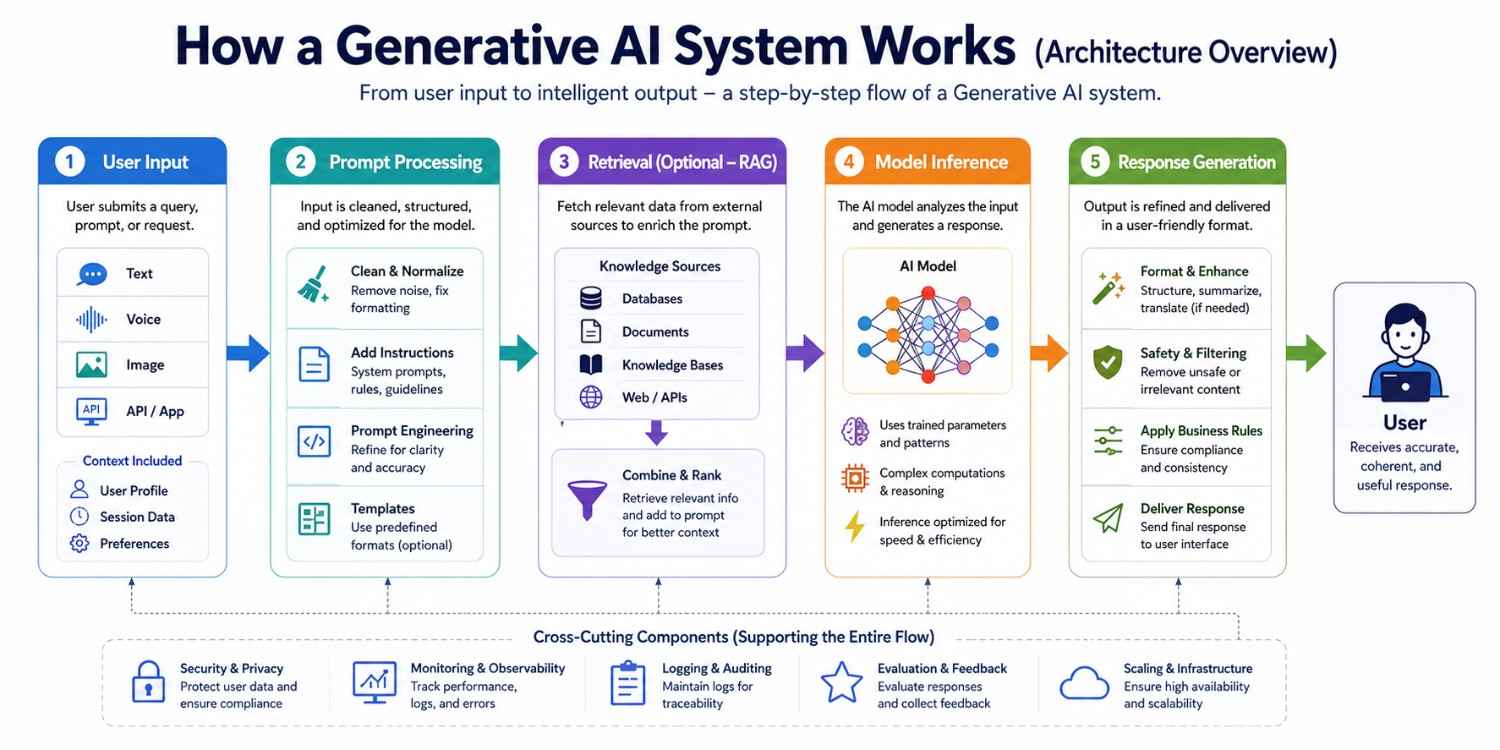
A generative AI system works through a series of connected steps, starting from a user’s request and moving through multiple processing stages.
At each stage, the input is refined and enriched with additional context to improve understanding. The system then uses trained models to analyze the input and generate relevant outputs. This structured flow ensures that the final response is accurate, coherent, and useful for the user.
User Input
The process begins when a user submits a query, prompt, or request through an interface such as a chatbot, web app, or API. This input can be in the form of text, voice, or even images in multimodal systems.
The system captures this input and forwards it to the backend for further processing. User context, session data, or preferences may also be included at this stage. This helps personalize and improve the relevance of responses.
Prompt Processing
Once the input reaches the backend, it is cleaned and structured for better understanding by the model. This step may involve removing noise, correcting formatting, and adding system-level instructions.
Prompt engineering techniques are applied to guide the model toward more accurate and useful outputs. In some systems, templates or predefined formats are used to standardize prompts. This stage plays a key role in improving response quality.
Retrieval (Optional – RAG)
In systems using Retrieval-Augmented Generation (RAG), relevant data is fetched from external sources such as databases, documents, or knowledge bases. This ensures that the model has access to up-to-date and domain-specific information.
The retrieved data is combined with the prompt to provide better context. It reduces hallucinations and improves factual accuracy. This step is especially useful for enterprise and data-driven applications.
Model Inference
The processed prompt, along with any retrieved context, is sent to the AI model for inference. The model analyzes the input using its trained parameters and generates a response. This step involves complex computations and pattern recognition.
The quality of output depends on the model’s training, architecture, and prompt clarity. Inference speed and efficiency are also important for real-time applications.
Response Generation
The model’s raw output is refined into a user-friendly format before being delivered. This may include formatting text, filtering unsafe or irrelevant content, and applying business rules.
Additional enhancements like summarization or translation can also be applied. The final response is then sent back to the user interface. This step ensures clarity, safety, and usability of the output.
Let's take an example of building a product from scratch,
Imagine you're building an internal HR chatbot that answers employee questions about company policy.
User Input: "How many sick days do I get per year?"
Prompt Processing
The query is cleaned and a system instruction is prepended:
"You are an HR assistant. Answer only based on the provided policy documents. If the answer is not in the documents, say so."
Retrieval (RAG)
The query is embedded and matched against your vector database of HR policy PDFs. The top 3 chunks from the "Leave Policy 2024" document are retrieved, covering annual leave, sick leave, and unpaid leave sections.
Model Inference
The model receives: system instruction + retrieved chunks + user query.
It generates: "According to the company's 2024 Leave Policy, full-time employees receive 10 sick days per year, which can be carried over up to a maximum of 5 days."
Response Generation:
The response is returned to the frontend with a citation showing it came from "Leave Policy 2024, Section 3.2" , building user trust and reducing the chance of a misattributed answer going unchallenged.
This is a simple but complete flow. Every layer played a role. Changing any one of them would change the output.
Types of AI Models Used in a Generative AI Stack
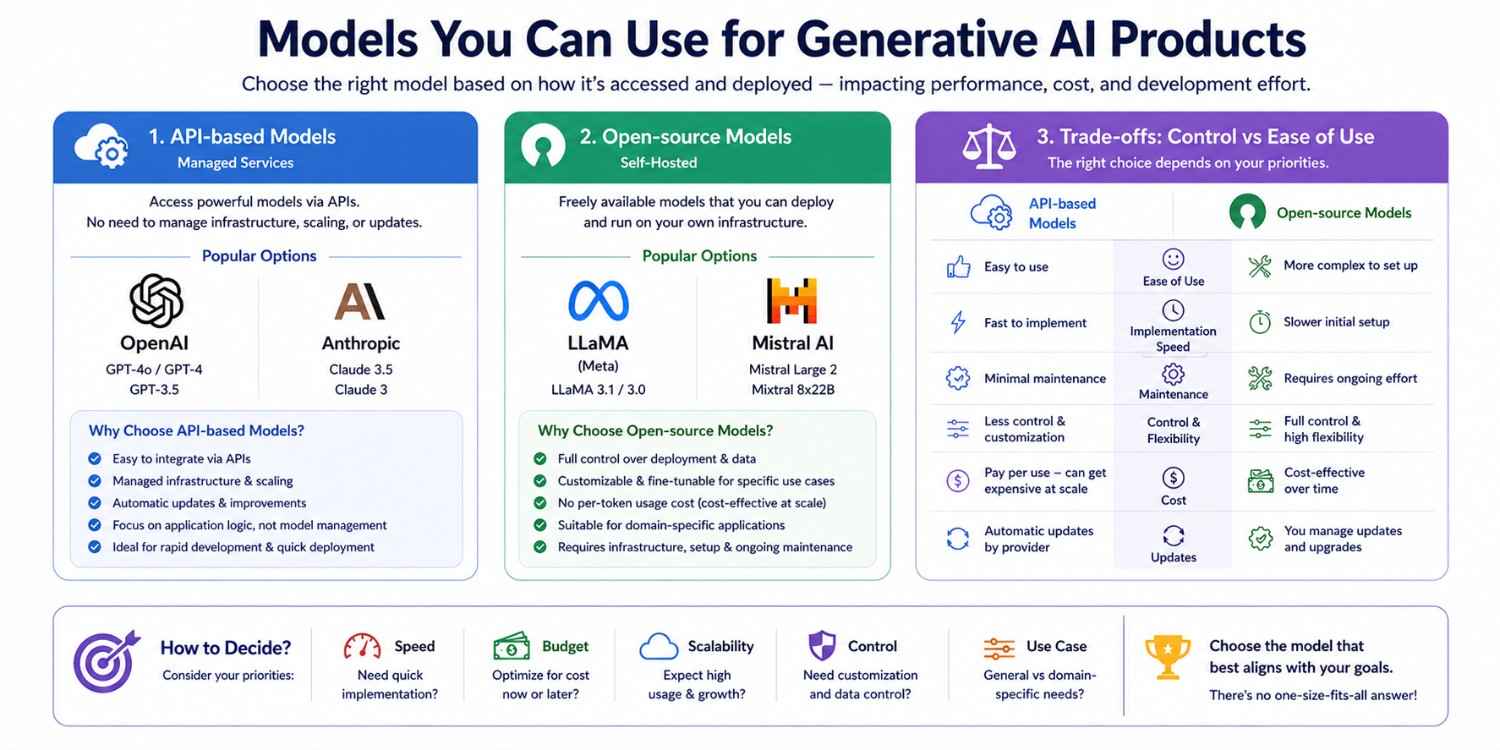
Choosing the right model is a key decision when building generative AI applications. Models are generally categorized based on how they are accessed and deployed. This choice directly impacts performance, cost, and development effort.
API-based Models
These models are provided as managed services and accessed through APIs, making them easy to integrate. Popular options include OpenAI GPT models and Anthropic Claude.
They handle infrastructure, scaling, and updates automatically. This allows developers to focus on application logic instead of model management. They are ideal for rapid development and quick deployment.
Open-source Models
Open-source models are freely available and can be deployed on your own infrastructure. Examples include LLaMA and Mistral. Teams working with deep learning frameworks often prefer this route for the flexibility to fine-tune and customize based on specific use cases.
This makes them suitable for domain-specific applications. However, they require proper setup, hardware resources, and ongoing maintenance.
Multimodal Models
These models process and generate across multiple data types, text, images, audio, and video, from a single system. They are becoming the standard for advanced product experiences.
Fine-Tuned Models
Teams can take a base model and fine-tune it on domain-specific data using techniques like LoRA (Low-Rank Adaptation) to achieve higher performance on narrow tasks at lower inference cost than using a large general-purpose model.
Model Comparison
RAG in Modern Generative AI Systems
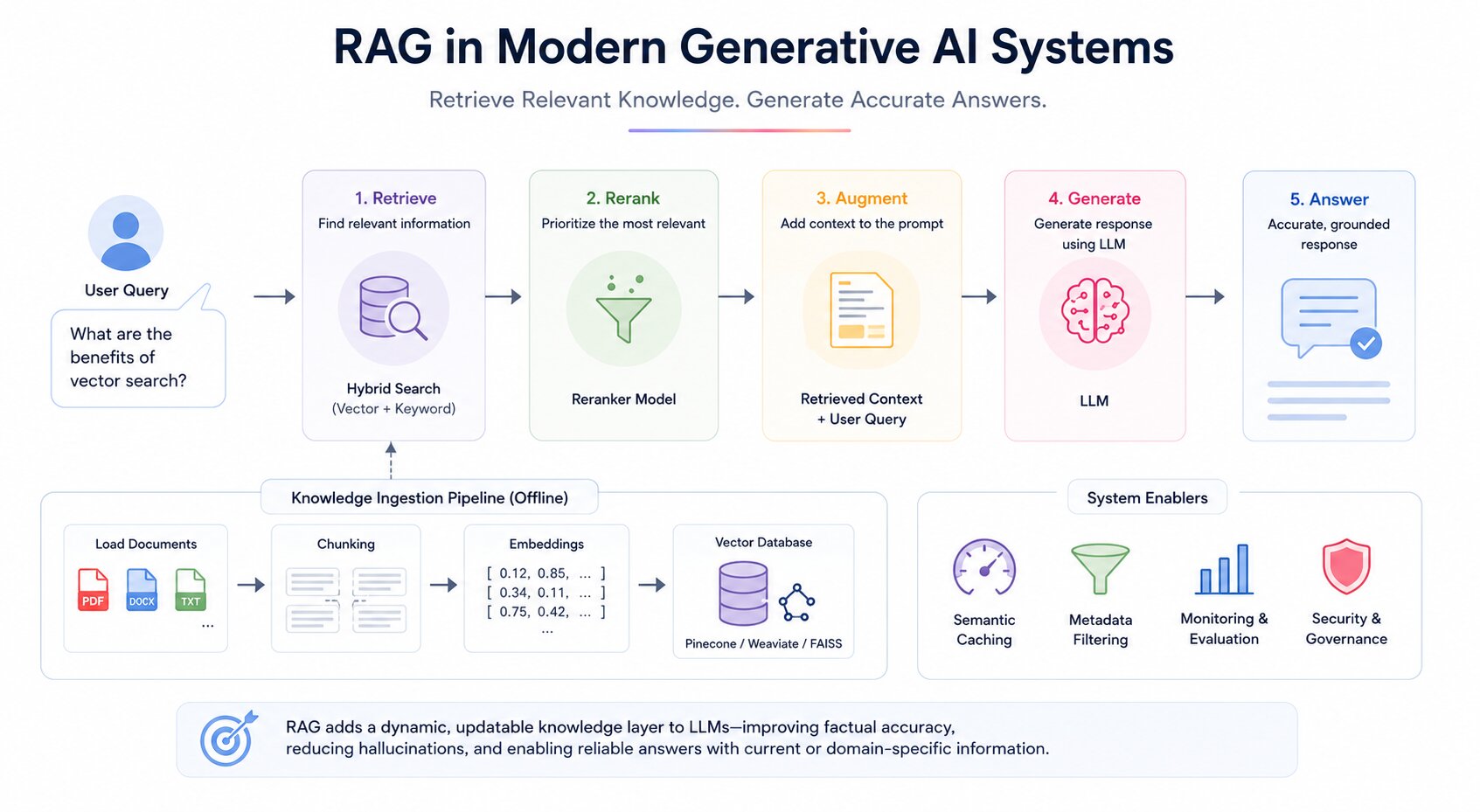
Retrieval-Augmented Generation is a technique that enhances generative AI by connecting a language model to external data sources at inference time. Instead of relying solely on what the model learned during training, RAG retrieves relevant documents or knowledge and injects them into the prompt before the model generates a response.
This approach dramatically improves factual accuracy, reduces hallucinations, and allows the system to answer questions about proprietary or up-to-date information without retraining the model.
Ingestion Pipeline
Before retrieval can happen, data must be prepared. The ingestion pipeline handles loading raw documents, splitting them into appropriately sized chunks, generating embeddings for each chunk, and storing those embeddings in a vector database alongside the original text.
Chunking strategy matters significantly; chunks that are too large lose precision during retrieval, and chunks that are too small lose context. Common strategies include fixed-size chunking, sentence-based chunking, and recursive chunking based on document structure.
Embeddings
Embeddings convert text into numerical vectors that represent semantic meaning. When a user submits a query, it is converted into the same vector space, allowing the system to find semantically similar chunks, not just keyword-matched.
Embedding models like OpenAI's text-embedding-3 or open-source alternatives from Hugging Face are used to generate these representations.
Vector Database
The generated embeddings are stored in a vector database optimized for high-dimensional similarity search. Tools like Pinecone, Weaviate, and FAISS enable fast retrieval across millions of embeddings.
These databases are optimized for real-time querying at scale and support metadata filtering to narrow retrieval by attributes like document type, date, or category.
Retrieval and Reranking
When a query arrives, the system retrieves the top-k most semantically similar chunks. In production systems, a reranking step is often added after initial retrieval.
A secondary model scores the retrieved chunks for true relevance to the query and reorders them before they are injected into the prompt. This two-stage approach (retrieve broadly, rerank precisely) significantly improves generation quality.
Hybrid Search
Modern RAG systems increasingly use hybrid search, combining dense vector retrieval (semantic similarity) with sparse keyword retrieval (BM25 or similar).
This captures both semantic intent and exact keyword matches, reducing cases where relevant documents are missed because the user phrased their query differently from the source text.
Where RAG Actually Fails in Production
RAG is not a silver bullet, and understanding its failure modes is as important as understanding the architecture.
Retrieval misses: If the user's query is phrased very differently from the source document, semantic similarity search will return irrelevant chunks. This is why hybrid search (dense + sparse) exists.
Context window stuffing: Retrieving too many chunks and injecting them all into the prompt degrades model attention. More context is not always better. In practice, 3–5 well-ranked chunks outperform 15 loosely relevant ones.
Stale embeddings: If your documents are updated but your embeddings aren't re-generated, retrieval will return outdated content. Build re-indexing triggers into your ingestion pipeline from the start.
Chunk boundary problems: A retrieved chunk that starts mid-sentence or cuts off a key clause loses critical context. Sentence-aware chunking or overlapping windows address this.
Semantic Caching
For applications with high query volume, semantic caching stores the results of previous retrievals and model calls. When a new query is semantically similar to a previous one, the cached response is returned instead of triggering a full retrieval and inference cycle. This reduces both latency and cost at scale.
RAG effectively adds a dynamic, updatable knowledge layer to generative AI systems, making them more reliable, accurate, and suitable for real-world applications that depend on current or domain-specific information.
Tools & Frameworks for Building Generative AI Apps
A strong generative AI application is built by combining the right tools for LLM-based applications across each layer.
Grouping them by function makes it easier to design, develop, and scale systems efficiently. Each category of tools plays a specific role in ensuring performance, flexibility, and maintainability.
Organizing tools by layer makes it easier to design, develop, and scale generative AI systems efficiently. Teams can swap components within a layer without rebuilding the entire stack.
How to Choose the Right Generative AI Stack
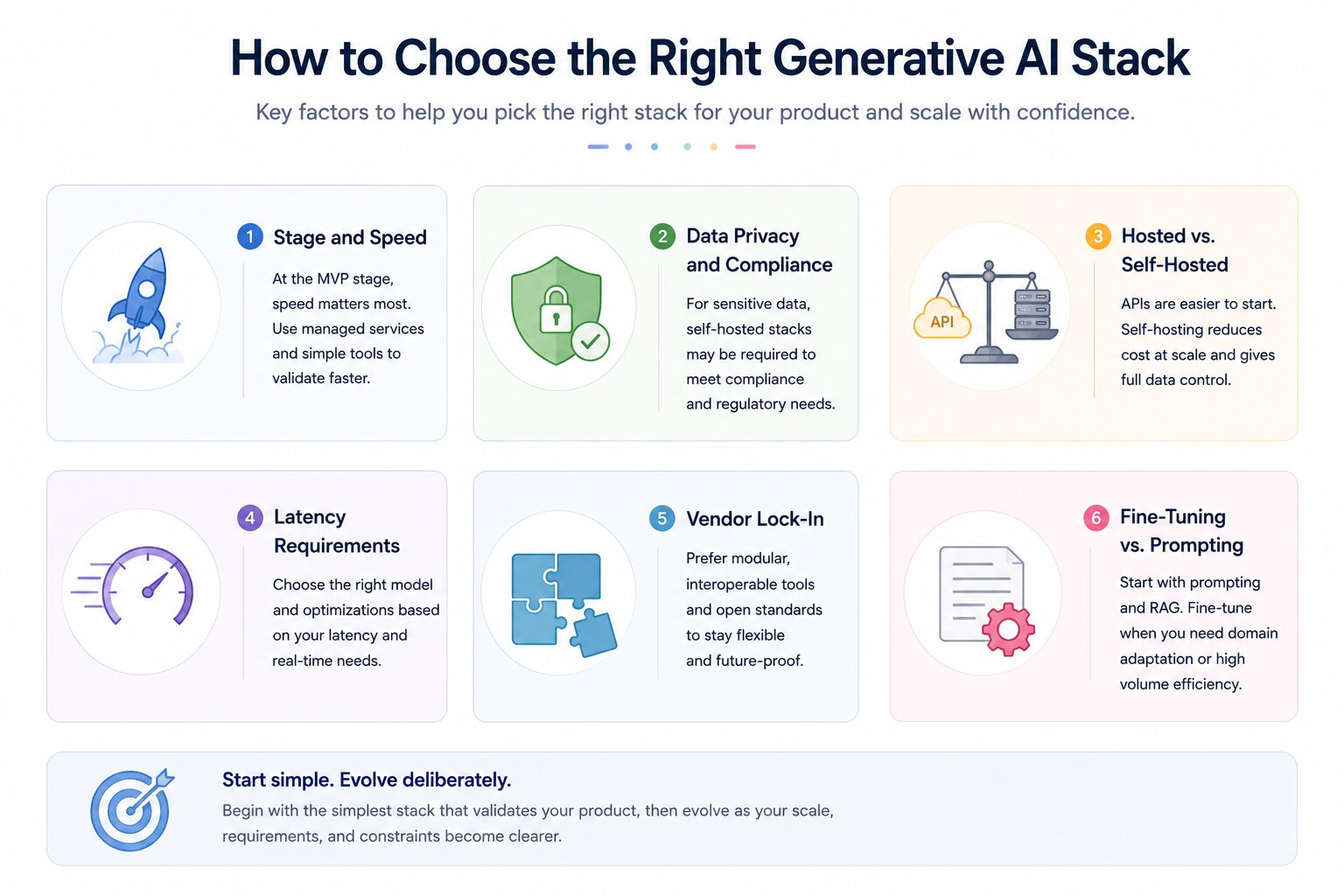
Choosing the right stack is a decision that shapes your cost profile, release velocity, and operational complexity for years. There is no universally correct answer; the right stack depends on your stage, constraints, team capabilities, and product requirements.
Stage and Speed
At the MVP stage, the right stack is the fastest. Use managed APIs, hosted vector databases, and a simple orchestration layer.
Do not build infrastructure you do not yet need. Speed of validation is more valuable than architectural purity at this stage.
Anthropic or OpenAI API + LangChain + Pinecone + FastAPI backend + Next.js frontend. This combination can be stood up in days and handles most early-stage use cases without infrastructure management.
Data Privacy and Compliance
If your product processes sensitive user data, medical records, financial information, legal documents, or personal communications, you may not be able to send that data to a third-party API.
In these cases, a self-hosted model stack is not optional. Compliance requirements (HIPAA, GDPR, SOC 2) will dictate your infrastructure choices before cost or convenience do.
Llama 3 or Mistral served via vLLM on private cloud infrastructure + Qdrant self-hosted + on-premise ingestion pipeline. No data leaves your environment.
Hosted vs. Self-Hosted
API-based models are simpler to integrate, easier to maintain, and require no GPU infrastructure. They are the right default for most teams starting.
Self-hosted models offer lower per-request cost at scale, full data control, and the ability to fine-tune on proprietary data.
They require engineering capacity to manage inference serving, model updates, and hardware.
The break-even point where self-hosting becomes cheaper than API usage depends on your volume and model choice, but is typically in the range of millions of requests per month.
Latency Requirements
Real-time applications like customer-facing chatbots have much tighter latency budgets than batch processing pipelines.
Smaller, quantized models served locally via vLLM can achieve lower latency than large API-based models, even if they have slightly lower output quality.
Caching strategies, prompt compression, and streaming responses are also important latency levers regardless of model choice.
Vendor Lock-In
Heavy reliance on a single provider's proprietary APIs, vector database, and orchestration tools creates lock-in that can be costly to exit. A modular stack , where each layer can be swapped independently reduces this risk.
Using open standards like MCP for tool integration and keeping your orchestration logic framework-agnostic are practical ways to preserve architectural flexibility.
Fine-Tuning vs. Prompting
For most use cases, prompt engineering and RAG deliver sufficient performance without the complexity and cost of fine-tuning.
Fine-tuning is worth considering when you need consistent output formatting, domain-specific vocabulary that the base model does not handle well, or very high inference volume where a smaller fine-tuned model can replace a larger general-purpose model.
For managed fine-tuning, OpenAI and Anthropic both offer fine-tuning APIs that handle the infrastructure side entirely. The best approach is to start with the simplest stack that validates your product, then evolve deliberately as you understand your real constraints.
Hugging Face's transformers + PEFT library for LoRA-based fine-tuning.
Axolotl is a popular open-source wrapper that simplifies the fine-tuning configuration significantly.
Build a Generative AI Product From Start
Building a generative AI product requires a structured approach, moving from idea to deployment in clear steps. Each stage focuses on a specific part of the system, from defining the problem to scaling the solution.
I've prepared a roadmap to provide a practical path to create efficient and production-ready AI applications.
Building a generative AI product requires a structured approach. Each stage focuses on a specific part of the system and builds on the previous one.
Step 1: Define the Use Case
Identify the exact problem you are solving and the value your product provides. Decide whether it is a chatbot, content generator, copilot, or automation tool. Define your target users, expected inputs, and desired outputs. A clear use case guides every subsequent decision.
Step 2: Choose Your Model Strategy
Decide between API-based and self-hosted models based on your privacy requirements, budget, and timeline. API-based models are faster to start with. Self-hosted models offer more control. See the model comparison section and the stack selection criteria above.
Step 3: Design Your Data Architecture
Identify what data your system needs to be accurate and useful. Build an ingestion pipeline to load, chunk, embed, and store that data in a vector database. Define your chunking strategy and decide whether you need metadata filtering or hybrid search.
Step 4: Build the Orchestration Layer
Set up your orchestration framework to handle prompt construction, retrieval integration, model calls, and response processing. If building an agentic system, define your agent roles, tool integrations, and memory architecture at this stage.
Step 5: Build Backend and Frontend
Develop backend services using FastAPI or Node.js to handle requests, business logic, authentication, and API routing. Build the user interface with React or Next.js. Keep the frontend and backend cleanly separated so each can evolve independently.
Step 6: Implement Evaluation
Before deploying, set up an evaluation framework to test output quality, factual accuracy, and safety. Define what good looks like for your use case and build automated tests that can run with every model or prompt change.
Step 7: Deploy and Monitor
Deploy using your chosen cloud infrastructure. Set up observability tools for tracing, logging, and performance monitoring. Implement guardrails for output safety and configure fallback logic for model failures or timeout scenarios.
Step 8: Iterate
Real-world usage will surface issues that testing does not catch. Use production data and user feedback to improve prompts, retrieval quality, and system reliability continuously.
Cost Considerations for Generative AI Products
Costs in generative AI systems come from multiple layers, and small decisions early in the architecture process can have a large financial impact at scale.
Token and API Costs
Using hosted models from providers like OpenAI or Anthropic charges per token on both input and output. Costs increase with longer prompts, more complex retrievals that inject large context windows, and higher query volumes. Prompt compression, reducing token count while preserving intent, is the most direct lever for reducing API spend.
Inference Costs for Self-Hosted Models
Running models like Llama 3 or Mistral on your own infrastructure requires GPU compute. Cloud GPU instances (AWS, Azure, GCP) are expensive, particularly for large models. vLLM and similar serving frameworks improve GPU utilization significantly through techniques like continuous batching and PagedAttention, reducing the number of instances needed.
Vector Database and Storage Costs
Managed vector databases like Pinecone charge based on storage volume and query count. Embedding large document collections and running high query volumes can create meaningful costs. FAISS and Qdrant offer self-hosted alternatives that trade operational complexity for cost savings.
Optimization Strategies
Caching frequent responses avoids repeated model calls for common queries. Using smaller fine-tuned models for narrow tasks instead of large general-purpose models reduces per-request cost. Batching requests during off-peak periods reduces peak infrastructure load.
Monitoring usage by endpoint, user segment, and query type reveals where costs are concentrated and where optimization will have the most impact.
Managing these areas carefully keeps your generative AI product financially sustainable as it grows from prototype to production scale.
Challenges in Building Generative AI Systems
Building generative AI systems comes with several practical challenges that can impact reliability, cost, and user experience. These issues often arise from the nature of large models and the complexity of integrating them into real-world applications. Addressing these challenges early helps create more stable and trustworthy systems. Below are some of the most common challenges teams face.
Hallucinations
Models can generate confident but incorrect or fabricated information, which can mislead users. This is especially risky in sensitive domains like finance, healthcare, or legal systems. Even well-trained models may produce errors when lacking proper context. Techniques like RAG and validation layers can help reduce this issue. Continuous evaluation is needed to maintain accuracy.
Mitigation: Implement a citation requirement in your system prompt. Instruct the model to only state facts that appear in the retrieved context and to explicitly say "I don't have information on this" otherwise.
This alone reduces hallucination incidents significantly in RAG systems.
Data Privacy Issues
Handling sensitive data is a major concern when using generative AI systems. Sending user data to external APIs may raise compliance and security risks. Proper encryption, anonymization, and access controls are essential. Organizations must also follow data protection regulations and policies. Secure architecture design helps prevent data leaks and misuse.
Latency
Generating responses from large models can introduce delays, especially with complex queries. High latency affects user experience in real-time applications like chatbots or assistants. Optimizing prompts, caching results, and using faster models can help. Infrastructure choices also play a role in reducing response time. Balancing speed and quality is key.
Mitigation: Stream responses instead of waiting for complete generation. Use a smaller, faster model for the first response and offer a "go deeper" option that triggers a larger model call. Semantic caching handles the 20–30% of queries that are near-duplicates in most production systems.
Scaling Challenges
As user demand increases, maintaining performance and controlling costs becomes more difficult. Systems must handle higher traffic, larger datasets, and concurrent requests efficiently. Poor scaling can lead to slow responses or system failures. Using cloud infrastructure and load balancing helps manage growth. Cost optimization strategies are also important at scale.
Prompt Reliability
Small changes in prompts can lead to inconsistent or unpredictable outputs. This makes it challenging to maintain uniform behavior across the system. Careful prompt design and testing are required to ensure stability. Versioning and standardizing prompts can improve consistency. Iterative refinement helps achieve better results over time.
Mitigation: Version your prompts the same way you version code. Store prompts in a repository, test them against a fixed evaluation set before changing, and never edit a production prompt without measuring the impact on your golden dataset first.
Model Cost Management
Running large models or frequent API calls can become expensive over time. Costs increase with higher usage, longer prompts, and complex workflows. Without optimization, expenses can quickly grow beyond budget. Techniques like caching, batching, and using smaller models can help control costs. Monitoring usage is essential for financial sustainability.
Evaluation and Monitoring
Measuring the quality of AI outputs is not always straightforward. Traditional metrics may not fully capture correctness or usefulness. Continuous monitoring and human evaluation are often required. Setting up feedback loops helps improve system performance. Proper evaluation ensures long-term reliability and improvement.
These challenges are common across most generative AI systems, and proactively addressing them is essential for building scalable, secure, and production-ready applications.
Best Practices for Generative AI Development
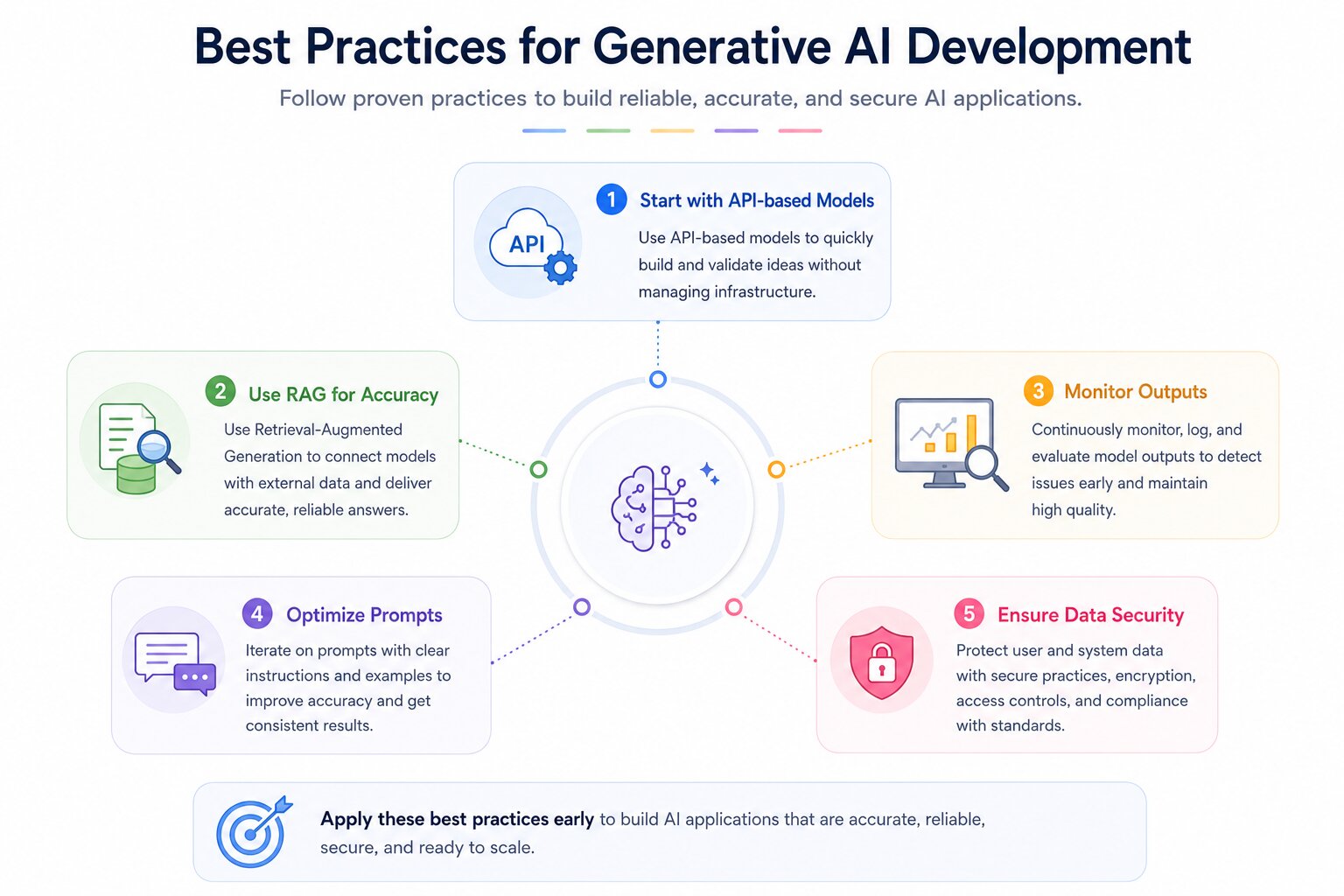
Building reliable and scalable generative AI applications requires following a set of proven best practices. These practices help improve accuracy, reduce risks, and ensure smooth performance in real-world use. By focusing on the right strategies early, teams can avoid common mistakes and speed up development. The following guidelines provide a strong foundation for creating effective AI solutions.
Start with API-based Models
Begin with API-based models from providers like OpenAI or Anthropic to quickly build and validate your idea. They reduce the need for infrastructure setup and allow faster experimentation. This approach helps you focus on core features instead of model management. Once validated, you can decide if moving to custom models is needed. It’s the fastest path from concept to prototype.
Use RAG for Accuracy
Implement Retrieval-Augmented Generation (RAG) to improve response accuracy and relevance. It connects your model with external data sources like documents or databases. This reduces hallucinations and ensures answers are grounded in real information. Tools like Pinecone or Weaviate are commonly used for this. It is especially useful for business and domain-specific applications.
Monitor Outputs
Continuously monitor model outputs to detect errors, bias, or unexpected behavior. Use logging and evaluation pipelines to track performance over time. Regular monitoring helps maintain quality and reliability. It also allows quick identification of issues in production. This is essential for building trustworthy AI systems.
Optimize Prompts
Refine prompts through testing and iteration to improve results. Small changes in wording, structure, or examples can significantly impact output quality. Use clear instructions and context to guide the model effectively. Prompt optimization reduces inconsistencies and improves accuracy. It is a low-cost way to enhance performance.
Ensure Data Security
Protect user and system data by following strong security practices. Use secure APIs, encryption, and proper access controls. Ensure compliance with data protection standards and regulations. Avoid exposing sensitive information in prompts or logs. Strong security builds trust and safeguards your application.
Real-World Use Cases
Generative AI is being widely adopted across industries to automate tasks, improve efficiency, and enhance user experiences. Its ability to generate content, understand context, and interact naturally makes it valuable for both customer-facing and internal applications. These use cases highlight how businesses are leveraging AI to solve real problems. As the technology evolves, its applications continue to expand.
Customer Support Chatbots
AI-powered chatbots handle customer queries, provide instant responses, and reduce support workload. They can operate 24/7, improving response time and customer satisfaction. With RAG, they can pull accurate answers from company knowledge bases. They also support multiple languages and personalized interactions. Businesses scale support without adding major costs.
Content Generation Tools
These tools create blogs, social media posts, marketing copy, images, or videos. They help teams produce large volumes of content quickly and consistently. Businesses use them for campaigns, branding, and communication. They also assist in idea generation and content optimization. This significantly reduces manual effort and speeds up workflows.
Code Assistants
AI copilots assist developers by generating code, suggesting fixes, and explaining logic. They help reduce repetitive coding tasks and improve productivity. Tools like GitHub Copilot can integrate directly into development environments. They also assist in debugging and learning new technologies. This enables faster development cycles and better code quality.
Internal Knowledge Systems
Organizations use generative AI to build intelligent search systems over internal documents and data. Employees can ask questions and get precise, context-aware answers instantly. This reduces time spent searching through files or manuals. It improves decision-making and knowledge sharing across teams. Such systems are especially useful in large enterprises.
These use cases demonstrate how generative AI is transforming industries by improving automation, enhancing productivity, and enabling smarter decision-making across different business functions.
Future Trends in Generative AI Tech Stacks
Generative AI stacks are shifting from expensive experimental systems to production-ready architectures focused on cost efficiency, multimodal capability, autonomy, and private deployment.
New advancements are focused on improving performance while reducing costs and resource usage. These trends are shaping how modern AI systems are designed and deployed. Understanding them helps teams stay ahead and build future-ready applications.
Smaller, Efficient Models
The rise of smaller efficient models has distilled, quantized, and fine-tuned smaller models, delivering competitive performance at lower inference cost. They reduce GPU demand, improve latency, and make deployment practical for startups and edge environments.
These models reduce compute costs and improve response speed. They are easier to deploy on edge devices and smaller infrastructures. This makes AI more accessible for startups and smaller teams. For many production workloads, cost per request and latency now matter more than benchmark size leadership.
Multimodal AI Systems
Multimodal models are unifying text, vision, audio, and video into single systems that can interpret inputs across formats and generate richer outputs from one interface. This allows applications like visual assistants, speech-to-text systems, and video generation tools. Combining multiple data types improves understanding and output quality.
This enables workflows such as visual customer support, voice copilots, document understanding, and AI video generation. Multimodal capability is becoming a standard feature in advanced AI systems.
AI Agents
AI is evolving from simple response systems to autonomous agents that can plan and execute tasks. These agents can interact with tools, APIs, and external systems to complete workflows.
Frameworks like LangChain support multi-step reasoning and decision-making. This reduces the need for constant human input. AI agents are paving the way for more automated and intelligent systems.
These trends indicate a shift toward more efficient, intelligent, and autonomous generative AI systems that can handle real-world complexity with greater ease and scalability.
Edge AI
Running AI models on local devices (like smartphones or IoT devices) is becoming more common. Edge AI reduces latency, improves privacy, and allows offline functionality, making applications faster and more secure.
Private AI Deployments
Enterprises are accelerating private AI deployments, running models within their own cloud environments or on-premises infrastructure, to meet compliance, data residency, and security requirements.
This is driving demand for efficient self-hosted serving frameworks (vLLM, Ollama), private vector databases, and secure orchestration layers that operate entirely within the organization's control boundary.
Model Context Protocol (MCP)
Anthropic's open Model Context Protocol is emerging as a standard for how AI models connect to external tools and data sources. Rather than building custom integrations for every tool an agent might need, MCP provides a standardized interface.
Early adoption is already visible in developer tooling, IDE integrations, and enterprise AI platforms. Teams building agentic systems should watch this closely , it may become the USB-C of AI tool connectivity.
Inference Cost Compression
The cost of running frontier model inference has dropped dramatically year over year. Techniques like speculative decoding, quantization (GGUF, AWQ), and mixture-of-experts architectures are making capable models significantly cheaper to run.
Stack decisions made today assuming certain cost profiles may look very different in 18 months , build cost assumptions with some margin.
Conclusion
Building a generative AI product is an architectural challenge as much as it is a technical one. The stack decisions made early, which model to use, how to handle retrieval, how to structure orchestration, and how to manage production, have compounding effects on quality, cost, and maintainability as the system scales.
The core insight from this guide is that the right stack is not the most advanced. It is the stack that fits your current stage, respects your constraints, and is designed to evolve as your understanding grows.
Start with managed APIs and simple orchestration. Build evaluation into the system from the beginning. Add production observability before you need it. Move to more complex agentic architectures and self-hosted models when your use case justifies the investment.
The generative AI stack is not static. Vector database capabilities, agent frameworks, model efficiency, and inference tooling are all evolving rapidly.
Teams that build modular, layer-independent architectures will adapt more easily than those that build tightly coupled systems around a single provider or framework.
The stack is the foundation. Getting it right is what makes the difference between a demo that impresses in a meeting and a product that delivers reliable value in production.
FAQs

Application Layer
This is the user-facing layer where users interact with the system through web or mobile interfaces. It includes APIs that connect frontend and backend services for seamless communication. Features like authentication, personalization, and real-time responses are implemented here. A good application layer ensures a smooth and intuitive user experience. It directly impacts usability and engagement.
Infrastructure Layer
This layer provides the computing resources needed to run the system, such as cloud platforms and GPUs/TPUs. It supports deployment, scaling, and performance optimization. Monitoring and logging tools help track system health and detect issues. It ensures high availability and low latency for users. Security and cost management are also key responsibilities of this layer.
 WhatsApp
 Call Us
 Mail Us